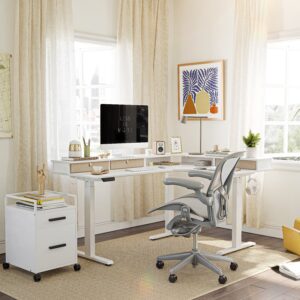
The best l shaped gaming desk is the one that gives your monitor arm, mousepad, tower, and chair enough room without turning the rest of the room into an obstacle course. My top pick is the Eureka Ergonomic L60. It has a useful 61.06 by 43.86-inch footprint, a listed 176-pound capacity, two cable grommets, and an included cable tray for US$249. The compromise is that you must choose the left or right return before ordering, and its two-leg frame can bounce if the rear of the return is loaded heavily.
This page contains affiliate links. If you buy through these links, we may earn a small commission at no extra cost to you. Full disclosure.
I did not test these products. I compared current manufacturer specifications, configuration diagrams, prices, stock states, warranties, and recurring details in retailer and owner feedback on September 7, 2026. Manufacturer load ratings are claims, not independent stability tests.
Disclosure: As an Amazon Associate I earn from qualifying purchases. Links marked affiliate can earn a commission at no extra cost to you.
By Ryan Billings

Bottom line: The Bestier 71.5-inch desk is the clearest option to consider if the trade-offs below fit your setup.
Table of Contents
- Quick Comparison
- Best L Shaped Gaming Desk Picks
- Why an L-Shaped Desk Can Beat a Straight Desk
- What to Check Before Buying
- Why Three Familiar Models Aren’t Ranked
- Who Should Skip This
- How I Researched These Desks
- Frequently Asked Questions
- The Short Version
Quick Comparison
| Desk | Best for | Listed size | Capacity | US price checked | Main drawback | Buy |
|---|---|---|---|---|---|---|
| Eureka L60 | Best overall | 61.06 x 43.86 x 30.08 inches | 176 lb | US$249 | Left and right versions are separate; two-leg return can bounce | Not listed |
| Arozzi Arena Angelo | Largest premium setup | 88.6-inch listed width; 28-inch working depth | 176.4 lb | US$449.99 | 102.9-pound desk and a very large footprint | Not listed |
| Bestier 71.5-inch | LEDs, outlets, and shelves | 71.5-inch main span; 19.7-inch panel depth | 100 lb | US$199.99 | Raised monitor shelf limits placement and some clamp positions | Amazon |
| SEDETA 67-inch | Maximum storage on a budget | 67-inch main span; 19.7-inch panel depth | Not listed | US$199.99 plus US$19.99 delivery | No published capacity or monitor-arm clamp clearance | Not listed |
| Eureka GTG-L60 | Glass top and built-in RGB | 60 x 40.25 x 30 inches | 200 lb | US$499 | Glass needs careful clamp installation; lighting warranty is one year | Not listed |
The table deliberately avoids pretending that a 71.5-inch marketing number tells you the usable area. A hutch, monitor riser, angled corner, shelf, or cable cutout can remove the exact patch of desktop you wanted for a clamp or large mousepad. Look at panel depth and the dimension drawing, not just the largest number in the title.
Best L Shaped Gaming Desk Picks
I rank the Eureka L60 first, but this isn’t a five-step ladder where every buyer should pay more. The best l shaped gaming desk for a triple-monitor streamer isn’t automatically the right desk for a bedroom setup with one display and a tower. Start with the space and equipment, then choose the simplest model that clears both.
1. Eureka Ergonomic L60: Best Overall
The Eureka L60 specification page lists an overall footprint of 61.06 inches wide by 43.86 inches deep, a 30.08-inch height, and a 176-pound capacity. Two cable grommets and an included tray give wires somewhere to go before adhesive clips enter the negotiations. The top is engineered wood with a melamine surface rather than glass, so a normal mousepad works and fingerprints don’t become part of the decor.
The frame is the reason I put it above cheaper shelf-heavy desks. The broad carbon-steel support runs below the two-piece top, while the open front leaves good chair access. Eureka’s own reviews are generally positive, but one detailed owner reports that the return can bounce when too much weight sits toward its back edge. That is useful evidence, not a reason to pretend the whole frame has been independently lab-tested.
Buy it if you want two or three monitors, a large mousepad, and a separate laptop or tower zone without adding a hutch. Skip it if you need built-in power or RGB. You must also select a left or right version at checkout, so this isn’t a desk you casually reverse after moving rooms.
Buy the Eureka L60 from Eureka Ergonomic for US$249.
2. Arozzi Arena Angelo: Best Large Premium Desk
Arozzi finally made the Arena idea into a genuine corner desk. The Arena Angelo has an 88.6-inch listed width, a 28-inch working depth, a 28 to 31.9-inch manual height range, and a 176.4-pound evenly distributed capacity. Its steel frame and aluminum feet support a 102.9-pound desk. This is furniture with a shipping plan, not something to tuck under one arm on moving day.
The full-surface, machine-washable microfiber pad is the main attraction. Three cutouts accept cables or monitor attachments, and a mesh basket spans the underside. The corner is broad and angled rather than a tight 90-degree elbow, which creates a natural central display position while keeping the keyboard and mouse directly in front of the chair.
US$449.99 is fair only if you will use that much surface. There are no drawers, outlets, or motorized height adjustment, and the fitted mousepad will eventually need cleaning or replacement. Buy the Angelo for a three-display cockpit, audio controls, or a tower that must stay on top. Skip it if either wall is short, stairs are narrow, or a US$249 desk already fits everything.
Buy the Arozzi Arena Angelo from Arozzi for US$449.99.
3. Bestier 71.5-Inch: Best Budget Desk With LEDs
The Bestier H100618KUS-BDCF puts the accessory budget into the desk. For US$199.99, it includes an RGB strip, four AC outlets, two USB charging ports, a 71.5-inch monitor shelf, adjustable metal storage, a cup holder, and headphone hooks. Bestier rates the particleboard and metal structure for 100 pounds.
That long shelf is helpful if your displays use their original stands. It is less friendly to a monitor arm because the raised rear edge and supporting frame reduce your choice of clamp locations. The listed geometry is also easy to misread: 71.5 inches is the main span, the return reaches about 31.5 inches, and the work panels are 19.7 inches deep. This isn’t a 31.5-inch-deep desktop across its full width.
Buy it when shelves, charging, and an l shaped gaming desk with LED lights matter more than maximum load capacity. Skip it for a very heavy tower plus multiple clamped displays. The carbon-fiber pattern is printed texture on particleboard, not carbon fiber doing anything structurally ambitious.
Canadian buyers can check the Bestier 71.5-inch desk at Amazon.ca. US buyers can check the same model at Amazon.com. Amazon prices and delivery eligibility vary by location, so compare the final cart with Bestier’s direct US$199.99 listing.
4. SEDETA 67-Inch: Best for Storage
The SEDETA 67-inch desk is what happens when a desk and a small storage wall agree to share a box. It has a pegboard, top hutch, keyboard tray, two shelves, a storage bag, four AC outlets, two USB ports, and app-controlled RGB lighting. The corner layout can reverse, or the same parts can form a 94.5-inch straight two-person desk.
At US$199.99 plus US$19.99 delivery, that is a lot of function for the money. It is also a lot of structure around a 19.7-inch-deep work surface. The hutch and shelves take away flexible monitor placement, and SEDETA doesn’t publish a desktop capacity or clear clamp-clearance measurement. Its Q&A says there is no pre-drilled monitor-arm hole, so a grommet-mounted arm is not a simple drop-in job.
Buy it for a single PC setup with controllers, headphones, speakers, and small accessories that otherwise live on the desktop. Skip it if your priority is an unobstructed edge for heavy monitor arms. More shelving can organize clutter, but it can also give clutter a promotion.
Buy the SEDETA 67-inch desk for US$199.99 plus US$19.99 delivery.
5. Eureka GTG-L60: Best Glass Desk With Built-In RGB
The Eureka GTG-L60 makes the lighting part of the desktop rather than sticking a strip beneath a shelf. Its 6 mm tempered-glass top sits on a four-pillar steel frame, measures 60 by 40.25 inches overall, and carries a listed 200 pounds. The geometric-mesh right-side version was US$499 when checked; other patterns and the left-side version were US$549.
Eureka explicitly lists monitor-arm compatibility, but glass still changes the installation. Use the arm maker’s approved protective plates, keep the clamp away from edges and seams, and stay within both products’ limits. The included power-strip holder and adhesive cable ties are useful, though they aren’t as clean as the L60’s two grommets and tray.
The glass top is easy to wipe and the four supports should distribute load better than a lightly braced return. It will also show dust, reflect room lighting, and make every hard object sound more dramatic. Electronic parts have a one-year warranty while the frame gets five years. Buy it because you specifically want illuminated glass, not because US$250 extra improves frame rates.
Buy the Eureka GTG-L60 from Eureka Ergonomic from US$499.
Why an L-Shaped Desk Can Beat a Straight Desk
A corner layout can put more usable surface into two wall runs without placing one extremely long desk across the room. The main side becomes the play zone: display, keyboard, mouse, and speakers. The return can hold the tower, streaming controls, work laptop, or charging gear. That separation is the practical advantage, not the letter L printed on the box.
The inside corner can also add viewing distance for a large display. OSHA’s computer workstation guidance notes that corner work surfaces can provide extra depth for large monitors and recommends enough desk depth to place the screen at least 20 inches away. Keep the monitor and keyboard facing the same direction. A wide desk is not ergonomic if you spend every match twisted toward one wing.
A monitor arm can free the broad area where two panels meet, but that corner isn’t automatically the right clamp point. Seams, braces, cable trays, glass, and raised shelves can all interfere. If screen format is still undecided, the site’s ultrawide versus dual-monitor guide explains the trade between one continuous canvas and two independent display zones.
What to Check Before Buying
Finding the best l shaped gaming desk starts on the floor. Mark both wings with painter’s tape using the complete dimension diagram, then add the chair. Roll back as if you were standing up and turn the casters through their normal path. A desk can fit both walls while its center leg traps the chair or its return blocks a closet.
- Measure the actual corner: include baseboards, outlets, radiators, window trim, doors, and the full depth of both wings.
- Confirm usable surface: subtract monitor risers, hutches, seams, rounded corners, and storage shelves from the marketing dimensions.
- Check clamp geometry: compare desktop thickness with the monitor arm’s supported range, then inspect underside clearance for braces and cable trays.
- Plan the heavy items: count monitors, arms, tower, speakers, and under-desk accessories against the published capacity. Keep concentrated loads near supported areas.
- Choose the correct return: reversible means the same parts can swap sides. Separate left and right variants cannot.
- Inspect the frame: crossbars, four-leg support, adjustable feet, and a properly tightened corner joint matter more than decorative carbon-fiber texture.
Cable management needs the same planning. Grommets move wires below the surface, but a tray or channel keeps them from hanging across your knees. Put the power bar under the desk and leave service loops for anything that moves. A large desk mat can smooth panel seams and protect a wood surface, but it cannot flatten a raised monitor shelf or make a glass top safe for an unapproved clamp.
Why Three Familiar Models Aren’t Ranked
The original Arozzi Arena is a very good 63 by 32.25-inch curved-front desk with a full-surface mousepad, three cable cutouts, and a 176-pound rating. It isn’t L-shaped. The newer Arena Angelo now provides the true corner layout, so recommending the straight model as an L-shaped alternative would solve a different room problem.
Walker Edison’s 51-inch glass corner desk is compact and has a long history of retailer reviews, but Best Buy marked the current D51Z29 listing unavailable on September 7. Its fixed glass panels and shallow 20-inch depth also make it a poor monitor-arm choice. I won’t recommend an unavailable desk because its old review count looks impressive.
The older GreenForest 58.1-inch reversible desk has sensible dimensions and adjustable feet, but I couldn’t verify normal current stock from a first-party or established US or Canadian retailer. Marketplace mirrors and old manuals prove that a product existed, not that a buyer can order the same configuration today. It can return to the list when the exact model and seller are clear.
Who Should Skip This
Skip an L-shaped desk if the return has no assigned job. A straight 60-inch desk is easier to center, move, resell, and fit with a long cable tray. It also leaves more freedom for bed placement, shelving, and the door you would still like to open.
Renters and frequent movers should be especially cautious with the Angelo and glass GTG-L60. Large panels, odd-shaped boxes, and glass do not become more cheerful on the third flight of stairs. A modular straight desk plus a small rolling side table gives up the continuous corner but adapts to the next room.
Also skip these fixed-height picks if a 30-inch surface places your keyboard too high. Desk shape doesn’t correct shoulder position. A height-adjustable straight desk can be the better gaming purchase when fit matters more than acreage.
How I Researched These Desks
I checked live product pages and configuration data from Eureka Ergonomic, Arozzi, Bestier, and SEDETA on September 7, 2026. I recorded orderability, exact variant prices, dimensions, materials, capacity claims, cable features, return orientation, warranties, and stated monitor-arm support. I used official diagrams to interpret the marketing width where possible and left a value unlisted when the manufacturer didn’t publish it.
I then read current retailer availability and owner-feedback patterns for assembly, stability, and hardware complaints. Reviews can reveal a question worth checking, but they don’t turn one person’s setup into a laboratory result. No desk here received a hands-on test from me, and I didn’t invent clamp clearance where a product page omitted it.
Availability is part of the recommendation. All five ranked products were orderable from a manufacturer or established retailer in the United States or Canada when checked. Prices can change, and large furniture often has location-specific shipping limits, so confirm the final delivered total before paying.
Frequently Asked Questions
What is the best l shaped gaming desk for three monitors?
The Arozzi Arena Angelo offers the most generous top and three monitor-attachment cutouts, so it is my first choice for three large displays when the room and US$449.99 budget allow it. The Eureka L60 is the better-value answer for two displays plus a smaller third screen. Add the full weight of monitors and arms before comparing it with the desk’s capacity.
Is an L-shaped desk better than a long straight desk for gaming?
It is better when you need two distinct zones or can use the corner depth for a large display. A straight desk is better when every device belongs in one line, you move often, or the return would reduce chair clearance. Measure the room rather than assuming more surface always means more usable space.
Can I clamp a monitor arm to an L-shaped gaming desk?
Sometimes. Check the arm’s supported desktop thickness, the flat edge available to the clamp, and braces or trays underneath. Glass requires an arm and protective plate approved for glass installation. A product photo showing an arm does not prove that your heavier arm fits every edge.
Should the PC tower sit on the desktop or a lower shelf?
Put it where vents remain clear, cables reach without tension, and the support is rated for its weight. A desktop position avoids floor dust but uses valuable surface and raises the desk’s load. A shelf frees the top, though a tight shelf can restrict airflow or fail to fit a wide case.
The Short Version
The best l shaped gaming desk for most US buyers is the US$249 Eureka L60. It provides more useful frame and cable management than the feature-packed budget models without reaching the Arozzi Angelo’s size or price. Choose the Angelo for a genuinely huge three-display setup, Bestier for inexpensive LEDs and outlets, SEDETA for storage, or the GTG-L60 only when illuminated glass is the point.
Before ordering, tape the complete footprint on the floor, roll the chair through it, and inspect the exact edge where a monitor arm will clamp. The largest number in the product title is not the usable surface. A desk that fits the room, equipment, and clamp is better than one that wins a specification table and blocks the door.