Snapdragon X2 Linux is real, but it isn’t a normal laptop operating system you should install before Monday’s meeting. Qualcomm’s September release is an early developer preview built around Debian 13, a custom kernel, and work-in-progress drivers. The consumer answer is much less exciting: use Windows for now unless debugging kernels is part of your idea of a relaxing evening.
The timing matters if you’re considering one of the new Snapdragon X2 Elite laptops. Qualcomm says Debian support is coming first, while certified Ubuntu support is targeted for the first half of 2027. Buying the hardware today for a promised Linux experience means buying the promise, not the finished experience.
This is a source-based readiness check using Qualcomm’s developer documentation, its public platform roadmap, and Canonical’s Ubuntu announcement. It is not a hands-on Linux review, and the roadmap dates are targets rather than shipping guarantees.
Table of Contents
- Snapdragon X2 Linux Support Right Now
- The Preview Is Not a Normal Installer
- Hardware Support: What Works and What Is Early
- The Roadmap to Debian and Ubuntu
- Should You Install It or Wait?
- Who Should Skip This Preview
- FAQ
- The Short Version
Snapdragon X2 Linux Support Right Now
Qualcomm’s developer preview announcement is unusually clear about scope. The current reference environment uses Debian 13, also called Trixie, with a custom kernel. It targets distribution maintainers, toolchain developers, kernel contributors, and hardware-enablement engineers. Qualcomm says an install-and-go experience for end users comes later.
That distinction stops a promising announcement from becoming bad buying advice. A system that boots, displays a desktop, and exposes some I/O is a development target. A daily laptop also needs dependable suspend, battery reporting, audio, cameras, wireless networking, external displays, firmware updates, and recovery paths across each OEM design. Qualcomm explicitly says readiness varies by laptop and X2 processor variant.
The Preview Is Not a Normal Installer
There is no supported consumer shortcut hiding behind the word preview. Qualcomm’s workflow tells developers to download the software package and tools, build the kernel and device trees, create a bootable image, flash it, then validate hardware. If those verbs sound like a release checklist rather than an installation guide, that’s because they are.
The preview also applies to Snapdragon X2 laptops. Qualcomm says it does not currently cover desktop form factors, older Snapdragon X platforms, or unrelated development boards. That means the ASUS Ascent QN10 mini PC cannot inherit laptop support just because it uses an X2 chip. Device trees and firmware integration are specific enough to make that assumption expensive.
Owners of first-generation Snapdragon X Elite laptops are on a separate path. Canonical’s current ARM work brought Secure Boot support to those machines in Ubuntu 26.04 LTS, but its summer 2026 ARM update describes X2 enablement as ongoing work. A working image for one generation is not proof that the next generation’s graphics, NPU, power management, or laptop-specific devices are ready.
Hardware Support: What Works and What Is Early
The encouraging part is that Qualcomm is working upstream instead of treating Linux as a disposable demo. Its initial enablement covers UEFI boot through systemd-boot, USB, PCIe, and Qualcomm’s serial-engine interfaces for UART, I2C, and SPI. Those are foundations a distribution can maintain rather than a one-off image that dies when the launch team moves on.
| Area | Current position | Why it matters |
|---|---|---|
| Boot | UEFI with systemd-boot | A conventional path for loading the kernel |
| Core I/O | USB, PCIe, UART, I2C, and SPI enablement | Necessary for storage and connected devices |
| Graphics | Freedreno, Turnip, and Rusticl work in progress | Desktop acceleration, Vulkan, and GPU compute |
| NPU | Hexagon access through FastRPC is being upstreamed | Required for local AI acceleration |
| Power and thermals | System-wide support is still maturing | Directly affects battery life and reliability |
| Distribution | Custom Debian 13 reference environment | Not yet a certified consumer image |
The graphics stack uses familiar open-source pieces: Freedreno for Adreno graphics, Turnip for Vulkan, and Rusticl for OpenCL. Qualcomm also names FastRPC as the path to the Hexagon NPU. That is relevant to anyone interested in a local coding model, but driver plumbing is not the same thing as broad framework support. A model runner still needs an ARM64 build and a backend that can use the available accelerator.
CPU-only software is the easier case. Native ARM64 packages should have the least friction, while x86 applications need a compatible build or translation. Before planning a Linux workstation around X2, list the exact browser, VPN client, development tools, containers, peripherals, and local-AI runtime you need. The processor badge cannot fix one missing link in that chain.
The Roadmap to Debian and Ubuntu
The Snapdragon X2 Linux roadmap has four useful markers. The early preview arrived in September 2026. Qualcomm targets the end of November for production-ready platform quality, says Debian support starts by the end of 2026, and targets certified Ubuntu in the first half of 2027. HP, ASUS, and HUMAIN also plan Linux support on X2 devices in that first half.
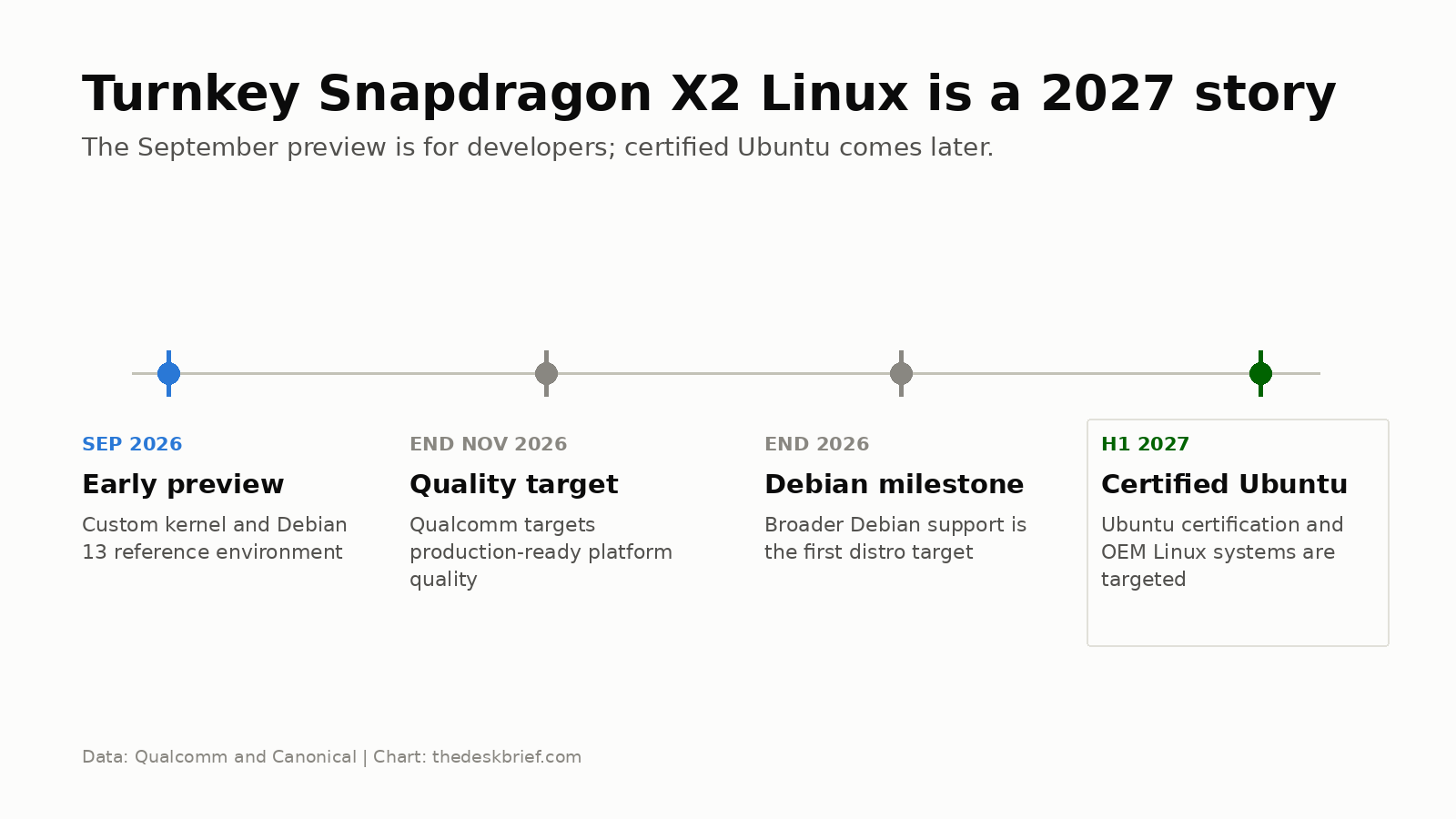
Canonical’s Ubuntu announcement promises a fully optimized, certified image in 2027 and says more preview and hardware-partner details will come closer to release. It does not offer a public consumer image today. Qualcomm’s more precise first-half target is useful for planning, but neither company names a final Ubuntu version or a complete certified-laptop list.
Mainline work continues beyond November. That is healthy, not alarming. Linux laptop support improves when drivers, device trees, and fixes land upstream and survive review. The practical catch is that the work can be technically successful while your exact webcam, fingerprint reader, dock, or sleep state remains unfinished.
Should You Install It or Wait?
Wait if Linux is the reason you are buying the laptop. Certified Ubuntu and named OEM systems provide a much safer boundary than a processor-level preview. You will know which machines carry supported firmware, what Canonical certifies, and which hardware features survive suspend and resume. Until then, a Windows-first X2 laptop with experimental Linux is the honest description.
Try the preview if you already have supported hardware, can recover the original installation, and want to contribute test results or driver work. Keep a second machine available. Treat every successful boot as useful evidence, not as proof that the laptop is ready to replace your work computer.
Developers who mainly need Linux command-line tools today have a cheaper option: stay on Windows and use WSL2 while native support matures. It does not test the X2 Linux kernel path, but it handles many development workflows without risking cameras, sleep, audio, or vendor recovery. For a conventional x86 Linux machine, our local LLM setup guide covers the hardware trade-offs without tying the project to an early ARM laptop stack.
Who Should Skip This Preview
Skip it if the laptop earns your income, if you need reliable docking or video calls, or if encrypted corporate access depends on a proprietary VPN client. The same answer applies if you expect a graphical installer, vendor support, painless firmware updates, or a simple dual-boot rollback.
Local-AI buyers should also wait unless they are explicitly developing the Hexagon software stack. Qualcomm is upstreaming NPU access, but that does not guarantee your preferred model runner can use it. CPU and GPU paths may work sooner, yet paying for an 80-TOPS NPU that your Linux application cannot address would be an oddly expensive form of optimism.
FAQ
Can I install Snapdragon X2 Linux now?
Developers can build and deploy Qualcomm’s early preview on supported X2 laptop hardware. It requires a custom build and validation workflow, not a normal consumer installer. Support varies by device and processor variant.
When will Ubuntu support Snapdragon X2?
Qualcomm targets certified Ubuntu support for the first half of 2027. Canonical says official support is planned for 2027 and will publish preview and hardware-partner details closer to release.
Will the preview work on Snapdragon X Elite laptops?
Not by assumption. Qualcomm scopes this preview to Snapdragon X2 Series laptops and explicitly excludes earlier Snapdragon X platforms. First-generation X Elite machines have their own Ubuntu enablement and device support.
Does the Hexagon NPU work in Linux?
Qualcomm says FastRPC driver work is being upstreamed to enable Hexagon NPU access. That is platform support, not a promise that every AI framework or model runner already has a compatible backend.
The Short Version
Snapdragon X2 Linux has crossed the line from demonstration to serious enablement work, but it has not crossed the line into a dependable consumer install. The current Debian 13 reference build is for developers. Debian comes first, certified Ubuntu is targeted for the first half of 2027, and OEM-specific support still decides whether a laptop is genuinely usable.
Buy an X2 laptop now if you want it as a Windows machine and consider Linux experimentation a bonus. If native Linux is the purchase requirement, wait for Canonical certification and a named supported model. Being early is fun right up until the webcam, suspend state, or corporate VPN reminds you that the roadmap is not the product.