XG32UQDS is not enough of an upgrade to make the shipping XG32UCDS obsolete. ASUS raises the refresh rate from 165 Hz to 180 Hz and adds its new BlackShield film, but the published specification sheet also cuts peak HDR brightness and drops USB-C. My answer is simple: buy the 165 Hz model at its current price unless bright-room black levels are the problem you need to solve.
As of October 16, 2026, the XG32UQDS is announced but not on sale anywhere. ASUS has posted the product page without a price or purchase link, and ASUS has not announced a ship date. Exact-model searches of Amazon US and Newegg found no shipped listing.
This comparison uses current ASUS specifications, ASUS Store pricing, and independent launch coverage, not hands-on testing. What we will update at launch: US and Canadian stock, final pricing, measured brightness, BlackShield behavior in lit rooms, input lag, motion performance, and burn-in coverage terms on the retail page.
Table of Contents
- What actually changed
- The 15 Hz difference
- Why BlackShield matters
- Brightness and ports
- ASUS model names decoded
- Buy now or wait?
- Who Should Skip This
- What we will update at launch
- FAQ
- The Short Version
XG32UQDS vs XG32UCDS: what actually changed
These monitors share more than their needlessly similar names. Both use a flat 31.5-inch 3840 x 2160 QD-OLED panel, both carry ASUS’s 0.03 ms gray-to-gray claim, and both cover a claimed 99% of DCI-P3. They also share OLED Care Pro, a Neo Proximity Sensor, a three-year warranty that includes panel burn-in, DisplayPort 1.4, and two HDMI 2.1 inputs.
| Specification | XG32UCDS | XG32UQDS |
|---|---|---|
| Panel and resolution | 31.5-inch 4K QD-OLED | 31.5-inch 4K QD-OLED |
| Maximum refresh | 165 Hz | 180 Hz |
| ASUS HDR peak claim | 1,000 cd/m² | 450 cd/m² |
| HDR listing | DisplayHDR 400 True Black | HDR10 |
| Screen treatment | Anti-reflection | Anti-reflection with BlackShield |
| USB-C | Display input and 15 W charging | Not listed |
| Video inputs | 1 x DP 1.4, 2 x HDMI 2.1, 1 x USB-C | 1 x DP 1.4, 2 x HDMI 2.1 |
| Warranty | 3 years, including burn-in | 3 years, including burn-in |
| ASUS Store price | US$599; CA$1,099 | Not announced |
| Release state | Orderable now | Announced, not shipping |
The comparison is not a clean succession from worse to better. The new model is faster and adds a potentially useful surface treatment. The current model has the stronger published HDR specification, a VESA certification, and one more input type. That makes price and independent measurements more important than the extra letter in the model number.
The 15 Hz increase is a small upgrade
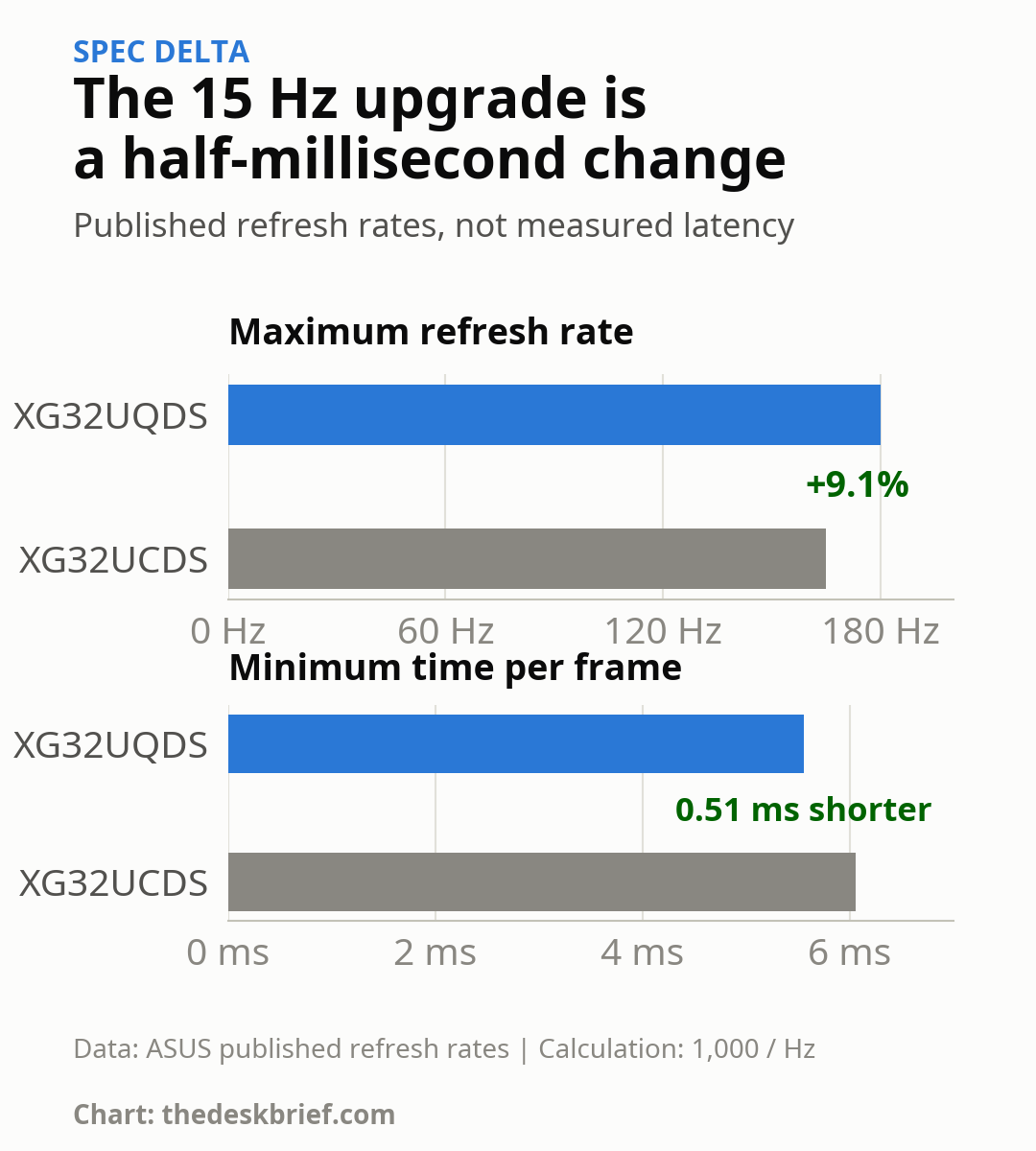
Moving from 165 Hz to 180 Hz raises the maximum refresh rate by 9.1%. At the limit, a new frame can begin every 5.56 ms instead of every 6.06 ms. The difference is 0.51 ms, before input lag, pixel response, game-engine delay, and system latency enter the picture.
You also need a graphics card and game settings that hold more than 165 frames per second at 4K to use the added ceiling. That can happen in competitive games with reduced settings. It is much less likely in visually heavy single-player games. Consoles top out at 4K 120 Hz over HDMI 2.1 here, so the jump to 180 Hz adds nothing for a PlayStation 5 or Xbox Series X.
If 165 Hz already feels limiting, ASUS also lists the 240 Hz XG32UQDMS. The 180 Hz newcomer sits in an awkward middle position: it is only marginally faster than the value model, while the genuinely faster sibling remains above it.
BlackShield is the real reason to wait
ASUS says BlackShield improves perceived black levels by 40% in bright ambient light and provides 2.5 times the scratch resistance of previous-generation QD-OLED panels. Those are manufacturer claims. No independent reviewer has measured a retail XG32UQDS yet, so we do not know how much the treatment changes reflections, black elevation, color, haze, or cleaning marks in a normal room.
This feature matters more than 15 Hz. Earlier QD-OLED panels can look purple or gray under strong room lighting because the panel surface does not preserve the same deep black appearance seen in a dark room. If your desk faces a window or sits under bright overhead lights, waiting for instrumented BlackShield tests is reasonable. If you control the room lighting, the case for waiting gets much weaker.
The new model loses brightness and USB-C
ASUS lists 450 cd/m² peak HDR brightness for the new model. The current XG32UCDS specification page lists 1,000 cd/m² and VESA DisplayHDR 400 True Black. Published peaks do not predict every HDR scene, and neither number replaces a controlled test, but this is too large a paper difference to wave away.
The port change is easier to judge. The 165 Hz monitor accepts DisplayPort over USB-C and supplies 15 W of charging. That is not enough to power most work laptops, but it can carry video from a laptop, handheld, or tablet with one cable. ASUS lists no USB-C port on the 180 Hz model. Anyone building a mixed work-and-gaming desk should treat that omission as a real downgrade, not a missing checkbox buried in the manual.
For a broader look at which features matter away from games, our gaming monitor versus office monitor guide separates refresh rate from desk connectivity. Our Alienware AW3226Q analysis also covers another announced 32-inch 4K OLED option, while the EIZO CG3200X analysis shows what a color-work-first QD-OLED prioritizes.
ASUS model names decoded
One mistyped letter can land you on a different panel. ASUS currently has four closely named 32-inch 4K ROG Strix displays:
- XG32UQ: the older 160 Hz Fast IPS model.
- XG32UCDS: the shipping 165 Hz QD-OLED discussed here.
- XG32UQDMS: a 240 Hz QD-OLED for buyers who value a larger refresh jump.
- XG32UQDS: the announced 180 Hz QD-OLED with BlackShield and no listed USB-C.
The useful shortcut is to check the entire suffix and the panel type before comparing prices. Searching only “XG32UQ” mixes the older IPS display with three OLED models. ASUS has created a fine memory test and called it a product family.
Buy the XG32UCDS now or wait?
Buy the XG32UCDS now if you need a 32-inch 4K OLED, can get it near ASUS’s current US$599 price, and prefer a known price to an unmeasured coating. It is also the better paper choice for HDR brightness and the only one of the pair with USB-C video input. You can check the exact model through the ASUS Store. Stock and regional pricing can change.
Wait if bright-room QD-OLED black elevation bothers you, you are worried about cleaning scratches, or you want measurements before committing. Do not wait merely for 180 Hz. I would not pay a meaningful premium for a 0.51 ms theoretical frame-interval reduction, especially while the new model’s published HDR peak is lower.
The missing launch price prevents a complete value verdict. If ASUS brings the new monitor close to US$599 and reviewers verify a clear BlackShield benefit without a painful brightness trade-off, the balance changes. Until then, the cheaper model is the rational purchase and waiting is the cautious choice, not the default.
Who Should Skip This
Skip both if static spreadsheets, code editors, and browser windows dominate your day and OLED burn-in anxiety will become a new hobby. A good 32-inch IPS or Mini LED display avoids the same long-term static-image concern. Also skip both if you expect laptop-dock power: 15 W on the current model is useful for small devices, not a proper one-cable laptop setup.
Competitive players who can sustain far beyond 180 frames per second should compare the 240 Hz model instead. Console-only buyers can stop at 120 Hz support. Neither group gets much from paying extra for a 165-to-180 Hz step.
What we will update at launch
We will replace the wait verdict when retail evidence exists. The checklist is short: official US and Canadian price, actual stock, measured peak and sustained brightness, BlackShield results under controlled lighting, input lag, motion clarity, color accuracy, text fringing, warranty wording, and any firmware issues. TFTCentral’s launch coverage is useful context, but it is announcement analysis rather than a hands-on review.
FAQ
When will the XG32UQDS ship?
ASUS has not announced a ship date. Its product page is live, but there is no price or order path as of October 16, 2026.
Is 180 Hz noticeably better than 165 Hz?
The theoretical frame interval falls from 6.06 ms to 5.56 ms, a difference of 0.51 ms. Some sensitive competitive players may notice it in a matched test, but the GPU, game, input lag, and pixel response affect the result.
Does BlackShield prevent OLED burn-in?
No. ASUS describes BlackShield as a surface film for better perceived blacks in ambient light and greater scratch resistance. OLED Care Pro, the proximity sensor, pixel cleaning, and the warranty address burn-in risk separately.
Which model has USB-C?
The XG32UCDS has USB-C DisplayPort input with 15 W power delivery. ASUS does not list USB-C among the new model’s ports.
The Short Version
Buy the XG32UCDS at US$599 if you want a 32-inch 4K QD-OLED now. Its 165 Hz ceiling is close to 180 Hz, and it keeps the stronger published HDR peak plus USB-C input. Wait for the XG32UQDS only if BlackShield could solve a bright-room problem and you are willing to let launch pricing and independent measurements decide. A newer model number is not a performance review.