Yes, gaming monitors are good for office work. A 27-inch 1440p IPS gaming monitor is usually the better choice for mixed work and gaming, while an office monitor makes more sense when sharper text, USB-C laptop charging, a KVM switch, webcam features, or factory-calibrated color matter more than adaptive sync. The prices overlap, so the right choice depends on what you do for most of the day, not which aisle the monitor appears in.
Last updated: August 29, 2026.
Currency note: Canadian dollar equivalents use the Bank of Canada daily average of 1 USD = 1.4014 CAD on July 17, 2026. Converted amounts are approximate; the original US price is shown in brackets.
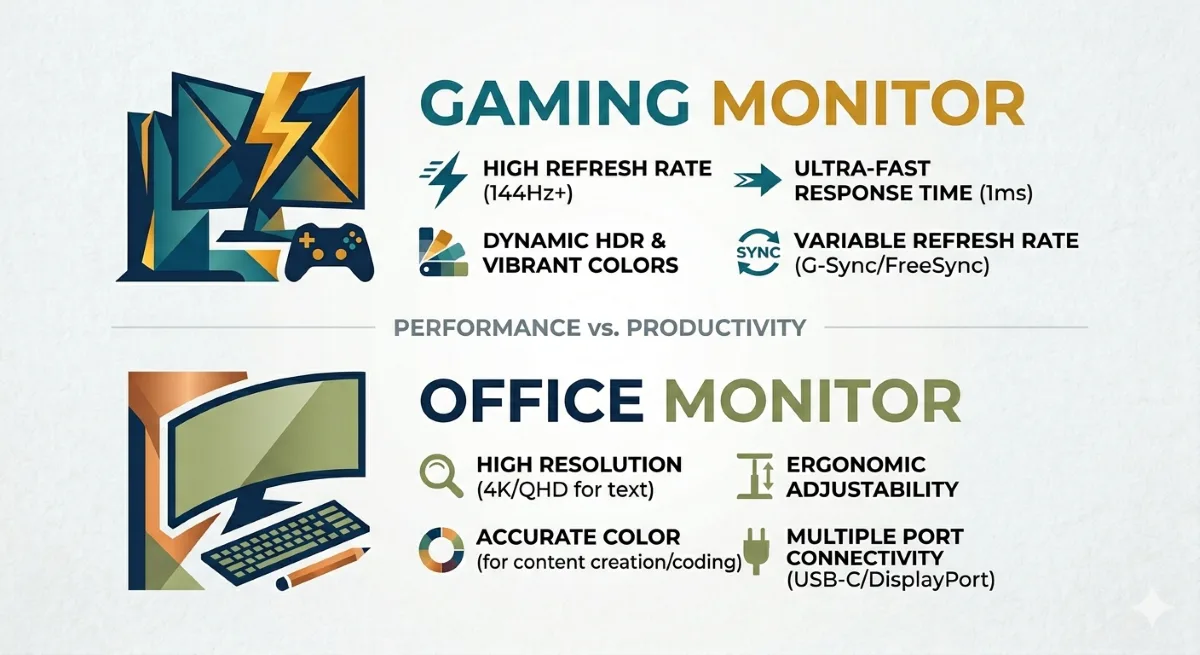
Here’s the short version: gaming monitors optimize for speed, office monitors, sometimes sold as productivity monitors, optimize for accuracy and comfort. Which matters more depends entirely on what you do with your screen.
Disclosure: This page contains affiliates. If you buy through them, The Desk Brief may earn a commission at no extra cost to you.
| Product | Best for | Buy |
|---|---|---|
| AOC 27G4 | Overall | Amazon |
| LG 27GP850-B | Value | Amazon |
| ASUS ProArt PA278QV | Alternative | Amazon |
Table of Contents
Are Gaming Monitors Good for Office Work?
Yes, provided the resolution, panel, and ports fit the job. High refresh makes scrolling and window movement smoother, and an IPS gaming panel can handle documents, spreadsheets, coding, and video calls as well as an ordinary office display. The compromises are usually connectivity and pixel density: many gaming models omit USB-C power delivery, a KVM switch, and webcam hardware, while a 27-inch 1080p gaming screen renders softer text than a 27-inch 1440p or 4K work screen.
The category line is also blurring in 2026. RTINGS’ current work-monitor recommendations include the 120 Hz Dell S2725QS and 144 Hz Dell S2725DC, so smooth desktop motion is no longer exclusive to gaming products. Buy the gaming label for adaptive sync and motion handling. Buy the office label when laptop docking, sharp text, and work-focused ports are worth more.
Gaming Monitor vs Office Monitor: Key Differences
| Feature | Gaming monitor | Office or productivity monitor |
|---|---|---|
| Refresh rate | Usually 144 Hz or higher | Often 60 to 120 Hz, with some current 144 Hz models |
| Panel type | IPS, VA, TN, or OLED; speed and contrast vary | Often IPS for viewing angles and predictable text work |
| Text clarity | Depends on resolution; avoid 27-inch 1080p for text-heavy work | Often prioritizes 1440p, 4K, or higher pixel density |
| Color accuracy | Varies widely; good IPS models can be accurate | Creator models may include calibrated sRGB or Rec. 709 modes |
| Ports and docking | Usually HDMI and DisplayPort; USB-C charging is less common | More likely to include USB-C power, USB hubs, KVM, or daisy chaining |
| Ergonomics | Good on mid-range models, inconsistent at the budget end | Height, tilt, swivel, and pivot are common work features |
| Typical 27-inch price | About CA$200 to CA$400 in the options discussed below | About CA$200 to CA$350 in the options discussed below |
| Best fit | Mixed work and gaming, fast motion, adaptive sync | Laptop docking, text-heavy work, calibrated creative work |
Refresh rate is the biggest divide in a gaming monitor vs office monitor comparison. Many office monitors still run at 60 Hz or 75 Hz, while newer work models increasingly reach 120 Hz or 144 Hz. Gaming monitors commonly start around 144 Hz and go much higher. For office work such as documents, spreadsheets, and video calls, 60 Hz is functional, but higher refresh makes scrolling and cursor movement look smoother. For fast-paced gaming, anything under 144Hz feels noticeably sluggish once you’ve tried higher.
Response time is how quickly pixels change color, measured in milliseconds. Gaming monitors push 1-5ms; office monitors are typically 5-10ms. The difference is invisible when writing an email. It’s very visible in a fast-paced first-person shooter.
Color accuracy favors creator-focused office monitors, not every screen sold for office use. Models such as ASUS ProArt displays include calibrated sRGB and Rec. 709 modes, while an ordinary low-cost office panel may be no more accurate than a gaming model. Budget gaming monitors sometimes sacrifice accuracy for speed, but good IPS gaming monitors have narrowed the gap substantially. Whichever panel you pick, setting up your monitor correctly out of the box matters as much as the panel’s factory spec.
Price for equivalent screen size varies less than it used to. A decent 27-inch office monitor runs CA$200-350 (US$143-250). A decent 27-inch 144Hz gaming monitor runs CA$200-400 (US$143-285). At the CA$300 (US$214) mark, you can find solid options in both categories the question is which tradeoffs you prefer, not which one is cheaper.
Ergonomics traditionally favored office monitors height adjustment, tilt, swivel, and pivot were standard on office monitors while gaming monitors focused on looks. In 2026 this gap has narrowed, but it still exists at the budget end. If you’re pairing your monitor with a proper ergonomic desk setup, VESA compatibility and height adjustment matter. Check before you buy.
Design and desk presence is the most obvious difference. Gaming monitors have aggressive styling, RGB lighting, and dramatic stands. Office monitors are neutral. Neither is objectively better it’s aesthetic preference. One practical note: RGB lighting on a gaming monitor adds zero performance benefit and occasionally causes distraction. It’s fine to buy a gaming monitor and just turn the RGB off.
Resolution: 1080p vs 1440p
Refresh rate gets all the attention, but resolution is the more important decision for most desk setups.
1080p on a 27-inch panel looks noticeably soft at a normal desk distance of 60-75cm. Text isn’t sharp, small UI elements are fuzzy, and you’ll notice it most when reading or coding. At 24 inches, 1080p is fine. At 27 inches and above, 1440p is a meaningful improvement for all-day work, and the price gap has narrowed enough in 2026 that it’s worth prioritizing if you can stretch the budget.
1440p (2560×1440) is the practical sweet spot for a 27-inch desk monitor. Sharp enough for work, fast enough for gaming on a mid-range GPU, and the upgrade over 1080p now costs around $80-140 CAD rather than the CA$250 (US$178)-plus it used to be.
4K on a 27-inch monitor is excellent for photo editing and design work where pixel density matters. For gaming, you’ll need a capable GPU to push it at playable frame rates. For most people doing mixed work and gaming, 1440p delivers more practical value per dollar at this screen size.
Specific Monitor Picks to Compare in Canada
Budget gaming pick: The AOC 27G4 is a 27-inch IPS panel at 180Hz. It handles fast gaming well and works fine for everyday tasks. The 1080p resolution is a real limitation at 27 inches if you do a lot of reading or coding. If you mainly game and the occasional document doesn’t bother you, it is a strong budget option.
Best mid-range pick: The LG 27GP850-B is a 27-inch, 1440p Nano IPS at 165Hz. It is sharp enough for all-day work, fast enough for modern games, and capable enough for light photo editing. This is the one I would point most mixed-use buyers toward when the current price is competitive.
Office-first pick: The LG 27MP400-B is a 27-inch IPS at 75Hz with a basic tilt-only stand. Its neutral design and IPS panel suit ordinary office work, but the lack of height adjustment means some desks will need a riser or VESA arm. The model is becoming difficult to find in Canada, so verify the exact model before ordering rather than accepting a similarly named substitute.
Color-conscious work: The ASUS ProArt PA278QV is a 27-inch, 1440p IPS with factory calibration and 100% sRGB and Rec. 709 coverage. It is a sensible tool for sRGB photo, web, and video work. The trade-off is a 75Hz refresh rate, which matters less when colour accuracy is the priority.
Who should buy which
Buy an office monitor if:
- You work 6-8 hours daily and eye comfort is the priority; our eye strain guide covers which panel type is easier on your eyes
- You do photo, video, or graphic design work requiring color accuracy
- You want a clean, neutral aesthetic that fits a professional setup
- You never game, or only game casually (strategy, turn-based, slow-paced)
- You need reliable VESA compatibility for a monitor arm
Buy a gaming monitor if:
- You game regularly, especially fast-paced titles (FPS, racing, action)
- You want a monitor that does both work and gaming without compromise
- You’re already buying a mid-range or high-end option: at CA$300 (US$214)+, IPS gaming monitors match office monitors on color and comfort
- You want adaptive sync for a smoother visual experience across everything
Buy either if:
- Your budget is under CA$200 (US$143) and you primarily do office work. At that price point, a decent office monitor and a budget gaming monitor are closer in quality than the marketing suggests. Pick based on whether refresh rate matters to your use case.
The one scenario most people miss
A mid-range IPS gaming monitor is genuinely the best all-rounder.
A 27-inch, 144Hz, IPS panel gaming monitor at CA$250-350 (US$178-250) gives you good color accuracy (IPS panel), fast refresh rate for gaming, and usually decent ergonomics. It works well for office tasks, handles casual creative work, and lets you game properly. Don’t forget about the difference between refresh rate and response time.
If you’re building a do-everything desk setup and have one monitor budget, an IPS gaming monitor in this range is often the smartest buy not as a compromise, but as a genuinely good choice for both use cases. This will be a important decision for deciding between a gaming monitor vs office monitor.
The only reason to choose a pure office monitor over it is if color accuracy for professional creative work is the non-negotiable priority, in which case a proper color-calibrated office monitor is the right tool.
Test before you replace: Check the active mode with the free monitor refresh rate test, inspect a new or suspect panel with the dead pixel test, and verify a gaming input with the controller test. A setting or cable problem is cheaper to fix than the wrong monitor.
Gaming Monitor vs Office Monitor: Before You Decide
The best monitor in the wrong position is still a neck problem. Check your screen height before finalizing the setup. The ergonomic desk setup checklist covers monitor height, distance, and tilt. If a monitor arm is in the plan, the monitor arm vs. monitor stand guide breaks down when each option makes sense and what the cable routing implications are for each.
The cable question comes up either way. Clean routing matters more once the monitor is properly positioned, especially on a monitor arm where there’s no stand to hide cables behind. The cable management guide covers under-desk trays, raceways, and the routing approaches that work for both standing desks and fixed setups.
The short version: match resolution to screen size (1440p at 27 inches), pick IPS for anything you’ll look at all day, and make sure the refresh rate reflects how you actually use the monitor. A 27-inch, 1440p, 144-165Hz IPS panel in the $380-440 CAD range covers almost any desk setup well.