

Setting up AI agents at home is one of the most talked-about tech projects of 2026, and for good reason. The idea of having software that thinks, plans, and acts on your behalf without a monthly subscription sounds genuinely appealing. But after spending real time running AI agents at home, I can tell you the experience is more complicated than the YouTube tutorials make it look. This guide walks through the honest trade-offs, your actual options, and what you need to know before committing to a home AI agent setup.
Currency note: Canadian dollar equivalents use the Bank of Canada daily average of 1 USD = 1.4014 CAD on July 17, 2026. Converted amounts are approximate; the original US price is shown in brackets.
Table of Contents
For the model layer beneath an agent, the best local LLM guide compares current options for tools, reasoning, code, and low-memory systems.
What Is a Home AI Agent, Actually?
Before getting into the pros and cons, it helps to be precise about what we mean. A home AI agent is not just a chatbot you run locally. A chatbot responds to questions. An agent takes actions. Give an agent a goal and it breaks the goal into steps, uses tools like web search, email access, or your file system, and works toward completing it without you managing every step.
The “home” part means you are hosting the AI model and the automation software yourself, on your own hardware, rather than paying a cloud provider to do it. That distinction is the source of almost every trade-off in this article.
A typical home AI agent setup has three layers: a language model running locally (the brain), an interface to talk to it (the front end), and an automation platform to connect it to other tools and services (the legs). You choose the components at each layer, which is both the appeal and the challenge.
The Pros of Running AI Agents at Home
Home AI Agent Benefit: Your Data Never Leaves Your Machine
This is the clearest, most concrete advantage of a home AI agent setup. When you run a local model using a tool like Ollama, every prompt, every document you feed it, and every response stays on your hardware. Nothing is sent to a third-party server.
For most casual use this does not matter. For anyone handling sensitive documents, including financial records, private correspondence, medical information, or client data, it matters enormously. The alternative is trusting that OpenAI, Anthropic, or Google are handling your data responsibly and not using it to train future models. Their privacy policies are better than they used to be, but running locally removes that question entirely.
There is also a subtler benefit: no data retention period, no risk of a breach at a cloud provider exposing your prompts, and no legal ambiguity about who owns AI-assisted content you create using proprietary services.
The cost comparison is genuinely compelling
Cloud AI subscriptions have a way of multiplying. If you use AI seriously across multiple tools, you can easily hit CA$60-100 (US$43-71) per month before noticing. A home setup, by contrast, is a one-time hardware investment and then free to run indefinitely.
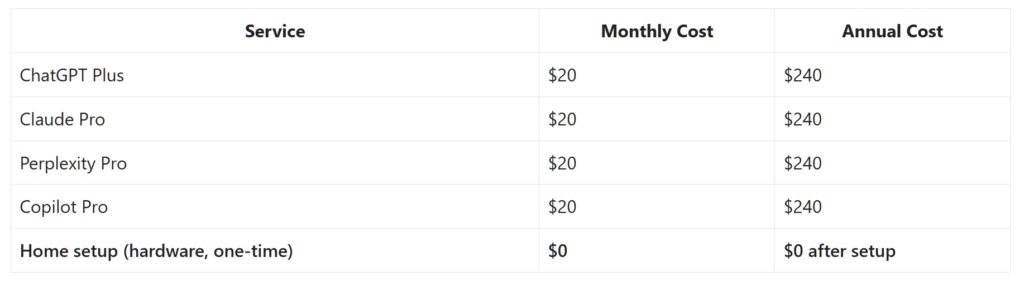
If you are already paying for two or three cloud AI services, a decent home server or mini PC can pay for itself in under a year. n8n, the most popular self-hosted automation platform, is free to run locally, whereas the cloud version starts at CA$20 (US$14)/month. Open source tools across the board follow this pattern.
Automation that is genuinely tailored to your life
Cloud AI services offer pre-built automations, but they are designed for the average user. A self-hosted setup lets you build workflows that match exactly how you work. Real examples that are running today on home setups: summarise unread emails every morning and drop a digest into a note, flag any email mentioning invoices or billing and add it to a spreadsheet, monitor an RSS feed and generate a briefing on topics you care about, or extract structured data from PDFs and populate a database.
These are not hypothetical capabilities. They work with current tools. The catch is that you have to build them yourself, which is where we get into the cons.
The Cons of Running AI Agents at Home
Hardware requirements are real and significant
Local AI models are memory-hungry in a way that surprises most people. A capable 8-billion-parameter model like Llama 3 8B requires roughly 6-8 GB of RAM just to load into memory, before it has processed a single token. Running on CPU rather than a dedicated GPU, which most home setups involve, means response times of 10-30 seconds per query rather than the near-instant feel of a cloud service.
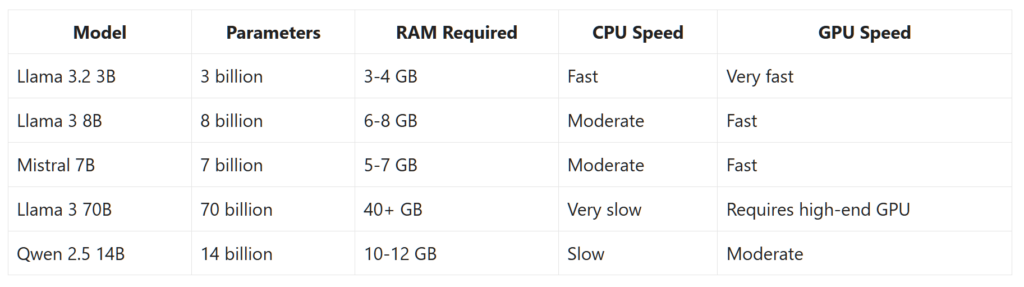
If your machine has 8 GB of total RAM, you will be splitting it between the model, the operating system, and everything else you have open. The experience is frustrating. 16 GB is the realistic minimum for a comfortable setup with smaller models. 32 GB opens up mid-sized models that produce meaningfully better results but more expensive to acquire.
A dedicated GPU changes the picture dramatically. Running a model on a modern GPU is 5-10x faster than CPU inference. But a capable GPU (RTX 3060 or better) adds CA$300-500 (US$214-357) to the hardware cost, which shifts the cost-benefit calculation considerably. If you are starting from scratch and need to buy a GPU, the economics look very different from someone who already has a gaming machine sitting idle. I explored this in more detail in my Lenovo Legion 7i review, specifically around local LLM performance with dedicated GPU hardware.
Home AI Agent Setup Time Is Not Trivial
The tooling has improved remarkably in the last 18 months. Installing Ollama and running a model is now genuinely as easy as installing any other application. But building a proper home AI agent setup, one where the AI connects to your email, calendar, files, and external services, is a different level of effort. Expect a few hours for a basic setup and realistically a weekend for something that does useful automation.
You will encounter Docker configuration issues, port conflicts, authentication problems with the services you want to connect, and the occasional cryptic error that requires forum-diving to resolve. This is not a complaint about the tools, which are genuinely impressive for free software. It is an honest description of the current state of the ecosystem. If troubleshooting command-line errors is not something you find enjoyable, a polished cloud service will serve you better.
Local models are not as capable as the frontier models, yet
The open-source model ecosystem has closed the gap with commercial models faster than anyone expected. Llama 3, Mistral, and Qwen are genuinely impressive for many tasks. But GPT-4o, Claude Sonnet, and Gemini 1.5 Pro are still noticeably better at complex reasoning, nuanced writing, following multi-step instructions reliably, and coding tasks that require understanding a large codebase at once.
For summarising emails, answering factual questions, drafting simple communications, and routine analysis tasks, the quality difference is modest. For anything requiring analytical depth, high-quality original writing, or reliable instruction-following across a long document, you will notice what you are trading away. Be realistic about your use cases before committing to local-only.
Agents act on their mistakes, not just report them
This is the risk that catches people off guard, and it is worth taking seriously. A chatbot that gives you a wrong answer is annoying. An AI agent that acts on a wrong interpretation, sending an email you did not intend, deleting files, submitting a form, making an API call, is a meaningfully different problem.
Agents are not reliably good at knowing when to stop and check with you. They are designed to complete tasks, and they will attempt to complete them even when they are uncertain. Setting guardrails takes thought and testing. The standard advice is to start with read-only agents, ones that summarise and report rather than write and send, until you understand exactly how your setup behaves. Only add write access to services once you have observed the agent handling edge cases.
Your Options: Choosing Your Home AI Agent Stack
There is no single product you install to get a home AI agent. It is a stack of components you choose and connect. Here is what each layer looks like and your main options at each.
The AI model (the brain)
Ollama is the easiest starting point for most people. It runs on Mac, Windows, and Linux, installs like any application, and gives you access to Llama 3, Mistral, Qwen, Gemma, and dozens of other models with a single command. Models download automatically on first use and run entirely offline after that.
LM Studio is a strong alternative with a polished graphical interface that makes model management more accessible if you prefer not to use a terminal. It also has a compatibility layer that makes local models behave like the OpenAI API, which means many tools designed for ChatGPT can be redirected to your local model with minimal reconfiguration.
If you want access to a wider selection of models, including newer releases before they are available through Ollama, Hugging Face hosts tens of thousands of open-source models, though working with them directly requires a bit more technical setup.
The interface (how you interact with it)
Open WebUI is the most polished self-hosted chat interface available and connects directly to Ollama. The experience is genuinely close to ChatGPT, including conversation history, model switching, and basic file upload. If you want a daily-driver chat interface without a subscription, this is the most mature option.
For something more integrated with your personal knowledge base, Khoj indexes your own notes and documents and can search them as part of a conversation. This is particularly useful if you keep research notes, meeting summaries, or a personal wiki that you want your AI assistant to reference.
The automation layer (where the agent behaviour lives)
n8n is the tool I would point most people toward for automation. It is visual, self-hosted, has pre-built connectors for hundreds of services including Gmail, Google Calendar, Notion, Slack, and RSS feeds, and lets you wire up multi-step workflows without writing code. The learning curve is real but manageable over a weekend.
Node-RED is a lighter alternative popular in the home automation and IoT world. It is less polished for AI-specific workflows but requires fewer system resources, making it a reasonable choice for lower-powered hardware like a Raspberry Pi.
If you are comfortable with Python, LangChain and LlamaIndex give you much finer control over agent behaviour and memory management, but they require proper development skills to use effectively. These are tools for people who want to build something specific, not tools for people who want something that works out of the box.
The infrastructure (where it all runs)
You can run everything on your main computer. It will work, but your machine needs to stay on and responsive for any scheduled automations to run reliably. For anything more serious, a dedicated always-on machine is a better long-term setup. Options range from a repurposed old laptop, to a mini PC like an Intel NUC or Beelink, to a Raspberry Pi 5 for lighter workloads.
Docker is what holds most home AI setups together. It packages each component, Ollama, Open WebUI, n8n, and any other tools, into isolated containers that do not conflict with each other. Updates are straightforward, rollbacks are possible, and the whole setup is portable if you want to move it to different hardware. If you are serious about a home AI setup, learning Docker basics is one of the better investments you can make.
This also connects to the broader shift happening in home workspaces. AI and automation are becoming part of how intelligent workspaces are designed, which I explored in more depth in The Desk of 2027: How AI, Sensors, and Smart Furniture Are Changing the Way We Work.
What Home AI Agents Can Reliably Do Today
Setting realistic expectations matters here, because the gap between what demos show and what works reliably in day-to-day use is still significant.
Tasks that work well with current home AI agents: summarising long documents and emails, extracting structured information from unstructured text like invoices or meeting notes, classifying and routing content based on topic or sender, generating first drafts of standard documents from templates, answering questions about a defined body of knowledge you have fed it, and monitoring sources for specific topics or keywords and reporting findings.
Tasks that work but require careful setup and testing: sending emails or messages on your behalf, making calendar entries, updating records in external tools, and multi-step workflows that depend on the AI making judgment calls at branch points.
What Home AI Agents Still Struggle With
Being honest about limitations is more useful than listing everything a demo has managed once. Current home AI agents struggle with: maintaining context reliably across very long conversations or large document sets, consistent reasoning across multi-step tasks that require holding many variables in mind simultaneously, knowing when a task is outside their competence rather than attempting it poorly, and anything requiring real-world knowledge more recent than their training cutoff.
They also struggle with nuance in tone and intent. An agent summarising an email thread may miss subtext that changes the appropriate response. An agent drafting a reply may produce something technically accurate but tonally wrong. The outputs need review, especially for anything that represents you externally.
Who Should Actually Set This Up?
If privacy is your main reason for looking at this, a digital privacy audit is worth doing first; it gives you a clear picture of where your data currently lives and where you most want to tighten things up.
A home AI agent setup is a good fit if you handle sensitive data and want it off cloud servers, are already paying for multiple AI subscriptions and want to consolidate costs, have a machine with 16 GB or more of RAM and are comfortable with some technical setup, find the project of building your own tools rewarding rather than frustrating, or have specific automation needs that cloud tools do not handle well.
It is probably not the right move if you want something that works immediately without configuration, have a machine with less than 16 GB of RAM, need the highest quality outputs for professional writing or complex analysis, or are not prepared to invest time in setup and occasional maintenance when things break after an update.
The honest middle path for most people: keep using a cloud service like ChatGPT or Claude for daily tasks where quality and convenience matter, and experiment with local tools on a secondary machine or dedicated server to understand what the home AI agent world actually looks like. The ecosystem is changing fast enough that waiting six months will give you meaningfully better tools and clearer best practices.
Where This Is Heading
The trajectory is clear. Models are getting smaller and faster without proportional quality loss. Hardware is getting cheaper (aside from the RAM and SSD costs in late 2025 and into 2026). The tooling around agents is maturing rapidly, with better memory management, more reliable tool use, and improved guardrails for autonomous action. What requires a weekend to set up today will likely require an afternoon in 12 months.
The privacy and cost advantages of local AI are not going away. If anything, they are becoming more relevant as AI becomes more deeply integrated into productivity workflows and the data being processed becomes more sensitive. The question is not whether home AI agents will be practical for the average user, but when.
Frequently Asked Questions About Home AI Agents
What exactly is a home AI agent?
A home AI agent is software that runs on your own hardware and can take actions on your behalf, not just answer questions. Unlike a hosted chatbot, a home AI agent keeps your data local, connects to your own tools and services, and can run automated workflows on a schedule without any cloud subscription. The term covers everything from a locally-run language model you chat with, to a full home AI agent automation stack that monitors your email and acts on it.
What hardware do I need for a home AI agent setup?
The realistic minimum for a comfortable home AI agent setup is 16 GB of RAM and a modern multi-core processor. With 8 GB you can run smaller models but will feel the constraint immediately. A dedicated GPU with 8 GB or more of VRAM makes a significant difference in response speed, reducing wait times from 20-30 seconds per response on CPU to under 3 seconds on GPU. An always-on machine, whether a mini PC, a repurposed laptop, or a dedicated server, is better than using your main computer if you want scheduled automations to run reliably. One caveat for any unattended box: set up auto power on after a power outage, or a blackout can leave your agent offline until you notice.
Is a home AI agent better than using ChatGPT or Claude?
It depends on what you value. A home AI agent gives you privacy, zero ongoing cost, and full control over your automations. ChatGPT and Claude give you better model quality, instant responses, and no setup overhead. For most people the right answer is using cloud services for daily tasks and experimenting with a home AI agent setup on the side. The two approaches are not mutually exclusive, and many people run both.
What is the best tool to start with for a home AI agent?
For most people, the best starting point is Ollama for running the AI model locally, combined with Open WebUI for a chat interface. Once you have that working and understand the hardware reality on your specific machine, n8n is the most accessible tool for building home AI agent automation workflows. This sequence lets you validate each layer before adding complexity.
How much does a home AI agent cost to run?
Once your hardware is in place, running a home AI agent costs essentially nothing ongoing. Ollama, Open WebUI, and n8n are all free and open-source when self-hosted. The main running cost is electricity, typically CA$3-8 (US$2-6) per month for a low-power mini PC or dedicated server. Compare that to CA$20-80 (US$14-57) per month for commercial AI subscriptions and a home AI agent setup pays for its hardware within 6-18 months, depending on what you spend upfront.
Is a home AI agent difficult to maintain?
Maintenance is real but manageable. The main ongoing tasks for a home AI agent are updating software containers when new versions release, pulling updated models as better ones become available, and troubleshooting when an update breaks a workflow. Using Docker to run your home AI agent stack makes updates straightforward. Expect a couple of hours every few months to keep things current, plus occasional debugging when something changes unexpectedly.
Is a Home AI Agent Worth It? The Short Version
Home AI agents are genuinely capable, genuinely private, and genuinely free to run once you have the hardware. The trade-off is setup effort, hardware investment, and accepting that local models are not yet as capable as the best cloud alternatives. If those trade-offs work for your situation, the tools to build a home AI agent setup are better today than they have ever been. If they do not, the cloud services are not going anywhere, and the gap will keep closing regardless.
Leave a Comment