
The margin you think you have on an imported product isn’t the margin you’ll actually see. Not after freight. Not after duties. Not after Section 301 tariff overlays, Merchandise Processing Fees, Harbor Maintenance Fees, marketplace commissions, and fulfillment costs. Most sellers find this out on their second or third order, when the numbers don’t work out the way the original math suggested. A proper landed cost calculator makes that math visible before you commit.
Table of Contents
Import Math is a free landed cost calculator that runs all of that math before you commit to inventory.
What the Landed Cost Calculator Covers
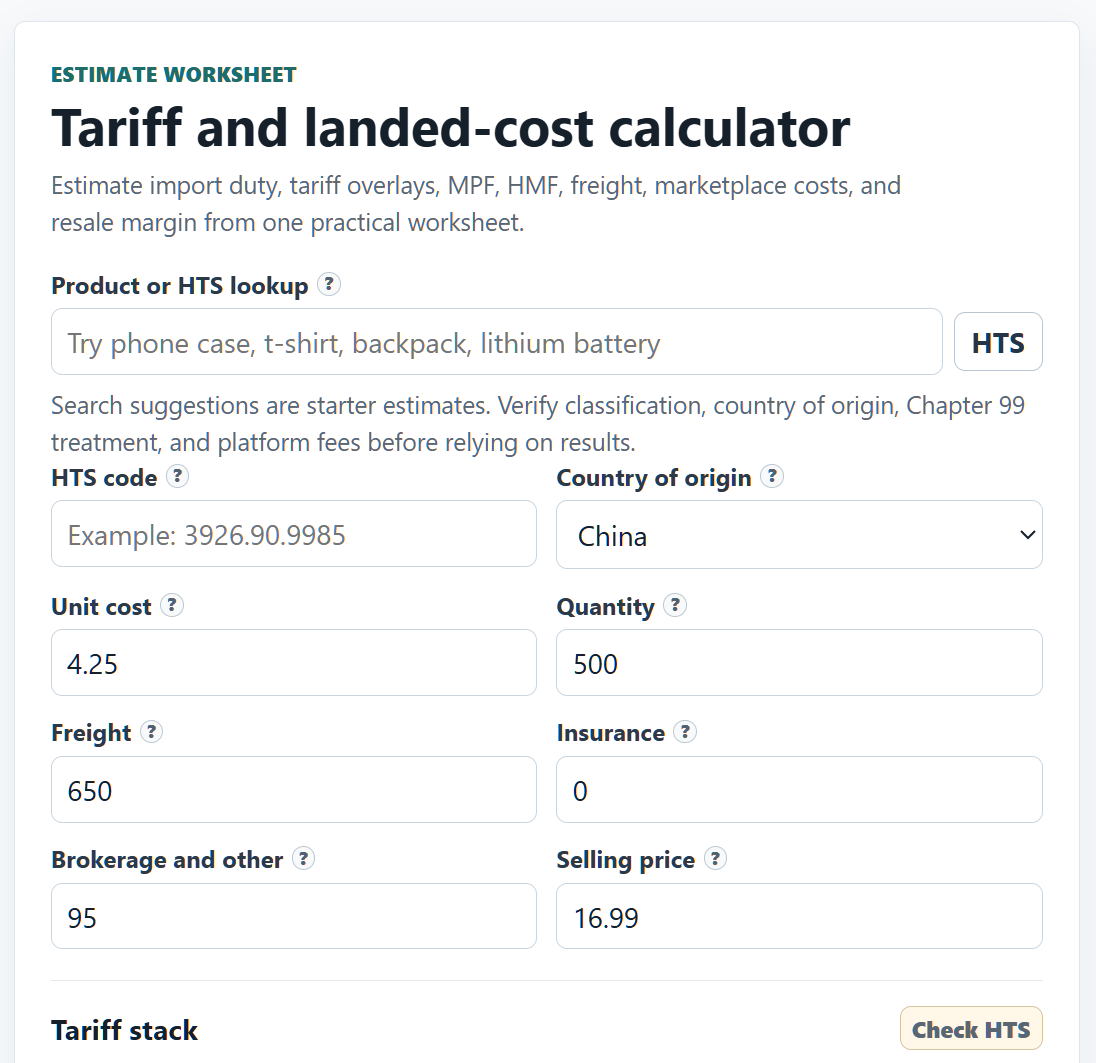
The landed cost calculator works through every cost in the order they actually stack. You start with product cost, then add freight and insurance. From there it applies the base import duty rate from your HTS code, any Section 301 tariff overlays on Chinese-origin goods, and then the two federal entry fees that most sourcing spreadsheets miss: Merchandise Processing Fee and Harbor Maintenance Fee.
MPF is calculated at 0.3464% of the declared customs value, with a minimum of $32.71 and a maximum of $634.62 per entry, based on current CBP MPF guidance. HMF sits at 0.125% of cargo value and applies to ocean shipments. Neither fee is large on any individual shipment, but they’re real line items that compress margin, and they’re easy to forget when you’re doing quick back-of-envelope math on a new product.
After landed cost, the calculator adds marketplace fees and fulfillment costs based on the platform you’re selling on. Amazon FBA, Shopify, Etsy, TikTok Shop, eBay, Walmart Marketplace, WooCommerce, BigCommerce, Wix, and Squarespace are all covered. It then works backward from your target margin to give you a break-even price and a clear answer on whether the product survives the math.
A Real Example: What the Numbers Actually Look Like
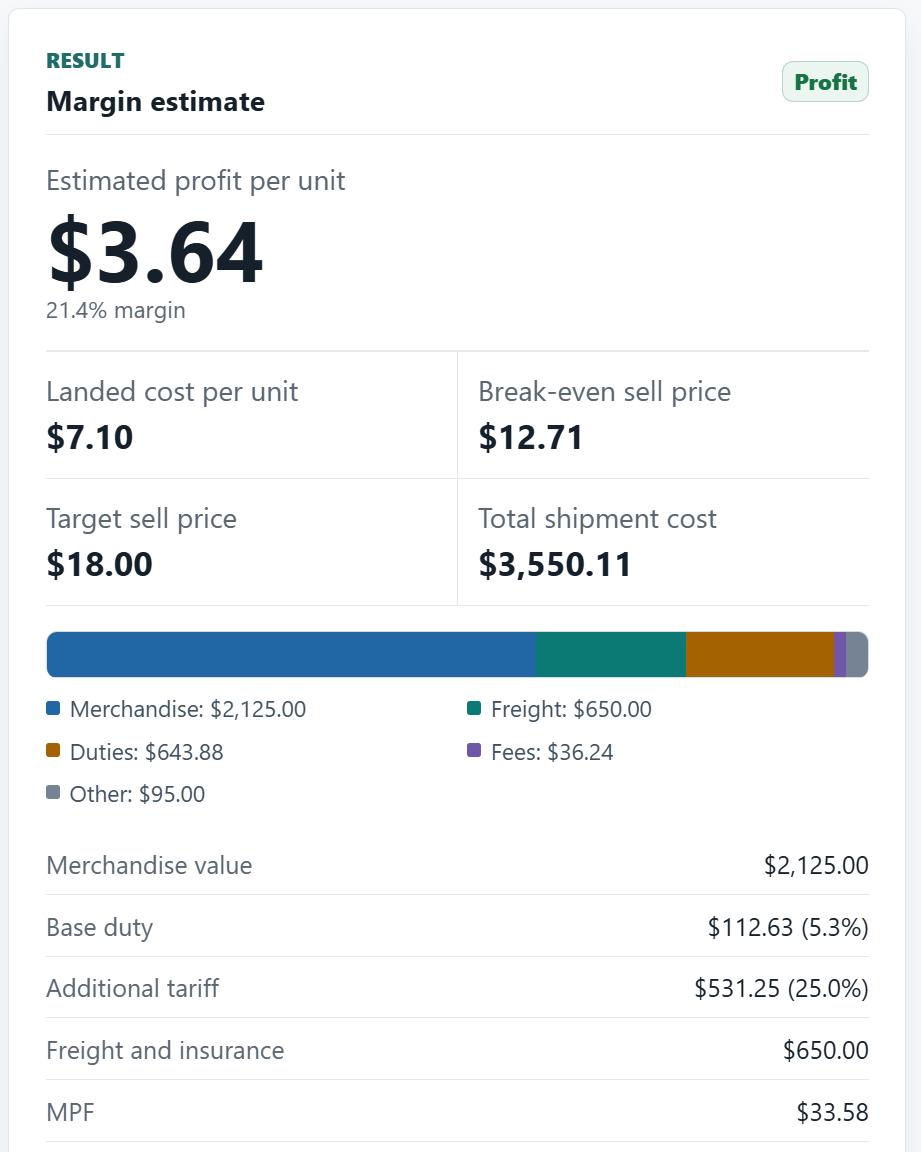
The screenshots above come from an actual run through the calculator. Here’s what the math produces on a specific product: a plastic phone case sourced from China at $4.25/unit, 500 units, $650 in ocean freight, with the default Amazon FBA fee structure.
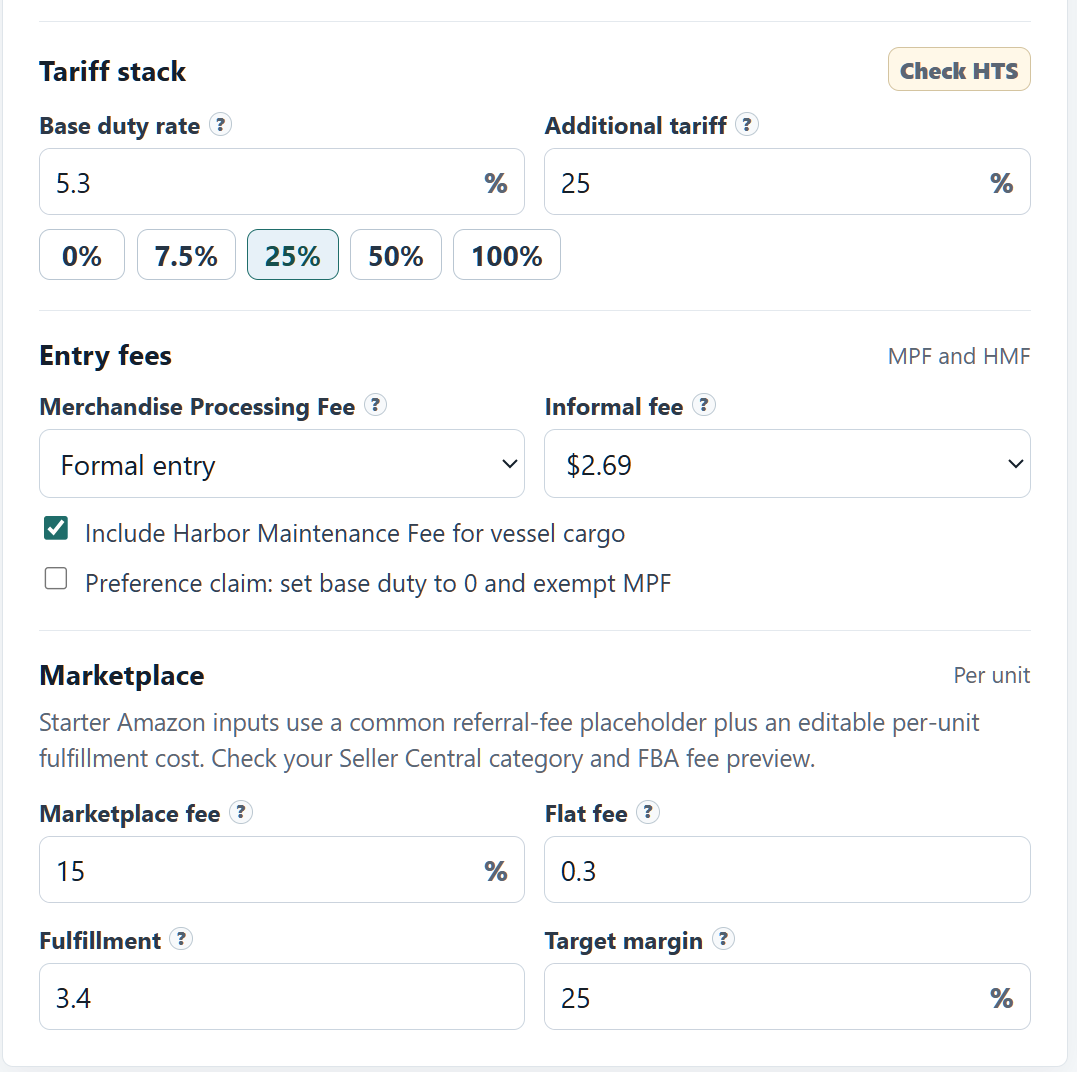
Base duty on that HTS code runs 5.3%. Section 301 adds another 25% on top. On $2,125 in merchandise value, that’s $112.63 in base duty and $531.25 in Section 301 tariffs. Freight is $650. MPF on a formal entry at this value comes to $33.58. HMF adds another $2.66. Brokerage and other charges add $95. Total shipment cost: $3,550.11.
Divide by 500 units and the landed cost is $7.10 per unit. That’s 67% higher than the $4.25 you paid the supplier. The unit cost on your order confirmation is not your cost. Not even close.
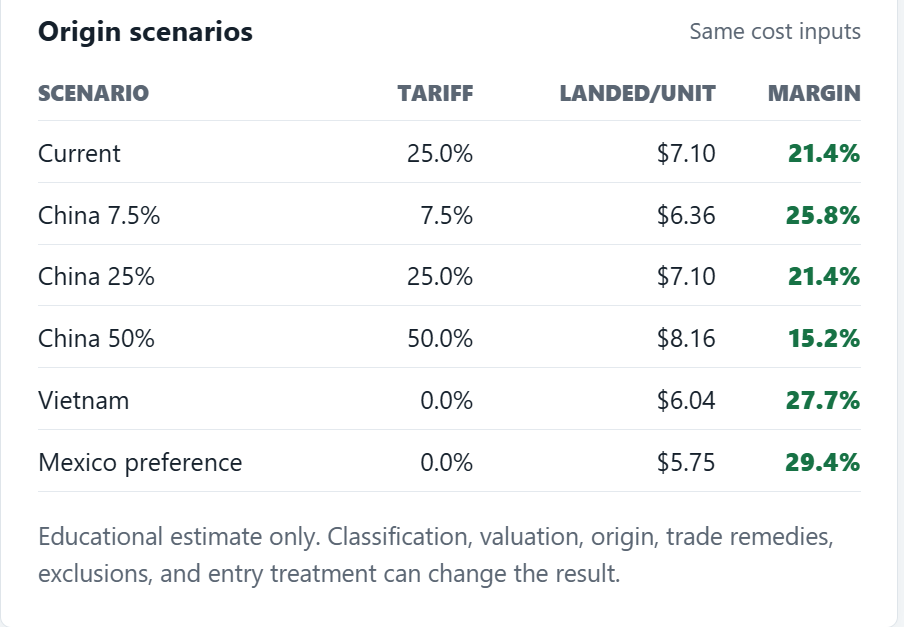
At a $16.99 selling price with a 15% Amazon referral fee and $3.40 fulfillment cost, the estimated profit is $3.64 per unit, a 21.4% margin. Break-even is $12.71. That’s a workable product. But change the Section 301 rate to 50% (one of the active tariff scenarios for some categories) and the margin collapses to 15.2%. Change it to 100% and the product probably doesn’t make sense to source from China at all.
That’s exactly what the origin scenarios table in the tool shows, and it’s the clearest illustration of why running a landed cost calculator before committing to a supplier matters. Vietnam sourcing at 0% tariff drops the landed cost to $6.04 and lifts margin to 27.7%. Mexico preference treatment gets it to $5.75 and 29.4%. Same product, same freight and fees, different supplier address; materially different margin. Running those numbers before you send a purchase order is the whole point of a landed cost calculator.
Section 301 Tariffs: The Part Most Calculators Skip
If you’re sourcing from China, Section 301 tariffs are the number that hits hardest and gets missed most often. The USTR Section 301 tariff lists added between 7.5% and 25% on top of base duty rates across thousands of product categories, and the actual rate depends on your specific HTS code and country of origin.
Import Math applies the relevant Section 301 overlay once you’ve entered your HTS code and selected China as the origin. It also lets you run origin comparisons, which is useful if you’re evaluating whether moving to Vietnam, Bangladesh, or another sourcing country changes the margin picture. For some categories the tariff difference is significant enough to affect which supplier you’d work with.
The tool doesn’t classify your product for you. You need to know your HTS code, or look it up using the USITC HTS database. That’s a real limitation, and the site is upfront about it. HTS classification is a compliance question, not a math question, and a tool like this can’t and shouldn’t answer it for you.
What’s Actually in the Tool
The main landed cost calculator on the homepage covers most use cases, but Import Math includes several additional pages worth knowing about:
- Platform-specific calculator pages for each major marketplace, pre-loaded with the right fee structures
- HTS starter lookup to find your product category and base duty rate before running numbers
- Origin and tariff scenario pages for comparing sourcing countries side by side
- CSV batch SKU checker for running multiple products at once without re-entering everything manually
The batch SKU checker is the most practical feature if you’re evaluating a product line rather than a single item. Upload a CSV with your SKUs, costs, and HTS codes and the landed cost calculator processes the full analysis across all of them at once. If you’re managing a catalogue of any size, doing this one product at a time is slow. The batch tool is the version that actually fits into a real sourcing workflow.
What It Won’t Do
Import Math describes itself as a planning worksheet, and that framing is accurate. It’s a landed cost calculator, not a compliance tool. It won’t classify your goods. It won’t tell you whether your shipment requires a formal entry or informal entry. It doesn’t address bonded warehouses, antidumping duties, countervailing duties, or any of the other overlays that can apply to specific product categories. It isn’t customs advice.
Links to CBP, USITC, and USTR run throughout the site, which at least tells you where to go when you need real guidance. For regulated goods, antidumping categories, first-time imports, or anything with a complicated origin story, a licensed customs broker is still the right call. Import Math is the math you do before you decide whether to make the call at all.
Who Should Use It
The pre-purchase margin check is the obvious use case. Before you send a deposit to a supplier, you want to know whether the product still makes money after duties, freight, and platform fees, not after you’ve already committed inventory. That’s where this tool earns its keep.
It’s also genuinely useful for origin comparisons. If you’re sourcing from China and the Section 301 rate on your category is 25%, running the same inputs against Vietnam or Mexico often changes the conversation. The calculator shows you the margin difference in seconds. Whether that difference is worth the supplier switch is your call, but at least you’re making it with real numbers.
MPF caps are another thing most sellers don’t think about until they’re running bigger orders. At low volumes, the $32.71 minimum fee applies and adds real cost per unit. Once your shipment value is high enough, the fee caps at $634.62 regardless of declared value, so per-unit MPF cost drops substantially at scale. If you’re deciding between a 200-unit test order and a 1,000-unit first order, the MPF math is part of that decision.
Who Should Skip It
If you already have a landed cost model you trust in your own spreadsheet, this landed cost calculator doesn’t add much. If you’re importing highly regulated goods, category-specific products with antidumping overlays, or anything that needs a customs ruling, start with a broker rather than a calculator. And if you don’t know your HTS code and aren’t prepared to look it up, the output won’t be accurate enough to act on.
Running an Import Business from a Home Office
Landed cost is one input. If you’re running sourcing and fulfilment as a home-based operation, the overhead picture is wider than that. Your home office costs, equipment, software subscriptions, and time are all part of the business model. A simple overhead worksheet can map those costs clearly, which matters when you’re trying to figure out whether the business is actually profitable or just looks like it is.
On the automation side, sourcing workflows have a lot of repeatable steps: tracking shipments, monitoring supplier communications, updating listings, logging costs. No-code automation tools like n8n and Make handle this kind of work without requiring you to build anything from scratch. If you’re doing volume, the time savings add up quickly.
And if the import business is how you’re building toward something larger, it helps to know the number you’re working toward. A financial-independence target belongs alongside your margin projections because it puts a concrete target on the portfolio size that would let the business income become optional rather than necessary.
Frequently Asked Questions
Is Import Math free?
Yes. No signup, no account required. The full calculator and all platform-specific pages are free to use.
Does it cover Section 301 tariffs on Chinese goods?
Yes. You enter your HTS code and select China as the origin, and the calculator applies the relevant Section 301 overlay on top of the base duty rate. It also supports origin comparisons so you can see how the numbers change with a different sourcing country.
What is MPF and why does it matter?
Merchandise Processing Fee is a U.S. Customs fee charged on most commercial imports. It’s 0.3464% of the declared customs value, with a minimum of $32.71 and a cap of $634.62 per entry. On small orders the minimum fee applies and raises your effective per-unit cost. On large orders the cap kicks in and the per-unit impact shrinks. Import Math accounts for both.
Can it handle multiple products at once?
Yes. The CSV batch SKU checker lets you upload a file with multiple products and run the landed cost analysis across all of them at once.
How accurate is it?
The landed cost calculator is accurate enough to make sourcing decisions, not accurate enough to file an entry. The duty and tariff calculations are correct when you feed it the right HTS code and origin country. Where it gets fuzzy is on anything that requires actual classification judgment: product descriptions that straddle two HTS codes, first-sale valuation, assist values, or special trade programs that need documentation. Use it for directional margin analysis. Treat any output as an estimate, not a binding cost.
Does it replace a customs broker?
No. Import Math is a pre-purchase planning tool. It doesn’t classify products, provide customs rulings, or handle compliance for regulated goods. For anything beyond straightforward commodity imports, a licensed customs broker is still the right call.
Short Version
Import Math is a free landed cost calculator at importmath.com. It handles base duty, Section 301 tariffs, MPF, HMF, marketplace fees, and fulfillment costs for Amazon FBA, Shopify, Etsy, TikTok Shop, and several other platforms. The batch SKU checker is the most practical feature for anyone running more than a handful of products. It won’t classify your goods or replace customs advice, but it does the math correctly and quickly for the decision that matters most: whether the margin is actually there before you buy.