Gifts for remote workers Canada shoppers can buy should improve an ordinary Tuesday, not create another object that needs a place to live. The remote worker already owns a mug. What they may not own is a mouse that stops twisting the forearm, a light that fixes a dim desk, or a headset that keeps the dishwasher out of a client call.
Last updated: August 26, 2026.
This guide covers eight upgrades with a clear daily job. I have avoided chairs and desks as surprise purchases because both depend heavily on body size, room dimensions, and personal preference. Those are better discussed first and wrapped later.
The best gifts for remote workers Canada can deliver this year are compatible, returnable, and useful with the equipment already on the desk. That sounds obvious. Seasonal lists routinely forget all three.
This article is one part of the Christmas Gifts Canada 2026 guide, which collects the broader Canadian holiday shortlist.
Disclosure: This page contains affiliates. If you buy through them, The Desk Brief may earn a commission at no extra cost to you.
Don’t want to read the whole article? Here are our quick picks.
1Best overall Logitech Lift vertical mouse. Vertical grip reduces forearm rotation at the desk.
2Best compact keyboard Logitech MX Keys Mini. Compact multi-device keyboard for smaller workspaces.
3Best laptop posture gift Rain Design mStand. Raises a laptop screen with sturdy aluminium support.
4Best call-quality upgrade Logitech Brio 500. Better framing and audio for frequent video calls.
As an Amazon Associate I earn from qualifying purchases.
Table of Contents
- Gifts For Remote Workers Canada: Quick Picks
- How I Chose These Gifts
- How to Choose Gifts For Remote Workers Canada
- Who Should Skip This
- Frequently Asked Questions
- The Short Version
Gifts For Remote Workers Canada: Quick Picks
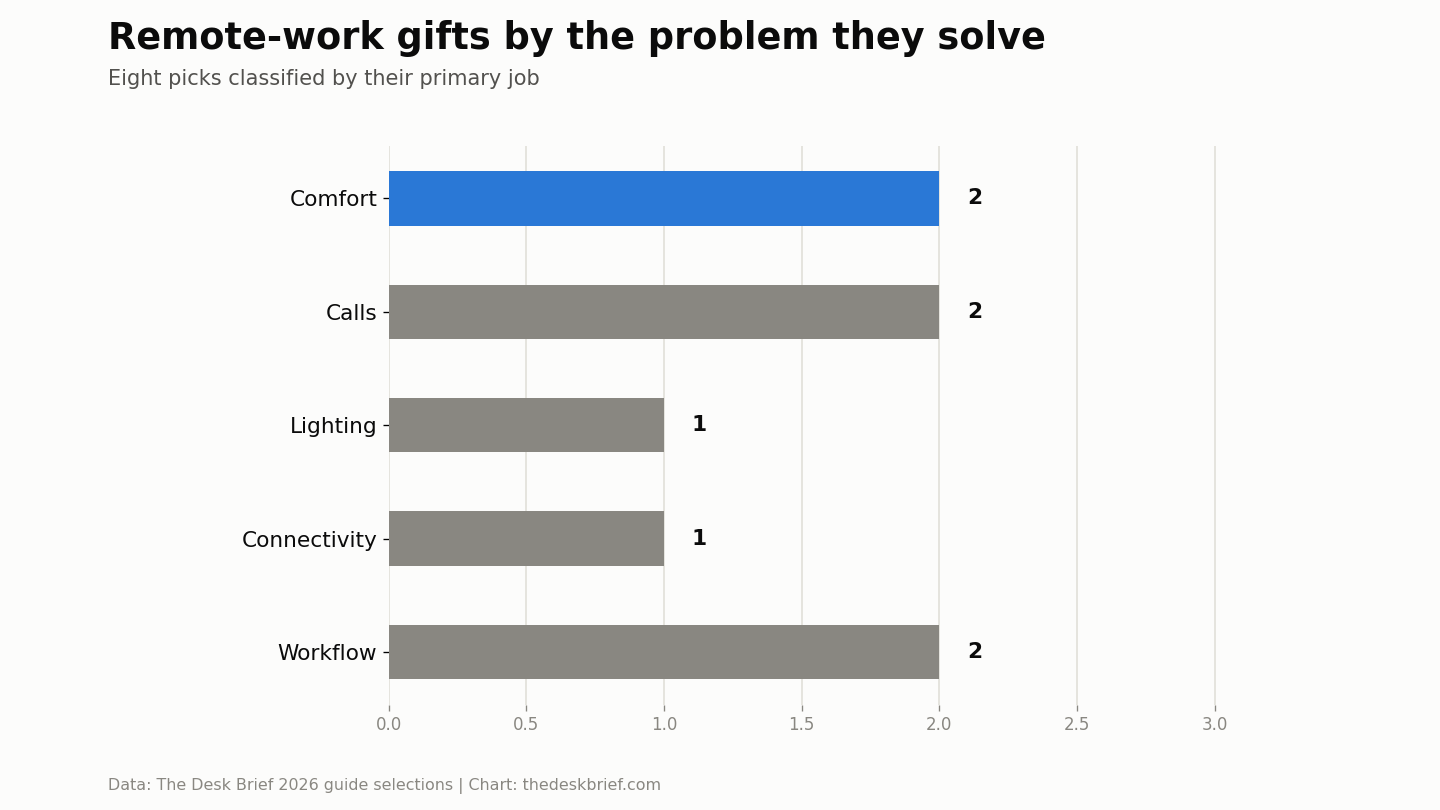
| Gift | Best for | Where to check |
|---|---|---|
| Logitech Lift vertical mouse | Best comfort upgrade | Check Logitech Lift on Amazon.ca |
| Logitech MX Keys Mini | Best compact keyboard | Check MX Keys Mini availability on Amazon.ca |
| Rain Design mStand | Best laptop posture gift | Check the Rain Design mStand on Amazon.ca |
| Logitech Brio 500 | Best call-quality upgrade | Check Logitech Brio 500 availability on Amazon.ca |
| Jabra Evolve2 55 | Best shared-space headset | Check Jabra Evolve2 55 availability on Amazon.ca |
| BenQ ScreenBar Halo | Best desk light | Check ScreenBar Halo availability on Amazon.ca |
| Anker USB-C hub | Best laptop connectivity fix | Compare Anker USB-C hubs on Amazon.ca |
| Elgato Stream Deck Neo | Best workflow shortcut | Check Stream Deck Neo availability on Amazon.ca |
How I Chose These Gifts
The recommendations start with the setup order in the work-from-home laptop guide and the complete desk-setup guide. Screen position and input comfort come before decorative accessories because those are the changes a person feels for eight hours.
I used CCOHS office ergonomics guidance as the ergonomic baseline, then checked manufacturer specifications for fit and compatibility. I also favoured products with a narrow purpose. A device that does one useful job reliably is a better gift than a complicated dock whose ports the recipient may never need.
Retail links go to Canadian listings or searches. Check the specific seller and delivery estimate before paying. Gifts for remote workers Canada buyers order in August may look completely different by Black Friday, especially when colours and keyboard layouts rotate through marketplace stock.
Best comfort upgrade1. Logitech Lift vertical mouse: Best comfort upgrade
The Lift puts the hand in a more neutral handshake-like position and uses quiet buttons. It is an easy change for somebody working from a laptop touchpad or a low-cost flat mouse, and it does not require rebuilding the rest of the desk. Check Logitech Lift on Amazon.ca.
The catch: Fit is the catch. It is intended for small and medium hands, and you must choose the correct handed version. Confirm those details through Logitech’s Lift specifications.
Best compact keyboard2. Logitech MX Keys Mini: Best compact keyboard
This compact board keeps laptop-style keys and removes the number pad, leaving more room for the mouse. It can switch among multiple devices, which suits somebody moving between a work computer, personal computer, and tablet. Check MX Keys Mini availability on Amazon.ca.
The catch: The compact layout is a downgrade for heavy spreadsheet work, and the Canadian listing may not use the key legends the recipient expects. Logitech’s MX Keys Mini specifications documents the layout and device support.
Best posture gift3. Rain Design mStand: Best laptop posture gift
A fixed laptop stand is deliberately boring. It raises the display, does not slowly sink under weight, and has no hinges to loosen. Pair it with an external keyboard and mouse so the recipient is not reaching upward to type. Check the Rain Design mStand on Amazon.ca.
The catch: It is not portable and it cannot fix a desk that is already too high. The laptop-stand comparison explains why some people need an adjustable model instead.
Best call upgrade4. Logitech Brio 500: Best call-quality upgrade
A separate webcam allows better framing than a laptop camera placed below eye level. The Brio 500 also has a physical privacy shutter and works well as a sensible middle step before expensive creator cameras. Check Logitech Brio 500 availability on Amazon.ca.
The catch: A webcam cannot repair poor lighting or weak internet. If the current camera already looks clear, move the gift budget to a light or headset.
Best shared-space headset5. Jabra Evolve2 55: Best shared-space headset
The boom microphone is the reason to buy a work headset rather than fashionable headphones. It keeps speech consistent as the wearer moves, and active noise control helps when a home office shares walls with the rest of family life. Check Jabra Evolve2 55 availability on Amazon.ca.
The catch: Headset clamp and ear-pad comfort are personal, and connection options differ by bundle. Verify the included USB adapter and platform certification against Jabra’s Evolve2 55 specifications.
Best desk light6. BenQ ScreenBar Halo: Best desk light
The Halo lights papers and the keyboard without occupying the corner of a small desk. Its rear light softens the contrast between a bright monitor and a dark wall, which is useful during Canada’s early winter evenings. Check ScreenBar Halo availability on Amazon.ca.
The catch: It costs more than an ordinary lamp and can compete with a webcam for the top of the display. Check monitor compatibility using BenQ’s ScreenBar Halo product page.
Best connectivity fix7. Anker USB-C hub: Best laptop connectivity fix
A hub is useful for the worker who reconnects power, a monitor, and accessories one plug at a time. Choose only the ports actually needed: HDMI or DisplayPort, card reader, Ethernet, and enough USB connections for current equipment. Compare Anker USB-C hubs on Amazon.ca.
The catch: USB-C is a connector, not a promise that every laptop supports charging or display output. Confirm the laptop model before gifting a hub, and remember that many hubs require a separate charger.
Best workflow shortcut8. Elgato Stream Deck Neo: Best workflow shortcut
Eight labelled keys can launch applications, run meeting controls, paste repeated text, or trigger automation without memorizing shortcuts. It is especially good for somebody who repeats the same small actions all day. Check Stream Deck Neo availability on Amazon.ca.
The catch: It rewards setup time and may become an expensive ornament if the recipient dislikes customization. Browse the supported workflows on Elgato’s Stream Deck Neo specifications first.
How to Choose Gifts For Remote Workers Canada
Listen for a repeated complaint. Neck discomfort points toward a stand. Household noise points toward a boom-mic headset. A dark desk points toward lighting. Too many repeated clicks point toward a shortcut controller.
Then inspect the ports and operating system. USB-C docks are the biggest compatibility trap in this category. Keyboards introduce layout and switch preferences; mice introduce hand size and handedness. A photo of the existing desk can answer half the questions without ruining the surprise.
For gifts for remote workers Canada purchases, the return window matters more than gift wrapping. Keep the box, include the receipt, and avoid third-party imports with unclear warranty coverage.
Who Should Skip This
Skip technology if the recipient’s employer controls all peripherals or blocks companion software. Also skip ergonomic products when you do not know the person’s hand size, desk height, or pain history. A choice made together is better than a beautifully wrapped mismatch.
Frequently Asked Questions
What are useful gifts for remote workers in Canada?
The most useful gifts solve a repeated setup problem: input comfort, screen height, call audio, lighting, or cable reconnection. Start with the problem and compatibility, then choose the product.
Is a standing desk a good surprise gift?
Usually not. Desk width, minimum height, finish, assembly, and return shipping make it a purchase to discuss. A monitor light, mouse, or cable tray is easier to fit.
Should I buy a dock or a USB-C hub?
A hub is the safer low-cost choice when the recipient needs a few ports. A full dock makes sense when you know the laptop supports its display and charging features and the desk needs a permanent one-cable connection.
When should these gifts be ordered?
Order by the delivery estimate for the exact postal code and seller. Headsets, keyboards, and popular colours can sell through earlier than generic cables and stands.
The Short Version
The best gifts for remote workers Canada can buy are practical and compatible. Choose the Logitech Lift for a small or medium right hand, the Brio 500 or Jabra headset for calls, the ScreenBar Halo for a dark desk, and a simple stand for a low laptop screen. Avoid guessing at furniture and complex docks.