My first work from home desk setup cost more than it should have, because I bought everything in the wrong order. I started with a wide desk, added a monitor I liked the look of, and then spent two months fixing a sore neck and a knot of cables I could have skipped.
Last updated: July 29, 2026.
The order matters more than the budget. Get the sequence right and a modest desk will out-comfort an expensive one that ignores your body. Get it wrong and no amount of gear rescues you.
This guide walks through the work from home desk setup in the order that actually saves money and your back: posture first, then the surface, the screen, the seat, and the small stuff most people buy first and regret. None of it needs a showroom or a five-figure budget.
Before a call, use the private mic test, webcam test to check the browser-facing devices without joining a meeting.
Table of Contents
- Build your work from home desk setup in the right order
- Start with your posture, not the furniture
- The desk: fixed, riser, or electric
- Fix the monitor height, the most affordable big win
- Chair, keyboard, and mouse
- Light, sound, and one cable
- Frequently asked questions
- The Short Version
Build your work from home desk setup in the right order
Almost every bad work from home desk setup shares one habit: the shopping starts with the thing that looks best in a photo. A wide desk, a chair with racing-car styling, a glowing light bar. The pieces that decide whether you ache by 4 p.m. are cheaper and far less exciting.
Here is the sequence I wish I had used, highest impact and lowest cost first:
- Set your neutral posture targets so every other choice has something to aim at.
- Get the work surface to the right height, sitting or standing.
- Raise the monitor until the top of the screen sits at or just below eye level.
- Fix the chair, keyboard, and mouse so your wrists and shoulders stay neutral.
- Add light, sound, and cable control once the ergonomics are sorted.
Follow that order and you rarely buy the same thing twice. Jump to the end and you collect a drawer of half-right accessories, which is roughly how mine began.
Start with your posture, not the furniture
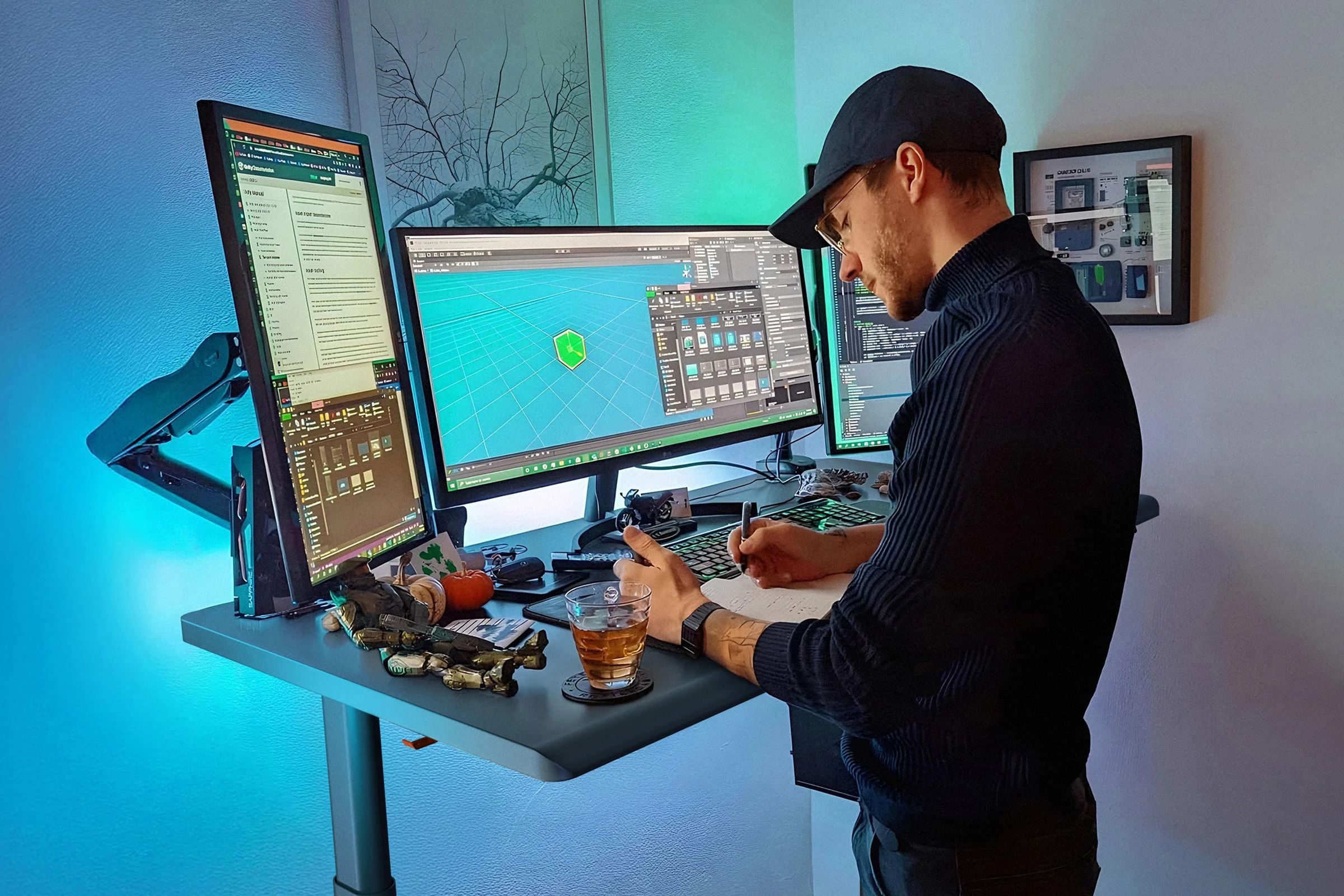
Neutral posture is the entire point of a desk. The US Occupational Safety and Health Administration describes it as joints in their natural alignment: forearms roughly parallel to the floor, wrists straight, head level and in line with your torso, and shoulders relaxed.
Two numbers do most of the work. Your elbows should sit between 90 and 120 degrees at the keyboard, per OSHA. And the seated position that holds up best is not the rigid 90-degree pose from old posters. Cornell University research points to a slight recline of 100 to 110 degrees, with the center of the screen about 17 to 18 degrees below your horizontal line of sight.
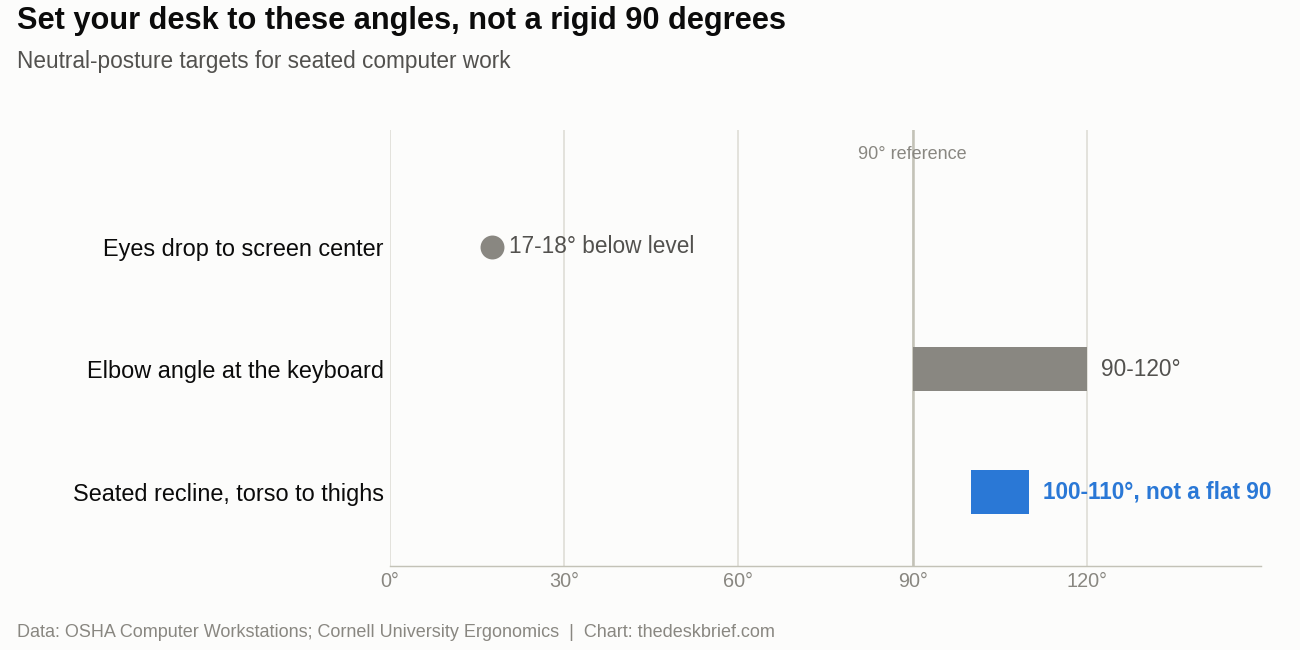
Fix these targets before you spend anything. Once you know where your elbows and eyes need to land, every purchase becomes a simple question of whether it gets you there. Our ergonomic desk setup checklist covers the same ground point by point if you want to work through a room.
The desk: fixed, riser, or electric
There are three honest ways to get a work surface at the right height, and price is not the only tradeoff.
A fixed desk is most affordable and steadiest, but only if its height matches you. Most desks ship at about 29 inches (74 cm), which is correct for almost nobody seated. Before you commit to one, check the right desk height for your body, because a fixed desk you cannot adjust is exactly that: a commitment.
A desktop riser, or converter, sits on your existing desk and lifts the keyboard and monitor so you can stand. It is the budget route to sit-stand and it works, but it eats desk depth and can wobble at full height. A full electric standing desk costs more and solves both problems, letting you save a sitting and a standing preset and switch in seconds.
Whichever you pick, alternate sitting and standing through the day. CCOHS, Canada’s occupational health and safety centre, is blunt that prolonged sitting is the hazard, so a desk that moves only helps if you actually move it.
Fix the monitor height, the most affordable big win
If you change one thing today, raise the monitor. A screen that sits too low drags your head forward, and your neck pays for every hour. The target is simple: the top of the display at or just below eye level, roughly an arm’s length away, so your gaze drops about 17 degrees to the screen center.
You get there with a monitor arm or a stand, or a stack of books in a pinch. An arm frees desk space and makes height changes trivial; a sturdy stand is cheaper and fine if you never move the screen. Our guide to the correct monitor height has the exact measurements. Laptop users need an external monitor, or a laptop stand plus a separate keyboard, because you cannot put a laptop screen at eye level and keep your hands low at the same time.
Chair, keyboard, and mouse
This is where your money actually matters, and where most people underspend. A chair you sit in for eight hours earns its keep more than anything else on the desk. Look for adjustable height, real lumbar support, and armrests that carry your forearms evenly, the basics CCOHS lists for a work chair. Our shortlist of ergonomic chairs that do not cost a fortune is a sensible place to start.
Keyboard and mouse belong at elbow height with your wrists flat, not angled up toward a desk that sits too tall. OSHA suggests centering the spacebar on your body and keeping the mouse close, at the same level as the keyboard. If your desk cannot drop low enough, a keyboard tray is far cheaper than a new desk. Spend on the seat before the lighting.
Before replacing an input device, run the free mouse test and spacebar test. They catch missing inputs, accidental double clicks, and uneven spacebar response without installing software.
Light, sound, and one cable
The last layer is the stuff people buy first: lighting, audio, and cable control. It belongs at the end because it only pays off once the ergonomics are right.
For light, put your brightest source to the side, not behind or in front of the screen, which is what CCOHS recommends to cut glare. A small task or bias light earns its place in a dim room. For calls, a basic headset or a dedicated mic beats laptop audio and spares your colleagues the echo.
Then tame the wires. A single USB-C dock can carry power, display, and peripherals down one cable, which matters even more on a desk that raises and lowers. Our guide to standing desk cable management covers the slack loops and routing that stop a moving desk from yanking its own cables. That final pass is what turns a functional work from home desk setup into one you actually enjoy using.
Frequently asked questions
What does a good work from home desk setup actually need?
At minimum: a surface at the right height, a monitor with its top edge near eye level, a chair with height and lumbar adjustment, and a keyboard and mouse that keep your wrists flat. Everything else is comfort and polish. If a purchase does not move your elbows, eyes, or wrists toward neutral, it is optional.
How high should my desk be?
High enough that your elbows sit at 90 to 120 degrees with your forearms parallel to the floor, which depends on your height rather than a standard number. The common 29-inch desk is too tall for most people when seated, so set the chair first, then bring the desk down to your elbows.
Do I need a standing desk to work from home?
No. A fixed desk at the correct height plus regular movement beats an expensive standing desk you never raise. A standing desk helps only if you alternate positions, because the real problem is staying still, not sitting itself.
Where should I spend money first?
The chair, then getting the monitor to eye height. Those two fixes prevent the aches that make people abandon a home office. Lighting, docks, and desk accessories can wait until the ergonomics are solved.
The Short Version
Build a work from home desk setup from your body outward. Nail the posture targets first: elbows at 90 to 120 degrees, a slight recline near 100 to 110, and the top of the screen at eye level. Get the surface to the right height, raise the monitor, then put real money into the chair and input before the lights and gadgets. Do it in that order and a modest budget buys a workspace that still feels good at the end of a long day.