ASRock’s PGO27QSA is a 27-inch QD-OLED with a 240 Hz refresh and a fast response time, and it is now listed at US$299.33 at Newegg, down from US$465. The panel is the interesting part. QD-OLED at 1440p, quoted at a 0.03 ms grey-to-grey response, is the same class of screen that sits inside gaming monitors people queue up for, and ASRock ships it in plain black and a Minimal White version for buyers who want the monitor to disappear into the desk.
Last updated September 22, 2026: ASRock formally launched the PGO27QSA on July 24 and US retailer stock has since appeared. Canadian distribution and instrumented panel testing remain unresolved.
This is a spec analysis, not a review. Nobody outside ASRock has tested the PGO27QSA yet, so every performance figure below is a manufacturer claim until an independent lab measures one. What you can do today is read the spec sheet honestly, compare it against a QD-OLED that has already been measured, and work out whether the parts ASRock left out matter for the way you work. They might. This monitor drops USB-C, speakers, and a brightness certification that its closest rival keeps.
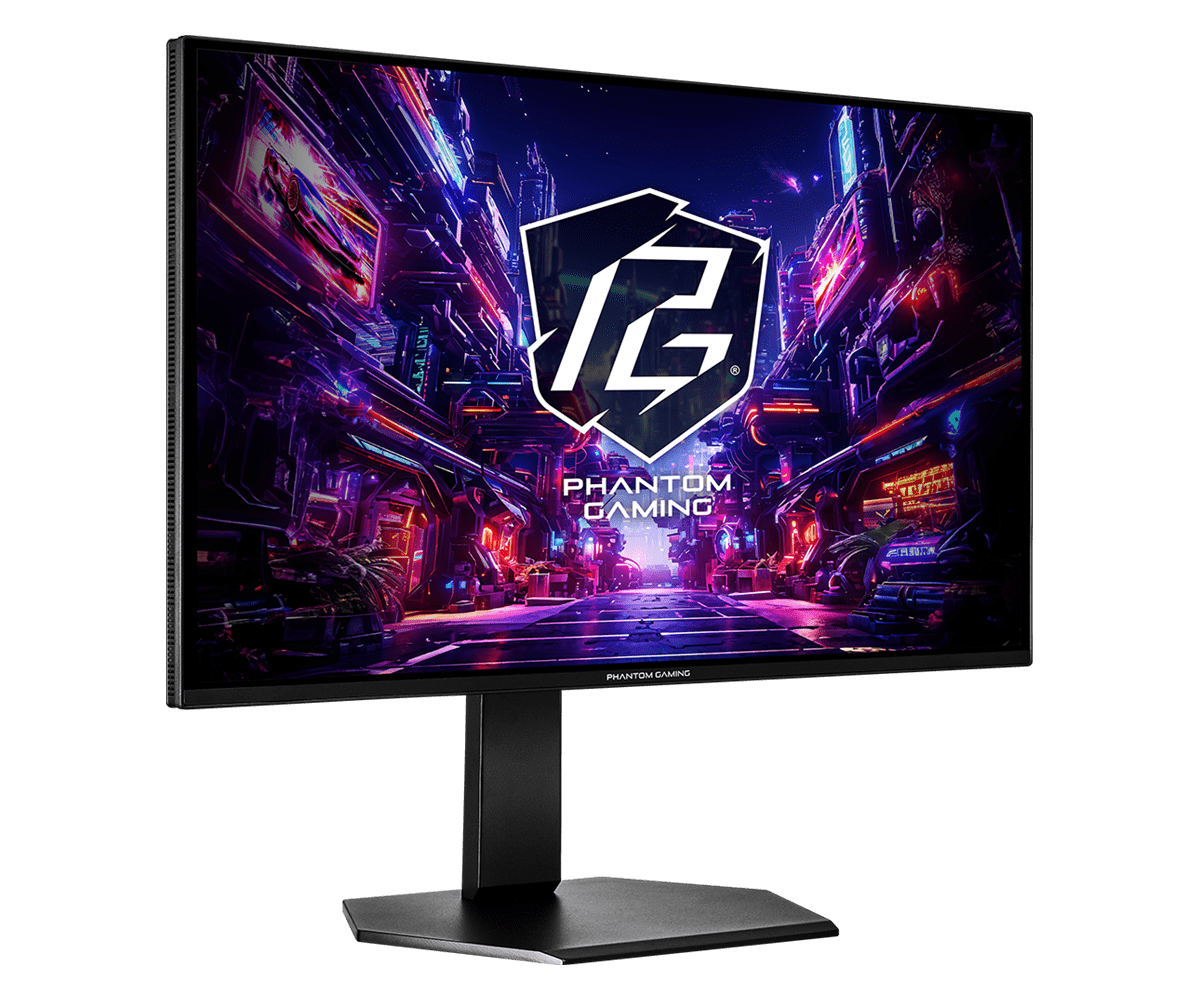
Table of Contents
- What ASRock confirmed about the PGO27QSA
- The connectivity catch: two ports, no USB-C
- Why a 200-nit OLED can feel dim on a desk
- PGO27QSA versus the proven value pick
- What ASRock still has not announced
- Who should skip the PGO27QSA
- Frequently asked questions
- The short version
What ASRock confirmed about the PGO27QSA
ASRock’s official product page and its July 24 launch release agree on the core numbers, so treat these as confirmed. The PGO27QSA is a 27-inch flat QD-OLED running QHD, which is 2560 by 1440. Refresh tops out at 240 Hz, response time is quoted at 0.03 ms grey to grey, and the contrast ratio is the usual OLED 1,500,000 to 1 that comes from pixels switching fully off. Colour coverage is 99% of DCI-P3 at 10-bit, with a Delta E under 2 factory calibration.
- Panel: 27-inch QD-OLED, 2560 by 1440, flat, 16:9
- Speed: 240 Hz refresh, 0.03 ms grey-to-grey response (manufacturer)
- Brightness: 200 nits SDR typical, 400 nits HDR peak at a 10% window (manufacturer)
- Colour: 99% DCI-P3, 10-bit, Delta E under 2 factory calibration
- Stand: 130 mm height, tilt, swivel, and a 90-degree pivot into portrait; 100 by 100 VESA
- Extras: AMD FreeSync Premium and a low blue light mode
The stand alone puts it ahead of the cheap OLEDs that ship on a fixed, tilt-only foot. You get 130 mm of height travel, full swivel, and a pivot into portrait, plus the 100 by 100 VESA pattern if you would rather hang it off an arm. At its current US$299.33 Newegg price, ASRock at least did not cut the ergonomics.
The connectivity catch: two ports, no USB-C
This is where the PGO27QSA starts making decisions for you. The rear carries two HDMI ports and two DisplayPort 1.4 inputs, plus a headphone jack, and that is the entire list. There is no USB-C, no USB hub, and no built-in speakers. For a dedicated gaming rig that is fine. For a desk that doubles as a work machine, no USB-C means no single-cable laptop docking and no charging a laptop from the screen, so a separate dock goes back on the shopping list.
The HDMI detail rewards a close read. ASRock lists both HDMI ports as HDMI 2.1 (TMDS 6G), the reduced-bandwidth version that tops out near 18 Gbps rather than the full 48. At 1440p and 240 Hz you will want DisplayPort 1.4 for the complete refresh rate, so think of the HDMI ports as console and secondary inputs. A PS5 or Xbox caps at 1440p and 120 Hz anyway, which those ports handle without complaint. Just do not assume all four inputs are equal.
Why a 200-nit OLED can feel dim on a desk
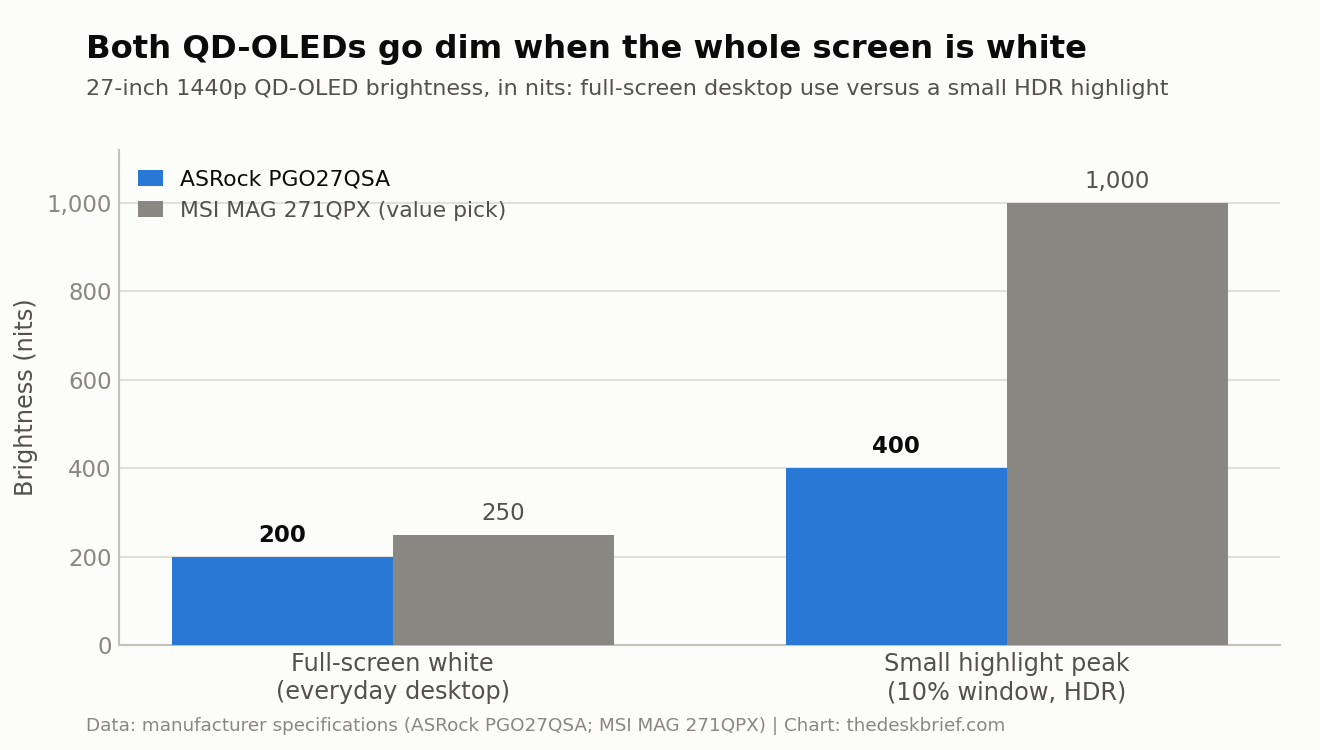
QD-OLED brightness is a two-number story, and the PGO27QSA spec sheet tells both halves. Full-screen, ASRock quotes 200 nits typical for standard content. That is the figure your eyes live with when a white document or a bright spreadsheet fills the panel. It climbs to a claimed 400 nits only for HDR highlights covering about a tenth of the screen. OLEDs are gorgeous in a dim room and merely adequate in a bright one, and 200 nits full-screen sits on the modest side of that trade.
The chart below shows the same pattern on a QD-OLED that has been measured. Independent testing by DisplayNinja put the MSI MAG 271QPX at roughly 250 nits full white and around 1,000 nits on a small highlight. Same shape, higher ceiling. If your desk sits under a window or harsh office lighting, respect this spec: any 27-inch QD-OLED, the PGO27QSA included, will look dimmer with a full white page open than a mid-range IPS panel rated at 350 or 400 nits. Our look at a brighter IPS alternative covers that trade if glare is your main enemy.
PGO27QSA versus the proven value pick
The honest way to judge the US$299.33 Newegg price is to line it up against a QD-OLED that has already been measured. The MSI MAG 271QPX is the reference here: a 27-inch 1440p QD-OLED that reviewers have already picked apart, recently near US$619 at Best Buy and closer to US$750 at launch. It is the value benchmark this class has to beat. There is even a 240 Hz E2 edition that has dipped to about US$399.99 on sale, which is roughly the refresh rate ASRock is shipping.
| Spec | ASRock PGO27QSA | MSI MAG 271QPX QD-OLED |
|---|---|---|
| Price | US$299.33 at Newegg; Canada unconfirmed | About US$619 street, roughly US$750 at launch |
| Panel | 27-inch QD-OLED, 1440p, 240 Hz | 27-inch QD-OLED, 1440p, 360 Hz |
| Response (mfr) | 0.03 ms GtG | 0.03 ms GtG |
| HDR | HDR10 only, no VESA True Black cert | VESA DisplayHDR 400 True Black |
| Peak brightness | 400 nits at 10% (mfr claim) | ~1,000 nits small window (measured) |
| USB-C | None | USB-C, DP Alt Mode, 15 W power delivery |
| Speakers | None | None |
| Warranty | Not stated | 3 years, covers burn-in |
| Biggest drawback | No USB-C, HDMI capped near 18 Gbps, no confirmed Canadian listing | 15 W USB-C too weak to charge a laptop; 250-nit full white |
The MSI wins the comparisons that are already settled: a higher 360 Hz refresh, a real VESA DisplayHDR 400 True Black certification, USB-C with 15 W of power delivery, and a 3-year warranty that explicitly covers burn-in. The PGO27QSA answers none of those on its current spec sheet. Its current US$299.33 Newegg price makes the missing USB-C and certification easier to accept for a clean 240 Hz panel. Canadian buyers still need a local listing before the value case travels north.
What ASRock still has not announced
The US retail picture is now clear enough to buy: Newegg lists the black PGO27QSA at US$299.33, down from US$465, and TechRadar reported the same listing. Canadian availability and CA$ pricing remain unconfirmed. The product page also does not state a warranty length or detail the OLED care suite, pixel shift, panel refresh, and logo dimming features that protect these screens from burn-in over years of desktop use.
Treat the remaining warranty, OLED-care, and Canadian details as unannounced, not as missing. The US price makes the PGO27QSA a real value option, but Canadian buyers should not convert that sale figure into a local promise.
Who should skip the PGO27QSA
Skip it, at least for now, if you need one cable to your laptop. No USB-C means a separate dock or a bundle of cables, and even a good arm from our monitor arm versus stand guide cannot add ports the panel does not have.
Skip it if you work in a bright room and mostly read documents. A 200-nit full-screen OLED is the wrong tool for glare, and a brighter IPS at a lower price will treat your eyes better; our budget 27-inch picks are a saner starting point for that job.
Canadian buyers should also skip an import if the delivered price, warranty, and return terms erase the US discount. If you are still weighing whether a fast QD-OLED even suits your work, our gaming versus office monitor breakdown lays out where the speed helps and where it is wasted.
Frequently asked questions
Is the ASRock PGO27QSA good for office and everyday desk work?
The panel can do office work well, with sharp 1440p text and accurate colour, but two caveats matter. The 200-nit full-screen brightness is modest for a bright room, and the lack of USB-C means no one-cable laptop setup. If your room is dim and you connect over DisplayPort, it is fine for mixed work and play.
Does the PGO27QSA have USB-C or built-in speakers?
No on both counts. The PGO27QSA has two HDMI 2.1 (TMDS 6G) ports, two DisplayPort 1.4 inputs, and a headphone jack, with no USB-C, no USB hub, and no speakers. Plan for a separate dock and separate audio.
What is the PGO27QSA price and release date?
The black PGO27QSA is on sale at Newegg for US$299.33, down from US$465. Canadian pricing and availability remain unconfirmed, so that US sale should not be treated as a Canadian price.
PGO27QSA or MSI MAG 271QPX, which should I buy?
The MSI remains the safer feature pick because it is measured, certified, carries USB-C, and has a burn-in warranty. At US$299.33, the PGO27QSA is the value pick if those missing features do not matter.
The short version
The ASRock PGO27QSA is a competent 27-inch 1440p 240 Hz QD-OLED with a good stand, honest colour numbers, and a genuinely stripped feature set: no USB-C, no speakers, HDMI ports capped near 18 Gbps, and no VESA True Black certification. Against the measured MSI MAG 271QPX at about US$619, it trails on brightness ceiling, connectivity, and warranty clarity. At US$299.33 from Newegg, the value case is now strong for US buyers. Canadian buyers should wait for local pricing and warranty terms before importing it.
Editorial rating: 3.5 out of 5. The PGO27QSA delivers 1440p QD-OLED contrast and 240 Hz performance at a newly competitive price. Missing USB-C, modest full-screen brightness, and limited exact-model testing keep it from being an automatic recommendation.
Current offer checked September 11, 2026: US$299.33, in stock. Prices and availability can change.