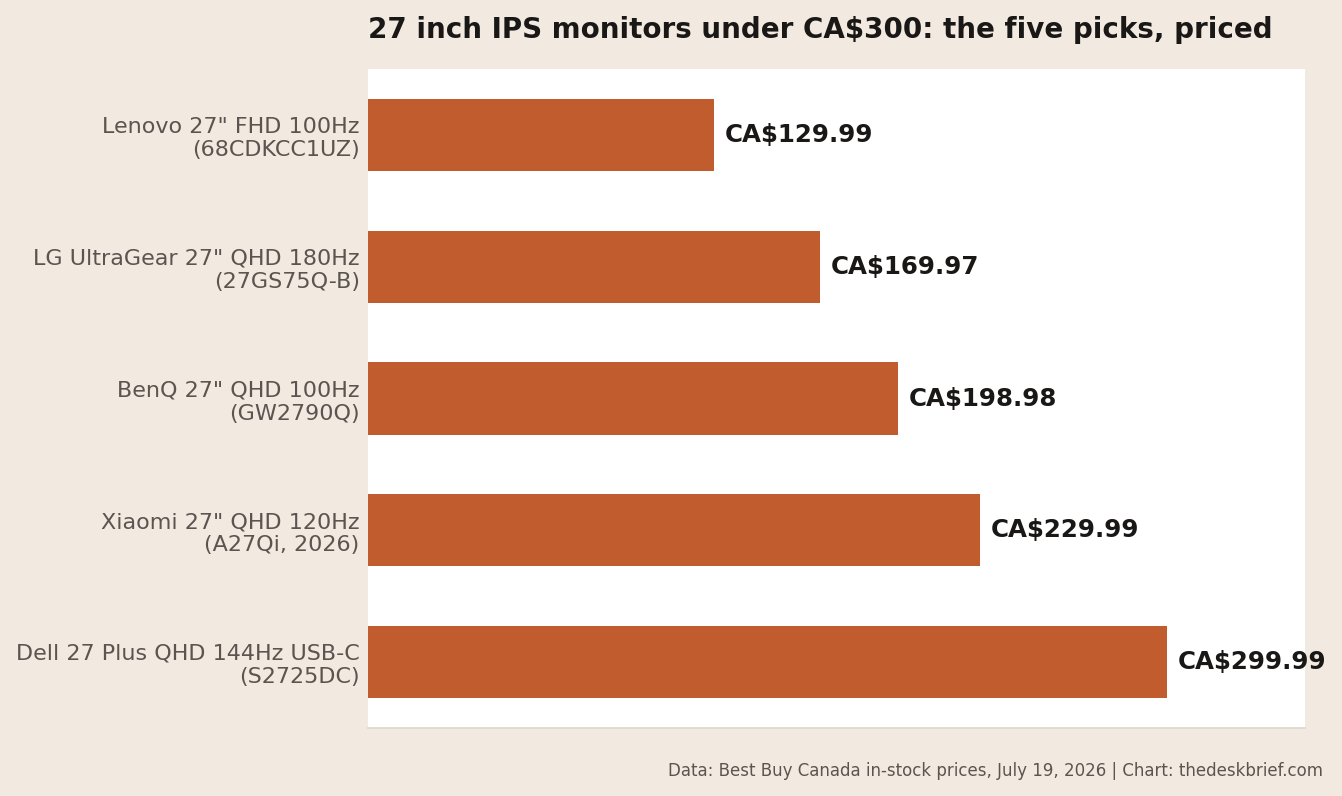
A decent 27 inch monitor under 300 CAD is still easy to find in Canada. I found five current IPS models that were orderable when I rechecked the market on September 13, 2026, with prices from CA$164.99 to CA$299.99.
This page contains affiliate links. If you buy through these links, we may earn a small commission at no extra cost to you. Full disclosure.
Don’t want to read the whole article? Here are our quick picks.
1Best second screen Dell SE2726H. Low-cost 144Hz screen works well as a secondary display.
2Top office pick BenQ GW2790Q. QHD clarity and 100Hz refresh suit everyday office work.
3Best for gaming Lenovo Legion 27Q-10. QHD resolution and 240Hz refresh favour fast gaming.
4Best for laptop docking Dell S2725DC. USB-C docking and full stand simplify laptop setups.
As an Amazon Associate I earn from qualifying purchases.
Last updated: September 2026.
This one started as a question on r/HomeOffice, and it deserved a real answer with Canadian prices instead of a US listicle converted at an imaginary exchange rate. Prices and availability checked: September 13, 2026. Four picks were orderable directly from Dell, Lenovo, Staples, or Memory Express. The Xiaomi was available through a named Best Buy Marketplace seller. Sale prices drift, so check the linked listing before you order.
Table of Contents
- How I picked these
- The five picks, from CA$164.99 up
- What you give up under CA$300
- Who Should Skip This
- 27 Inch Monitor Under 300 CAD: FAQ
- The Short Version
How I picked these
Three rules. IPS only, because the question was about a screen you stare at for eight hours and IPS viewing angles and color stability are worth the small premium over VA at this size, and panel choice is one of several factors covered in my eye strain guide if screen comfort is your main concern. New units only, no open-box or refurbished, even though skipping those left some tempting deals on the table. And actually in stock at a Canadian retailer at a real CA$ price, because a great monitor you can’t buy is a screenshot, not a recommendation. Those filters are also why this 27 inch monitor under 300 CAD list has five entries instead of fifteen.
One honest caveat: I have not had all five of these on my desk. The specs and prices are verified from retailer listings and manufacturer pages; the judgment calls about trade-offs come from years of staring at panels in this class. Where I’m guessing, I say so.
How this Canadian list applies outside Canada
The prices are Canadian, but the buying rule travels. At 27 inches, start with 2560 x 1440 resolution, then choose refresh rate, USB-C power delivery, stand adjustment, or colour coverage based on the work you actually do. The exact model price will change by country, so readers outside Canada should use the five picks as a specification shortlist and compare the local price against the same trade-offs. A cheaper 1080p panel is still reasonable as a second screen; QHD is the better default for text, editing, and mixed use.
The five picks, from CA$164.99 up
Here’s the current field at a glance. Price is useful only with the panel, resolution, colour claim, and the feature you’re paying extra to get:
| Monitor | Panel and resolution | Refresh | Colour information | Stand or docking feature | Price checked Sept. 13 |
|---|---|---|---|---|---|
| Dell SE2726H | IPS, 1920 x 1080 | 144Hz | 72% NTSC | Tilt only | CA$164.99, Dell Canada |
| BenQ GW2790Q | IPS, 2560 x 1440 | 100Hz | 99% sRGB coverage | Tilt only | CA$199.99, Memory Express |
| Xiaomi A27Qi 2026 | IPS, 2560 x 1440 | 120Hz | 100% sRGB and claimed Delta E under 1 | Tilt only | CA$209.99, Best Buy Marketplace |
| Lenovo Legion 27Q-10 | IPS, 2560 x 1440 | 240Hz | 99% sRGB, 90% DCI-P3 | Height, swivel, pivot, tilt | CA$249.99, Lenovo Canada |
| Dell S2725DC | IPS, 2560 x 1440 | 144Hz | 99% sRGB coverage | Full stand, USB-C with 65W | CA$299.99, Dell Canada |
Best second screenDell SE2726H, FHD 144Hz, CA$164.99
The Dell SE2726H is the sensible low-cost second screen. It’s a 1920 x 1080 IPS panel at 144Hz with two HDMI ports and a tilt-only stand. Dell lists 72% NTSC colour coverage and a one-year warranty. The honest drawback is pixel density: 1080p at 27 inches is about 81 pixels per inch, so text looks softer than it does on every QHD pick below. Buy it for email, chat, video, or a secondary browser window, not colour-sensitive editing. Check the Dell SE2726H on Amazon.ca.
Top office pickBenQ GW2790Q, QHD 100Hz, CA$199.99
The BenQ GW2790Q is the best value here for ordinary office work. Its 2560 x 1440 IPS panel gives text a clear 109 PPI, 100Hz makes scrolling smoother than 60Hz, and BenQ specifies 99% sRGB coverage. The eye-care controls and built-in speakers are useful, though the speakers are basic and the tilt-only stand is the compromise. It was CA$199.99 with online stock at Memory Express when checked. Check the BenQ GW2790Q on Amazon.ca.
Best for colour on a budgetXiaomi A27Qi 2026, QHD 120Hz, CA$209.99
The Xiaomi’s specifications are unusually strong for the price: 2560 x 1440 at 120Hz, 100% sRGB, 95% DCI-P3, and a manufacturer claim of factory calibration below Delta E 1. That last number is a claim, not a measurement of the unit you’ll receive, so paid colour work still calls for a colorimeter. The CA$209.99 listing was available online through Best Buy Marketplace seller Liangmi Canada, not sold directly by Best Buy. That weaker warranty and return path is the reason it doesn’t replace the BenQ as the office winner. Check the Xiaomi A27Qi on Amazon.ca.
Best for gamingLenovo Legion 27Q-10, QHD 240Hz, CA$249.99
The Lenovo Legion 27Q-10 is the speed pick. Lenovo lists a 2560 x 1440 IPS panel, 240Hz refresh, 99% sRGB and 90% DCI-P3 coverage, plus height, swivel, pivot, and tilt adjustment. It also ships with a factory calibration report. The CA$249.99 direct price makes it a lot of gaming monitor under the cap, but there’s no USB hub or USB-C docking. Office buyers who don’t need 240Hz can save CA$50 with the BenQ. Check the Legion 27Q-10 on Amazon.ca.
Best for laptop dockingDell S2725DC, QHD 144Hz USB-C, CA$299.99
The Dell S2725DC is the other clear office winner when one-cable laptop docking matters. Its USB-C input carries video and up to 65W of charging, and the monitor adds two downstream USB-A ports plus a downstream USB-C port. The 2560 x 1440 IPS panel runs at 144Hz, Dell lists 99% sRGB coverage, and the stand adjusts for height, swivel, pivot, and tilt. At CA$299.99, you’re paying almost CA$100 over the BenQ for docking, the better stand, and more refresh. That premium is worthwhile only if you’ll use those features every day. Check the Dell S2725DC on Amazon.ca.
What you give up under CA$300
Every 27 inch monitor under 300 CAD makes the same three compromises somewhere. Stands: outside the Lenovo and Dell S2725DC, expect tilt-only, so budget for a monitor arm if posture matters; my arm versus stand comparison covers when that’s worth another CA$40. Brightness and HDR: these are 250 to 350 nit SDR panels with token HDR modes, fine indoors, washed out beside a sunny window. And uniformity lottery: at this price, panel-to-panel variation is real, so buy from somewhere with painless returns.
What you notably do not give up anymore is resolution or refresh. Four of the five picks are 1440p at 100Hz or better. Two years ago that combination reliably cost more than CA$300; this is one category where the market moved in your favor.
Who Should Skip This
Skip the whole category if you do color-critical work for money; the Xiaomi’s calibration claim is impressive but a wide-gamut professional panel it is not. The Asus ProArt PA279CDV guide covers the step-up option for colour-critical workflows. Skip it if you want one monitor for serious competitive shooters and daily work both, because a low price doesn’t prove low input lag or clean overdrive at every refresh rate. And if what you actually want is a bigger, sharper everyday screen and the budget can stretch, a 4K panel like the one I covered in my Samsung ViewFinity S80HF review is the better long-term desk upgrade. Still torn about panel priorities? My gaming versus office monitor guide sorts out which specs your actual day justifies.
Our picks: Choose the BenQ GW2790Q for the best office value, or the Dell S2725DC if your laptop needs one-cable USB-C docking. As an Amazon Associate I earn from qualifying purchases.
27 Inch Monitor Under 300 CAD: FAQ
Is 1080p acceptable on a 27 inch screen?
For video and casual use, yes. For all-day text work, the roughly 81 PPI of 1080p at 27 inches looks softer than QHD’s 109 PPI. The QHD BenQ cost only CA$35 more than the FHD Dell SE2726H when checked, so that upgrade is worth it for a primary office screen.
Do I need 144Hz or 240Hz for office work?
No. Even 100Hz makes scrolling and cursor motion smoother than 60Hz. The Dell’s 144Hz and Lenovo’s 240Hz matter more for gaming, so don’t pay for refresh you won’t use at the expense of resolution, ports, or stand adjustment.
Why are there no VA panels on this list?
The question I set out to answer specified IPS, and for office use I’d make the same call: better viewing angles and more stable colour at wide angles. Good VA panels exist at this price and often win on contrast, so if you work in a dim room and watch a lot of video, that’s a legitimate different list.
Are these prices going to hold?
Probably not exactly. Several prices were promotional when checked on September 13, 2026. Use CA$165 to CA$300 as the current shape of the market, then confirm the linked listing before paying.
The Short Version
Buy the BenQ GW2790Q at CA$199.99 for the best office value. Laptop users who want one USB-C cable should spend the full CA$299.99 on the Dell S2725DC. The Dell SE2726H is the low-cost second-screen choice, the Xiaomi A27Qi is the colour-spec gamble, and the Lenovo Legion 27Q-10 is the gaming pick.
A 27 inch monitor under 300 CAD is no longer a compromise purchase. That’s rare good news in a year where most PC part prices went the other way, and it’s worth taking while it lasts.