For local AI, buy 32GB for 8B to 14B models, 64GB for a 70B model at 4-bit quantization, and 128GB for large mixture-of-experts models or long context. The harder question is whether that capacity is system RAM, discrete VRAM, or unified memory the GPU can actually use. This guide maps current Ollama model files to the memory tier they need so you can buy once without paying for headroom that sits empty.
The short version up front: 32GB runs the models most people actually want, 64GB unlocks the 70-billion-parameter class, and 128GB is for the largest quantized models and long context work. The catch is that not all memory is equal, and getting that part wrong is the most expensive mistake in a home AI build.
Last updated: August 29, 2026. Model files and Canadian RAM prices rechecked.
After matching model size to memory, use the best local LLM guide to choose a current model for chat, code, writing, documents, or agents.
Table of Contents
- RAM for local AI, by tier
- Exact RAM requirements by model
- RAM vs VRAM vs unified memory
- How RTX Spark changes the equation
- 32GB: the practical entry point
- 64GB: where 70B becomes possible
- 128GB: the biggest models and long context
- Laptop vs mini-PC vs dedicated AI box
- A worked example: size it yourself
- What this costs in Canada
- RAM for Local AI FAQ
- The Short Version
RAM for local AI, by tier
Modern local models are run quantized, usually at 4-bit (the Q4_K_M format), which cuts memory use to roughly a quarter of the full-precision size while losing only 1 to 3% of quality on standard benchmarks. That is the setting almost everyone should use, and it is what the numbers below assume. The figures include the model weights plus the overhead for context and runtime, drawn from published Ollama and llama.cpp footprints.
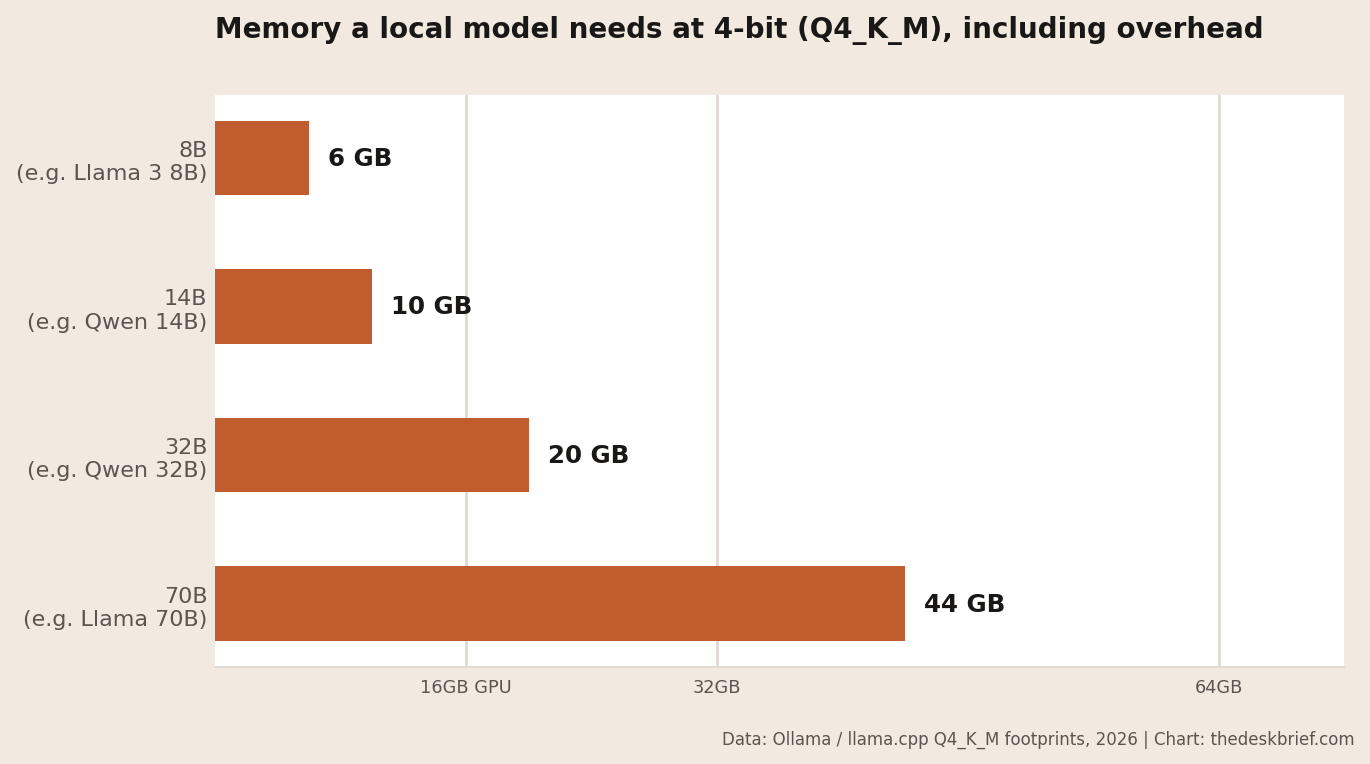
Read that chart as a shopping guide. An 8-billion-parameter model needs about 6GB, a 14B model about 10GB, a 32B model about 20GB, and a 70B model about 44GB. Add the memory your operating system and other apps use, round up, and you land on the tier you actually need.
Exact RAM Requirements by Local AI Model
These are downloaded model-file sizes from Ollama, not estimates based only on parameter count. Leave additional memory for the operating system, runtime, and context cache.
| Model and Ollama tag | Model file | Practical memory tier |
|---|---|---|
| Llama 3.1 8B | 4.9GB | 16GB minimum; 32GB with comfortable app headroom |
| Mixtral 8x7B | 26GB | 32GB is tight; 64GB is comfortable |
| Llama 3.1 70B Q4_K_M | 43GB | 64GB |
| Mixtral 8x22B | 80GB | 128GB |
| Llama 3.1 405B | 243GB | Does not fit in 128GB |
Mixture-of-experts architecture changes generation speed, not the requirement to keep the model weights resident. Mixtral 8x22B activates fewer parameters per token than a dense model, but its default Ollama file still occupies 80GB. That is why model names belong beside real file sizes in a buying guide.
RAM vs VRAM vs unified memory
This is the part the spec sheets bury, and it decides whether your money buys speed or frustration. There are three kinds of memory in play, and only the right kind makes a model fast.
VRAM is the memory on your graphics card. Models run fast when they fit entirely in VRAM, because the GPU never has to wait on slower system memory. System RAM is what your sticks of DDR5 provide. A model can run from system RAM on the CPU, but it is many times slower, often the difference between a usable assistant and a slideshow. Unified memory is one shared pool the CPU and GPU both address at full speed, used by Apple Silicon, the NVIDIA RTX Spark platform, and AMD’s Ryzen AI Halo.
Here is why it matters for your RAM for local AI budget. A desktop with 128GB of DDR5 but only an 8GB graphics card cannot run a 70B model quickly, because only 8GB of that model fits in fast VRAM and the rest crawls on the CPU. A machine with 128GB of unified memory runs the same model at usable speed because the GPU can reach all of it. When you compare two machines with the same memory number, check which kind it is first. The rest of this guide talks about the memory the model can actually use, not the number on the box.
How RTX Spark’s 128GB Unified Memory Changes the Equation
NVIDIA lists up to 128GB of unified memory and up to 6,144 CUDA cores for RTX Spark, with CUDA running natively. That is not the same as putting 128GB of DDR5 beside a small graphics card. Spark’s GPU can address the shared pool, so a model too large for one consumer GPU can stay on the accelerated path instead of falling mostly to the CPU.
The trade is fixed capacity and an untested retail platform. RTX Spark memory is part of the machine rather than an upgradeable DIMM kit, and the announced laptops still need independent model-by-model bandwidth, thermals, and battery tests. Use the RTX Spark laptop comparison to compare the announced systems, but do not treat 128GB on a spec sheet as a performance benchmark.
32GB: the practical entry point
For most people getting into local AI, 32GB is the sweet spot. Paired with a 16GB graphics card, it comfortably runs 8B and 14B models entirely in VRAM, which covers coding assistants, chat, summarization, and general-purpose work. Those are the models that do 90% of what people actually want, and they run fast on hardware you might already own.
You can load a 32B model at this tier too, but it will spill past a 16GB card and lean on system RAM, so expect a real speed drop. Treat 32B as occasional, not your daily driver, unless you move up a tier. If you are building fresh and local AI is a core reason, spend the budget on a bigger GPU before a bigger pile of system RAM.
64GB: where 70B becomes possible
64GB is the tier where the 70B class comes into reach, needing about 44GB with context headroom. This is the jump that matters if you want noticeably stronger reasoning, better code, and longer, more coherent output than the smaller models manage. On a unified-memory machine, 64GB runs a 70B model at usable speed. On a traditional desktop, you still need enough VRAM to hold the model, or you are back to the slow CPU path.
This is also the tier where mini-PCs get interesting. A 64GB unified box like the Lenovo Yoga mini-PC can run models a desktop with a mid-range GPU simply cannot fit, in a fraction of the space and power. If a 70B model is your target and you do not need a gaming rig, that route is worth a serious look.
128GB: the biggest models and long context
128GB is for two things: the largest quantized models, including the 120B-class mixture-of-experts models that need roughly 65 to 80GB, and long context work where you feed the model huge documents and the context cache balloons. It is genuine headroom, not a number for bragging rights, and most people do not need it.
Where 128GB earns its price is unified-memory machines built for exactly this, like the current RTX Spark systems and the Beelink GTR9 Pro with its 128GB pool. If you are running the frontier of what is possible at home, or you handle sensitive data and want a capable model fully offline as covered in our home AI agent guide, this is the tier. If you are running an 8B coding assistant, it is money left on the table.
Laptop vs mini-PC vs dedicated AI box
The same memory tier behaves differently across form factors. A laptop gives you mobility, but its memory is usually soldered, so you buy your tier at checkout and live with it for the life of the machine. The Snapdragon X2 Elite laptop comparison shows how those fixed memory tiers vary across current Arm systems. Spec up, because you cannot add more later. A mini-PC with unified memory is often the best value for local AI specifically: it delivers a large fast memory pool in a small, quiet, low-power box, which is exactly what an always-on model server wants. A traditional desktop is the most flexible and upgradeable, and the right choice if you also game or need a big discrete GPU, but you pay for that GPU to get enough VRAM.
The trap is buying a desktop with a huge system RAM number and a small GPU, expecting it to run big models. It will run them, just slowly. Match the machine to the memory type, not the memory number.
A worked example: size it yourself
Say you want to run a 32B model as your daily assistant with a decent amount of context. Start with the weights: about 20GB at 4-bit. Add context overhead, which grows with how much text you feed it, so budget a few extra GB for comfortable use. That puts the model itself around 24GB of memory it can actually reach at speed.
Now add your operating system and normal apps, call it 8 to 12GB. You land near 36GB of working memory, which is why a 32B daily driver really wants a machine with a 32GB-plus fast memory pool, not a 16GB GPU. The method is always the same: model weights at 4-bit, plus context headroom, plus your system’s own use, then round up to the next tier. Assumptions here are 4-bit quantization and moderate context; heavier context or higher precision pushes you up.
What this costs in Canada
Memory is unusually expensive right now, which makes sizing correctly worth real money. On August 29, our RAM price tracker recorded qualifying DDR5-6000 lows of CA$589.99 for 32GB, CA$1,249.99 for 64GB, and CA$4,789.99 for 128GB. The 755-observation Canadian RAM price study found that DDR5 capacities rose 4.3% to 30.2% from July 24, while the tracked 128GB low jumped CA$1,100 in one day. That 128GB series came from one retailer, so it is a tracked-listing discontinuity, not a national average. The RAM shortage outlook covers the supply-side context.
For a traditional build, the bigger cost is the graphics card that supplies the VRAM, not the system RAM. For a unified-memory machine, the memory is baked into the price of the box, which is why those mini-PCs look expensive until you price the equivalent GPU. Before you commit either way, read the RAM buy-or-wait guide and check the daily tracker. Capacity can decide whether a model fits, but paying for 128GB to run an 8B assistant is still an expensive way to leave memory empty.
RAM for Local AI FAQ
Is 16GB enough for local AI?
It is enough to start. 16GB of VRAM runs 8B and 14B models well, which covers most everyday assistant and coding tasks. You will just hit a ceiling around the 14B class and cannot reach the 32B or 70B models that need more.
Does system RAM or VRAM matter more for local AI?
For speed, the memory the GPU can reach matters most: VRAM on a traditional PC, or the unified pool on an Apple, RTX Spark, or Ryzen AI Halo machine. System RAM only helps if you accept the slow CPU path, so prioritize fast memory the model fits into entirely.
How much RAM for local AI do I need to run a 70B model?
About 44GB at 4-bit with context headroom, so a 64GB tier in practice. On a unified-memory machine that runs at usable speed; on a traditional desktop you need a graphics card with enough VRAM to hold it, which is the expensive part.
Can I just add more system RAM instead of buying a bigger GPU?
Only if you accept slow, CPU-bound speeds. Adding DDR5 lets a bigger model load, but it will not run fast unless the GPU can address that memory. On a traditional PC, VRAM is the real constraint; on a unified-memory machine, adding to the shared pool does help because the GPU reaches all of it.
Is 32GB enough for local AI?
Yes for most people. It leaves comfortable system headroom around Llama 3.1 8B and similar small models, and it can hold the 26GB Mixtral 8x7B file with little room left over. Move to 64GB for 70B Q4 models, multiple simultaneous services, or long context.
Do I need DDR5 for local AI?
No if the model fits entirely in discrete VRAM, because GPU memory is doing the important work. DDR5 matters more for CPU inference and partial GPU offload, where system-memory bandwidth affects token speed. Use DDR4 you already own for a budget experiment, but do not build a premium CPU-inference system around it.
The Short Version
Buy 32GB if you want 8B to 14B models for coding and chat, 64GB if you want the 70B class, and 128GB only if you are running the largest models or long-context work. Then check the memory type: fast VRAM or unified memory is what makes a model quick, and a big system RAM number next to a small GPU is the classic overspend that still runs slowly.
Size the model first, match the memory type second, and buy the tier that fits, not the biggest one on the shelf. That is the whole of getting RAM for local AI right.