Would you keep the EV2401S on your desk for seven years if the screen were still only 1080p? EIZO is betting that a 120 Hz refresh rate, USB-C docking and a long warranty matter more than extra pixels on a compact office monitor.
The monitor is not shipping anywhere as of October 23, 2026. EIZO says global shipments begin in January 2027, while its Japanese store is taking preorders at 63,800 yen (about US$406) for delivery from January 15. EIZO has not announced US, Canadian or European pricing. My early verdict is to wait for that price: the warranty is unusually strong, but the shipping Dell U2424HE costs US$369.99 and is a more complete dock.
This early analysis draws on current manufacturer specifications, launch coverage and regional store status; it is not based on hands-on testing. I also calculated seven-year energy use from each maker’s typical-power figure. What we will update at launch: North American and European prices, stock, independent response-time measurements, USB-C behavior and any regional warranty differences.
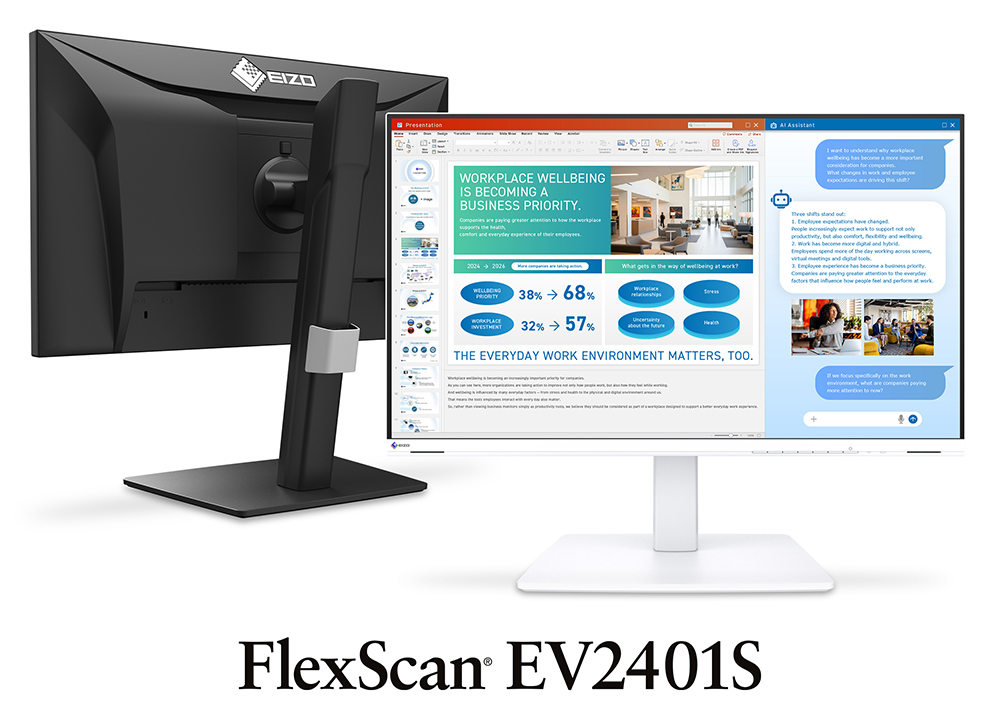
Table of Contents
- EV2401S specs that matter
- A seven-year warranty with a ceiling
- 120 Hz is the practical upgrade
- EIZO vs Dell U2424HE
- Power use over seven years
- The missing dock features
- Who should skip this
- What we will update at launch
- Office Monitor FAQ
- The Short Version
EV2401S Specs That Matter
The basic display is deliberately conservative. EIZO’s current specification page lists a 23.8-inch IPS panel with 1920 x 1080 resolution, 93 pixels per inch, a claimed 350-nit typical brightness and a 1500:1 contrast ratio. EIZO also lists a 5 ms gray-to-gray response time and sRGB colour coverage, but it has published no independent measurements. This is an office panel that scrolls smoothly, not a creator display hiding behind business clothes.
The useful hardware sits around the panel. One USB-C connection carries video, 5 Gbps data and up to 70 W of laptop charging. DisplayPort and HDMI handle separate video sources, four USB-A ports take peripherals, and two 2 W speakers cover calls and system audio. The stand offers 195 mm of height adjustment, pivot in either direction, swivel and a 100 x 100 mm VESA mount.
That makes the EV2401S a tidy fit for a modest desk, but 70 W charging is not enough for every performance laptop. It is fine for many ultrabooks and business machines. A mobile workstation that expects 90 W, 100 W or more may charge slowly, reduce performance or keep its own power brick in service.
A Seven-Year Warranty With a Ceiling
Seven years sounds almost absurd in a market where three years is respectable. EIZO covers the monitor body and LCD panel for seven years, subject to a 30,000-hour usage limit. Run it for 40 hours each week and that ceiling works out to roughly 14.4 years, so a normal home-office schedule is unlikely to hit the hour cap first.
The bright-pixel promise is much shorter. EIZO guarantees zero bright sub-pixels for six months, not the full warranty. That distinction deserves more attention than the large seven-year badge. A panel fault in year five and a bright pixel appearing in month eight are not handled by the same promise.
A long warranty only has value if service is practical where you live. EIZO’s global page says regional terms can vary, and North American availability has not been announced. I would not import the Japanese version just to chase the January date. Wait until the local product page states the price, service route and included cables.
120 Hz Is the Practical Upgrade
The jump from 60 Hz to 120 Hz cuts the interval between refreshes from 16.7 ms to 8.3 ms. That does not make a spreadsheet calculate faster, but cursor movement, document scrolling and window animation look cleaner. It is the kind of improvement that becomes obvious when you return to a 60 Hz screen.
Windows 11 Dynamic Refresh Rate can reduce the refresh rate when the screen is static and raise it during motion. EIZO also supports variable refresh rate, though the company has not published the range on the product page. Treat it as a desktop-comfort feature until testing shows whether the implementation behaves cleanly at its lower boundary.
The trade-off is resolution. Full HD at 23.8 inches is readable and light on a laptop GPU, but it cannot match the text density or workspace of a 27-inch 4K monitor. The site’s gaming monitor versus office monitor guide explains why refresh rate is only one part of the decision. If your work lives in dense documents, code or large spreadsheets, more pixels can be worth more than smoother scrolling.
EIZO vs Dell U2424HE
Dell’s U2424HE is the tougher reference because it is already shipping, matches the 23.8-inch Full HD and 120 Hz basics, and costs US$369.99 direct. The EIZO is brighter on paper, includes speakers and offers much longer standard coverage. Dell answers with a better dock.
| Decision point | EIZO EV2401S | Dell U2424HE |
|---|---|---|
| Current price | 63,800 yen in Japan, about US$406; other regions not announced | US$369.99 direct |
| Panel | 23.8-inch IPS, 1920 x 1080, 120 Hz | 23.8-inch IPS, 1920 x 1080, 120 Hz |
| Brightness and contrast claims | 350 nits, 1500:1 | 250 nits, 1000:1 |
| USB-C charging | 70 W | 90 W |
| Dock connections | Four USB-A ports; no Ethernet or DisplayPort output listed | USB-A, USB-C, 2.5 GbE and DisplayPort output |
| Speakers | Two 2 W speakers | None |
| Standard warranty | Seven years, limited to 30,000 hours | Three years with Advanced Exchange |
| Typical power claim | 8 W on the global specification table | 14.5 W |
The price comparison is not perfectly regional. EIZO’s 63,800-yen preorder converts to about US$406 using the Bank of Canada’s October 22 exchange rates, but Japanese tax and distribution do not map neatly to a future US price. The useful conclusion is narrower: EIZO has not shown that the warranty premium will be small enough to ignore.
Power Use Over Seven Years
EIZO’s global specification table lists 8 W of typical power for the EV2401S, although its launch release and Japanese page say 9 W. That one-watt discrepancy is small, but it is exactly why I would not present a precise electricity-cost promise before regional documentation settles. The chart uses the current global table value and treats every manufacturer’s number as a claim, not a measurement from a shared lab.
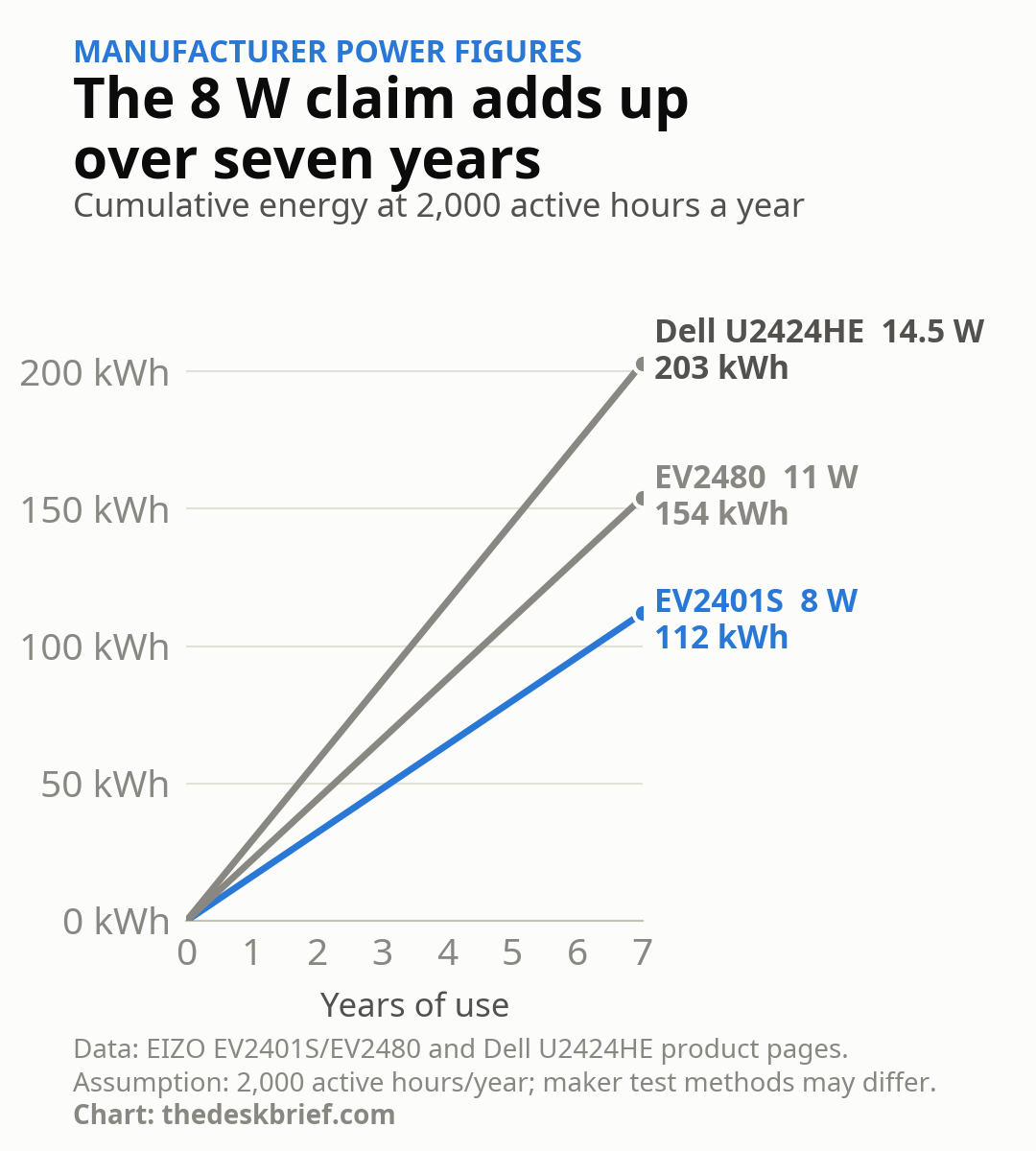
At 2,000 active hours per year, 8 W accumulates to 112 kWh over seven years. The older EIZO EV2480’s 11 W claim reaches 154 kWh, while Dell’s 14.5 W figure reaches 203 kWh. The EV2401S therefore saves a calculated 42 kWh against its predecessor and 91 kWh against the Dell across that period. The financial saving depends on your electricity rate and is unlikely to recover a large purchase-price premium by itself.
The Missing Dock Features
The EV2401S has enough ports to clear a basic laptop desk, but it stops short of replacing a serious dock. EIZO lists no Ethernet jack, no DisplayPort output for daisy chaining and no downstream USB-C port. Dell includes all three, plus 90 W charging. That difference matters more than the EIZO’s extra 100 nits if your monitor is supposed to be the centre of a one-cable work setup.
The built-in speakers are the EIZO’s practical counterpoint. They will not replace good desktop speakers, but they keep meeting audio and notification sounds off the desk. Buyers who need a camera should look at the site’s monitor with a built-in webcam analysis, because neither of these models includes one.
Who Should Skip This
Skip it if 1080p already feels cramped, your laptop needs more than 70 W, or you want Ethernet and multi-monitor daisy chaining from one cable. A 27-inch 4K display is the stronger productivity upgrade for fine text and large workspaces. A proper USB-C hub monitor is the better answer when cable reduction is the main goal.
The EV2401S makes more sense for a compact desk where smooth motion, speakers, low claimed power use and long support outrank pixel density. Set the screen up properly before blaming the panel for neck strain; the site’s monitor-height guide covers the useful starting point.
What We Will Update at Launch
The biggest missing fact is regional price. We will add US, Canadian, UK and European pricing when EIZO publishes it, then check whether the local warranty keeps the full seven-year term. Independent tests also need to confirm brightness, contrast, response time, input lag, power use and whether Windows 11 Dynamic Refresh Rate changes cleanly.
Office Monitor FAQ
When will it ship?
EIZO says global shipping begins in January 2027. Its Japanese direct store is accepting preorders for delivery from January 15, 2027. Dates for the US, Canada, UK and Europe have not been announced.
How much does it cost?
The Japanese preorder price is 63,800 yen, about US$406 at the exchange rates checked for this article. EIZO has not announced pricing for North America or Europe.
Does it charge a laptop over USB-C?
Yes. The USB-C port carries video, 5 Gbps data and up to 70 W of power. Check your laptop’s charger rating because some performance models need more.
Is the seven-year warranty really seven years?
EIZO lists seven years for the body and LCD panel, limited to 30,000 hours. Its zero-bright-pixel guarantee lasts six months. Confirm the terms on your regional page before buying.
The Short Version
This EIZO pairs a compact 23.8-inch Full HD screen with 120 Hz, 70 W USB-C, four USB-A ports, speakers and a seven-year warranty. Those are sensible office features, and the low power claim is credible enough to be interesting without pretending it will transform an electricity bill.
Wait for the local price. Dell already sells a US$369.99 alternative with stronger docking, while EIZO has not announced when or for how much this model reaches North America or Europe. Buy the EIZO only when the warranty, speakers and brighter panel are worth more to you than Ethernet, daisy chaining and 90 W charging.