The correct monitor height is simple to state and easy to get wrong: the top of the screen should sit at or just below your eye level when you are sitting up straight and looking ahead with relaxed eyes. Get that one thing right and most of the neck and upper-back ache that people blame on “bad posture” quietly goes away. Get it wrong, usually too low, and no amount of sitting up straight fixes it.
This is a precise setup answer, not another broad checklist. If you want the whole desk in sequence, the ergonomic desk setup checklist covers chair-first, monitor-last. Here we are only solving the screen: where it sits, how far away, and how to adapt it to laptops, glasses, and multiple monitors.
Table of Contents
- The correct monitor height, exactly
- Why eye level, and the angle that matters
- If you wear progressive or bifocal lenses
- Laptops, ultrawides, and dual monitors
- Viewing distance and text size
- The five-minute setup and self-check
- When discomfort needs a professional
- Correct Monitor Height FAQ
- The Short Version
The correct monitor height, exactly
Sit the way you actually work, look straight ahead, and close your eyes for a second. When you open them, your natural line of sight should land on the top third of the screen. That means the top of the monitor is at or slightly below eye level, and your eyes travel gently downward to read the rest. That is the correct monitor height, and it is the same range published by OSHA’s computer workstation eTool.
Why “at or slightly below” rather than a single exact number? Because it varies with your height, your chair, and your desk. A tall person in a low chair and a short person at a high desk need different physical monitor positions to land the same line of sight. The rule is about your eyes relative to the screen, not centimetres off the desk. Use the starting point below, then adjust it to your measurements and natural line of sight.
Why eye level, and the angle that matters
Your head weighs about five kilograms, and it balances easily when it sits level on your neck. Tip it forward to look down at a low screen and the muscles in your neck and upper back have to hold that weight against gravity all day. That sustained load, not a single bad moment, is what produces the chronic ache people call “tech neck.” A screen at the correct monitor height keeps your head level and your gaze relaxed slightly downward, which is the position the neck tolerates best.
A small downward gaze, roughly 10 to 20 degrees below horizontal to the center of the screen, is actually ideal, because the eyes rest more comfortably looking slightly down and it lets you tilt the screen back a touch to face your eyes squarely. Too high is a real mistake in the other direction: a monitor mounted above eye level tips your head back, strains the neck differently, and dries your eyes because you hold them wider open.
If you wear progressive or bifocal lenses
This is the big exception, and it trips up a lot of people over 40. Progressive and bifocal lenses put the reading portion at the bottom of the lens, so to see the screen clearly you tip your head back, which is exactly the neck position you are trying to avoid. The fix is to set the monitor lower than the standard rule, often with the top of the screen at chin or nose height, so you look through the reading zone without craning.
If you split your day between screen work and everything else, it is worth asking your optometrist about dedicated computer glasses set for your exact working distance. The correct monitor height for progressive-lens wearers is whatever lets you read the screen with your head level, even if that looks lower than the textbook says.
Laptops, ultrawides, and dual monitors
A laptop cannot meet the correct monitor height on its own, because raising the screen to eye level lifts the keyboard out of reach. The fix is a stand that puts the screen up plus an external keyboard and mouse, covered in the laptop stand guide. An ultrawide follows the same top-third rule; just make sure the stand or monitor arm can carry the weight and hold height without sagging.
For dual monitors, it depends on how you use them. If you split work evenly across both, place them side by side at equal height with the seam in front of your nose. If one is clearly primary, put that one directly ahead at the correct monitor height and angle the secondary screen in beside it. A large single 4K panel, like the one in the Samsung ViewFinity S80HF review, sidesteps the seam problem entirely and is often the more ergonomic answer than two smaller screens.
Viewing distance and text size
Height solves your neck; distance solves your eyes. The baseline is arm’s length, around 20 to 40 inches (50 to 100 cm) per OSHA, and it scales up with screen size because a bigger panel needs more distance to take in without moving your head.
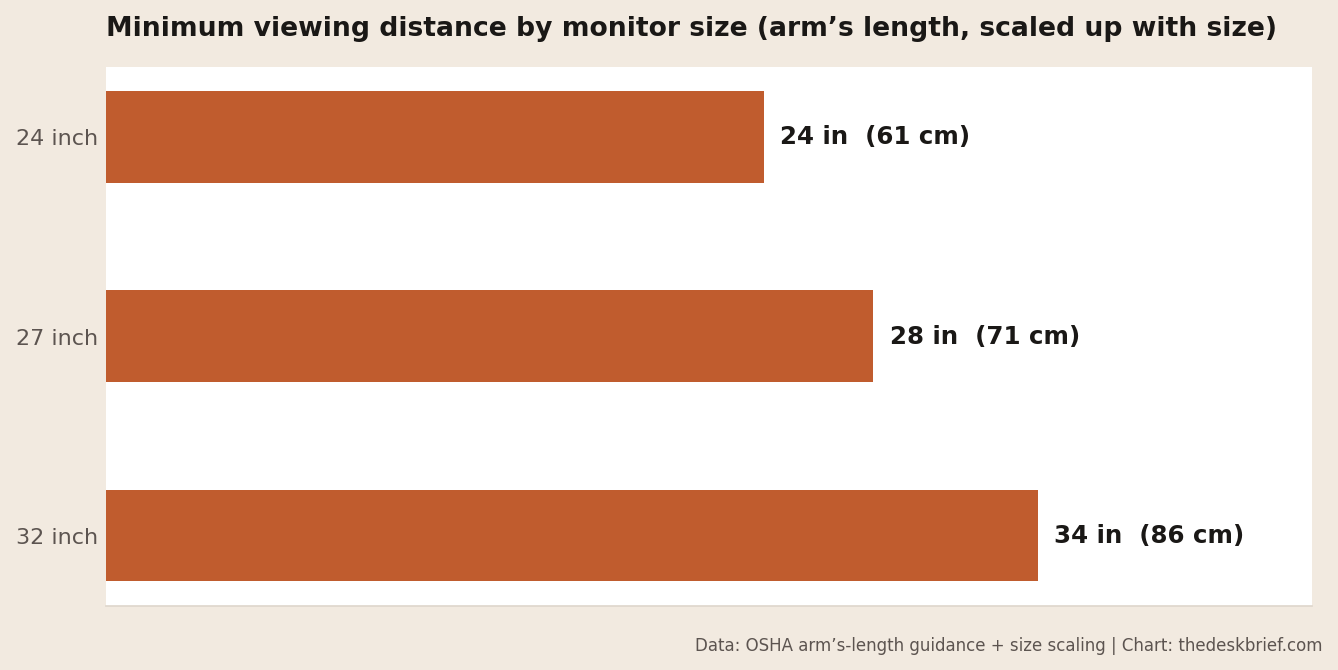
The catch: as you sit farther back to be comfortable, text gets smaller. Do not fix that by leaning in, which undoes your posture. Fix it by turning up the operating system’s display scaling until text is comfortable at your correct distance. Set the distance for your neck and eyes first, then make the software match, never the reverse.
The five-minute setup and self-check
Do this once, properly. Set your chair first so your feet are flat and your elbows are at desk height, because chair height changes where your eyes are. Then sit back, look straight ahead, and raise or lower the monitor until the top third meets your natural line of sight. Tilt the screen back 10 to 20 degrees so it faces your eyes. Slide it to arm’s length, then scale up the text if it feels small.
The self-check a day later: if your gaze rests on the top third without tilting your head, the height is right. If your neck aches by afternoon, the screen is almost always still too low. If you find yourself leaning in to read, the fix is text scaling, not moving the monitor closer. For the whole workspace in one pass, the ergonomic desk self-assessment walks each point, and the office chair fit calculator handles the chair that everything else depends on.
When discomfort needs a professional
Setup fixes setup problems. If neck or eye discomfort persists after you have the correct monitor height, distance, and a decent chair dialed in, that is a signal to stop adjusting furniture and talk to someone qualified. Before buying another display, compare flicker, glare, text clarity, and adjustability in the monitor guide for sensitive eyes. Persistent eye strain, headaches, or blurred vision are worth raising with an optometrist, and the American Optometric Association covers the pattern in its computer vision syndrome guidance. Ongoing neck, shoulder, or arm pain that does not ease with rest deserves a doctor or physiotherapist. Ergonomics reduces load; it does not diagnose.
Correct Monitor Height FAQ
Should the monitor be at eye level or higher?
At or slightly below eye level, never higher. The top of the screen meets your natural line of sight, and your eyes travel gently downward to read the rest. A monitor above eye level tips your head back and strains the neck and eyes.
What is the correct monitor height if I wear progressive lenses?
Lower than standard, often with the top of the screen at chin or nose height, so you read through the bottom of the lens without tipping your head back. Dedicated computer glasses set for your working distance are the cleaner long-term fix.
How far away should my monitor be?
About arm’s length, 20 to 40 inches, scaling up with screen size. If text is too small at that distance, increase display scaling rather than moving the monitor closer, so your posture and eyes both stay comfortable.
Can a monitor be too high?
Yes. Mounting a screen above eye level forces your head back, loads the neck from the opposite direction, and dries your eyes because you hold them wider open. Aim for the top third at eye level, not the center.
The Short Version
Set your chair first, then raise the monitor so the top third meets your natural line of sight, tilt it back slightly, and place it at arm’s length. That is the correct monitor height for most people. Progressive-lens wearers go lower so they can read with the head level, and anyone sitting farther back should scale up text rather than lean in.
It takes five minutes and it is the single highest-return change on the whole desk. If the ache does not lift once the screen is right, that is when furniture stops being the answer and a professional starts.