
The correct desk height is the one where your elbows rest at roughly 90 degrees and your forearms are parallel to the floor while you type, shoulders relaxed. That is the whole rule, and it is the same whether you sit or stand. What changes is how you get there: sitting, you set the chair and let the desk follow; standing, the desk itself has to land at the right number for your height.
Most desks are sold at a fixed 29 inches (74 cm), which is correct for almost nobody. This guide gives you the actual target for both positions, a height-by-height chart for standing, and the fixes for when your desk cannot move. It is the desk half of the setup; the screen half is the correct monitor height guide.
Table of Contents
- The correct desk height rule
- Sitting: set the chair, then the desk
- How high should a standing desk be
- If your desk height cannot change
- The keyboard and mouse check
- Correct Desk Height FAQ
- The Short Version
The correct desk height rule
Your working surface should sit at your seated or standing elbow height, so your upper arms hang relaxed at your sides and your forearms reach the keyboard level, not angled up or down. Wrists stay neutral and flat, not bent back. That elbow-height target is what OSHA’s neutral working posture guidance describes, and it is the anchor for everything below.
Notice the target is your body, not a number off the floor. Two people at the same 29-inch desk can both be wrong in opposite directions. That is why the correct desk height depends on your height and your chair, and why a fixed desk forces compromises we will fix in a moment.
Sitting: set the chair, then the desk
Seated, work in this order. Set the chair first so your feet are flat and your knees are near 90 degrees. Now look at your elbows: the desk should meet your forearms with your upper arms relaxed. For most people that lands the desk around 28 to 30 inches (71 to 76 cm), but your elbows are the real judge, not the tape measure.
If setting the chair for your elbows lifts your feet off the floor, do not lower the chair and wreck your arm position. Add a footrest instead. The chair drives the whole seated setup, which is why it comes first; the office chair fit calculator turns your measurements into the seat height to start from.
How high should a standing desk be
Standing, there is no chair to absorb the difference, so the desk has to hit your standing elbow height directly. As a starting point, that is roughly your height mapped to the numbers below, then fine-tuned by eye. Set it, stand naturally, and check that your forearms are parallel to the floor, the neutral position Cornell University Ergonomics recommends for sit-stand work.
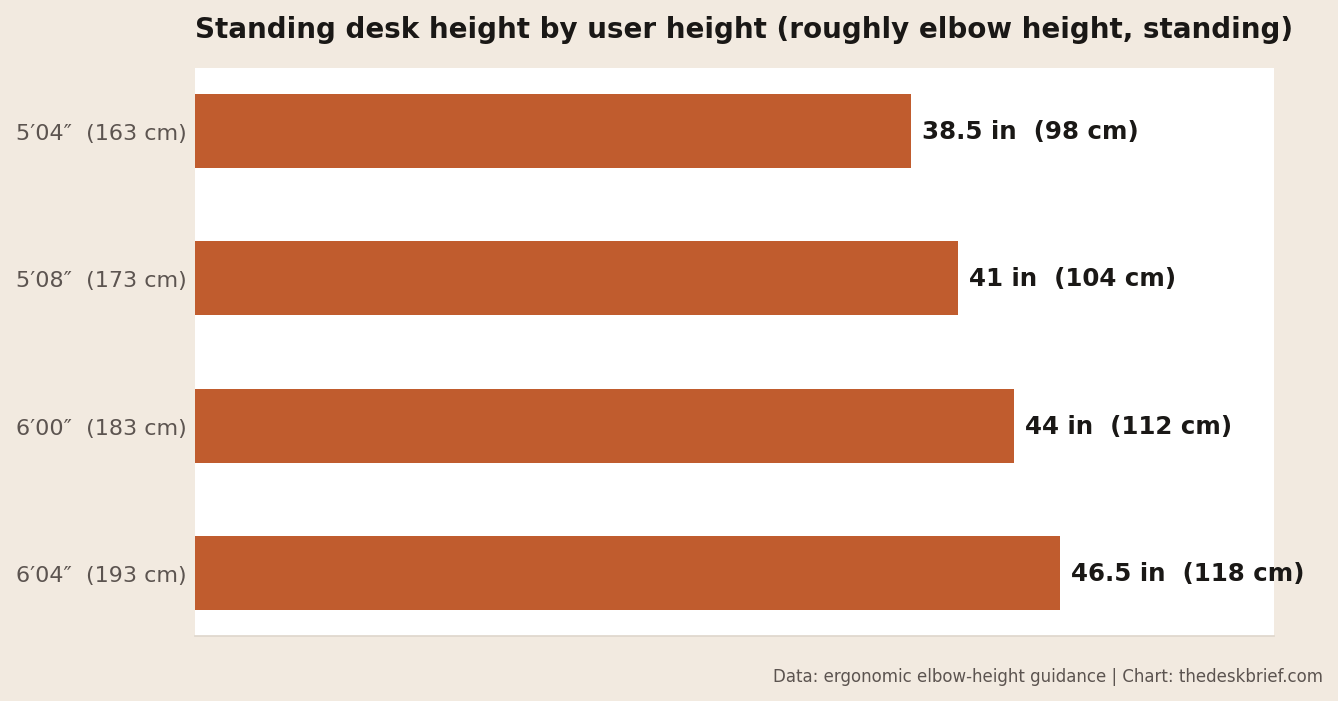
Two adjustments to the chart. If you wear supportive shoes while standing, set it a touch higher, because your effective height went up. And save your correct standing height as a memory preset if your desk has them, so you are not eyeballing it every time. While you are dialing in the standing position, mind the cables that have to travel with the desk, covered in the standing desk cable management guide.
If your desk height cannot change
Most desks are fixed, and usually too tall at that standard 29 inches. You cannot lower the desktop, so raise yourself to meet it: set the chair up until your elbows are right, then add a footrest so your feet are supported. If a keyboard tray is an option, it drops the typing surface below the desktop and can rescue a too-tall desk without touching the desk at all.
A desk that is too low is harder to fix, because you cannot easily add height to a fixed top. Sturdy risers under the legs work if you commit to it. Honestly, if you are fighting a fixed desk every day, an adjustable one is the fix that ends the compromise, and whether that upgrade is worth it is covered in are standing desks worth it and the Uplift V3 review.
The keyboard and mouse check
Desk height is really keyboard height, because that is where your hands live. Once the surface is at elbow height, keep the keyboard flat: fold down the little kickstand legs most keyboards have, because they tilt the keyboard up and bend your wrists back, the opposite of neutral. The mouse sits at the same level, right beside the keyboard, so you are not reaching up or across for it.
One last check for wrists: they should float in a straight line from your forearm while you type, not rest bent on the desk edge. If the front edge digs in, the desk is a shade too high for your chair, so nudge the chair up a notch. This is the point where the correct desk height and your comfort finally agree, and the full sequence lives in the ergonomic desk setup checklist.
Correct Desk Height FAQ
What is the standard desk height, and is it right for me?
Standard is about 29 inches (74 cm), and it is too tall for most people under about 5 foot 10. The correct desk height for you is your seated elbow height, so use the standard number only as a starting point and adjust to your arms.
How high should a standing desk be for my height?
Roughly your standing elbow height: about 38.5 inches at 5 foot 4, 41 inches at 5 foot 8, 44 inches at 6 foot, and 46.5 inches at 6 foot 4. Set it there, then fine-tune so your forearms are parallel to the floor.
Is my desk too high or too low?
Too high if you shrug your shoulders to type or the front edge digs into your wrists. Too low if you lean or hunch down to reach the keyboard. At the correct desk height your shoulders are relaxed and your forearms are level.
Can I fix a desk that is the wrong height without replacing it?
Usually. For a too-tall desk, raise the chair and add a footrest, or fit a keyboard tray. For a too-low desk, use sturdy leg risers. If you are fighting it daily, a height-adjustable desk is the permanent fix.
The Short Version
The correct desk height puts your elbows at about 90 degrees with forearms level and shoulders relaxed, sitting or standing. Seated, set the chair first and let the desk meet your elbows around 28 to 30 inches; standing, set the desk to your standing elbow height using the chart. A fixed desk gets rescued by chair height, a footrest, or a keyboard tray.
Get the desk and the monitor right together and the whole workstation stops working against you. Neither takes more than five minutes, and both are on the checklist when you want the full walkthrough.

1 thought on “Correct Desk Height: How High Should Your Desk Be?”