1×32 vs 2×16 RAM is an easy call for most new PCs: buy the two-stick kit. Both configurations give you 32GB, but two matched modules give a mainstream desktop CPU the wider memory path it was designed to use. One 32GB stick is the sensible exception when reaching 64GB soon matters more than getting full performance today.
That difference isn’t just a tidy diagram in a motherboard manual. Tom’s Hardware’s July 2026 testing found that one DDR5 module reduced the 13-game average by 2.8% to 10.9%, depending on the CPU. The penalty can be small. It isn’t zero, and you don’t get a refund for leaving bandwidth on the table.
This page contains affiliate links. If you buy through these links, we may earn a small commission at no extra cost to you. Full disclosure.
Don’t want to read the whole article? Here are our quick picks.
1Best for performance Crucial Pro 32GB DDR5-5600 kit. Full dual-channel bandwidth from one matched kit.
2Best for a planned 64GB upgrade Crucial 32GB DDR5-5600 UDIMM. Keeps two-slot systems open for a 64GB upgrade.
As an Amazon Associate I earn from qualifying purchases.
Table of Contents
- The 1×32 vs 2×16 RAM verdict
- What two sticks actually change
- What current testing shows
- When one 32GB stick makes sense
- Buying and installing the right kit
- Who Should Skip This
- Our Pick
- FAQ
- The Short Version
The 1×32 vs 2×16 RAM Verdict
Choose 2x16GB for a new 32GB desktop build, a gaming PC, or a machine that will stay at 32GB for years. You get a matched pair with the same advertised speed and timings, and you enable both memory channels immediately. That is the boring answer. Boring is excellent when the alternative is buying performance and then forgetting to turn it on.
Choose 1x32GB if the computer has only two replaceable slots and 64GB is a near-term plan. Adding a second matching 32GB module is cleaner than replacing a 2x16GB kit. You accept lower bandwidth now, plus the risk that a separately purchased module may not match the first one closely enough later.
| Decision point | 1x32GB | 2x16GB |
|---|---|---|
| Total capacity | 32GB | 32GB |
| Memory modules | One | Two matched modules |
| Immediate channel use | One populated DIMM path | Both motherboard channels populated |
| Free slots on a four-slot board | Three | Two |
| Simplest route to 64GB | Add one matching 32GB module | Replace the kit or populate four slots |
| Best default choice | Planned capacity growth | Performance and kit compatibility |
What Two Sticks Actually Change
A memory channel is a data path between the CPU’s memory controller and the RAM. Corsair’s dual-channel guide explains that two modules let the controller access two channels simultaneously. The theoretical bandwidth doubles when both channels are active, although real applications don’t become twice as fast.
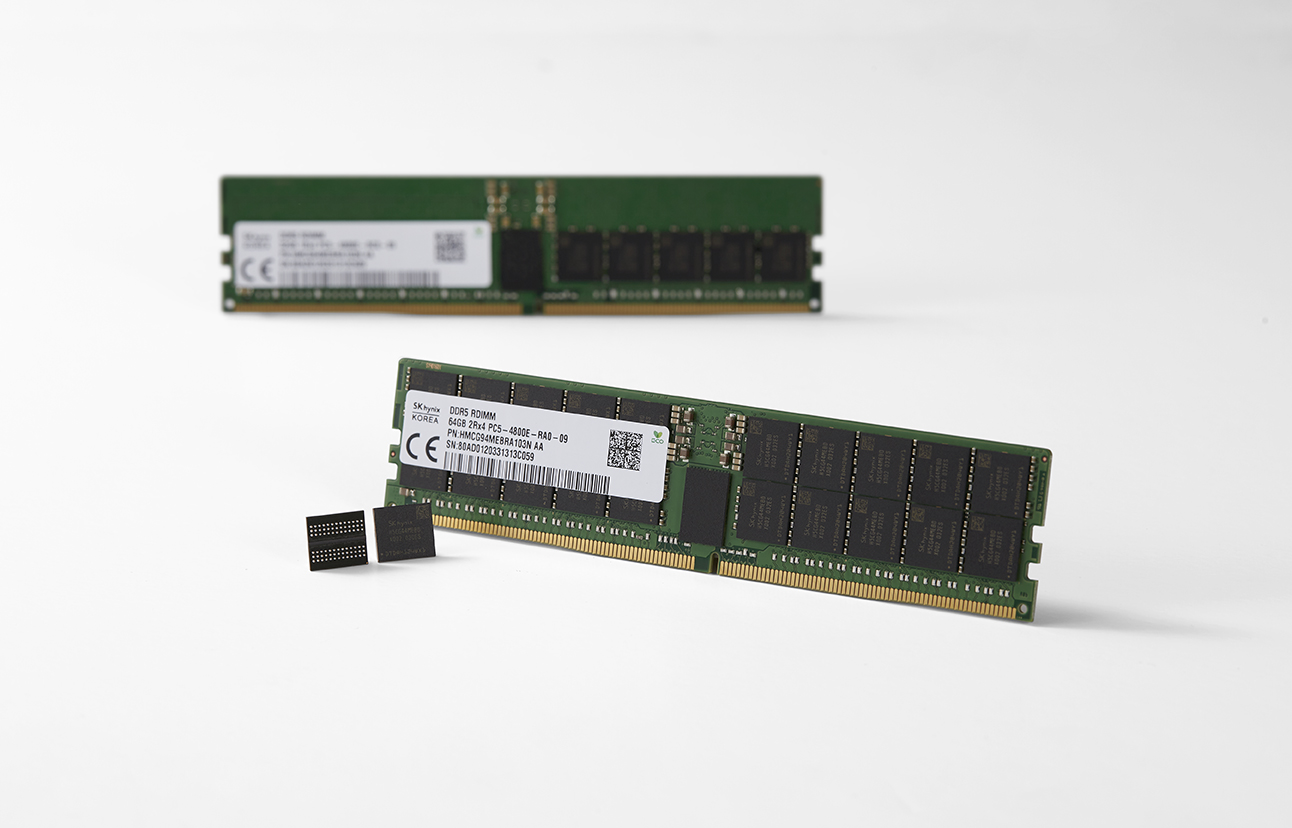
DDR5 makes the wording confusing because each DIMM contains two 32-bit subchannels. One DDR5 stick can handle more independent work than one DDR4 stick, but it still supplies half the total data width available from two DDR5 DIMMs on a mainstream dual-channel platform. Calling one DDR5 stick “dual channel” because it has internal subchannels is a fine way to win an argument and lose the buying decision.
The practical rule survives the terminology: populate the recommended pair of motherboard slots if you want full bandwidth. On a typical four-slot board, those are often A2 and B2, but use the board manual rather than trusting folklore or the colour of the plastic.
What Current Testing Shows
Tom’s Hardware compared one 16GB DDR5 DIMM with two 16GB DIMMs across 13 games at 1080p, using an RTX 5090 to reduce the graphics-card bottleneck. The Ryzen 5 7600X lost 10.9% in the average, the Core Ultra 7 270K Plus lost 8.7%, and the Core i5-14600K lost 8.3%. The Ryzen 7 9800X3D lost only 2.8%, helped by its large L3 cache.
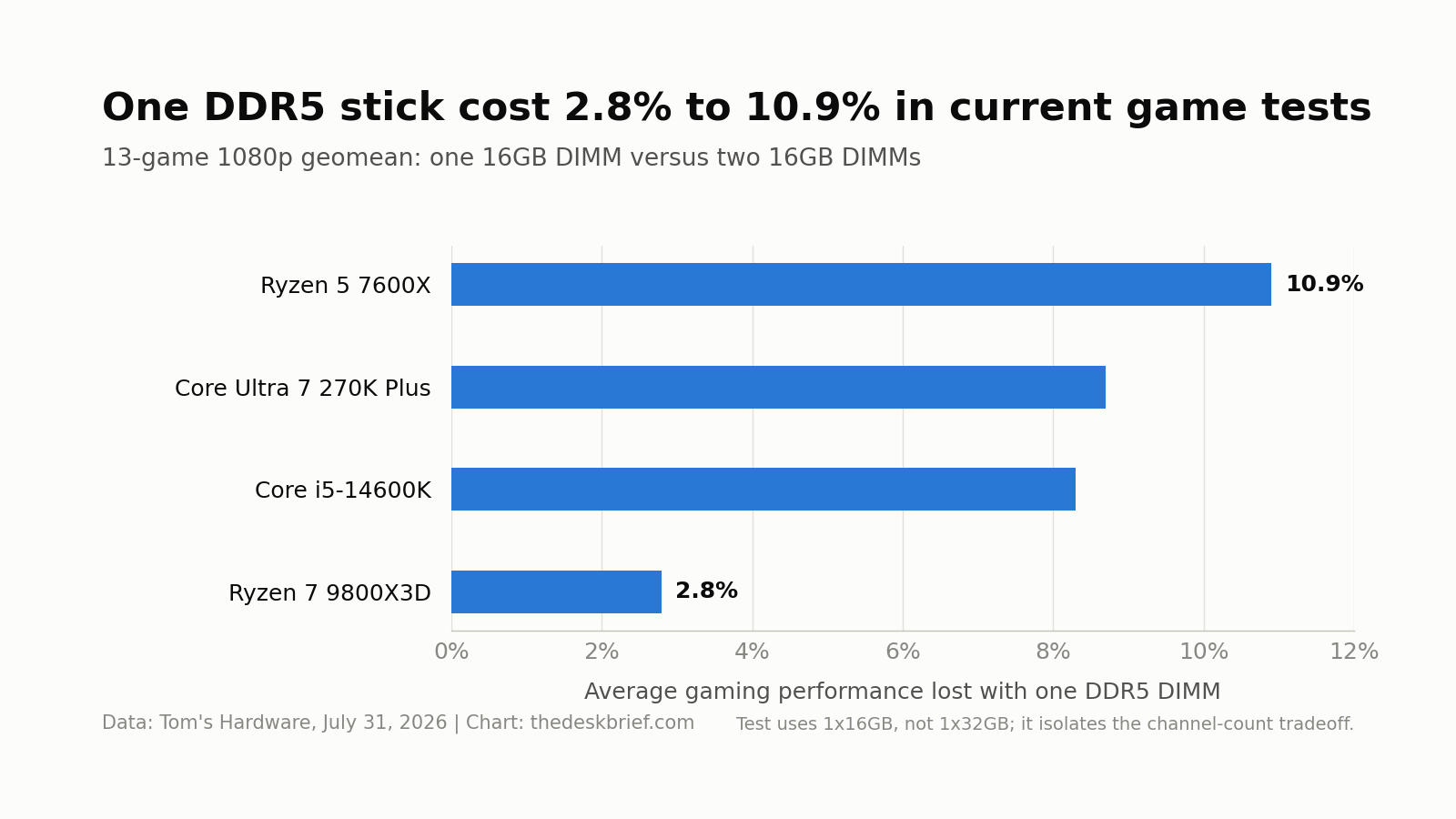
Those results don’t prove that every 1x32GB setup will lose the same amount. The test used 1x16GB against 2x16GB, and memory speed, timings, CPU cache, game engine, resolution, and GPU load all change the gap. It does show why the 1×32 vs 2×16 RAM decision shouldn’t rest on capacity alone.
Office work is usually less sensitive. Browsing, documents, and video calls rarely keep the memory bus busy enough to make the full gaming gap obvious. Integrated graphics, CPU rendering, compression, code compilation, and other memory-heavy work can care much more because they compete for bandwidth directly.
When One 32GB Stick Makes Sense
A single 32GB module is a capacity strategy, not a performance strategy. It makes sense in a two-slot laptop, mini PC, or small-form-factor system when you know 64GB is coming and replacing a full 2x16GB kit would waste money. It can also be a temporary answer when one module is all the budget allows.
The catch is the future match. Tom’s Hardware warns that two modules bought separately can use different memory chips or subtimings even when the brand, rated speed, and main timings look identical. The pair may run at a lower speed, refuse its XMP or EXPO profile, or need manual tuning. A factory-matched kit removes much of that uncertainty.
Capacity can still beat bandwidth. If your work actually exceeds 32GB, a stable 64GB configuration is better than a faster 32GB setup that spills into storage. For local models, start with our RAM requirements for local AI. For an ordinary gaming and office machine that stays below 32GB, two modules remain the cleaner choice.
Buying and Installing the Right Kit
Start with compatibility, not the biggest speed printed on a heat spreader. Confirm DDR4 or DDR5, desktop DIMM or laptop SO-DIMM, maximum capacity, supported speeds, and the motherboard or system vendor’s qualified-memory list. If you’re weighing an older platform, our guide to whether DDR4 is still good in 2026 covers the larger platform decision.
- Buy one matched kit when possible, not two separately packaged modules.
- Use the manual’s recommended slots, commonly A2 and B2 on four-slot boards.
- Boot and test at stock settings before enabling XMP or EXPO.
- Run your real applications and a memory stability test after installation.
Memory prices can turn a sensible plan into theatre quickly. Check the current direction in our RAM price buy-or-wait guide, but don’t pay a premium for a one-stick “upgrade path” you aren’t likely to use.
Who Should Skip This
Skip the blanket 2x16GB recommendation if your system has soldered memory, uses a nonstandard memory layout, or needs 64GB immediately. Skip the 1x32GB plan if you have no dated reason to add a second module. “Maybe someday” is how a slower PC stays slower until it gets recycled.
Owners of a working 1x32GB system also shouldn’t panic. Check whether the machine is actually memory-bound before buying anything. If your workload is smooth and the GPU is the limiting part, a second stick may produce a benchmark win that you never notice.
Our Pick
Buy a matched 2x16GB kit for a new 32GB build. It delivers the full dual-channel layout now and avoids betting future compatibility on a second separately sourced DIMM. Check the Crucial Pro 32GB DDR5-5600 kit on Amazon.
As an Amazon Associate I earn from qualifying purchases.
1×32 vs 2×16 RAM FAQ
Is 2x16GB faster than 1x32GB?
Usually, yes. Two modules can populate both memory channels, increasing available bandwidth. The real gain varies by CPU and workload, so don’t translate “double the theoretical bandwidth” into “double the application speed.”
Does one DDR5 stick already run in dual channel?
No, not in the same sense as two DIMMs across a mainstream CPU’s two memory channels. A DDR5 module has two internal 32-bit subchannels, but adding the second DIMM still doubles the total data width available to the controller.
Can I add another 32GB stick later?
Yes, if the system supports 64GB and the new module works with the old one. Match the exact model, capacity, speed, timings, and voltage when possible, then test at stock settings before enabling XMP or EXPO. A matched 2x32GB kit is safer than two separate purchases.
Which slots should two RAM sticks use?
Use the slots named in the motherboard manual. A2 and B2 are common on four-slot boards, but the manual is the authority. Installing both modules beside each other can leave the system in the wrong channel configuration.
The Short Version
For most 32GB builds, 2x16GB wins. It gives you a matched kit and full memory-channel bandwidth from day one. Pick 1x32GB only when you have a real plan to add a matching 32GB module soon, especially in a two-slot machine. The 1×32 vs 2×16 RAM choice is performance now versus a cleaner path to 64GB later, and most buyers need the performance now.