The Logitech ERGO K860 is the best ergonomic keyboard for most people. Its fixed split, curved keyframe and negative-tilt feet improve wrist position without forcing you to relearn where every key lives. The Kinesis Freestyle2 with VIP3 is the better choice if you need to control the split width and tenting angle yourself.
An ergonomic keyboard isn’t a treatment for carpal tunnel syndrome, and the shape doesn’t guarantee comfort. It can make a straight wrist and relaxed shoulder position easier to maintain. Start with the correct keyboard height and angle before replacing hardware.
This isn’t a hands-on ranking. I compared manufacturer specifications and Canadian buying options. Reference prices were checked September 14, 2026. Amazon links are purchase destinations only, so check the retailer page for the current price, seller and availability.
This page contains affiliate links. If you buy through these links, we may earn a small commission at no extra cost to you. Full disclosure.
Don’t want to read the whole article? Here are our quick picks.
1Best overall Logitech ERGO K860. Fixed split with negative tilt.
2Best adjustable Kinesis Freestyle2 with VIP3. Control split width and tent angle.
3Best budget Perixx PERIBOARD-512. Full ergonomic shape at an entry-level price.
4Best compact Logitech Wave Keys. Mild wave, three-device switching.
As an Amazon Associate I earn from qualifying purchases.
Table of Contents
- Quick comparison
- What actually matters
- Seven ergonomic keyboard picks
- Ergonomic keyboard vs regular keyboard
- How to choose
- Who should skip this
- Frequently asked questions
- The Short Version
Best Ergonomic Keyboard Quick Comparison
| Keyboard | Best for | Layout and adjustment | Reference price | Buy |
|---|---|---|---|---|
| Logitech ERGO K860 | Most people | Full size, fixed split, 0, -4 or -7 degree tilt | CA$189.99 | Check Amazon |
| Kinesis Freestyle2 with VIP3 | Adjustable split | Two modules, up to 9-inch separation, 5, 10 or 15 degree tent | US$149.00 (about CA$207.24) | Check Amazon |
| Perixx PERIBOARD-512 | Budget buyers | Full size, fixed split, integrated palm rest | US$49.99 (about CA$69.53) | Check Amazon |
| Perixx PERIBOARD-335BR | Mechanical keys | Tenkeyless, fixed split, low-profile tactile switches | US$44.99 (about CA$62.58) | Check Amazon |
| Logitech Wave Keys | Compact wireless setup | Compact full size, fixed wave, three devices | CA$89.99 | Check Amazon |
| HP 960 Ergonomic | Wrist-angle concerns | Split-zone board, negative tilt, detached numpad | CA$159.99 | Check Amazon |
| Goldtouch Go!2 | Travel | Folding board, 0 to 30 degree splay and tenting | CA$161.99 | Check Amazon |
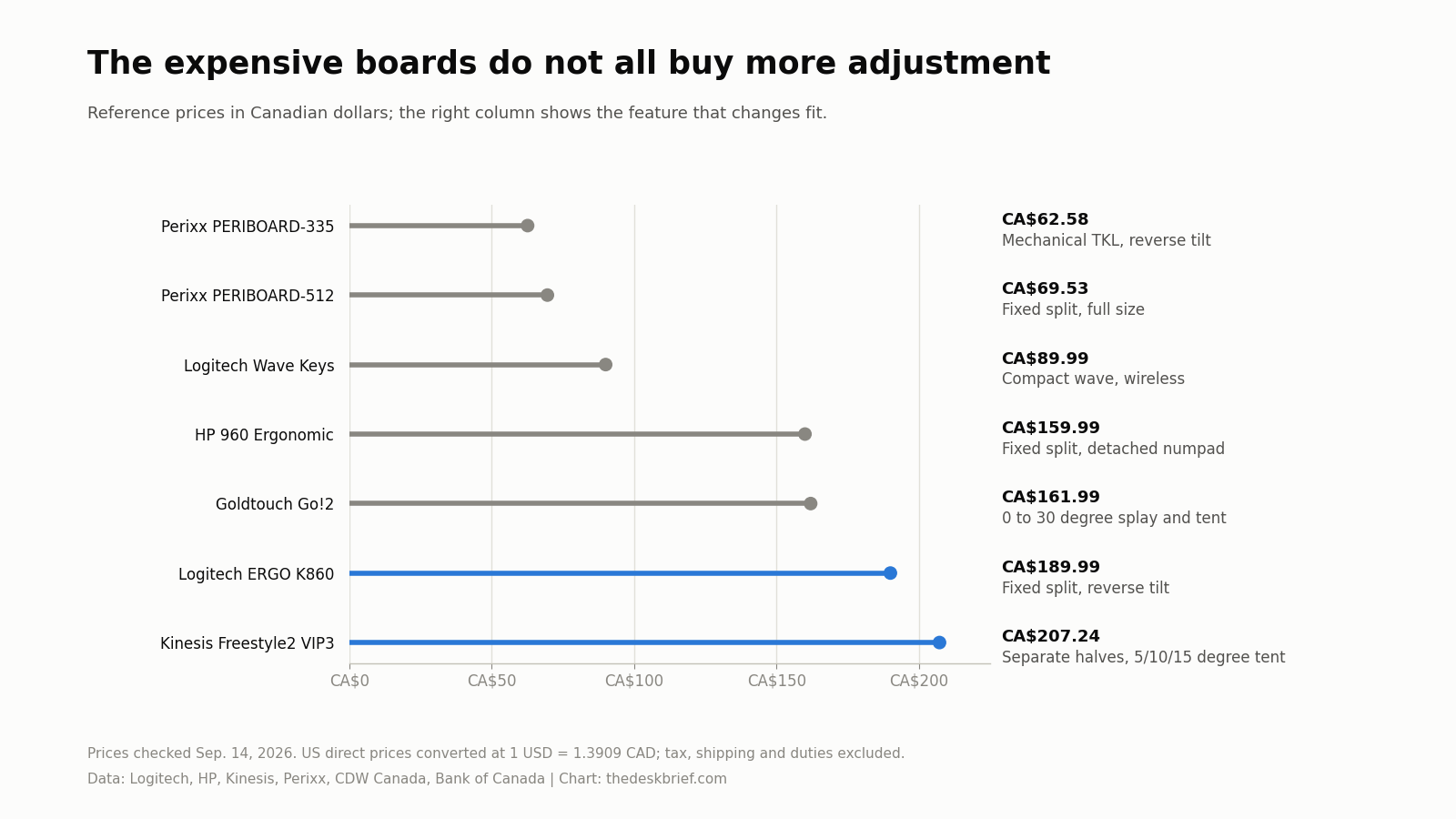
The chart uses current Canadian manufacturer prices for Logitech and HP, CDW Canada’s listed Goldtouch price, and current US manufacturer prices for Kinesis and Perixx converted at the Bank of Canada September 14 rate of 1 USD = 1.3909 CAD. Converted figures are approximate and exclude tax, shipping and duties.
Price isn’t a quality score. An adjustable split is wasted money if you never set its width and angle.
What Actually Makes a Keyboard Ergonomic?
Look at wrist position, not the label. The Canadian Centre for Occupational Health and Safety says there isn’t one universally best design. A split can reduce sideways wrist bend. Tenting can reduce forearm rotation.
Negative tilt raises the front edge slightly, which can help if your keyboard sits below elbow height. It isn’t automatically better. Canadian federal workstation guidance says keyboard height and tilt should serve a neutral wrist posture, so the useful direction can change with your arm angle.
A palm rest should support the heel of your hand between typing bursts. Don’t plant your wrists on it while typing. Our wrist rest ergonomics guide explains why a thick, soft pad can still be wrong if it presses into the underside of your wrist.
The 7 Best Ergonomic Keyboard Picks for 2026
1. Logitech ERGO K860: Best Overall and Best Wireless
Best for: You want a familiar full-size wireless keyboard with a meaningful ergonomic shape and almost no setup work.
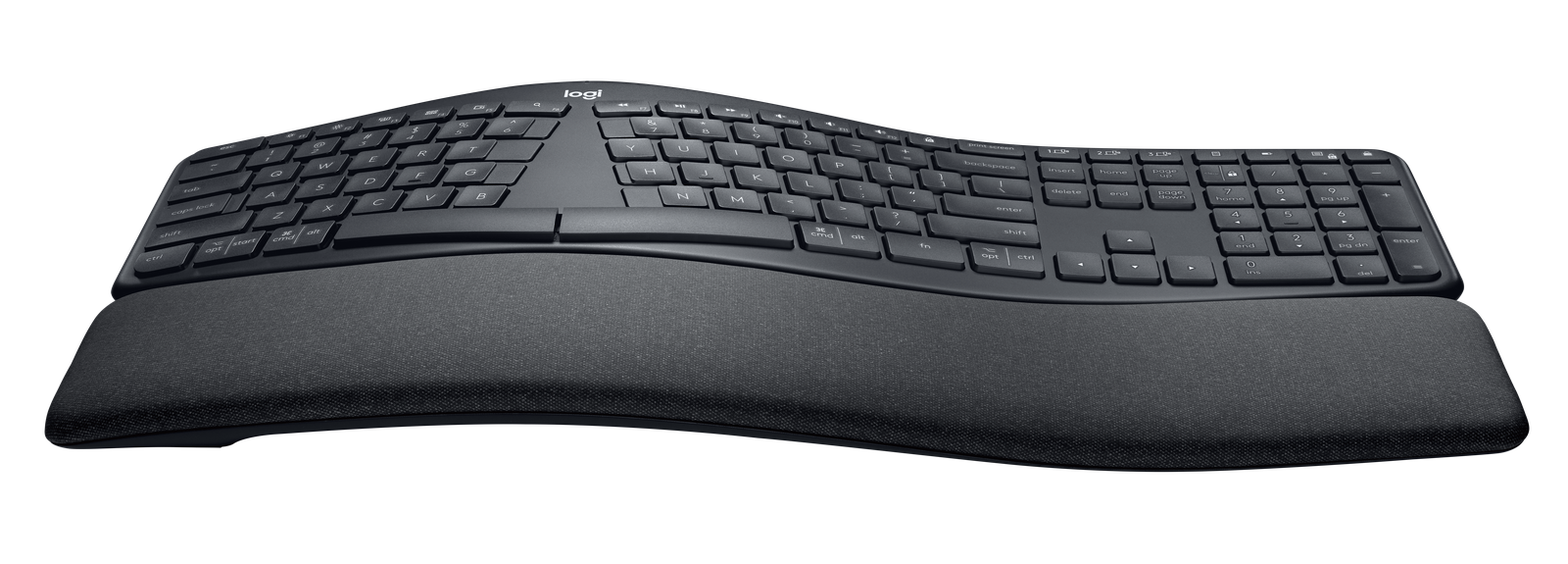
Its keys form two curved groups around a raised centre, but they remain one fixed board. You get a number pad and familiar shortcuts. Bluetooth Low Energy or a USB receiver connects up to three paired devices.
Logitech lists the ERGO K860 at 456 mm wide, 233 mm deep and 48 mm high. It weighs 1,160 g. The front feet provide flat, -4 degree and -7 degree positions, which is useful at a conventional desk or a standing desk. Two AAA batteries are rated for up to 24 months.
The drawback: It is enormous. The attached palm rest makes it 233 mm deep, the split angle isn’t adjustable, and the number pad pushes your mouse farther right. The keys aren’t backlit, either. A smaller ergonomic mouse won’t fix the reach if the keyboard itself consumes the desk.
Check the Logitech ERGO K860 on Amazon.
2. Kinesis Freestyle2 with VIP3: Best Split Keyboard
Best for: Your shoulder width or preferred arm angle doesn’t suit a fixed split.
The Kinesis Freestyle2 is two keyboard halves connected by a cable. This preassembled KB820PB-US package includes the VIP3 lifters and padded palm supports. You can separate the halves by as much as 9 inches, rotate them independently, and choose 5, 10 or 15 degrees of tenting.
The base keyboard measures 15.375 inches wide at minimum, 7.125 inches deep and 0.875 inches high. Its membrane switches have a stated 35 g activation force and 3.9 mm travel. The zero-degree base and adjustable tent offer more control than a one-piece board.
The drawback: The US$149.00 manufacturer list price, about CA$207.24 at the September 14 exchange rate, is expensive for a wired membrane keyboard. The USB-A cable and office-key layout also feel dated, and moving the halves can make the setup look untidy. It has no dedicated number pad.
Check the Kinesis Freestyle2 with VIP3 on Amazon.
3. Perixx PERIBOARD-512: Best Budget Ergonomic Keyboard
Best for: You want to try a fixed split and palm rest without spending more than CA$100.
Perixx listed the PERIBOARD-512 at US$49.99, about CA$69.53 at the September 14 exchange rate. It combines a fixed split, raised centre and integrated palm rest with a number pad. Its wired connection needs no batteries or pairing. Seven multimedia keys cover volume and playback.
The board measures 19.09 by 9.29 by 1.73 inches, or roughly 485 by 236 by 44 mm. That gives you full-size spacing and tactile membrane keys, but the dimensions also explain why it feels bulky beside a compact office board.
The drawback: The angle and split are fixed, and the case occupies more space than the ERGO K860. The tall centre can also feel severe if you’re moving directly from a thin laptop keyboard. Give yourself time to adapt, but don’t force an angle that causes new discomfort.
Check the Perixx PERIBOARD-512 on Amazon.
4. Perixx PERIBOARD-335BR: Best Mechanical Ergonomic Keyboard
Best for: You want tactile mechanical switches without buying a custom two-piece keyboard.
The PERIBOARD-335BR pairs a fixed split with low-profile brown tactile switches. Its tenkeyless layout brings your mouse closer, while the palm-rest feet support flat, -4 degree and -7 degree positions. It connects by a 1.8 m USB-A cable.
Perixx lists a 202 mm depth, 44 mm maximum height and 1,043 g weight. Windows software lets you remap keys and record macros. The keys still work on macOS and Linux, and a hardware shortcut switches the bottom-row labels between Windows and Mac behaviour.
The drawback: The split and tenting aren’t adjustable, and the switches aren’t hot-swappable. Perixx’s programming software is Windows-only. Brown switches are quieter than blue clicky switches, but they still won’t be as discreet as a thin scissor keyboard in a shared room.
Check the Perixx PERIBOARD-335BR on Amazon.
5. Logitech Wave Keys: Best Compact Wireless Ergonomic Keyboard
Best for: You want a gentler ergonomic change and need to keep a number pad.
Wave Keys uses a mild wave instead of a divided keyframe. At 376 mm wide, 219 mm deep and 30.5 mm high, it is 80 mm narrower than the ERGO K860 while retaining a number pad.
Bluetooth and the included Logi Bolt receiver cover up to three devices. Logitech rates the two AAA batteries for up to 36 months. The 750 g weight is light enough to move between rooms, and the memory-foam palm rest is integrated so it won’t slide away.
The drawback: The wave, palm rest and typing angle are fixed. There is no backlight. It also isn’t a proper split keyboard, so it won’t give a broad-shouldered user the separation available from the Freestyle2. Logitech Canada listed it at CA$89.99 when checked September 14, 2026.
Check Logitech Wave Keys on Amazon.
6. HP 960 Ergonomic: Best for Carpal Tunnel Concerns
Best for: A clinician has advised you to limit wrist extension or mouse reach, and you still need a number pad sometimes.
The HP 960 has a split-zone keyframe, negative tilt and detached wireless number pad. Moving the pad lets you centre the letters and keep your mouse close, addressing upward wrist bend and mouse reach.
The main board measures 398.77 by 233.57 by 39.2 mm and uses low-profile scissor keys with 2.0 mm travel. The separate pad measures 117.2 by 87.05 by 13.9 mm. Bluetooth and HP’s USB dongle connect up to three devices, while 20 keys can be programmed through HP Accessory Center. HP rates the keyboard batteries for up to 24 months and the numpad cells for up to six months.
The drawback: The board is still very deep because of its fixed foam palm rest. The separate numpad needs its own batteries and is one more object to keep track of. Most importantly, this isn’t a medical device. HP Canada listed it at CA$159.99, but numbness, weakness or persistent pain deserves professional assessment, not another accessory.
Check the HP 960 Ergonomic on Amazon.
7. Goldtouch Go!2: Best Compact Travel Split Keyboard
Best for: You work away from a fixed desk and don’t want to give up adjustable splay and tenting.
A ball-and-lever joint on the Goldtouch Go!2 lets you adjust horizontal splay and vertical tenting from 0 to 30 degrees, then fold the board for transport. Its full-size scissor keys have 2.7 mm travel and a stated 40 to 45 g activation force.
Open, it measures 13.5 by 6 by 0.9 inches and weighs 1.1 lb. Folded, it is 7 by 6 by 2.5 inches. That isn’t pocket-sized, but it is much easier to pack than a 19-inch PERIBOARD-512. The wired GTP-0044 version works without batteries or pairing.
The drawback: CDW Canada listed it at CA$161.99. It uses USB-A and omits a dedicated number pad. Folding reduces its footprint, not its thickness. A standard compact keyboard is cheaper and flatter if travel convenience matters more than angle adjustment.
Check the Goldtouch Go!2 on Amazon.
Ergonomic Keyboard vs Regular Keyboard
A regular keyboard keeps every key on one flat rectangle. It can be comfortable when its height, distance and width fit you. An ergonomic model may separate or rotate the key groups, raise their inner edges, slope the front upward or shorten the board to reduce mouse reach.
The change that matters depends on the posture you can’t correct now. Sideways wrist bend points toward a split. Forearm rotation points toward tenting. Upward wrist bend may call for a lower keyboard or slight negative tilt. Excessive mouse reach often improves with tenkeyless keys or a detached number pad. Our correct desk height guide covers the free adjustment that should happen first.
Don’t switch for the label alone. If your wrists already remain straight, your shoulders stay relaxed and you have no discomfort, a regular board may be fine. Alternative layouts also carry a learning period. Shortcuts can move, typing speed can dip, and a deeply split board can be awkward for people who don’t touch-type.
How to Choose the Right Ergonomic Keyboard
Start with the problem you can see. Check for wrists bent outward, hands tilted upward, elbows flared or a long mouse reach. Don’t buy maximum adjustability without knowing which adjustment you need.
Measure your available depth. Integrated palm rests make several picks more than 219 mm deep. A keyboard can’t sit at a useful distance if it collides with the monitor stand or hangs over the desk edge. A large desk mat can stabilize two split modules, but it can’t create depth that isn’t there.
Choose fixed or adjustable split. A fixed split is easier to place and learn. An adjustable model suits more shoulder widths, but adds cables and setup decisions. Full separation is also less forgiving if you can’t touch-type.
Decide where the number pad belongs. Daily spreadsheet work may justify one. Occasional number entry doesn’t. A tenkeyless board or detached pad keeps your pointer closer, which can matter as much as the key shape. Plan the keyboard and mouse together inside your wider ergonomic desk setup.
Keep the return window. Adaptation and pain aren’t the same thing. A few days of slower typing is normal. New tingling, numbness or increasing pain isn’t something to push through. A keyboard is also a personal gift, so use our broader work-from-home gift guide if you don’t know the recipient’s layout preference.
Who Should Skip This
Skip the category if your present keyboard already lets you keep straight wrists, relaxed shoulders and an easy mouse reach. A new shape won’t rescue a keyboard that is simply too high or too far away. Fix the desk and chair relationship first.
Also skip a deeply split or adjustable model if you rely on looking down for every key. Two movable halves punish improvised finger placement. The gentler Wave Keys is the lower-risk transition, while a conventional compact keyboard may be the honest answer if mouse reach is your only problem.
Our pick: Logitech ERGO K860
It asks for less adaptation than a fully adjustable split while still offering a curved keyframe and useful reverse-tilt positions. Check the Logitech ERGO K860 on Amazon.
As an Amazon Associate I earn from qualifying purchases.
Frequently Asked Questions
What is the best ergonomic keyboard for most people?
The Logitech ERGO K860 is the best ergonomic keyboard for most people because it combines a familiar full-size layout, mild fixed split, negative-tilt options and three-device wireless support. Choose the Kinesis Freestyle2 instead if a fixed angle doesn’t match your shoulder width.
What is the best ergonomic keyboard for carpal tunnel syndrome?
No keyboard treats carpal tunnel syndrome. The HP 960 is the strongest fit in this list for wrist-angle concerns because it combines negative tilt with a detached number pad that can reduce mouse reach. Ask a qualified clinician about numbness, weakness or persistent pain. Don’t rely on a product recommendation for diagnosis or treatment.
Are split keyboards actually better?
They can be better if a flat board makes your wrists bend sideways or forces your elbows inward. They aren’t automatically more comfortable, and NIOSH says the evidence that alternative keyboards prevent musculoskeletal disorders is inconclusive. Fit and setup matter more than the word split.
Should an ergonomic keyboard tilt up or down?
Use the direction that leaves your wrists straight. Raising the rear feet often increases upward wrist bend at a standard-height desk. Slight negative tilt may help when the board sits below your elbows. Set your chair and work surface first, then adjust the keyboard. The full work-from-home desk setup guide puts those steps in order.
Is a mechanical ergonomic keyboard better?
Mechanical switches offer a distinct feel and may last longer, but they don’t make a keyboard more ergonomic by themselves. Split geometry, height, reach and the force needed to type matter more. Mechanical boards also tend to cost more, sit higher and make more noise.
The Short Version
Buy the Logitech ERGO K860 if you want one safe, familiar recommendation. Choose the Kinesis Freestyle2 with VIP3 when adjustable separation and tenting matter more than price. The Perixx PERIBOARD-512 is the budget entry, while the PERIBOARD-335BR adds tactile mechanical switches. Logitech Wave Keys is the easy compact wireless choice, HP’s 960 handles negative tilt and number-pad placement well, and the Goldtouch Go!2 is the only pick here that folds for travel.
Measure your desk, fix the keyboard height and keep the packaging until you know the shape works. The best ergonomic keyboard is the one that lets you type with straight wrists and relaxed shoulders without creating a new reach somewhere else.