A monitor with a fully working screen on both sides sounds like a gimmick until you picture a hotel check-in desk, and the Philips 24B2D5300 is built for exactly that moment. It is a genuine first: a standalone display with a 23.8-inch panel facing you and a second 23.8-inch panel facing whoever stands on the other side of the counter.
This page contains affiliate links. If you buy through these links, we may earn a small commission at no extra cost to you. Full disclosure.
Last updated September 28, 2026: The exact Philips 24B2D5300 on Amazon is now orderable in Canada through one marketplace seller. This is an import-style marketplace offer, not broad Canadian retail availability or an official Canadian MSRP.
Both sides run at Full HD and 120 Hz, each with its own HDMI and USB-C input, so two people can work off the same box from opposite directions. Philips is aiming the 24B2D5300 at banks, clinics, hotel receptions and retail counters, the places where staff and customers already sit face to face.
eTeknix has now published a hands-on review of the 24B2D5300, confirming that production hardware is shipping. Philips performance figures remain manufacturer claims unless the review directly measured them. That still leaves plenty to weigh up today: who the second screen genuinely helps, and how the launch price stacks up against the dull but obvious alternative of two ordinary USB-C monitors. For most desks, that comparison does not flatter the novelty.
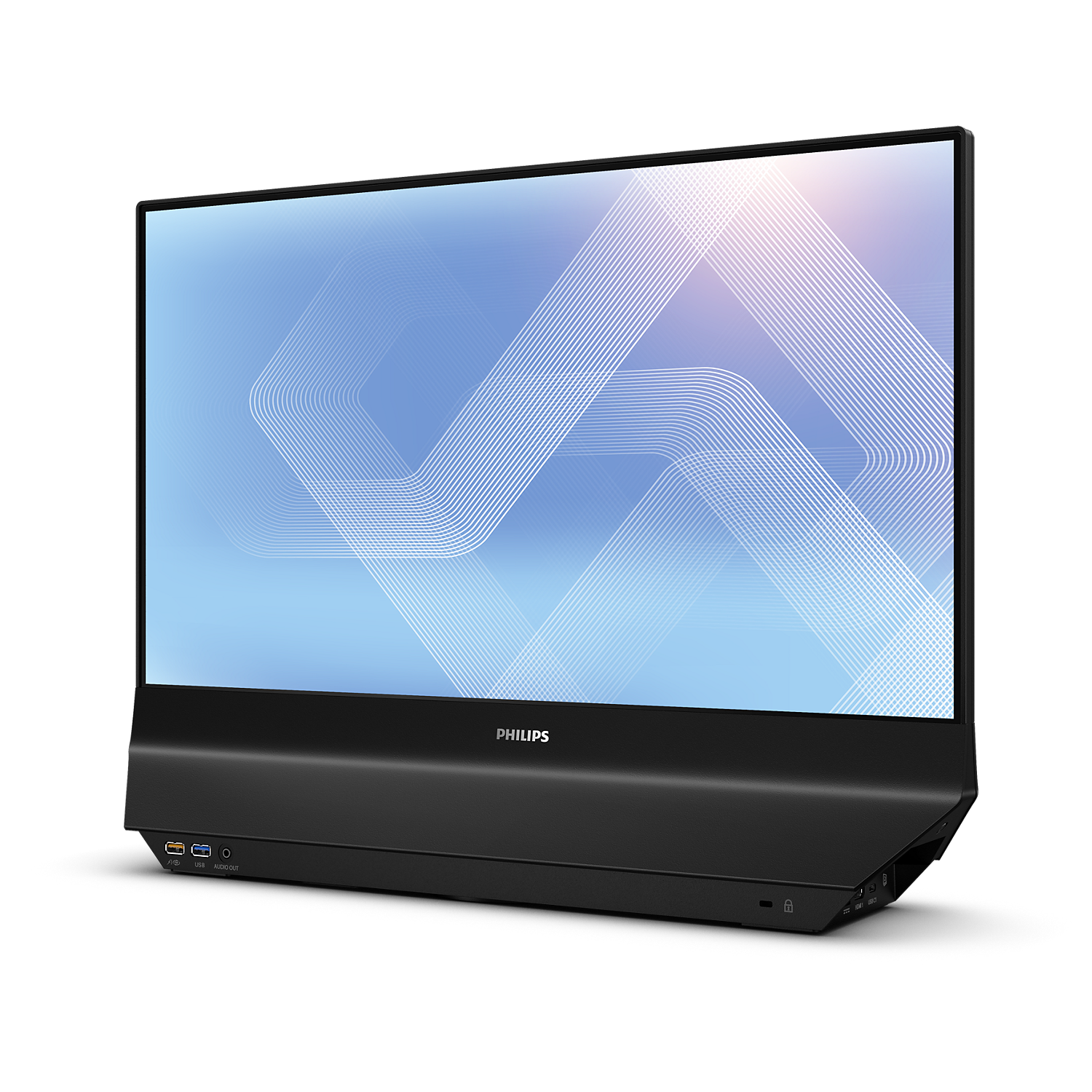
Table of Contents
- What Philips built into the 24B2D5300
- Who the dual-sided design is actually for
- Where the 24B2D5300 cuts corners
- The 24B2D5300 versus a conventional USB-C monitor
- What Philips has not announced
- Who should skip the 24B2D5300
- Frequently asked questions
- The short version
What Philips built into the 24B2D5300
Strip away the party trick and the 24B2D5300 is two mid-range office panels bonded back to back in one chassis. Each side is a 23.8-inch IPS screen at 1920 by 1080, running up to 120 Hz, with the 178-degree viewing angles and roughly 1500:1 typical contrast you would expect from this panel class. Philips lists both screens as identical, so neither side is a cut-down secondary display.
The connectivity is where it earns the “standalone” label. According to Philips, each side carries its own set of inputs rather than sharing one:
- One HDMI input and one USB-C input per side, with USB-C carrying video, data and up to 65 W of power delivery to charge a connected laptop.
- A USB hub and up to gigabit LAN pass-through on each side, so either operator can dock a machine with one cable.
- DualView, which lets each screen run a completely separate source, plus OSD Sync to mirror on-screen settings across both panels at once.
- Built-in stereo speakers, Flicker-Free backlighting, SoftBlue low blue light, and Eyesafe 2.0 certification.
Philips backs it with a two-year warranty in Europe. That spec sheet is coherent for a shared counter, and the 65 W USB-C on each side is genuinely useful. The questions start when you ask what a single person gets for the money.
Who the dual-sided design is actually for
The clean use case is a transaction across a counter. A bank teller confirms a transfer amount and the customer reads the same figure on their side. A pharmacist shows dosage instructions without spinning a screen around. A hotel clerk displays the room rate while keeping the booking system private on the staff-facing panel. DualView makes that possible because the two sides can show different content, so the customer never sees your back office.
There is a smaller creative angle too. A photographer shooting tethered can face the client-side panel toward the subject or the art director for instant review while keeping the capture software on their own screen. Any job where you already turn your laptop around to show someone something is a job the 24B2D5300 was designed to remove.
Notice the shape of that list. Every winning scenario involves a second person on the far side of the desk. If you work alone, the second panel faces a wall, and you have paid for a screen nobody looks at. This is a fixture for customer-facing counters, not a productivity upgrade for a solo work from home desk setup.
Where the 24B2D5300 cuts corners
The resolution is the first compromise. At 23.8 inches, 1920 by 1080 works out to about 93 pixels per inch. Across a counter that is fine, because the customer is reading a number from a metre away. Sat right in front of it for eight hours of spreadsheets, text looks softer than the 1440p and 4K panels most desk workers have moved to. If your day is document-heavy, this is the wrong tool.
The stand is the second. Philips describes a 180-degree swivel base that rotates the whole unit so either side faces out, which suits a shared counter. What the published material does not confirm is a height adjustment, and getting the monitor height right is the most affordable fix for neck strain there is. A conventional office monitor in this price range raises, tilts, swivels and pivots. Treat the 24B2D5300 stand as fixed-height until Philips says otherwise.
Then there is what Philips does not print at all. The company has not published a brightness figure in nits for the 24B2D5300, which matters for a display that may sit under bright retail or lobby lighting. It is also a 120 Hz panel with built-in speakers and a webcam-free bezel, so if you want calls handled at the counter you still need a separate camera or a monitor with a built-in webcam. None of this is disqualifying for its intended job. It just means the spec sheet has real gaps.
The 24B2D5300 versus a conventional USB-C monitor
To see what the second screen costs, line the 24B2D5300 up against a normal 23.8-inch USB-C office monitor from the same panel class. The BenQ GW2486TC is a fair yardstick: same 23.8-inch 1080p IPS format, same 65 W USB-C, and a street price of US$169.99 at Best Buy against a US$199.99 list. The Philips launched in Europe at £359.99, or about US$460. The only Canadian offer found on September 28 was a single Amazon marketplace listing.
| Spec | Philips 24B2D5300 | BenQ GW2486TC (one screen) |
|---|---|---|
| Screens | Two 23.8-inch, back to back | One 23.8-inch |
| Resolution each | 1920 x 1080 IPS | 1920 x 1080 IPS |
| Refresh | 120 Hz | 100 Hz |
| Brightness | Not published | 250 nits |
| Contrast (typ.) | 1500:1 | 1300:1 |
| USB-C power | Up to 65 W, each side | Up to 65 W |
| Speakers | Built-in stereo | 2 W x 2 |
| Stand | 180-degree swivel base, height not confirmed | Height 130 mm, tilt, swivel, pivot |
| Price | £359.99 (about US$460), EU only | US$169.99 street, US$199.99 list |
The comparison writes itself. One BenQ costs roughly a third of the Philips. Buy two of them and you are still under the Philips price, with two fully adjustable stands and the freedom to point each screen wherever you like. The chart below lays the three setups side by side.
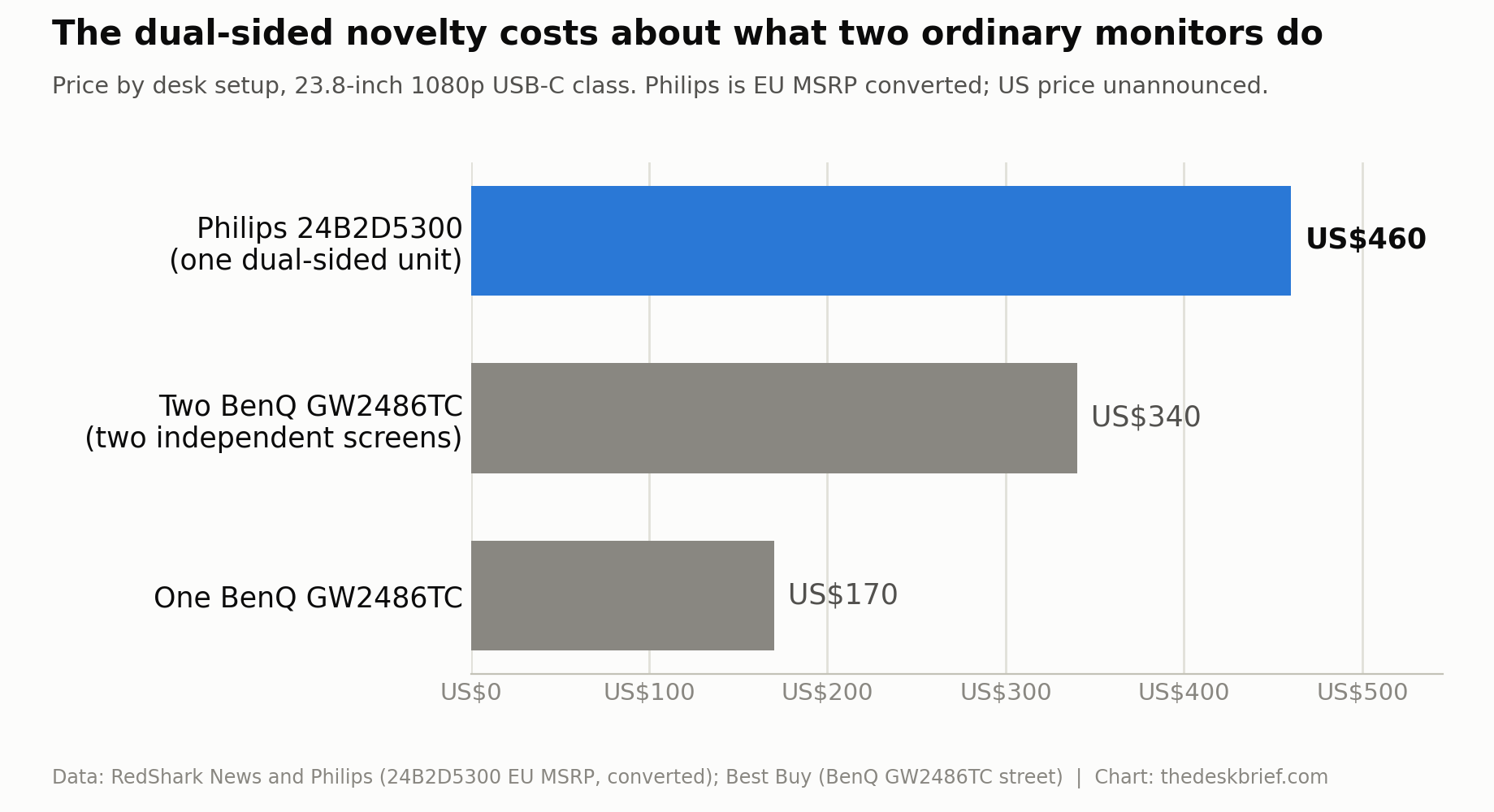
What you are paying the premium for is not performance, it is geometry. Two separate monitors cannot sit spine to spine on a narrow counter and show each face a clean image without a gap or a bezel seam pointed at the customer. The 24B2D5300 solves a physical layout problem. If you do not have that problem, the money is better spent elsewhere. For the broader trade-offs between a fast panel and a work panel, our gaming monitor versus office monitor guide covers the ground.
What Philips still has not announced
Being honest about the gaps matters more here than usual, because the 24B2D5300 is new and the marketing runs ahead of the data sheet. As of this writing, these details are not confirmed:
- An official North American MSRP or broad retail rollout. The only Canadian stock found is a marketplace offer, not a Philips Canada launch.
- Brightness in nits, along with any HDR handling.
- Measured response time and factory colour accuracy, as opposed to the panel-class contrast figure.
- Whether the stand offers any height travel, and the exact VESA mount behaviour given the dual-panel body.
Do not let a spec-sheet blank get filled in by assumption. A single marketplace listing confirms that Canadians can order the monitor, but it does not answer the remaining specification gaps or establish a normal Canadian street price.
Who should skip the 24B2D5300
Skip it if you work alone. A solo desk gets nothing from a rear-facing panel except a bigger bill and a screen aimed at the wall. Skip it if your work is text-heavy, because 93 PPI is a step back from the 1440p and 4K panels that make small type crisp. Skip it if ergonomics drive your buying, since a swivel-only base with no confirmed height adjustment cannot match a normal monitor arm or a height-adjustable stand.
Skip it, too, if you simply want two screens on your own desk. Two conventional USB-C monitors cost less than one 24B2D5300, adjust independently, and face the same direction where you actually need the pixels. The people who should shortlist it are narrow and specific: front-desk and counter staff at banks, clinics, hotels and shops who show information to a customer dozens of times a day and want one tidy box instead of two monitors and a tangle of cables.
Frequently asked questions
Is the Philips 24B2D5300 available in the US or Canada?
Yes, but only through a marketplace offer found on September 28, 2026. Amazon listed the exact model through a marketplace seller. Philips has not announced a Canadian MSRP or broad North American retail rollout.
Can each side of the 24B2D5300 show different content?
Yes. Philips lists a DualView mode where each panel runs its own source independently, so the customer-facing side can show one thing while the operator side shows another. OSD Sync is the option that mirrors settings across both when you want them matched.
Does the 24B2D5300 charge a laptop over USB-C?
Yes, up to 65 W on each side according to Philips, which is enough for most thin-and-light laptops and many 14-inch machines. Each side also acts as a USB hub with up to gigabit LAN, so one cable handles video, data, network and charging.
Is 1080p sharp enough on a 23.8-inch screen?
At counter distance, yes. Up close for all-day reading, it is soft. A 23.8-inch 1080p panel lands near 93 pixels per inch, noticeably coarser than a 1440p screen of the same size. For a customer glancing at a total it is a non-issue; for your own documents it is the main reason to look elsewhere.
The short version
The 24B2D5300 is a clever answer to a specific question: how do you show a screen to the person across the counter without turning yours around. For banks, clinics, hotels and shops, one tidy dual-sided box beats two monitors and a cable knot, and the 65 W USB-C on each side is a real convenience. It earns its niche.
For everyone else, the maths is blunt. At the price of the only Canadian offer we found, the 24B2D5300 costs more than two conventional 23.8-inch USB-C monitors that adjust properly and point where you need them. The resolution is dated, the brightness is unpublished, and the stand looks fixed. Buy it because you have a two-sided counter, not because it sounds futuristic. If you only have one side of a desk, spend the money on pixels and a stand that moves.
Sources: Philips 24B2D5300 product page, RedShark News, New Atlas, and the BenQ GW2486TC specifications.
Editorial rating: 3.5 out of 5. The 24B2D5300 is a clever dual-sided monitor for counters where staff and customers need separate views from one tidy device. Its high price, limited adjustment, and 1080p resolution make conventional dual monitors better for most desks.
Current Canadian offer: see the price on Amazon through one marketplace seller. Prices, seller, and availability can change.