The best photo scanner for most people is the Epson Perfection V19 II. It scans prints, documents, artwork and book pages at up to 4800 dpi optical resolution, needs only a USB connection, and costs much less than a high-speed photo feeder. Large print collections justify the faster Plustek ePhoto Z300 instead.
Every recommendation below was in stock at Amazon.com when checked on October 4, 2026. The comparison separates flatbeds, a photo feeder and a film digitizer because they solve different preservation jobs. It uses published specifications and does not claim hands-on testing. Prices and availability can change.
By Ryan Billings | Updated October 4, 2026.
Best Photo Scanners at a Glance
Disclosure: As an Amazon Associate I earn from qualifying purchases. Retail links are sponsored and do not change the price you pay.
| Pick | Amazon price | Type | Resolution | Best for |
|---|---|---|---|---|
| Epson V19 II | US$89.00 | Flatbed | 4800 dpi optical | Most prints and documents |
| Epson V39 II | US$106.99 | Flatbed | 4800 dpi optical | Oversize photo stitching |
| Plustek ePhoto Z300 | US$219.99 | Sheet-fed | 300 / 600 dpi optical | Boxes of loose prints |
| Kodak Slide N Scan | US$189.99 | Film digitizer | 14 MP sensor | Negatives and slides |
Quick decision: Choose the Epson V19 II for careful scanning of individual prints. Buy the Plustek ePhoto Z300 when speed matters more than very high optical resolution.
How to Choose a Photo Scanner
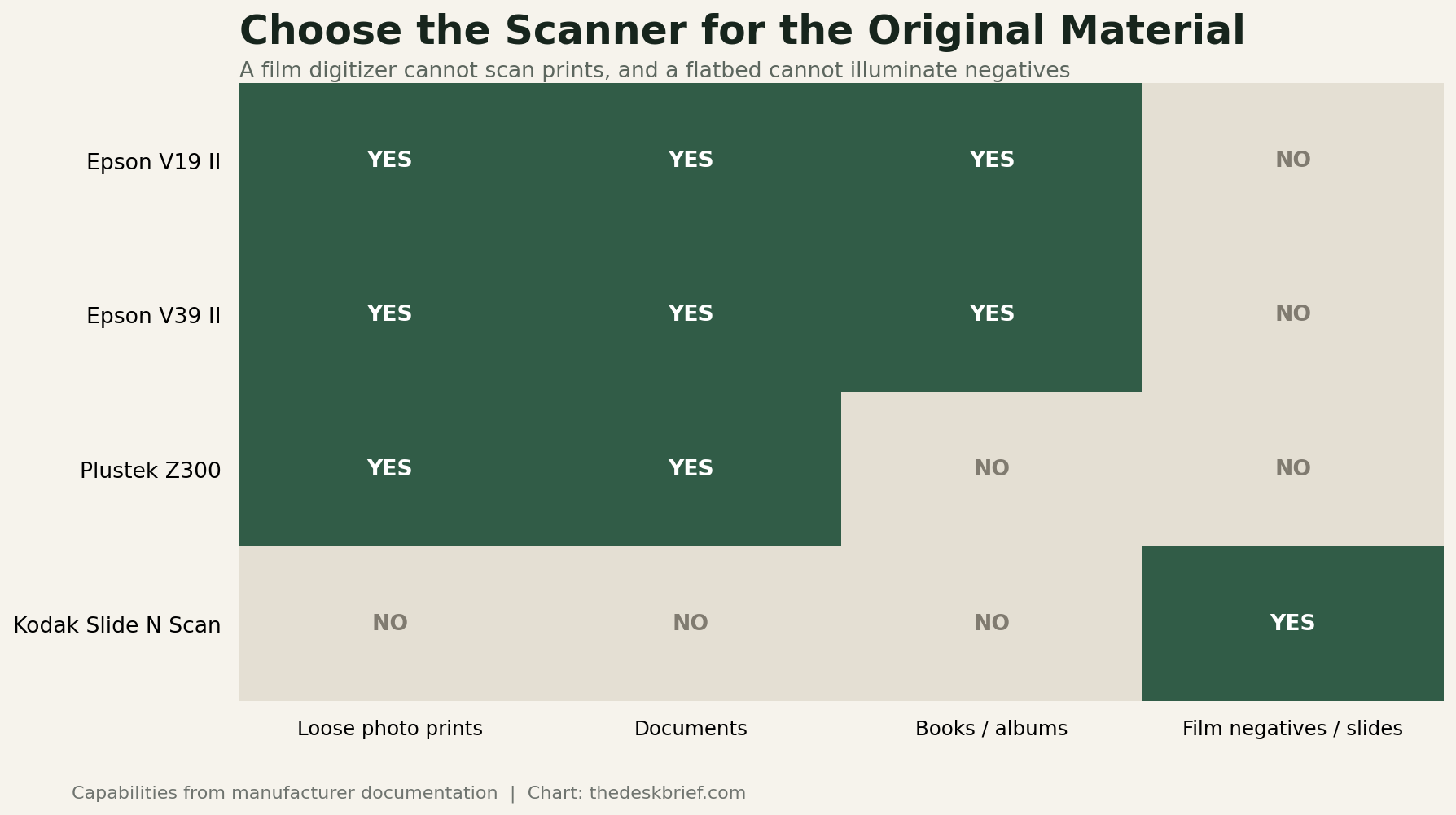
Choose by the original material, not the highest resolution on the box. A flatbed keeps fragile, curled or mounted prints stationary and can scan album pages or books. A sheet-fed photo scanner is much faster for a box of clean loose prints, but rollers can mark delicate surfaces and cannot accept a bound album. A film digitizer provides the backlight and holder needed for negatives and slides.
Resolution should match the source and intended output. A 4-by-6-inch print scanned at 600 dpi produces roughly 8.6 megapixels, enough for preservation, sharing and moderate reprints. Higher settings create larger files and slower scans without inventing detail absent from the print. Very high optical resolution helps with small originals, detailed artwork and aggressive crops.
Save an archival master separately from edited copies. TIFF avoids repeated lossy compression, while high-quality JPEG is smaller and convenient for sharing. Use consistent file names containing an approximate date, event and people. Keep at least two copies on different devices, with one off-site. A scanner converts the physical object; it does not provide a backup strategy.
Best Overall: Epson Perfection V19 II
The Epson Perfection V19 II at Amazon was in stock at US$89.00 when checked. It is a USB-powered letter-size flatbed with 4800 dpi optical resolution, a high-rise removable lid and buttons for common scan jobs. Epson includes color-restoration and searchable-PDF features in its ScanSmart workflow.

The removable lid is more useful than it sounds. It accommodates book pages, albums and thicker objects that cannot sit under a fixed shallow cover. Because the original stays on glass, the scanner is also safer for brittle or oddly shaped prints than a roller-fed machine. Epson states that a letter-size scan at 300 dpi can take about 10 seconds.
The V19 II is not the right machine for thousands of loose snapshots. Every print must be placed, scanned and removed manually, and image processing adds time. Epson describes its stitching as basic on the official V19 II product page. Choose the V39 II for more ambitious oversized stitching, or Plustek for throughput.
Best Flatbed for Oversized Originals: Epson V39 II
The Epson Perfection V39 II at Amazon was in stock with limited availability at US$106.99. Like the V19 II, it provides 4800 dpi optical resolution, USB power, a removable high-rise lid, one-touch controls and color-restoration software.

The upgrade is advanced photo stitching. It is designed to combine overlapping scans of artwork or photographs larger than the 8.5-by-11.7-inch bed. That can preserve scrapbook pages, maps and larger prints without purchasing an expensive A3 scanner. A flatbed also allows several small photos to be scanned together and separated in software.
Do not pay more expecting a faster bulk-photo workflow or film holders. The scanning mechanism and 4800 dpi headline resemble the cheaper model, and neither V19 II nor V39 II is a transparency scanner. The official V39 II page identifies advanced stitching as the principal distinction. Limited Amazon stock also makes the live price worth checking.
Best for Boxes of Loose Prints: Plustek ePhoto Z300
The Plustek ePhoto Z300 at Amazon was in stock at US$219.99. It is a sheet-fed CCD scanner with 300 and 600 dpi modes. Plustek rates a 4-by-6-inch print at approximately two seconds and an A4 document at approximately five seconds.

Automatic triggering is its advantage. Insert a photo, let the rollers feed it, and prepare the next while software saves and processes the scan. The accepted area runs from one inch square to 8.5 by 11.7 inches, so it handles common snapshots and full-page documents. Auto crop, deskew and image-adjustment tools reduce repetitive cleanup.
A feeder should not be the first choice for cracked, flaking, heavily curled, sticky or irreplaceable prints. Place those on a flatbed or use a professional service. The Z300 also does not scan film. Plustek’s official ePhoto Z300 page emphasizes speed, while its published manual confirms 300/600 dpi optical resolution and the 0.76 mm maximum non-embossed thickness.
Best for Negatives and Slides: Kodak Slide N Scan
The Kodak Slide N Scan at Amazon was in stock at US$189.99. It digitizes 135, 110 and 126 color negatives, black-and-white negatives and 50 mm slides using a 14-megapixel CMOS sensor. Its five-inch screen provides preview and basic editing without a computer.

This is the only pick here with the illumination and holders required for film. Files save to an SD or SDHC card up to 32 GB, which is required and not included. HDMI output allows a television preview, and the continuous-feed holders speed movement through a roll or stack of mounted slides.
The advertised 22-megapixel mode is interpolation, not extra sensor detail. A dedicated high-end film scanner or professional drum scan can extract more information and offer stronger dust removal, but at a much higher cost or slower pace. The official Slide N Scan specifications state the native 14-megapixel sensor and supported formats. Do not buy it for paper prints.
A Sensible Photo-Scanning Workflow
Sort before scanning, but do not turn sorting into a year-long prerequisite. Start with one dated envelope or album. Remove surface dust with tools appropriate to the material, clean the scanner glass as directed, and scan a small test group. Check focus, orientation, color and file location before processing hundreds more. Wear clean lint-free gloves when the film manufacturer or archive guidance recommends them.
Create archival masters with minimal automatic correction, then make edited copies for sharing. Record names and dates in metadata or a companion document while someone still remembers them. Back up the files before returning originals to storage. For an organized digitization station, the cable-management guide can keep drives, envelopes and scan batches identifiable.
Who Should Skip Buying a Photo Scanner
Use a professional service when originals are fragile, mould-damaged, historically important or stored on an unsupported film format. Outsourcing also makes sense for a one-time collection when the equipment would never be used again. Ask whether the service returns full-resolution files, what corrections are applied and how long uploaded images remain on its systems.
Continue Building the Small Office
This guide is part of The Desk Brief’s small-office equipment series. After comparing photo scanners, continue with paper shredders. Each guide uses the same Amazon-stock and manufacturer-specification checks.
Frequently Asked Questions
Is 600 dpi enough for old photos?
Six hundred dpi is a strong general-purpose setting for common photo prints. It preserves enough detail for sharing, modest enlargement and future editing without producing extreme file sizes. Small originals and detailed artwork may benefit from more; ordinary prints often contain little additional detail.
Can a flatbed scanner scan negatives?
Only a flatbed designed with a transparency light and suitable film holders can properly scan negatives. The Epson V19 II and V39 II do not include that system. Use a dedicated film scanner such as the Kodak pick or a photo service.
Should I save scans as TIFF or JPEG?
Use TIFF for archival masters when storage permits and JPEG for easy sharing. Keep the unedited master, then export smaller corrected copies. Whatever format you choose, multiple verified backups matter more than a theoretical format advantage stored on one drive.
The Short Version
The Epson V19 II is the best photo scanner for most households because its flatbed handles prints, documents, books and artwork at a reasonable price. V39 II adds better stitching for oversized originals. The Plustek ePhoto Z300 is worth the premium for quickly processing boxes of loose prints. Kodak Slide N Scan is a different tool entirely and should be chosen only for negatives and slides.