Disclosure: This page contains affiliates. If you buy through them, The Desk Brief may earn a commission at no extra cost to you.
Having owned eero’s for over 5+ years, I know how good these devices are and how well they perform, always. Whether you are looking for easy installation of the ability to incorporate a mesh network in your home, office, or workplace, they really are great. That being said, If you are looking at the eero Max 7, the first question is not whether it is fast. It clearly is. The useful question is whether your home can take advantage of enough of that speed to justify Check current price for one router. I run an Eero mesh system at home, and I like it because it made the network boring in the best possible way. This is my honest breakdown of the current Eero Wi-Fi 7 lineup, not a claim that I have tested the Max 7 itself.
The answer for most homes is surprisingly simple. The Eero 7 is the sensible buy. The Eero Pro 7 is the more interesting upgrade because it adds the 6 GHz band and faster Ethernet without jumping all the way to Max 7 pricing. The Max 7 is for a narrower buyer with multi-gigabit internet, fast wired hardware, demanding wireless clients, or a home lab that can actually make four Ethernet ports useful.
Use the linked Amazon.ca and Best Buy Canada pages to compare current prices before buying. Speed and coverage figures below are Eero’s maximum ratings, not results from my home.
Last updated: August 30, 2026.
Eero Max 7 vs Eero 7 vs Eero Pro 7
All three are Wi-Fi 7 systems, work with earlier Eero hardware, and can act as either a gateway or a mesh node. The differences are in the radios, ports, rated speed, and price. Comparing single units keeps the value question fair.
| Model | Single-unit price | Wi-Fi and bands | Coverage per unit | Ethernet ports | Maximum rated speed |
|---|---|---|---|---|---|
| Eero 7 | Check current price at Amazon.ca or Best Buy | Wi-Fi 7, dual-band 2.4 and 5 GHz |
Up to 190 m² | Two 2.5 GbE | Up to 2.3 Gbps wired Up to 1.8 Gbps wireless |
| Eero Pro 7 | Check current price at Amazon.ca or Best Buy | Wi-Fi 7, tri-band 2.4, 5, and 6 GHz |
Up to 190 m² | Two 5 GbE | Up to 4.7 Gbps wired Up to 3.9 Gbps wireless |
| Eero Max 7 | Check current price at Amazon.ca or Best Buy | Wi-Fi 7, tri-band 2.4, 5, and 6 GHz |
Up to 230 m² | Two 10 GbE Two 2.5 GbE |
Up to 9.4 Gbps wired Up to 4.3 Gbps wireless |
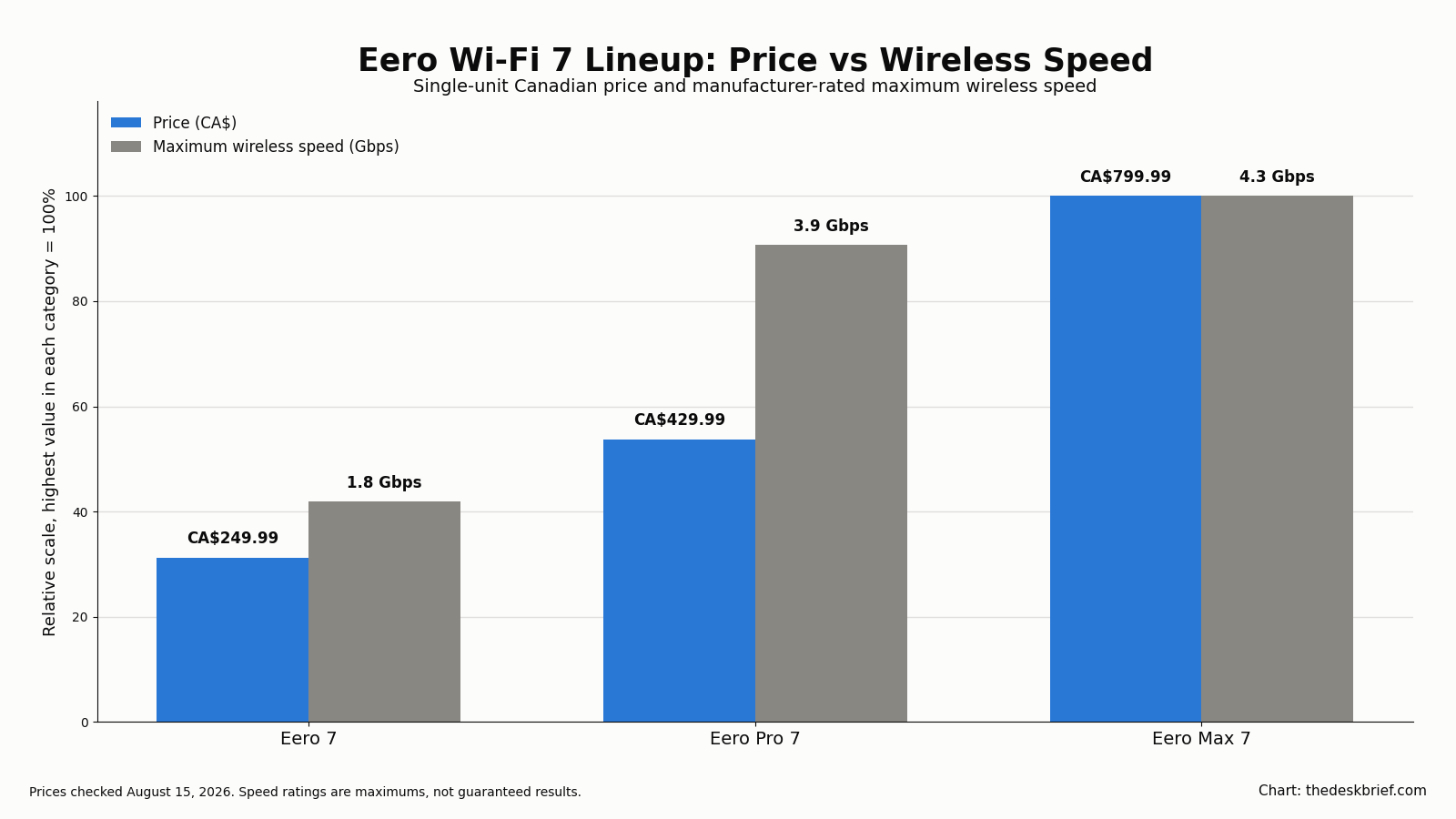
The numbers come from Eero’s Canadian comparison page. Pay attention to what the Max 7 does not do. Its rated wireless ceiling is only 0.4 Gbps higher than the Pro 7. The larger gains are its four Ethernet ports, two 10 GbE connections, more capable 5 GHz and 6 GHz radios, and an extra 40 m² of claimed coverage. That is excellent hardware, but it is specialized hardware.
What the price and speed numbers really mean
The Eero 7 costs less than one-third of the Max 7 price while supporting internet plans up to 2.5 Gbps. That already exceeds the connection in many Canadian homes. It also has two 2.5 GbE ports, so a fast modem or wired computer is not automatically limited to gigabit Ethernet.
Its biggest compromise is the dual-band design. There is no 6 GHz radio. In a wireless mesh, nodes need to communicate with each other while also serving phones, laptops, TVs, and smart devices. A tri-band Pro 7 or Max 7 has more radio capacity for that job. The difference matters more when nodes use wireless backhaul, the home is busy, and newer clients support 6 GHz.
The Pro 7 is the middle ground I would look at first for a premium build. It supplies tri-band Wi-Fi 7, two 5 GbE ports, and a wireless rating close to the Max 7 for less per unit. Its coverage rating matches the Eero 7 rather than the Max 7, but buying more claimed square metres is not always the right fix. Walls, floors, ducts, masonry, placement, and interference can matter more than a number on the box.
The Max 7 earns its name on wired networking. Two 10 GbE and two 2.5 GbE ports let one unit connect a multi-gigabit modem, a fast switch or server, and additional wired devices without an immediate external switch. If you move large files to a NAS, operate a home lab, or use multi-gigabit wired backhaul between nodes, that port layout is meaningful. If your fastest wired device has a 1 GbE port, it is mostly expensive unused capacity.
Who actually needs the Eero Max 7?
I would consider the Max 7 when at least two of these points are true:
- You pay for internet above 2.5 Gbps and have a modem or optical terminal with a matching Ethernet port.
- You already own a NAS, workstation, server, or switch with 5 GbE or 10 GbE networking.
- You need wired multi-gigabit backhaul and want four usable Ethernet ports on a node.
- Your important clients support Wi-Fi 7 and 6 GHz, and you regularly move very large local files.
- You need the higher per-unit coverage rating and have a layout where one well-placed Max 7 could replace multiple weaker nodes.
A creator editing from network storage, a household with a genuinely fast fibre plan, or an enthusiast running local services can make a case for it. My self-hosted cloud storage build is the kind of project where faster local Ethernet can improve large transfers, although the server, storage, switch, and client all need to support that speed. A 10 GbE label on the router cannot accelerate a gigabit server port or a slow hard drive.
There is also a simpler reason to buy it: you want the top Eero and the Check current price price is comfortable. That is a preference, not a technical requirement. I would still avoid buying several Max 7 units just for ordinary streaming, video calls, and smart-home devices. Those workloads do not come close to using this hardware.
Who should save money with the Eero 7?
Buy the Eero 7 if you want straightforward mesh coverage, your internet plan is 2.5 Gbps or slower, and most of your devices use Wi-Fi 6 or earlier. That describes a large share of real homes. Web browsing, 4K streaming, cloud backups, game downloads, and work calls do not require a Check current price router.
Compare the current one-unit and three-pack prices at both retailers. A three-pack can cost less than one Max 7. More nodes are not automatically better, but a properly placed three-node system can solve coverage problems that one powerful router cannot.
Choose the Pro 7 instead when you want 6 GHz, wireless backhaul will carry heavy traffic, or 5 GbE better matches your next few years of upgrades. It is not a token model between the cheap and expensive options. For many enthusiasts, it is the lineup’s best balance.
Most homes do not need Wi-Fi 7 yet
Wi-Fi 7 brings useful technology, including multi-link operation, wider channels, more capacity, and lower potential latency. The catch is that both ends of a connection need the right hardware, and the environment has to cooperate. Your Wi-Fi 6 phone does not become a Wi-Fi 7 phone because the router changed. A distant client behind several walls will not hold a headline speed simply because the box says BE20800.
Internet speed is another ceiling. If the service entering the home is 500 Mbps, a faster router may improve local transfers and congestion, but it cannot turn a 500 Mbps internet plan into 4.3 Gbps. Even on a multi-gigabit plan, a website, VPN, remote server, or client device may become the limiting point.
That does not make Wi-Fi 7 pointless. Routers usually stay in service for years, and buying the current standard can make sense during a replacement. It does mean that future-proofing has a price limit. Paying more for the Pro 7 over the Eero 7 can be reasonable for a tri-band radio and 5 GbE ports. Paying more for the Max 7 needs a clearer use.
What independent Eero Max 7 tests found
The independent reviews make the same value problem clearer. RTINGS’ lab review found strong close-range performance and enough throughput for multi-gigabit connections, while also flagging that advanced security, content filters, and VPN features require Eero Plus. Tom’s Guide’s testing praised the simple setup and performance near the router but found speeds fell more sharply at longer distances. Those are independent test findings, not results from my house.
That evidence does not make the Max 7 a bad router. It makes placement, wired backhaul, and the paid-feature model part of the buying decision. If your priority is ordinary whole-home coverage rather than multi-gigabit local traffic, buying more sensibly priced nodes can matter more than buying the fastest single unit.
What running Eero at home has taught me
My Eero experience began as a practical replacement for a home-built router. In my home server history, I explain that an Ubuntu machine had handled routing, DHCP, and file storage since 2010. By 2021, its old networking hardware had become a bottleneck. Consumer Eero mesh hardware had become good enough, actually really good, to handle the network without asking me to remain my own router vendor.
That distinction matters. I am comfortable running servers, containers, storage, and private remote access. I even have a separate home AI agent setup guide for people who want another hands-on project. I still chose consumer mesh for household routing because reliability and easy administration were worth more than preserving a custom system out of pride.
What I can say from that experience is that Eero’s appeal is not just a speed number. It is the ability to provide coverage and routine management without making networking a permanent side job. What I cannot say is how the Max 7 performs in my own rooms, because I have not tested that model. Its maximums should be treated as selection guidance, not a promise about your walls, devices, or interference.
Placement still deserves thought. Start with the fewest nodes that cover the home well. Put them in open areas rather than cabinets, and avoid placing them so far apart that each node is repeating a weak signal. Use wired backhaul where it is practical. Adding too many nearby nodes can create more contention, not magical extra speed.
My buying advice
For an ordinary home starting fresh, I would buy the Eero 7 and keep the receipt until placement is proven. For a busy home, premium fibre connection, or wireless mesh with newer 6 GHz clients, I would step up to the Pro 7. I would buy the Max 7 only after identifying which 10 GbE ports, fast local devices, or coverage need will repay the additional cost over the Pro 7.
Also compare the cost of cabling. A modest router with wired backhaul can outperform a much more expensive wireless arrangement in a difficult building. Spending part of the Max 7 premium on one clean Ethernet run and a switch may produce the better network.
Frequently asked questions
Is the Eero Max 7 worth Check current price?
It can be worth it for multi-gigabit internet, 10 GbE local networking, wired backhaul, or demanding Wi-Fi 7 clients. For normal streaming, calls, browsing, and smart devices, the Eero 7 or Pro 7 is better value.
What is the main difference between Eero Pro 7 and Max 7?
Both are tri-band Wi-Fi 7 routers. The Pro 7 has two 5 GbE ports, up to 190 m² of coverage, and a 3.9 Gbps maximum wireless rating. The Max 7 has two 10 GbE plus two 2.5 GbE ports, up to 230 m² of coverage, and a 4.3 Gbps wireless rating.
Does the Eero 7 use the 6 GHz band?
No. Eero 7 is a dual-band system using 2.4 GHz and 5 GHz. Eero Pro 7 and Eero Max 7 are tri-band models that add 6 GHz.
Can I mix these models with my existing Eero mesh?
Yes, Eero says its current Wi-Fi 7 models are backward compatible with earlier Eero generations. The overall experience still depends on node placement, backhaul, client capability, and which unit acts as the gateway.
The Short Version
- The Eero 7 is the best value for most homes. Check the current price; it has Wi-Fi 7, two 2.5 GbE ports, and up to 1.8 Gbps rated wireless speed.
- The Eero Pro 7 is the smart premium choice. Check the current price; it it adds tri-band Wi-Fi, 6 GHz, and two 5 GbE ports.
- The Eero Max 7 makes sense when you can use its four Ethernet ports, 10 GbE connections, higher-capacity radios, or extra coverage. I have not tested this model personally.
- I use Eero mesh at home because it replaced an aging DIY router with reliable coverage and simpler administration. Most households still do not need Wi-Fi 7, let alone the most expensive version of it.
Editorial rating: 3.5 out of 5. The eero Max 7 is fast, easy to administer, and well equipped for multi-gigabit wired backhaul and demanding Wi-Fi 7 clients. Its high price and subscription-gated advanced features make the eero Pro 7 or eero 7 better value for most homes.
Current offer checked August 30, 2026: CA$799.99 at Best Buy Canada, in stock. Prices and availability can change.