To make a PC turn on automatically after a power outage, enter the BIOS, find Restore AC Power Loss, AC Recovery, After Power Failure, or AC BACK, and set it to Power On. Press F10 to save, then disconnect and reconnect AC power to test it. If the PC uses a UPS, enable the UPS software’s output-off or killpower step so the motherboard sees power disappear and return.
Auto power on after power outage sounds like the most boring setting in your BIOS, right up until your home server spends seven days pretending to be furniture. Mine did exactly that last week. The power went out on a Monday morning, the UPS did its job perfectly, the server shut down cleanly, and then it never came back. Not that evening. Not the next day. Seven days of silence until I walked over and pressed the power button like it was 1998.
If you run a home server, a NAS, or even a desktop you reach over remote desktop, this is the failure mode you probably have not tested. Here is exactly what went wrong on my machine, why the obvious BIOS fix is not enough on its own, and how to build a restart chain that actually recovers without you standing in front of it.
Last updated: August 29, 2026. Current Intel, MSI, Gigabyte, and Dell BIOS names and firmware guidance rechecked.
Everything Worked, and It Still Failed
My server is an old desktop build (a 2014-era ASUS Z97 board with an i7-4770K) sitting behind an APC UPS, running apcupsd to manage shutdowns. This is the same box that runs my home AI agent setup, my file sync, my media library, and the DNS filtering for the entire house. When it goes down, every device in my home gets noticeably dumber.
Here’s the actual event log from the morning it happened:
2026-06-29 08:08:35  Power failure.
2026-06-29 08:08:41  Running on UPS batteries.
2026-06-29 09:24:31  Reached remaining time percentage limit on batteries.
2026-06-29 09:24:31  Initiating system shutdown!
Seventy-six minutes on battery, then a clean, graceful shutdown. Every filesystem unmounted properly. My shutdown script even armed the motherboard’s real-time clock to wake the machine three minutes later so it could check whether the power was back. If you showed me that log in isolation, I’d be proud of it.
The board never fired that wake alarm. Not once. The journal shows zero boot attempts between June 29 and the day I noticed. One missed wake, and the whole recovery plan was dead, because there was nothing left to try again.
Why the Famous BIOS Setting Didn’t Save Me
Every auto power on after power outage guide points you at one setting: Restore AC Power Loss (ASUS calls it that; Intel and others call it AC Power Recovery or After Power Loss). It has three options. Power Off means stay dead when power returns. Power On means boot every time AC comes back. Last State means return to whatever the machine was doing when power was lost.
It’s a genuinely good setting. It’s also the part every guide gets lazy about, because there’s a trap: the motherboard can only react to power coming back if power actually went away. And the entire job of a UPS is to make sure it never goes away.
Walk through my outage again. The UPS switched to battery, the server shut down gracefully, and then the UPS kept feeding the power supply’s standby rail off the battery. From the motherboard’s point of view, AC never dropped. When street power returned, there was no off-to-on transition for the BIOS to notice. The setting had nothing to react to. My server didn’t ignore the recovery plan; the recovery plan was never triggered.
The fix for this is a UPS feature with the alarming name of killpower. After the operating system halts, the UPS is told to cut its own output completely. Now the motherboard genuinely loses power, and when the grid comes back, the UPS re-energizes its outlets and the BIOS sees a real AC restore event. The apcupsd manual covers this, and I’ll be blunt: I had it disabled, because a graceful shutdown felt like the finish line. It isn’t.
How to Set Up Auto Power On After Power Outage Recovery
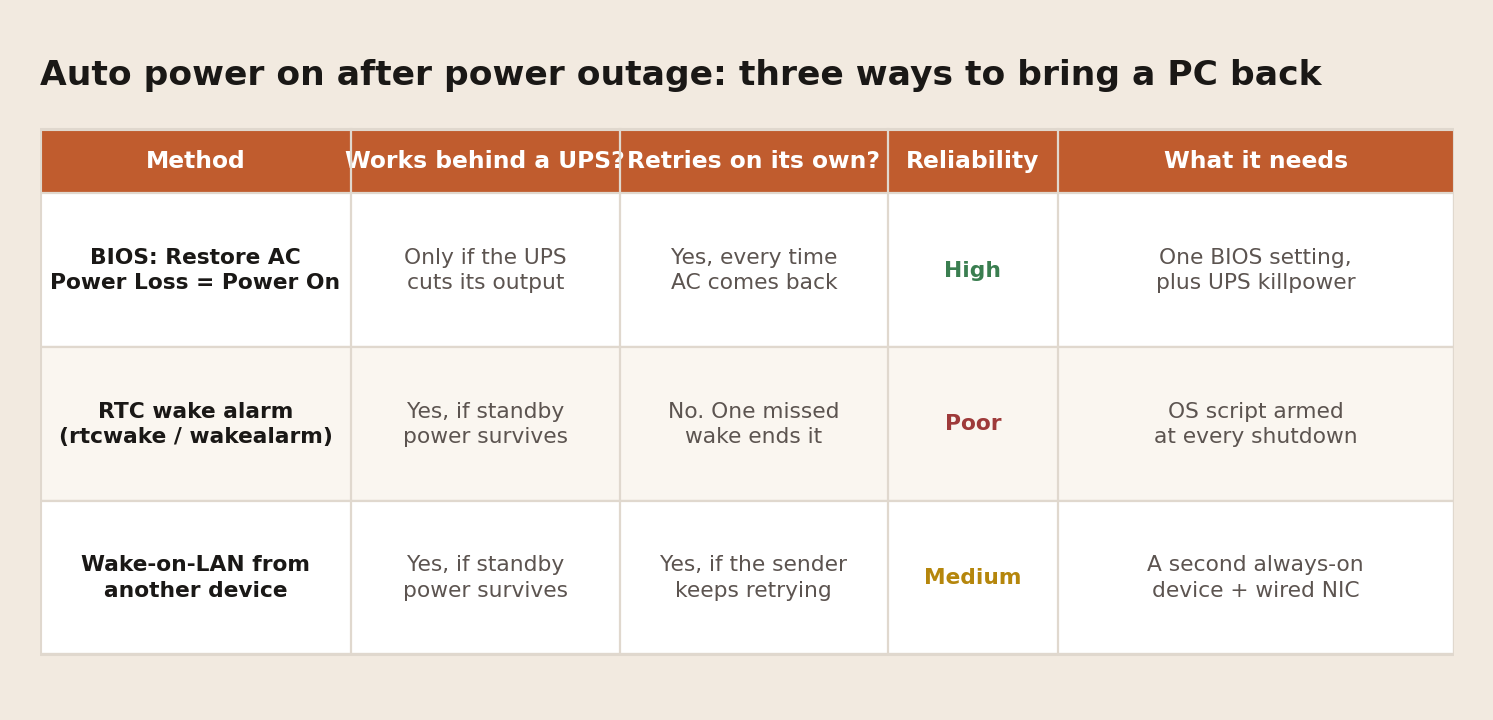
There are three real mechanisms, and they aren’t equal. I’ve now been burned by the middle one personally.
BIOS Setting Names by PC and Motherboard Brand
| Brand | Setting name | Typical menu | Choose |
|---|---|---|---|
| ASUS | Restore AC Power Loss | Advanced > APM Configuration | Power On |
| MSI | Restore after AC Power Loss | Advanced > Power Management Setup | Power On |
| Gigabyte | AC BACK | Power Management | Always On |
| Intel server boards | After Power Failure or AC Power Recovery | Power | Power On |
| Dell | AC Recovery | Power Management | Power On |
Firmware can matter too. Dell documented an AC Recovery fault on specific 16th-generation PowerEdge systems running BIOS 2.2.7 or 2.2.8. Its current fix is BIOS 2.3.5 or later. If the correct setting does not work, check the vendor’s release notes before assuming the motherboard cannot recover.
1. BIOS AC Restore (Plus Killpower if You Have a UPS)
This is the foundation of auto power on after power outage recovery, and the only method that retries by itself every single time power returns. On ASUS boards it lives under Advanced, then APM Configuration. Intel’s guide shows the equivalent for their boards. Set it to Power On, not Last State.
Why not Last State? Because if your UPS shut the machine down gracefully before the battery died, the last state was off. Power returns, and the board faithfully restores it to off. Last State is the right choice for a desktop that gets yanked mid-session. For anything that shuts itself down on battery, it’s a trap.
If you’re behind a UPS, pair it with killpower so the board actually sees the outage. Without that step, this setting can sit there doing nothing, which is exactly what mine did.
2. RTC Wake Alarm (The One That Betrayed Me)
Your motherboard’s real-time clock can wake the machine at a scheduled moment, even from full power-off. My setup armed it at every shutdown: wake in three minutes, boot, check whether we’re still on battery, shut down again and re-arm if so. On paper it’s a self-healing loop.
In practice, wake-from-poweroff is flaky on consumer boards. Mine had already failed a test back in March, and I filed that under “probably fine.” It was not fine. The loop has a fatal property: the alarm is one-shot. If the BIOS misses a single wake, nothing ever re-arms it, and the machine sleeps until a human shows up. Server boards with proper management hardware handle this reliably. A 2014 gaming board apparently rolls dice.
Keep it as a backup layer if your board supports it. Just don’t let it be the only plan, and test it more than once before you trust it, because intermittent is worse than broken.
3. Wake-on-LAN From a Second Device
A smart plug, a Raspberry Pi, or your router can send a magic packet to wake the server once the network is back up. This one can retry forever, which makes it a nice safety net. It comes with fine print, though. The network card needs standby power to hear the packet, most USB network adapters can’t do it from full power-off at all, and you need a second device that reliably survives the outage and comes back on its own. If you’re already deep into smart home and desk automation, you likely have something suitable plugged in already.
What I’m Changing on My Server
Three things, in order of importance. First, Restore AC Power Loss goes to Power On next time I’m physically at the machine. Second, killpower gets enabled in apcupsd so the UPS cuts output after halt and the BIOS actually sees power return. Third, the RTC wake loop stays, demoted from “the plan” to “a bonus.”
Then comes the part almost nobody does with auto power on after power outage setups: test them the ugly way. Shut the machine down, pull the UPS from the wall, let the output die, plug it back in, and watch what happens. A recovery plan you haven’t watched work is a guess. I had a guess. It cost me a week of downtime, missed backups, and a house full of devices asking where their DNS went.
One honest caveat: leaving Power On enabled means the machine boots every time power returns, including during those flickery storms where the grid stutters three times in ten minutes. A decent UPS absorbs most of that, but if your area gets rapid-fire outages, be aware your server may ride through a few boot cycles. I’ll take that over a silent week any day.
FAQ
Why won’t my PC turn on by itself after a power outage?
Because almost every motherboard ships with its AC recovery setting on Power Off or Last State. Staying off after power loss is the factory default, and no operating system setting can override it. The fix lives in the BIOS, not in Windows or Linux.
Do auto power on after power outage settings work behind a UPS?
Only if the UPS cuts its output after the shutdown finishes. If the UPS keeps the standby rail alive on battery, the motherboard never sees AC drop, so it never sees AC return either. Enable your UPS software’s killpower (apcupsd) or equivalent shutdown-and-return feature (NUT, PowerChute) so the outage is real from the motherboard’s perspective.
Should I pick Power On or Last State?
Power On for servers and anything headless. Last State only makes sense for machines that lose power while running. A UPS-managed graceful shutdown makes your last state “off,” which quietly defeats the whole feature.
Is Wake-on-LAN enough on its own?
No. It needs a second always-on device to send the packet, a wired network card with standby power, and the right BIOS options enabled. It’s a great retry layer on top of the BIOS setting, not a replacement for it.
The Short Version
A graceful shutdown is only half a plan. Set Restore AC Power Loss to Power On, enable killpower if a UPS sits in front of the machine, keep RTC wake or Wake-on-LAN as a second layer, and then actually test the whole chain by pulling the plug. If you self-host anything that matters (and if you’ve done a digital privacy audit, you probably should), configure auto power on after power outage recovery this week, not after your own server takes an unplanned vacation. Mine took seven days. Yours doesn’t have to.