A monitor with built-in webcam sounds like one less thing to buy: no clip-on camera clamped to your bezel, no spare USB cable crossing the desk, no cheap plastic eye staring back at you all day. Dell just turned that pitch into a real product with the Pro P34, a 34-inch ultrawide with a pop-up camera up top and a launch price of CA$1,023 (US$729.99).
Prices checked and links verified September 2026.
This page contains affiliate links. If you buy through these links, we may earn a small commission at no extra cost to you. Full disclosure.
Currency note: Canadian dollar equivalents use the Bank of Canada daily average of 1 USD = 1.4014 CAD on July 17, 2026. Converted amounts are approximate; the original US price is shown in brackets.
The P3426WEV, to use its full name, arrived next to a 24-inch and a 27-inch sibling, and all three share the same Sony Starvis 5-megapixel sensor, Windows Hello face sign-in, and a privacy shutter you close by hand. Notebookcheck was among the first to flag it. What nobody tells you in the launch copy is whether baking the camera into the glass is smart, or whether you are better off with a plain monitor and a webcam you can swap on its own. That is the real question here, and the answer depends on how you work.
I have not had a P34 on my desk, so every number below comes from Dell and from reviewers who logged the specs. Where I am guessing, I say so.
Table of Contents
- What the Dell Pro P34 actually is
- Why a monitor with built-in webcam even exists
- The camera, and where it beats a clip-on
- Where a clip-on webcam still wins
- The rest of the family: 24, 27, and 34 inch
- Get it to eye level or the camera is wasted
- Who Should Skip This
- Monitor with built-in webcam FAQ
- The Short Version
What the Dell Pro P34 actually is
Strip the camera off and the P3426WEV is a competent, unflashy office ultrawide. TFTCentral lists a 34-inch IPS panel at 3440 by 1440, a 100Hz refresh rate, a gentle 3800R curve, and 109 pixels per inch. Brightness is 350 nits, contrast is 1500:1, and colour covers 99% of sRGB at 10-bit. Those are honest office numbers, not creator numbers. Dell Pro P3426WEB on Amazon
The back is where it earns the “hub” in its name. One USB-C cable carries video, data, and 90W of power to a laptop, and the monitor hands back Gigabit Ethernet, three USB-A ports, HDMI 1.4, and DisplayPort 1.4. The stand tilts, swivels, and raises, and the panel carries a 4-star TÜV Rheinland Comfort 3.0 rating for eye comfort. If you have wondered about the gap between a gaming panel and an office one, this is squarely the office side: no HDR worth the name, no wide gamut, and HDMI capped at 1.4.
Why a monitor with built-in webcam even exists
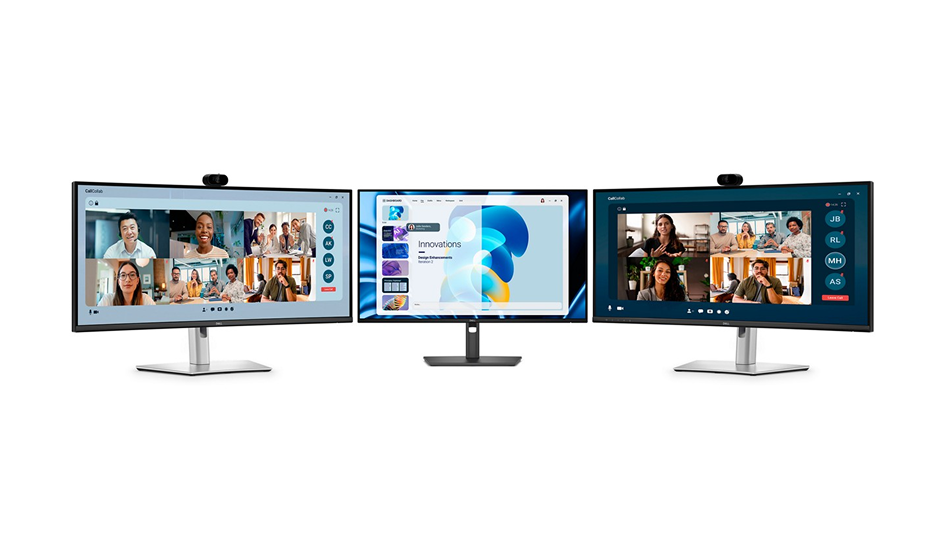
The case for a monitor with built-in webcam is simple: it deletes hardware from your desk. If you take calls most days, you already own a webcam, and it probably sits on top of a screen that has its own cables and its own stand. Dell’s bet is that people would rather buy one box that does both and connects to the laptop with a single cord.
There is a security angle too. The camera doubles as a Windows Hello sensor, so the screen logs you in by face the moment you sit down. Pair that with the one-cable docking, and the pitch is a cleaner desk with fewer things to plug in. If clutter is your enemy, our notes on desk cable management still apply, and the single USB-C run here does real work toward that goal.
The camera, and where it beats a clip-on
The camera is the reason to care. Dell’s own newsroom describes a Sony Starvis 5-megapixel HDR sensor with AI auto-framing that keeps you centred as you shift in your chair, an 81-degree field of view, an f/3.4 lens, and an infrared channel for Windows Hello. It outputs QHD video, a clear step over the 720p and soft 1080p cameras baked into most laptops.
Height is the quiet advantage. A laptop camera shoots up your nose from the desk. A monitor with built-in webcam sits the lens at the top of a large screen, roughly at eye level once the panel is raised, so you look level into the call instead of down at it. That single change does more for how you come across on video than any megapixel count. The privacy shutter, a physical slider over the lens, closes the obvious objection to a camera you cannot unplug.
Where a clip-on webcam still wins
Now the honest side. The catch with any monitor with built-in webcam is that the camera and the screen are one purchase and one lifespan. A standalone webcam can be upgraded the day a better sensor ships, moved to a different setup, angled independently, or unplugged and thrown in a drawer. A built-in camera does none of that. If it fails, you are sending back a 34-inch monitor, not a CA$98 (US$70) accessory.
The 5-megapixel sensor is good, not class-leading. A current premium clip-on can match or beat it on low light and colour, and it gives you the freedom to point the lens at a whiteboard or a second seat. So the built-in camera wins on tidiness and on being always there. It loses on flexibility. If your calls are the center of your job and you fuss over how you look, keep the separate camera.
The rest of the family: 24, 27, and 34 inch
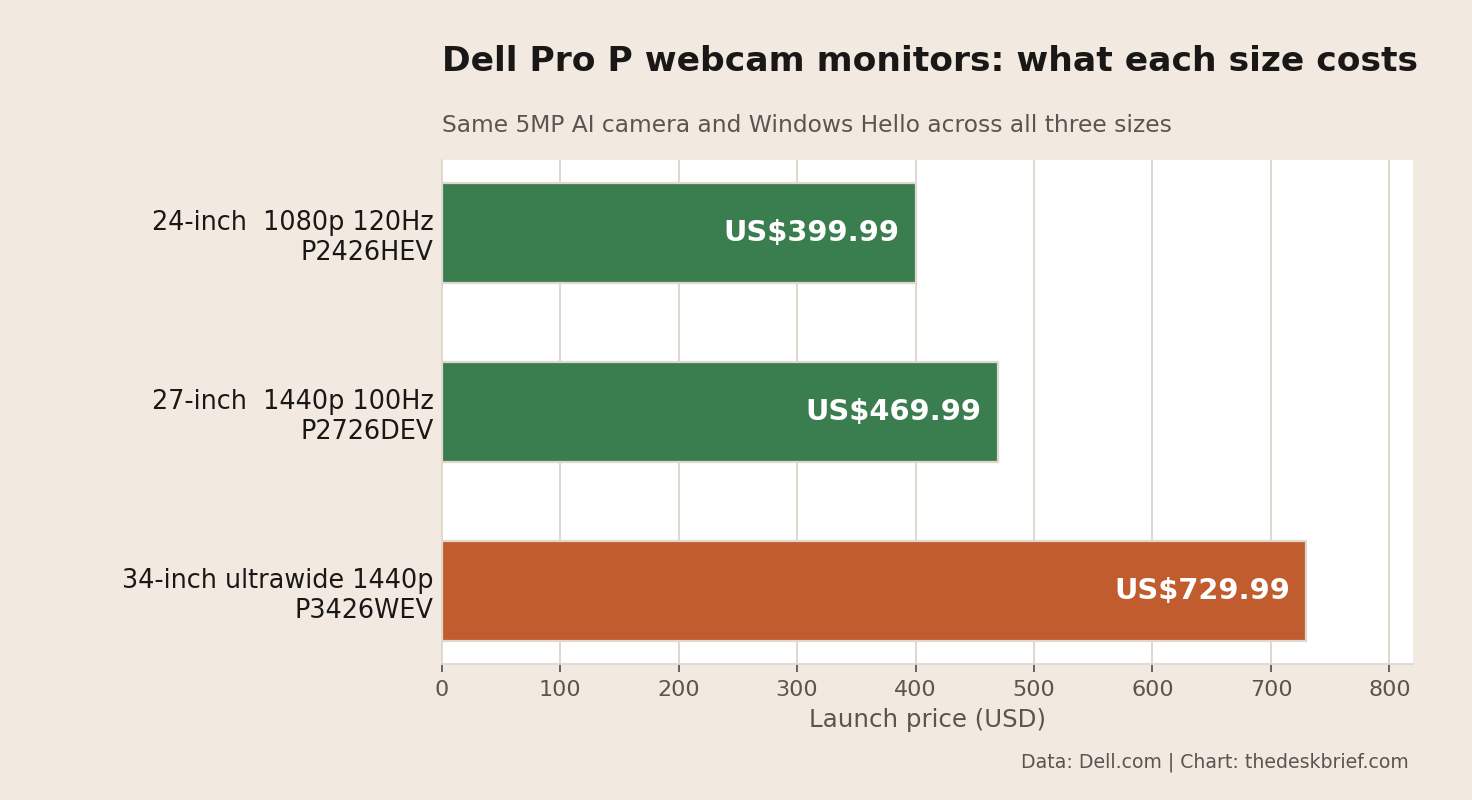
Dell did not build one monitor, it built a range. The webcam models carry the WEV suffix, and per Dell’s store the 24-inch P2426HEV is CA$561 (US$399.99) with a 1080p 120Hz panel, the 27-inch P2726DEV is CA$659 (US$469.99) at 1440p and 100Hz, and the 34-inch P3426WEV is CA$1,023 (US$729.99). Every one gets the same camera and Windows Hello, so the only thing you pay extra for as you climb is screen.
There is a second branch. The conferencing models use the WEB suffix and add two 5W speakers and dual beamforming microphones, which turns the screen into a full call station. The 34-inch P3426WEB runs CA$1,050 (US$749), about CA$27 (US$19) over the webcam-only version, which is close to free if you actually want the speakers. If you want a sharper, higher-end office panel instead and can live without a camera, the Samsung ViewFinity S80HF is a different kind of upgrade at 5K.
Get it to eye level or the camera is wasted
A built-in camera only pays off if the top of the screen sits near your eyes. Too low and you get the same up-the-nose angle a laptop gives you, camera or not. The included stand raises and tilts, which covers most people, but a very tall desk or a very tall person may still want a monitor arm or the stand in the box to lift the panel and free up the surface underneath.
One thing to plan for: the camera is fixed to the top center of the monitor, so you aim it by moving the whole screen, not the lens. Get the height and tilt right once, and it stays right. That is the trade for losing the free positioning of a clip-on.
Who Should Skip This
Skip the built-in camera if you rarely take video calls. Paying a premium for a lens you use twice a month makes no sense, and a plain ultrawide costs less. Skip it if you already own a monitor you like and a webcam that works, because you would be replacing two things that are fine to solve a problem you do not have.
Creators and gamers should also look elsewhere. The 100Hz, sRGB, no-HDR panel is tuned for spreadsheets and calls, not colour work or fast games. And if you are on a tight budget, a used 34-inch ultrawide plus a cheap webcam will beat the P34 on price, if not on tidiness. Buy the Dell for the clean single-cable desk, not for the display alone.
Monitor with built-in webcam FAQ
Is the webcam on the Dell Pro P34 any good?
It is a Sony Starvis 5-megapixel sensor with AI auto-framing and QHD output, which beats almost any laptop camera and most budget clip-ons. It is not the sharpest camera you can buy, but for daily calls it is more than enough, and the eye-level position helps as much as the sensor.
Can you turn off or cover the built-in webcam?
Yes. Every model in the range has a mechanical privacy shutter, a physical slider that covers the lens, so the camera is blocked whether or not the software cooperates. That is the answer to the main worry about a camera you cannot unplug.
Does a monitor with built-in webcam work with a Mac?
The display and USB-C charging work with any laptop, and the camera shows up as a standard USB webcam on a Mac. Windows Hello face login is the exception, since that feature is Windows-only. Mac users get the screen and the camera, just not the face unlock.
Is the 34-inch worth it over the 27-inch?
Only for the desktop space. The 34-inch ultrawide costs CA$1,023 (US$729.99) against CA$659 (US$469.99) for the 27-inch P2726DEV, and the camera is identical. Pay the CA$364 (US$260) gap if you want the wide canvas for side-by-side windows. If you just want a good call camera on a good screen, the 27-inch is the smarter buy.
The Short Version
A monitor with built-in webcam earns its price when it clears clutter you actually have: one cable to the laptop, a decent 5-megapixel camera at eye level, Windows Hello, and a privacy shutter for the paranoid. The Dell Pro P34 does all of that for CA$1,023 (US$729.99), and the 27-inch P2726DEV does it for CA$659 (US$469.99) with the same camera, which is the version most people should buy.
Skip it if you already own a webcam and a screen you like, or if you need HDR, wide gamut, or high refresh. Buy it for the tidy single-cable desk, not for the panel, and get the top of the screen up to eye level so the camera you paid for actually flatters you.