The Keychron C100 8K is worth US$64.99 only if you already need dozens of physical macros. Its 100 hot-swappable keys, QMK Launcher support, and 8000 Hz wired polling are remarkable for the price. The catch is just as large: every key starts blank, none has a screen, and the official US listing was backordered when checked. Most people should buy a smaller pad or an Elgato Stream Deck instead.
This page contains affiliate links. If you buy through these links, we may earn a small commission at no extra cost to you. Full disclosure.
I have not typed on one, so treat this as a specification read rather than a hands-on review. What I can do is lay out exactly what Keychron has confirmed, what it is quietly leaving unannounced, and whether a hundred programmable keys solve a problem you actually have at your desk.
Last updated: September 2026.
Table of Contents
- What the Keychron C100 actually is
- The specs Keychron has confirmed
- Where a 100-key macro pad earns its desk space
- Keychron C100 vs a Stream Deck: keys or screens
- What Keychron has not announced
- Who Should Skip This
- FAQ
- The Short Version
What the Keychron C100 actually is
A macro pad is a small keyboard with no dedicated typing job. You assign each key a shortcut, a macro, a chunk of text, or a media control, and it sits beside your main board doing the repetitive work your fingers are tired of. Most macro pads carry three to a dozen keys. The Keychron C100 has a hundred, laid out in a perfectly square 10 by 10 block that measures 196.65 mm on each side. That is closer to the footprint of a compact 60 percent keyboard than to a numpad. Keychron C100 on Amazon
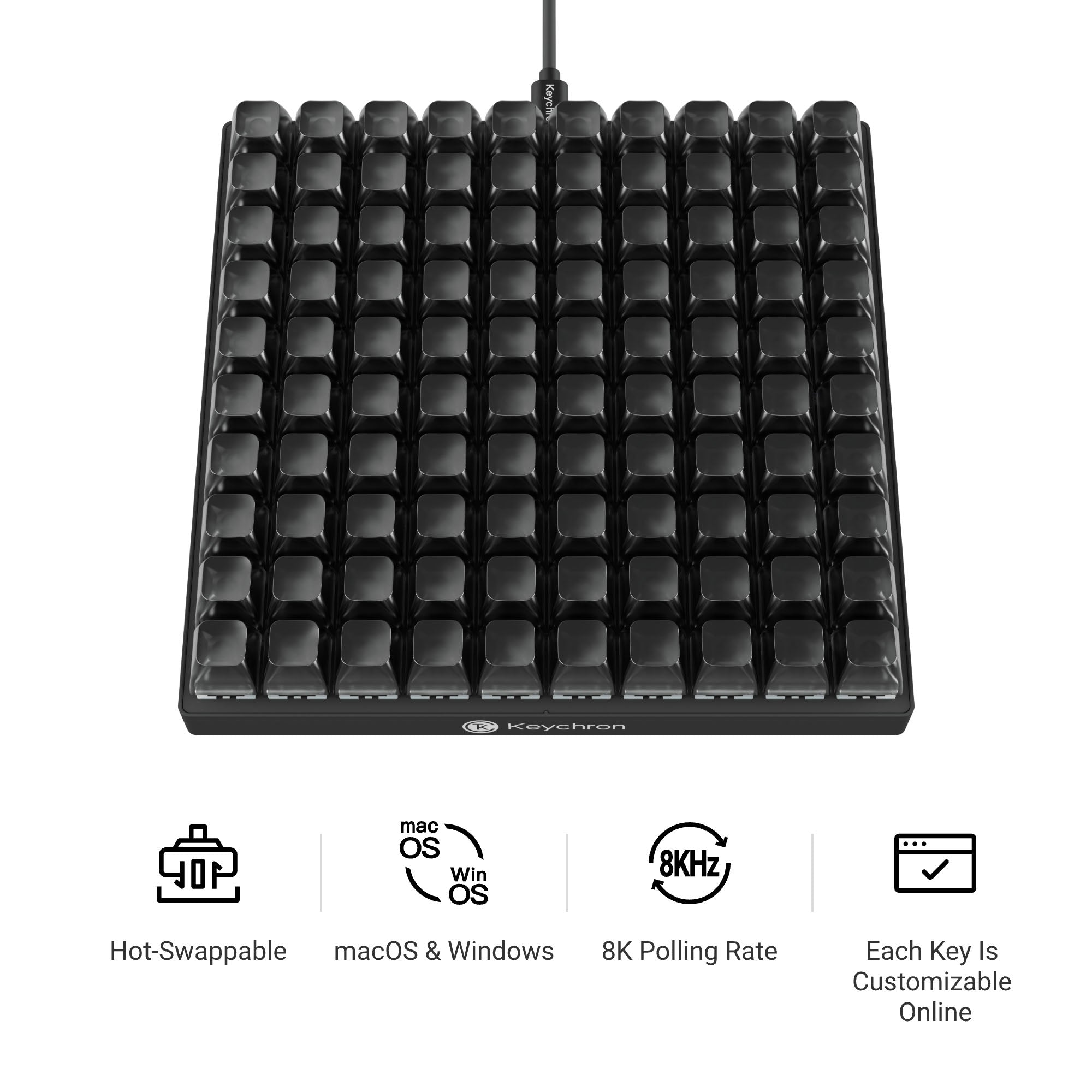
The 8K in the name is the polling rate: 8000 Hz over the wired USB-C connection, eight times the 1000 Hz most keyboards still run. For a pad that fires shortcuts rather than tracking twitch aim, that figure is closer to marketing than to something you will feel, but it is there on the spec sheet. The keys are hot-swappable, so you can pull the default Keychron Apex Red linear switches and drop in whatever you prefer with no soldering. If you have read our take on the Yunzii IF68 and its QMK layout, the customization idea is the same, just stretched across a hundred blank caps.
The specs Keychron has confirmed
These figures come from Keychron’s own product page, checked August 29, 2026. Where the company stays silent, I have said so rather than guessed.
- Price: US$64.99 with Keychron Apex Red switches pre-installed
- Layout: 100 keys in a 10 by 10 grid, 196.65 mm square
- Polling rate: 8000 Hz, wired USB-C only
- Switches: hot-swappable, shipping with Keychron Apex Red linear switches
- Keycaps: transparent ASA profile
- Backlight: per-key RGB with north-facing LEDs
- Height: 17.8 mm without keycaps, with a 0, 2, or 5 degree typing angle
- Software: Keychron Launcher, the browser-based QMK and VIA configurator
- Compatibility: macOS, Windows, and Linux
- In the box: the assembled pad, a USB-C cable, a USB-A adapter, and a keycap and switch puller
Notice what is missing from that list. There is no wireless mode, no rotary knob, no small screen, and no per-key display. Every key is an identical smoked cap, and that sameness is the whole design gamble. You are buying inputs, not labels.
Where a 100-key macro pad earns its desk space
A hundred keys is overkill for most people, and exactly right for a few. Video and photo editors who live in timelines can map an entire grade or trim workflow to real buttons. Engineers in CAD, developers with sprawling build and git commands, and anyone running a live production can offload the shortcuts they hit forty times an hour. There is also a genuine accessibility case: if chorded shortcuts hurt your hands, spreading them across single physical keys can take real strain out of a workday. Our notes on ergonomic keyboard position apply here too, because a second board changes where your arms sit.
Then comes the catch that no product photo shows. A hundred blank, identical keys means you have to remember what all hundred do, or label them yourself, or light them in RGB groups you can learn by color. The Keychron C100 gives you the hardware and hands the memory problem straight back to you. Enthusiasts will treat that as a feature. A busy office worker who wanted five buttons for mute, paste, and screenshots will find ninety-five caps of guilt staring back. Be honest about which one you are.
Keychron C100 vs a Stream Deck: keys or screens
The real rival is not another mechanical board, it is the Elgato Stream Deck MK.2, the device most people already reach for when they want a wall of shortcuts. The two solve the same problem from opposite directions. The Stream Deck puts a tiny changeable LCD under every key, so each button shows what it does and can shift with context. The C100 gives you far more keys and a proper mechanical press, but every one is blank. Price is where the gap is widest.
| Spec | Keychron C100 8K | Elgato Stream Deck MK.2 |
|---|---|---|
| Price | US$64.99 | US$149.99 |
| Keys | 100 | 15 |
| Key type | Mechanical, hot-swap | LCD button |
| Per-key label | None, blank caps | Live customizable icon |
| Software | Keychron Launcher (QMK and VIA) | Stream Deck app plus plugins |
| Connection | USB-C wired, 8000 Hz | USB-C wired |
| OS support | macOS, Windows, Linux | macOS, Windows |
| Footprint | 196.65 mm square | 118 by 84 mm |
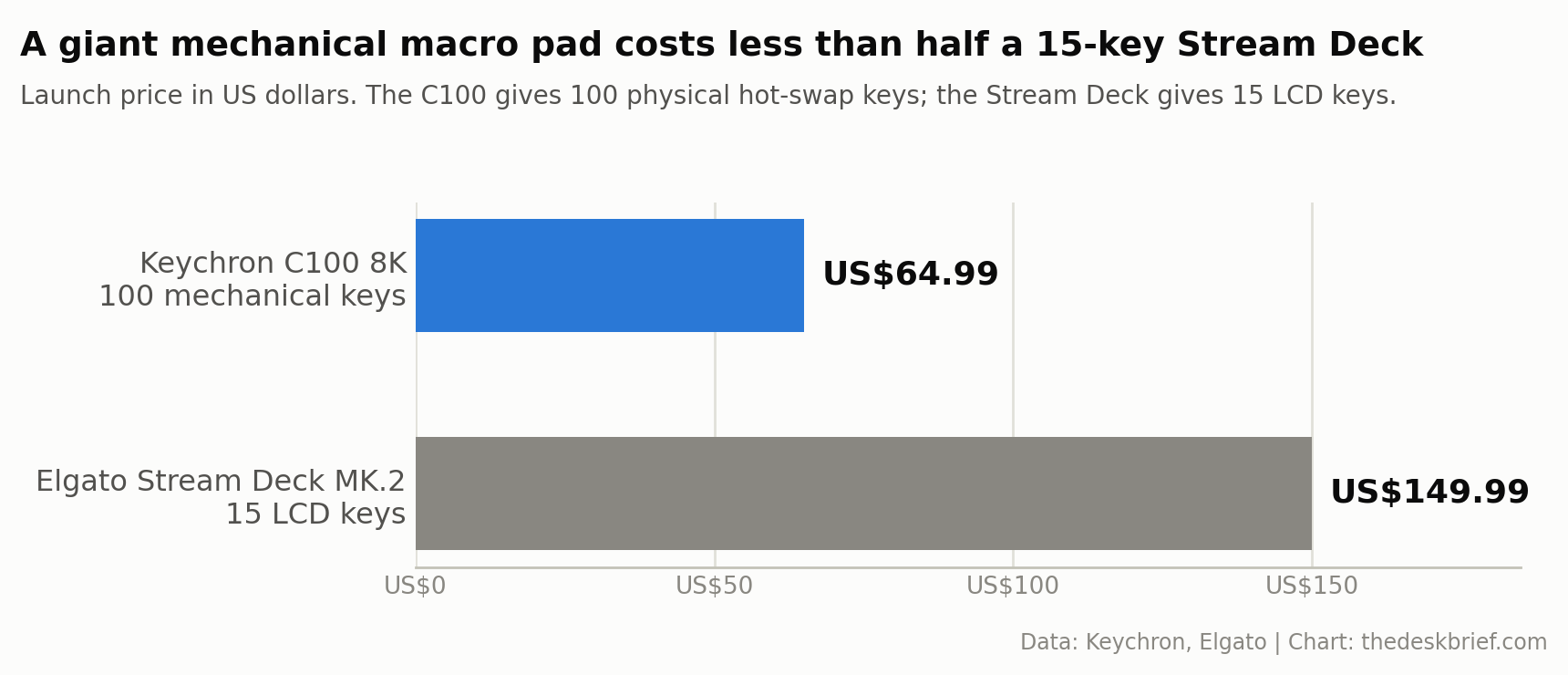
Read that trade honestly. The Stream Deck’s LCD keys are the reason to pay more: they show their job, update per app, and lean on a mature plugin library that ties into OBS, Teams, and hundreds of tools without you writing a thing. If you want a productivity pad you can hand to a colleague and have them understand in a minute, that is the one to buy. The C100 wins on raw count and cost. For less than half the money you get roughly seven times the keys and a mechanical feel, at the price of memorizing your own layout. If you are the kind of person who already runs a custom keymap, the cheaper board is the right call.
There is a quieter comparison worth making against Keychron’s own boards. The Keychron Q0 Max is a conventional wireless numpad with a macro column, rotary knob, QMK Launcher support, and a much smaller 118 by 137 mm footprint. Keychron listed the assembled version at US$119.99 when checked. It costs more and has far fewer inputs, but it is the better alternative when you want wireless, visible legends, and a numpad you can understand at a glance. A full custom keyboard like the Epomaker TH65 gasket build costs about the same and types too. The C100 only makes sense if the giant macro grid is the point, not a compromise.
What Keychron has not announced
A launch spec sheet is as useful for its gaps as its figures. Keychron has not published a weight for the C100, and the product page does not list an actuation force or travel distance for the Apex Red switch, so anyone quoting you a gram figure is guessing. Regional pricing is also unconfirmed. The US$64.99 number remains the direct Keychron price, the official US listing was marked backordered, and I found no C100 listing on Keychron Canada on August 29. Check the product page before importing rather than assuming a clean currency conversion.
The company also has not detailed switch options beyond the Apex Red at launch, nor a firm shipping timeline for every region. None of that is alarming for a new peripheral. It just means the buying decision rests on the confirmed hardware, not on a promise. If Canadian stock and pricing matter to you, that is worth a check before you commit, the same way we treat any launch on a work from home desk setup.
Who Should Skip This
Skip the C100 if you only need a handful of shortcuts. A three to six key pad costs less, takes no desk space, and you will actually remember what every button does. Skip it if you want your keys to show their function, because that is the Stream Deck’s entire job and the C100 cannot do it. Skip it if wireless is non-negotiable, since this is wired only. And skip it if you know, honestly, that you will never sit down to program it. A hundred unassigned keys is not a productivity tool, it is a paperweight with RGB. The people who should buy it already know exactly which fifty macros they would map tonight.
Our pick: The Keychron C100 makes sense for people who can put its unusually large macro grid to work. As an Amazon Associate I earn from qualifying purchases.
FAQ
What is the Keychron C100 8K?
It is a macro pad, despite looking like a small keyboard. Every key ships blank with no assigned character, so out of the box it types nothing. You map each of the hundred keys yourself in software before it does anything useful.
Does the Keychron C100 need special software?
You program it through Keychron Launcher, a browser-based configurator built on QMK and VIA. There is no driver to install and no background app that has to stay running, which is a real difference from the Stream Deck. Once your layout is flashed, the mapping lives on the pad.
Can you replace the switches on the Keychron C100?
Yes. The board is hot-swappable, so you can pull the stock Keychron Apex Red linear switches and fit tactile or clicky switches without soldering. The keycaps are a transparent ASA profile, so they let the per-key RGB through if you use lighting to group functions.
Is the Keychron C100 worth it?
Yes for editors, developers, accessibility workflows, or live-production operators who can name dozens of macros before buying. No for most office desks. If you need fewer shortcuts, the smaller Keychron Q0 Max adds wireless and visible legends, while a Stream Deck uses screens so every key explains itself.
How much does the Keychron C100 cost?
Keychron still listed it at US$64.99 with Apex Red switches on August 29, 2026, but the US product page marked it backordered. Canadian pricing and a Keychron Canada product listing were not available in the same check.
The Short Version
The Keychron C100 8K is a US$64.99 bet that you want a hundred blank, hot-swappable keys and the time to make them yours. As confirmed hardware it is a lot of macro pad for the money, with QMK software, per-key RGB, and an 8000 Hz wired link. The catch is baked into the design: no labels, no screens, no wireless, and a memory tax you pay every day you use it. If you already run custom layouts and know your fifty macros, it is one of the most affordable ways to buy that many physical shortcuts. If you wanted a handful of clearly labeled buttons, save your money and buy a small pad or a Stream Deck instead.
Sources used this run: the Keychron C100 8K product page, the Tom’s Hardware launch report, and Elgato’s Stream Deck specifications.
Editorial rating: 3.5 out of 5. The C100 8K offers an enormous number of programmable QMK keys at a low price for advanced shortcut and automation users. Its blank caps, wired-only design, and steep memory burden make a smaller labeled controller better for most people.
Current offer checked August 30, 2026: US$64.99, in stock. Prices and availability can change.