KB5121003 game crashes are real, but deleting a Windows driver should not be your first move. Microsoft says the August 11, 2026 security update can leave certain games frozen, closed without warning, showing an EXCEPTION_ACCESS_VIOLATION error, or restarting the PC. Its investigation points to RGB hardware components that install drivers with names similar to inpoutx64. That is a much narrower problem than “the update broke every game,” which is useful because panic is a lousy diagnostic tool.
Confirm the update, symptom, and driver before changing anything. If all three line up, stop the RGB utility first and test again. Microsoft now recommends temporarily disabling inpoutx64 through the registry. Embark Studios has also published a deeper removal procedure for players of THE FINALS, but that workaround deletes a system service and file. Use the reversible Microsoft method first.
Table of Contents
- KB5121003 Game Crashes: What Microsoft Confirmed
- Check Whether Your PC Matches the Known Problem
- Try the Low-Risk Test First
- Use Microsoft’s Driver Workaround First
- Why I Would Keep the Security Update
- What Happens Next
- Frequently Asked Questions
- The Short Version
KB5121003 Game Crashes: What Microsoft Confirmed
Microsoft’s KB5121003 support page applies to Windows 11 24H2 and 25H2, specifically OS builds 26100.9168 and 26200.9168. Microsoft added the known issue on August 20, nine days after the update shipped. It names ARC Raiders, MARVEL Tōkon: Fighting Souls, and THE FINALS among the reported games. That list isn’t a claim that every other title is safe. It is the confirmed scope, not an invitation to blame every crash on the new patch.
| What to check | Confirmed detail |
|---|---|
| Windows versions | Windows 11 24H2 and 25H2 |
| Update builds | 26100.9168 and 26200.9168 |
| Named games | ARC Raiders, MARVEL Tōkon, THE FINALS |
| Reported symptoms | Freeze, sudden close, access violation, restart |
| Suspected link | RGB components with inpoutx64-like drivers |
| Permanent fix | Not announced as of August 24, 2026 |
The awkward bit is that RGB software often reaches deeper into Windows than its rainbow keyboard suggests. Microsoft says affected peripherals or internal components may install code with a filename similar to inpoutx64. Launching certain games can then trigger the failure. Microsoft has not said that all RGB devices, all lighting apps, or Windows Dynamic Lighting itself cause the bug.
Check Whether Your PC Matches the Known Problem
Start with Settings, Windows Update, Update history. Look for KB5121003 installed on or after August 11. Then compare the failure itself. A game that freezes, vanishes, throws EXCEPTION_ACCESS_VIOLATION, or restarts the machine fits Microsoft’s report. A low-frame-rate problem, broken controller, corrupt save, or crash that started weeks earlier does not magically become the same bug because the KB number is popular this week.
Next, check installed RGB, motherboard, fan-control, and hardware-monitoring utilities. Task Manager’s Startup apps page is a quick inventory, though it won’t show every driver. If you built the PC years ago, an old utility you forgot about is entirely plausible. If your machine has no RGB parts or related control software, keep troubleshooting instead of forcing the diagnosis. Our guide to reducing RAM usage on Windows 11 uses the same rule: measure the actual bottleneck before removing useful software.
Try the Low-Risk Test First
Close the RGB or motherboard utility completely, including its tray process, and restart the PC. If the app launches automatically, disable that startup entry for one test. You can also disconnect a nonessential RGB peripheral, but do not pull internal hardware from a powered machine. Run the same game and repeat the same action that caused the crash.
This test is reversible and preserves the security update. It also separates an active controller problem from a driver service that loads without the visible app. A clean run is evidence, not proof. Re-enable one utility or device at a time until the failure returns. The procedure is tedious in exactly the way useful troubleshooting tends to be.
Windows has a built-in alternative for compatible hardware. Microsoft’s Dynamic Lighting guide places controls under Settings, Personalization, Dynamic Lighting and explains how background lighting controllers are prioritized. I would not promise that switching controllers fixes KB5121003 game crashes. It can, however, help you identify competing lighting apps without editing the registry.
Use Microsoft’s Driver Workaround First
Microsoft’s official workaround temporarily disables inpoutx64 without deleting the service or driver file. Back up the registry, open Registry Editor, go to HKEY_LOCAL_MACHINE\SYSTEM\CurrentControlSet\Services\inpoutx64, record the current Start value, change it to 4, and restart. Microsoft warns that this may disrupt RGB features or their control software. Restore the previous value if you need to re-enable the driver.
Embark’s official crash troubleshooting page supplies a stronger temporary procedure for THE FINALS. It tells affected players to open Command Prompt as administrator, stop the inpoutx64 service, delete that service, remove the driver file from the Windows drivers folder, and optionally remove its registry key before restarting.
sc stop inpoutx64
sc delete inpoutx64
Those commands are copied from Embark, not a trick I invented over coffee. Stopping the service is less final than deleting the service, file, and registry key. Before going further, create a restore point and identify which installed utility supplied the driver. Removing it may disable lighting, fan, sensor, or motherboard-control functions. If this is a work PC managed by an employer, stop here and hand the evidence to IT.
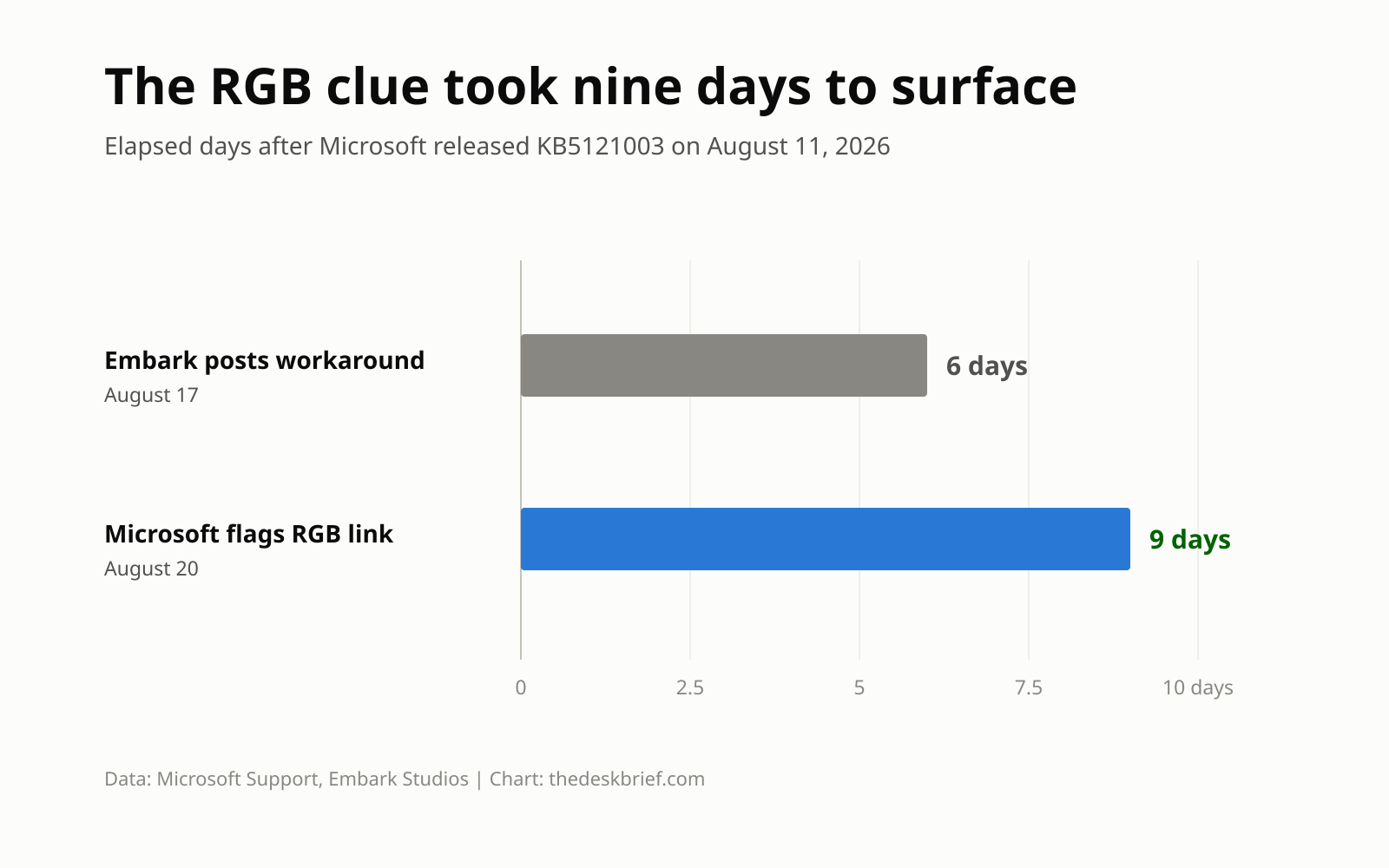
The timeline matters. Embark posted its workaround on August 17. Microsoft added the known issue on August 20, followed by its registry workaround on August 21, and says its investigation is still active. The driver-removal path is therefore a targeted developer workaround, not a universal Windows repair. Tom’s Hardware independently reported the same Microsoft finding and Embark procedure, which gives the diagnosis more weight without turning it into a cure-all.
Why I Would Keep the Security Update
Uninstalling KB5121003 is the blunt option. It may make an affected game run, but it also removes the security update from the whole operating system. That is a poor trade when disabling one obsolete hardware utility or driver solves the conflict. I would uninstall only if the machine is unusable, the targeted workaround fails, and I have a clear plan to reinstall as soon as Microsoft or the vendor ships a fix.
Do not stack random fixes. A clean GPU-driver installation, memory test, BIOS update, and Windows rollback performed together may change the result, but you won’t know which action mattered. If you are already wondering whether the machine has broader stability trouble, the decision framework in our PC build-or-wait guide can keep one software bug from becoming a CA$2,000 shopping spree.
What Happens Next
Microsoft says it is investigating the relationship between the RGB components and the games that trigger the issue. It has not announced a permanent fix or delivery date. Press Windows key and F to open Feedback Hub if your system matches the known pattern. Include the game, Windows build, exact error, RGB hardware, control utility, and whether inpoutx64 is present. “It crashed again” is emotionally accurate but diagnostically stingy.
Check the official KB page before repeating the deeper workaround. The evidence may change as Microsoft and device vendors identify specific packages. The article on Bluetooth headphones that keep disconnecting follows a similar escalation ladder: isolate the layer, change one variable, and save deletion for when the reversible steps fail.
Frequently Asked Questions
Which games have confirmed KB5121003 game crashes?
Microsoft names ARC Raiders, MARVEL Tōkon: Fighting Souls, and THE FINALS in reports. Other games may be affected, but Microsoft has not published a complete compatibility list.
Does every RGB keyboard cause the crash?
No. Microsoft points to certain RGB peripherals or internal components that install inpoutx64-like drivers. Owning a light-up keyboard is not enough to confirm the cause.
Should I delete inpoutx64.sys?
Use Microsoft’s reversible registry workaround first. Delete inpoutx64.sys only if your symptoms match, you have identified that driver, the safer steps did not work, and you understand which hardware utility may stop functioning. Back up first. Embark’s removal procedure is intended for this specific conflict.
Has Microsoft fixed KB5121003 game crashes?
Not as of August 24, 2026. Microsoft’s support page says the investigation is continuing and promises more details when they are available.
The Short Version
KB5121003 game crashes have a confirmed link to some RGB-related drivers, especially components named like inpoutx64. Verify the update and symptom, close or disable the RGB utility, then test one change at a time. If the driver is present, use Microsoft’s registry workaround before Embark’s service-and-file removal. I would keep the Windows security update installed and wait for the permanent fix unless the targeted steps fail and the machine remains unusable.