Bluetooth headphones keep disconnecting for reasons that have nothing to do with a weak radio. A browser tab can quietly hold the computer’s audio output open, win the priority fight inside a multipoint headset, and stop music on your phone without playing a sound.
That exact failure became a major discussion this week after a developer traced it to the AliExpress home page. The page created two hidden Web Audio contexts for browser fingerprinting. Closing the tab restored phone audio immediately. Muting the tab, browser, or Windows did not, because the silent processing session was still running.
This is not proof that every dropout comes from a shopping site. It is proof that the usual ritual of unpairing everything may attack the wrong problem. Start by finding which device thinks it owns the headphones. Reinstall drivers later, when simpler evidence says the computer itself is broken.
Table of Contents
- Why Bluetooth Headphones Keep Disconnecting
- Close the Tab First
- Isolate the Two Devices
- Fix Windows-Only Problems
- What the AliExpress Case Proved
- A Five-Minute Diagnostic Order
- Frequently Asked Questions
- The Short Version
Why Bluetooth Headphones Keep Disconnecting
Multipoint headphones maintain connections to two source devices, but they generally play one source at a time. A notification, meeting app, video, game, or browser audio session can tell the headset to switch. The losing device may remain connected in its Bluetooth menu while producing no sound. That looks like a disconnection even when the radio link never dropped.
The useful distinction is between a connection failure and an audio-priority failure. If the headphones disappear from both devices, suspect pairing, power, range, firmware, or drivers. If they stay listed as connected but one device goes silent, suspect the other source is holding the audio route.
This matters in a laptop-based home office, where one headset often serves a work computer and a personal phone. Multipoint saves daily pairing work until a silent app decides that convenience was getting suspiciously comfortable.
Close the Tab First
When audio from the phone stops after you use the computer, close recent browser tabs one at a time. Do not merely mute them. Chrome explains that Web Audio uses an AudioContext and connected audio nodes, and browser sound controls do not necessarily stop the underlying context. A page can therefore keep an audio session active at zero gain.
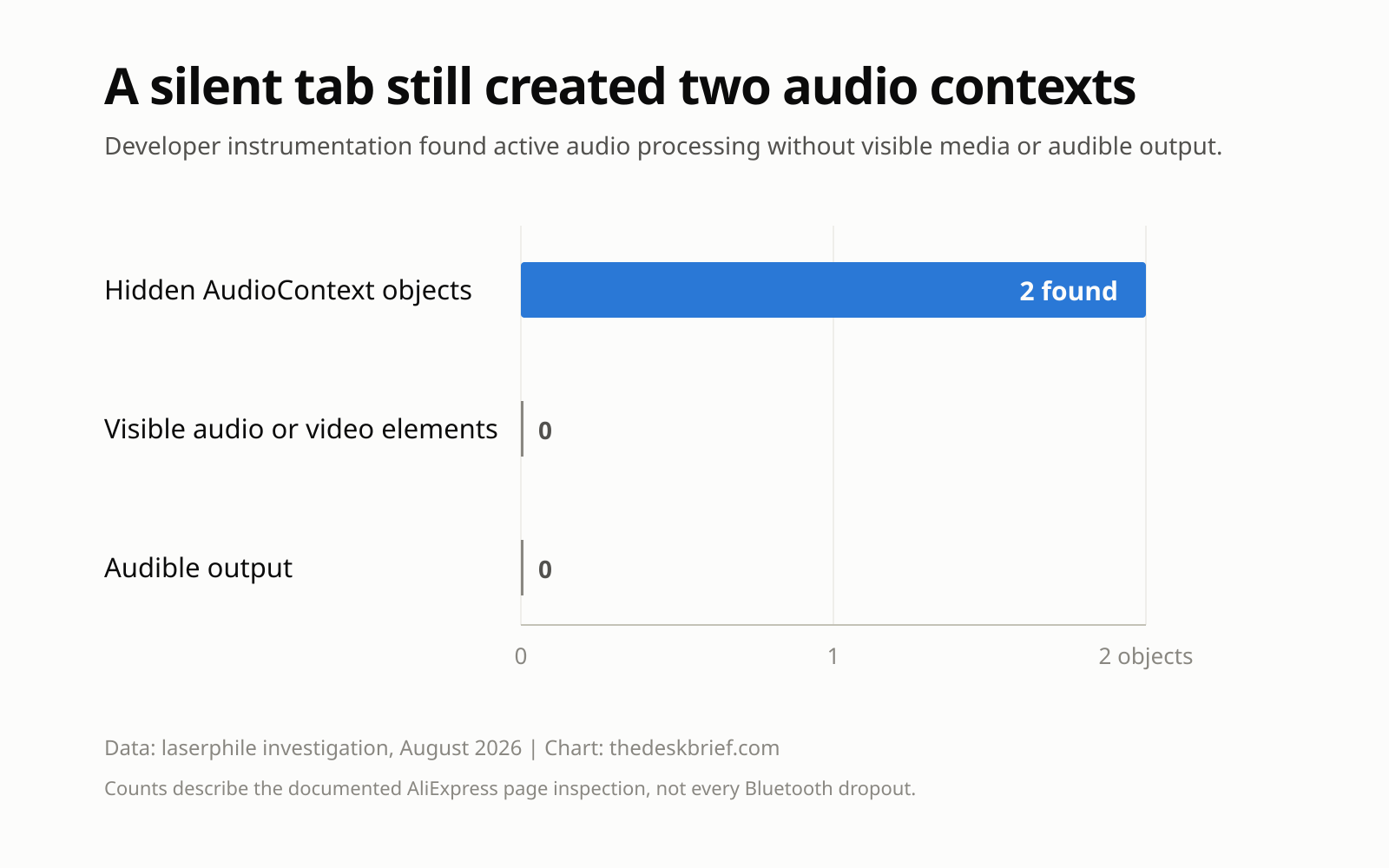
The original AliExpress investigation found two contexts connected to the destination while the page showed no audio or video. The investigator reproduced the behaviour in Firefox and Chrome. The right first test was closing the tab, not resetting the headset.
If closing one tab restores audio, reopen it to confirm the result. Repeatable cause and effect is better evidence than a fix that happens to coincide with the song ending. You can also try a private window with extensions disabled, then compare the same page in another browser.
Isolate the Two Devices
If browser tabs are innocent, disconnect the headset from one source without forgetting the pairing. Play audio from the remaining source for a few minutes. Then reverse the test. This tells you whether Bluetooth headphones keep disconnecting on one device or only when multipoint arbitration is active.
Next, close meeting software, game launchers, voice assistants, music players, and any app that can request a microphone. Calls usually get higher priority than music. An application does not need to produce a useful sound to occupy the route, and a stuck call state can keep the headset waiting for speech that never arrives.
Check the headset’s companion app as well. Some models let you disable multipoint or choose connected sources. Turn multipoint off, test a single connection, and turn it back on only after both devices work independently. That is diagnosis, not surrender.
Fix Windows-Only Problems
Once the problem follows the Windows computer even with the phone disconnected, move down the operating-system list. Microsoft recommends turning Bluetooth off and on, removing and pairing the device again, running the Bluetooth troubleshooter, and updating the adapter driver. It also warns that an unshielded USB 3.0 device close to the Bluetooth radio can cause interference.
Use that order. A toggle takes seconds. Re-pairing costs a minute. A driver update is sensible when Windows recently changed or the adapter has a known issue. Uninstalling the adapter is an escalation step, not the opening move every time audio hiccups.
Also check the selected output device in Windows quick settings. Headsets can expose more than one audio endpoint, especially when a microphone profile is involved. If stereo audio vanished after a call, switch the output back to the normal headphone endpoint and close the calling app completely.
What the AliExpress Case Proved
The current incident is useful because its numbers are small and ugly. Instrumentation found two hidden AudioContext objects, zero visible media elements, and zero audible output. The page generated a sawtooth oscillator, analysed the result, reduced gain to zero, and still connected the graph to the audio destination.
That graph was reportedly part of browser fingerprinting, which measures tiny differences in how a device processes a known signal. The same investigation found canvas, WebGL, screen, hardware, WebRTC, and interaction signals. I would not leap from that evidence to a claim about what Alibaba stores or why every script exists. The public evidence establishes the running audio contexts and the multipoint side effect, not the company’s private backend decisions.
Chrome’s Web Audio documentation confirms that an audio context can be running or suspended and that autoplay policy depends partly on prior user interaction. It also explains why developers need to manage context state. The broader lesson is durable: silent web processing can be real audio work from the operating system’s perspective.
A Five-Minute Diagnostic Order
Use the most affordable test first. This order separates audio ownership, multipoint behaviour, radio interference, and Windows faults without erasing every pairing on your desk.
- Close recent browser tabs and test the other source after each one.
- Quit meeting, media, game, and voice apps on both devices.
- Disconnect one source, test the other, then reverse the test.
- Disable multipoint in the headset app and confirm a stable single-device connection.
- Move USB 3.0 drives and hubs away from the Bluetooth adapter.
- Toggle Bluetooth, select the correct Windows output, and restart both source devices.
- Re-pair the headset, run the Windows troubleshooter, then update the Bluetooth driver.
A stable call setup also depends on choosing one microphone and one output before the meeting starts. My work-from-home desk setup guide covers the rest of that signal path. The fewer devices competing for a role, the less entertaining the troubleshooting becomes.
Frequently Asked Questions
Why do Bluetooth headphones keep disconnecting when they still look connected?
The radio connection may still be intact while another paired device owns the active audio route. Close audio-capable apps and browser tabs on the competing device, then test each source alone.
Can a muted browser tab interrupt Bluetooth multipoint?
Yes. The documented AliExpress case showed that muting did not stop two hidden Web Audio contexts. Closing the tab ended the active route and restored playback from the other device.
Should I reset my headphones first?
No. Close tabs and applications, isolate each source, and disable multipoint temporarily. Reset or re-pair only after the problem follows one device during a single-source test.
Why do Bluetooth headphones keep disconnecting near a USB hub?
Microsoft warns that unshielded USB devices connected to USB 3.0 ports can interfere with nearby Bluetooth hardware. Move the hub or drive away from the adapter before changing drivers.
The Short Version
When Bluetooth headphones keep disconnecting, first determine whether they truly disconnected or merely switched audio priority. Close browser tabs and calling apps, test each paired device alone, then disable multipoint temporarily.
If the failure stays with Windows during a single-device test, toggle Bluetooth, move USB 3.0 hardware away, re-pair the headset, run the troubleshooter, and update the adapter driver. A full reset belongs at the end of the list. The silent tab you forgot about may be doing far more work than its silence suggests.