Snapdragon C laptops have reached retail, but Qualcomm still gave buyers a reason to wait. The company removed web-browsing and idle-app efficiency results from an updated benchmark slide after presenting them less than a week earlier. That doesn’t prove the chip is bad. It proves the most important buying evidence is still missing.
This page contains affiliate links. If you buy through these links, we may earn a small commission at no extra cost to you. Full disclosure.
Last updated September 28, 2026: The Acer Aspire Go 15 with Snapdragon C C1-10-100 is now listed on Amazon.ca. Retail hardware and a Canadian listing now exist, but independent battery and performance testing remains thin.
The pitch for Snapdragon C laptops is tempting: Windows machines targeting US$300 and up, long battery life, quiet operation, and enough speed for browser tabs, documents, video calls, and streaming. The first Acer model is now listed in Canada well above that entry pitch, but Qualcomm’s performance numbers still come from Qualcomm. My recommendation is to wait for independent battery testing or a price closer to the entry-level pitch.
Table of Contents
- Snapdragon C Laptops Are a Wait, Not a Buy
- What Qualcomm Has Confirmed
- The First Laptop Exposes the Tradeoffs
- Why the Removed Benchmarks Matter
- What Qualcomm’s Numbers Actually Say
- Who Should Skip This
- A Sensible Buying Plan
- Frequently Asked Questions
- The Short Version
Snapdragon C Laptops Are a Wait, Not a Buy
The attraction isn’t mysterious. A genuinely good US$300 Windows notebook would fill a useful gap between bargain Chromebooks and the much pricier machines in my Snapdragon X2 Elite laptop comparison. Snapdragon C laptops target ordinary work instead of creators chasing flagship performance.
If this is a child’s first computer, our first-computer guide focuses on the practical fit beyond the chip.
That lower target changes the standard. I don’t need a budget laptop to render video like a workstation. I do need it to keep a dozen browser tabs, a video call, and a document open without wheezing. I also need a credible battery claim because endurance is the main reason to accept Windows on Arm compatibility risks.
Right now, none of those practical questions has an independent answer. Anyone ordering from a specification sheet and retailer listing alone would be paying to finish Qualcomm’s test plan. I prefer reviewers to do that job.
What Qualcomm Has Confirmed
Qualcomm’s current Snapdragon C product brief describes an eight-core ARM64 chip built on a 6 nm process. One core can reach 3.0 GHz, three can reach 2.6 GHz, and four top out at 2.0 GHz. Qualcomm separately lists a 2.0 GHz multi-core maximum.
| Specification | Confirmed | Buying consequence |
|---|---|---|
| Memory | Up to 16GB LPDDR5/5x or LPDDR4x | Enough for office work, but no room for a 32GB configuration |
| Storage | PCIe 3.0 NVMe or UFS 2.2/3.1 | OEM choice could create a large speed gap between models |
| Internal display | Up to FHD+ at 120 Hz | No native support for a premium high-resolution panel |
| External display | One display up to 4K at 60 Hz | Fine for one desk monitor, poor for a dual-monitor dock |
| USB | Up to two USB-C and two USB-A, USB 3.1 | Useful port count, but no USB4 |
| Wireless | Wi-Fi 6/6E and Bluetooth 6.0 | Modern enough for a budget notebook |
The 16GB ceiling matters more than the NPU badge. Eight gigabytes is already cramped for a busy browser and office apps in 2026. Sixteen is workable. If a manufacturer ships 4GB or slow UFS storage to reach the headline price, the bargain turns into e-waste with a keyboard.
The First Laptop Exposes the Tradeoffs
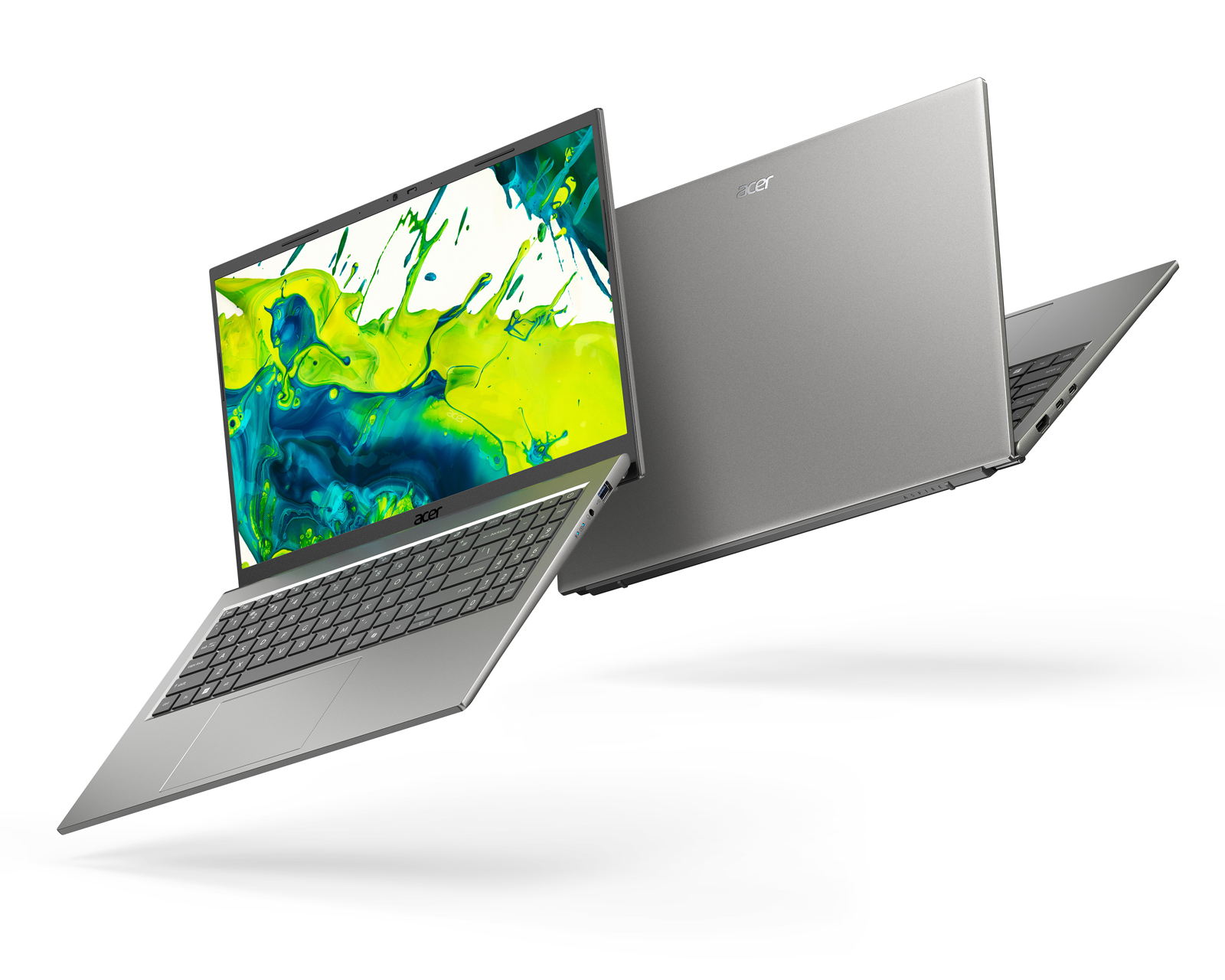
Acer is first with the Aspire Go 15 AG15-Q31P. Its official newsroom announcement confirms a 15.6-inch 1920 x 1080 screen, up to 8GB of memory, up to 512GB of storage, a 53Wh battery, two full-function USB-C ports, USB-A, HDMI 1.4, Wi-Fi 6E, and a 1080p webcam.
Amazon.ca lists the Acer Aspire Go 15 with Snapdragon C C1-10-100. The listing names a 15.6-inch Full HD IPS display. Its Canadian price sits well above Qualcomm’s US$300 entry pitch, while Acer still caps this model at 8GB even though the chip supports 16GB. Saving money by soldering in too little memory is an old budget-laptop trick wearing a new logo.
The port selection is better than I expected, but HDMI 1.4 and one supported 4K 60 Hz external display set a firm desk-work limit. If your setup uses two monitors, confirm the exact dock and DisplayLink support before buying. My work-from-home laptop setup guide explains why the laptop, dock, displays, and power delivery have to be treated as one system.
Why the Removed Benchmarks Matter
Qualcomm originally showed efficiency advantages over an Intel N250 system for several tasks. It later supplied an updated slide without the idle-app and web-browsing entries. A company representative told Tom’s Hardware that the change was intended to improve clarity and relevance.
Web browsing is not a side quest for a US$300 laptop. It is the job. Removing that result doesn’t invalidate Netflix playback or video-call claims, but it removes evidence from the workload buyers will use most. Qualcomm also didn’t publish raw wattage, test duration, or battery-life hours for the reference design.
The hardware comparison needs care too. Qualcomm used a 16-inch reference design against an 11.6-inch Acer TravelMate with Intel N250, then said total power was configured to match a 16-inch screen. Both ran on battery. That may be a defensible laboratory setup, but it isn’t the same as comparing two retail laptops with matched displays, batteries, memory, cooling, and operating modes.
What Qualcomm’s Numbers Actually Say
Tom’s Hardware reports that Qualcomm’s company-run tests compared the Snapdragon C reference machine with Intel N250 on battery. Qualcomm claimed 67% higher Cinebench multi-core performance, 50% higher Cinebench single-core performance, 44% higher Geekbench single-core performance, and 39% higher Speedometer 3.1 performance.
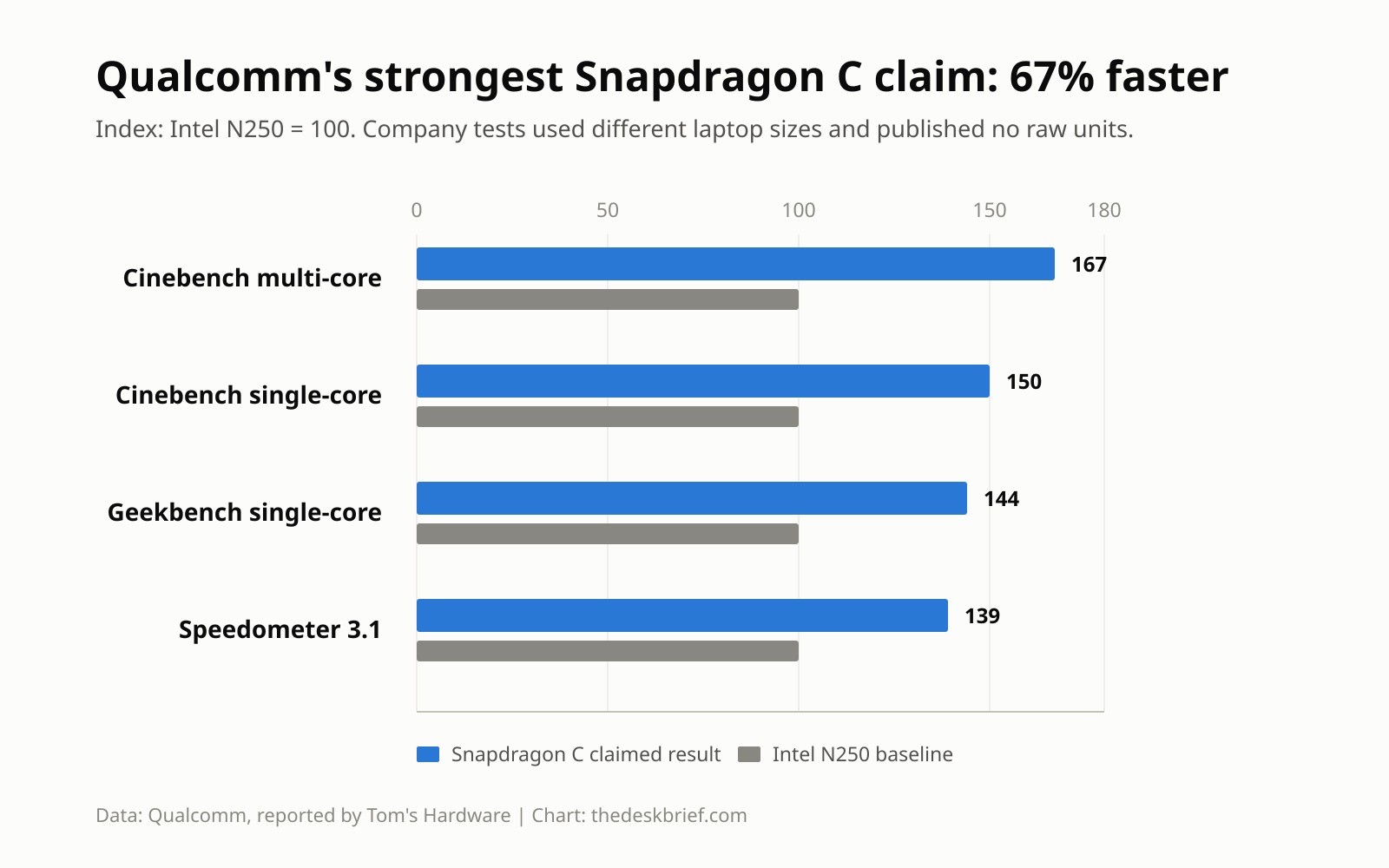
Those are good claims, especially the browser-focused Speedometer result. They still aren’t measured retail performance. Cinebench also flatters a chip with twice as many CPU cores as the four-core N250, while the missing plugged-in comparison leaves sustained desk performance unanswered.
Battery life can’t be inferred from a percentage advantage either. A laptop can be twice as efficient in one short test and still deliver mediocre endurance because of its display, battery size, firmware, background software, or sleep behaviour. The Acer’s 53Wh capacity is known. Its runtime isn’t.
Who Should Skip This
Skip first-wave Snapdragon C laptops if you rely on niche Windows utilities, older printers or scanners, corporate VPN software, anti-cheat systems, or drivers that haven’t been confirmed for Arm. Emulation has improved, but a US$300 laptop is the wrong place to discover that one indispensable tool refuses to cooperate.
Also skip them for local AI, serious photo or video work, gaming, or a two-monitor desk. The 16GB platform ceiling, integrated graphics, single 4K output, and entry-level storage options are designed for basic productivity. If local models matter, start with the memory realities in my RAM for local AI guide.
A Sensible Buying Plan
The Canadian price is no longer a mystery. The useful next evidence is independent testing on the exact laptop: battery hours for web browsing and video calls, performance on battery and AC power, storage results, display brightness, fan noise, sleep drain, and a clear list of incompatible apps. A 16GB Snapdragon C model from another laptop maker would also change the value calculation.
I would only consider an 8GB model near the promised US$300 floor and for genuinely light work. The current Canadian Acer fails that value test. At this price, I would buy a discounted x86 laptop with 16GB instead, gaining known compatibility and enough memory to survive a crowded workday.
If you can wait, do it. The platform may become the first genuinely pleasant cheap Windows laptop in years. It may also become another machine made attractive by one battery claim and unpleasant by every corner cut to hit the shelf price. Retail reviews will separate those outcomes quickly.
Frequently Asked Questions
When will Snapdragon C laptops ship?
Yes. The Acer Aspire Go 15 with Snapdragon C C1-10-100 is listed on Amazon.ca. Other regional prices and stock can differ, and independent battery testing remains limited.
Will they really cost US$300?
Not for the current Canadian Acer. Its Canadian listing is well above Qualcomm’s US$300 platform target, which was an entry point for the platform rather than a promise for every model or country. Memory, storage, display quality, regional pricing, and component costs can push retail machines higher.
Will normal Windows apps run?
Many common apps run natively or through Windows on Arm emulation. Drivers, anti-cheat software, older peripherals, and specialized business tools can still fail. Check every essential app and device before switching.
Is 8GB enough for office work?
It can handle light browsing and documents, but it leaves little margin for many tabs, Teams, cloud sync, and other background tools. I would choose 16GB for a primary work computer.
The Short Version
Snapdragon C laptops could make cheap Windows machines quieter and longer-lasting, but the first Canadian Acer costs well over Qualcomm’s US$300 target, has 8GB of memory, and still lacks an independent battery result. Qualcomm’s removed browsing-efficiency claim makes patience cheaper than optimism. Wait for an exact-model review or a lower price, then judge the whole laptop rather than the chip logo.