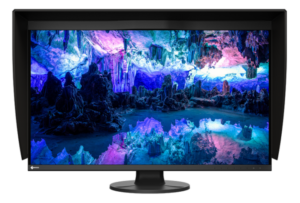
43H180C is the rare new monitor I wouldn’t preorder even if HKC opened sales tomorrow. The 43.8-inch, 24:9 screen solves a real workspace problem, but price, panel type, brightness, local-dimming zone count, release timing and Canadian support are still missing. That is too much blank space on the spec sheet for a monitor built around having more space.
The interesting part is not the 180 Hz headline. It is the 5760 x 2160 canvas: a full 3840 x 2160 workspace with a 1920 x 2160 column left beside it. Editors can keep a 4K preview at native resolution while leaving tools visible. Office users can run three tall windows without the bezel and cable clutter of a multi-monitor arrangement.
My verdict is wait, not dismiss. HKC has announced an unusually sensible shape for work, then left out most of the details needed to buy it sensibly.
Table of Contents
- 43H180C at a Glance
- What 24:9 Changes on a Desk
- The Display Hardware Is Still a Promise
- Ports and Laptop Docking
- 43H180C vs Dell U4025QW
- What HKC Has Not Announced
- Who Should Skip This
- 43H180C FAQ
- The Short Version
43H180C at a Glance
HKC announced the Tianqi 43H180C on September 14, 2026. The company calls it the first 43.8-inch desktop monitor with a 24:9 creation format. TechPowerUp’s announcement coverage independently reports the same core specifications.
- 43.8-inch curved display with a 1000R radius
- 5760 x 2160 resolution in a 24:9 aspect ratio
- Mini LED backlight and up to 180 Hz refresh rate
- Claimed 99% DCI-P3 coverage and 1.07 billion colours
- DisplayPort 2.1 and USB-C with up to 96 W charging
- Built-in KVM, picture splitting and desktop OSD controls
Those are manufacturer specifications, not test results. No outlet has published instrumented measurements of the exact model yet. Colour accuracy, response behaviour, dimming quality, input lag and sustained USB-C power remain unknown.
What 24:9 Changes on a Desk
A normal 4K monitor gives you 3840 x 2160 pixels. HKC adds exactly 1920 pixels to the width while keeping the same 2160-pixel height. The result has 12.44 million pixels, 50% more than 4K and 12.5% more than the Dell U4025QW’s 5120 x 2160 canvas.
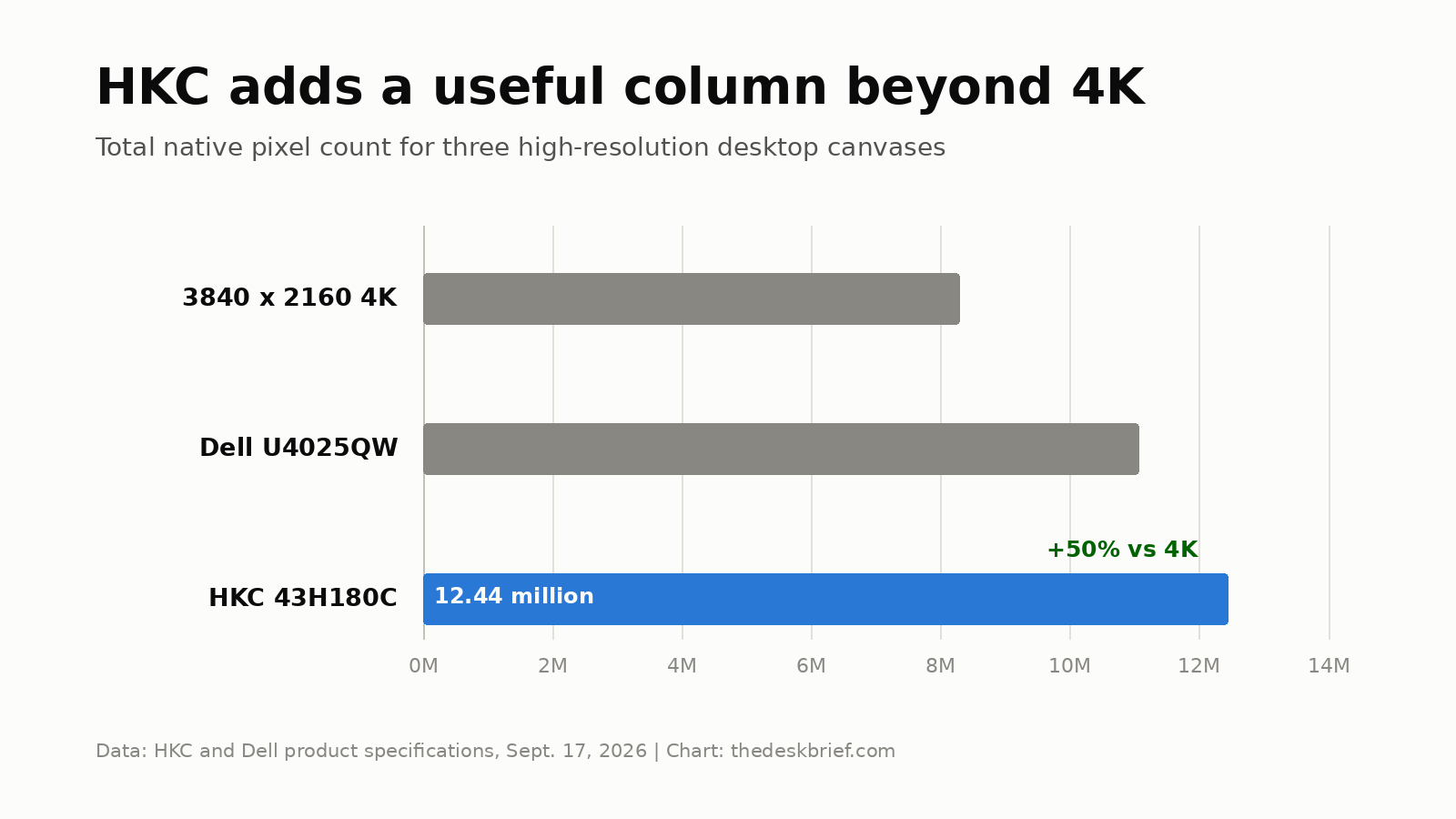
The extra column is the best argument for this monitor. A video editor can preserve a native 4K preview and park the timeline or inspector beside it. A developer can keep a main editor at 3840 x 2160 with documentation, chat or a local AI interface in the remaining column. HKC also describes an even three-way split, with each region measuring 1920 x 2160.
There is a catch hiding in the arithmetic. Twelve million pixels are expensive to drive at 180 Hz. Desktop work is easy enough for a modern connection, but gaming at native resolution asks the GPU to render 50% more pixels than 4K. That refresh ceiling is useful for scrolling and motion, yet it does not guarantee a game will reach 180 frames per second.
The 43.8-inch diagonal also needs real desk depth. The 1000R curve is aggressive for office work, and the stand dimensions have not been disclosed. Read our ultrawide versus dual-monitor guide before treating one large panel as an automatic upgrade.
The Display Hardware Is Still a Promise
Mini LED is a backlight system, not a quality guarantee. The number of dimming zones, the dimming algorithm and the native LCD contrast determine whether dark content looks convincing or develops bright halos around small objects. HKC has announced none of those details.
TFTCentral’s specification report also flags the undisclosed LCD panel type and missing zone count. That matters more than the words “Mini LED” on a box. IPS could offer wider viewing angles with weaker native contrast. VA could improve contrast while introducing more angle shift and different motion behaviour. Guessing would turn an analysis into fan fiction.
The claimed 99% DCI-P3 gamut says how much colour space the screen can cover. It does not tell us how accurately colours land, whether uniformity holds across 43.8 inches, or whether the factory modes track the correct gamma. A creator monitor needs measured results before it earns a creator recommendation.
Ports and Laptop Docking
DisplayPort 2.1 is the right headline connection for this resolution and refresh rate, but HKC has not identified the link rate or whether compression is required. The USB-C port delivers up to 96 W and the integrated KVM can switch peripherals between computers. Those features suit a work laptop plus desktop arrangement.
There is no announced Thunderbolt support, Ethernet speed, USB data rate or downstream-port list. A 96 W USB-C connection can cover many business laptops, but it will not replace the full adapter for every mobile workstation or gaming laptop. Buyers should wait for a manual rather than assume the USB-C logo means a complete dock.
If your real decision is gaming versus office hardware, start with our gaming monitor versus office monitor guide. The HKC tries to serve both jobs, which usually means the missing details decide whether it succeeds at either.
43H180C vs Dell U4025QW
The Dell U4025QW is the useful reference because it is a shipping high-resolution productivity ultrawide with a real warranty, mature hub and independent reviews. It is not a cheap consolation prize. Dell’s US product page listed it at US$2,099.99 on September 17, 2026.
| Specification | HKC 43H180C | Dell U4025QW |
|---|---|---|
| Size and shape | 43.8-inch, 24:9, 1000R | 39.7-inch, 21:9, 2500R |
| Resolution | 5760 x 2160 | 5120 x 2160 |
| Refresh rate | Up to 180 Hz | Up to 120 Hz |
| Backlight and panel | Mini LED; LCD type and zone count not announced | IPS Black with edge lighting |
| Laptop connection | USB-C with up to 96 W; data rate not announced | Thunderbolt 4 with up to 140 W, 10 Gbps USB and 2.5GbE |
| KVM | Confirmed | Confirmed |
| Price | Not announced | US$2,099.99 observed on Dell US |
| Named drawback | No price, measurements, detailed port map or regional support | Smaller canvas, lower refresh rate and no Mini LED local dimming |
The Dell is the safer work purchase today because the unknowns have names, manuals and a return path. The HKC could become the better canvas, especially for a native 4K preview plus tools, but that depends on price and panel behaviour. A novel aspect ratio cannot repair poor dimming or vague support.
For a gaming-first alternative with a less extreme curve, our LG 39GX950B guide covers a shipping 39-inch 5K2K OLED. That screen trades the HKC’s wider work area for faster OLED response, along with the usual text-fringing and burn-in considerations.
What HKC Has Not Announced
The omissions are substantial: price, order date, shipping date, Canada and US availability, panel type, local-dimming zone count, brightness, HDR certification, contrast, response-time method, HDMI specification, complete USB layout, stand adjustment, VESA mount, speakers, warranty and regional service.
That does not make the product fake. HKC has formally announced it, and multiple display publications have confirmed the launch specifications. It makes the product unfinished as a buying decision. The right next milestone is not another announcement story. It is a regional product page with a manual, price and warranty, followed by independent measurements.
Who Should Skip This
Skip it if you need a monitor now, want a proven single-cable dock, rely on colour-critical work, or cannot return an import easily. Anyone using a shallow desk should also wait for stand depth and total dimensions. A 1000R curve brings the edges inward, but it does not make a 43.8-inch monitor small.
Competitive gamers should not buy it for the 180 Hz number alone. Native 5760 x 2160 rendering is heavy, response performance is unmeasured, and no adaptive-sync range has been announced. A lower-resolution display may produce a better result for less money.
43H180C FAQ
What resolution is the monitor?
It uses 5760 x 2160 pixels in a 24:9 format. That is 50% more total pixels than 3840 x 2160 4K and keeps the same 2160-pixel vertical resolution.
Is 24:9 good for office work?
The shape is promising for a main 4K workspace beside a tall utility column, or for three equal windows. Comfort will depend on desk depth, scaling, curve preference and software window management.
Does it have Thunderbolt?
HKC has confirmed DisplayPort 2.1 and USB-C with up to 96 W charging, but it has not announced Thunderbolt. Do not treat the USB-C port as a complete Thunderbolt dock without a manual.
How much does it cost?
Pricing has not been announced. Release timing and Canadian availability are also unannounced as of September 17, 2026.
The Short Version
The 43H180C has one excellent idea: fit a full 4K canvas and a 1920 x 2160 tool column on one continuous screen. Its 180 Hz Mini LED hardware, 96 W USB-C port and KVM make the concept more than a stretched office panel.
Wait for the price, manual, panel details, zone count, warranty and independent tests. Until those arrive, the Dell U4025QW is the known productivity choice and the HKC is an interesting specification sheet with a very wide blank at the bottom.