LG 39GX950B finally gives a 39-inch OLED ultrawide enough pixels for serious desk work, but its price is now the problem. The 5120 x 2160 panel is the main event here. It has the same vertical resolution and nearly the same pixel density as a 32-inch 4K screen, with the extra width that makes ultrawides useful.
This page contains affiliate links. If you buy through these links, we may earn a small commission at no extra cost to you. Full disclosure.
Last updated September 22, 2026: RTINGS bought and tested the LG 39GX950B, confirming this is established retail hardware. Current recommendations and retailer links were rechecked for this update.
This is a verified research analysis, not a hands-on review. I checked LG’s current specifications, independent measurements from RTINGS and TFTCentral, official retail listings, and owner discussions. The result is a monitor I like much more than its value proposition.
By Ryan Billings
Bottom line: The LG 39GX950B is a superb work-and-play OLED if you need 5K2K sharpness, strong HDR and a matte screen. At CA$2,199.99, it is hard to defend against Alienware’s newer CA$1,499.99 AW3926QW. Check the LG 39GX950B on Amazon.
Table of Contents
- What the LG 39GX950B Gets Right
- 5K2K Is the Real Upgrade
- Tandem OLED Is Brighter, Not Risk-Free
- The 330Hz Mode Is a Side Feature
- AI Upscaling Does Not Replace Your GPU
- Ports and the Thunderbolt Catch
- LG 39GX950B vs OLED Ultrawide Rivals
- What Owners Keep Mentioning
- Price and Availability
- Who Should Skip This
- Our Pick
- FAQ
- The Short Version
What the LG 39GX950B Gets Right
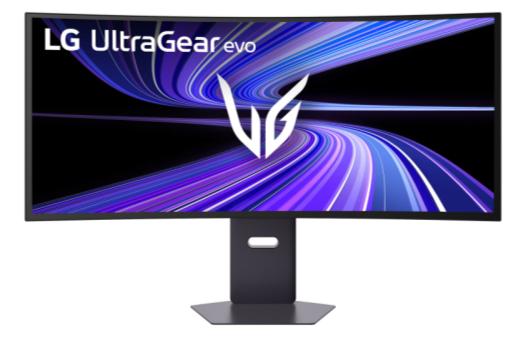
LG chose a sensible middle ground. A 39-inch 21:9 screen is appreciably larger than a 34-inch ultrawide without swallowing a desk like Samsung’s 49-inch, 32:9 OLED G9. The 1500R curve is also gentler than the 800R curve on several earlier 39-inch OLEDs. It should feel less aggressive for documents, timelines and side-by-side windows.
The full specification is serious: 5120 x 2160 at 165Hz, DisplayHDR True Black 500, 99.5% DCI-P3 coverage, FreeSync Premium Pro, G-Sync compatibility and a manufacturer-rated 0.03ms GtG response time. That last number is LG’s claim, not an independently repeatable single figure. Independent testing is more useful, and RTINGS found sharp motion, low input lag and strong HDR picture quality, while flagging noticeable VRR flicker and distracting reflections in a sunny room.
5K2K Is the Real Upgrade
The 143 PPI density is what separates this monitor from 3440 x 1440 models. A 39-inch 3440 x 1440 OLED sits near 96 PPI, which makes text visibly coarser at a normal desk distance. The LG keeps the 2160-pixel vertical workspace of 4K and adds horizontal room. That matters more for productivity than another jump in refresh rate.
RTINGS calls the text and image clarity sharp, and owner feedback largely agrees. This still isn’t a conventional RGB LCD subpixel layout, so very close inspection can reveal small colour edges. The high density makes those artefacts much less intrusive than on older low-density WOLED ultrawides. If your day is split between spreadsheets and games, read our gaming monitor versus office monitor guide before deciding how much OLED risk makes sense.
Tandem OLED Is Brighter, Not Risk-Free
LG’s fourth-generation Primary RGB Tandem OLED stack uses four emissive layers. LG rates the screen at 335 nits typical and up to 1,500 nits in a tiny 1.5% HDR window. TFTCentral measured 335 nits in uniform SDR mode, up to 541 nits with variable brightness, and roughly 1,430 nits in a small HDR highlight. Those numbers support the brightness claim without pretending the whole panel can sustain 1,500 nits.
The efficiency gains should help panel longevity, but they do not erase burn-in. Static taskbars, browser tabs and editing controls remain a poor workload for any OLED left unchanged all day. LG includes OLED Care functions and an advertised two-year panel warranty in the US, but terms can vary by region and seller. Our OLED monitor eye-strain guide also explains why excellent contrast doesn’t guarantee every viewer will find an OLED comfortable.
The 330Hz Mode Is a Side Feature
Dual Mode switches from 5120 x 2160 at 165Hz to 2560 x 1080 at 330Hz. Some early summaries call that mode 1920 x 1080, but LG’s current specifications identify it as 2560 x 1080 WFHD. You can also shrink the active image to 24.5 inches for competitive games.
It works, but it is not why I would spend this much. PC Gamer found the small active window odd and the lower-resolution image visibly softer. A dedicated esports player can buy a smaller 360Hz or 500Hz display for less. The useful default is 5K2K at 165Hz, where the LG 39GX950B combines detail, size and genuinely fast OLED motion.
AI Upscaling Does Not Replace Your GPU
LG calls this the first 5K2K gaming monitor with on-device AI upscaling. The processor can sharpen a lower-resolution input without asking the GPU to perform the scaling. That is different from rendering a game at a lower internal resolution with DLSS, FSR or XeSS, which uses motion data and game-engine integration.
LG’s own guidance says the feature works best when the source is set to 1080p at 60Hz. PC Gamer found support inconsistent across resolutions and refresh rates. Treat it as a convenience for consoles, video and older hardware, not a reason to avoid buying a GPU capable of driving 11 million pixels.
Ports and the Thunderbolt Catch
The port selection includes DisplayPort 2.1 UHBR20, two HDMI 2.1 inputs, USB-C with DisplayPort Alt Mode and 90 W charging, two USB-A ports and a headset jack. Picture-by-picture is supported, and there are two 7 W speakers.
Thunderbolt is not listed by LG or RTINGS. USB-C can still carry video, data and laptop power through one cable, but buyers should not assume Thunderbolt certification, daisy-chaining or every Thunderbolt-specific feature. A 90 W limit is enough for many work laptops and not enough to replace the power brick on most high-end gaming laptops.
LG 39GX950B vs OLED Ultrawide Rivals
The older alternatives trade sharpness for price, width or refresh rate. None of these three matches the LG’s combination of 39 inches and 5K2K, which is precisely why the comparison needs named drawbacks instead of a simple winner badge.
| Monitor | Panel and resolution | Refresh | Curve | What changes the decision |
|---|---|---|---|---|
| LG 39GX950B | 39-inch WOLED, 5120 x 2160 | 165Hz, or 330Hz at 2560 x 1080 | 1500R | Sharpest work text here; expensive, matte coating, OLED burn-in risk |
| Samsung Odyssey OLED G9 G95SD | 49-inch QD-OLED, 5120 x 1440 | 240Hz | 1800R | Much wider and faster; only 110 PPI and takes over a desk |
| ASUS ROG Swift OLED PG39WCDM | 39-inch WOLED, 3440 x 1440 | 240Hz | 800R | Same size with faster native refresh; coarse 96 PPI and aggressive curve |
| Alienware AW3423DWF | 34-inch QD-OLED, 3440 x 1440 | 165Hz | 1800R | Established lower-cost option; smaller and lacks USB-C video input |
What Owners Keep Mentioning
Owner reports repeatedly praise the physical size and improved text clarity compared with 34-inch 1440p OLEDs. Several people using the display for mixed work and gaming say fringing is difficult to notice at a normal viewing distance. Reports about the internal cooling fan are mixed: some call it effectively silent, while a smaller group hears it clearly in quiet rooms.
That feedback needs context. Some detailed posts disclose that LG supplied the monitor, while others describe retail purchases and returns. No collection of short-term owner comments can establish burn-in durability. The consistent, useful finding is simpler: 143 PPI solves most of the text complaint, while unit noise, the matte coating and OLED care behaviour remain personal tolerances.
Price and Availability
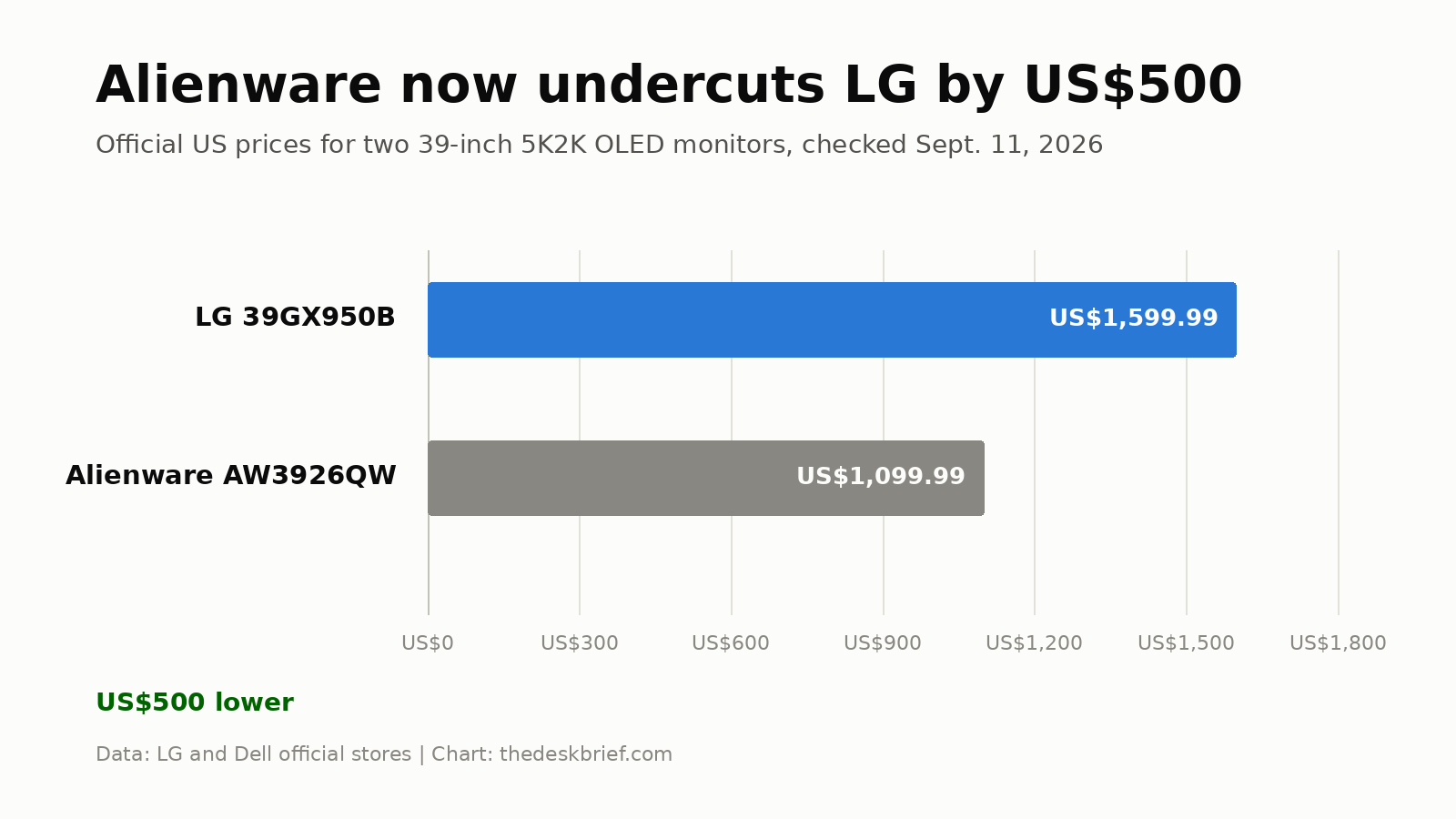
LG launched the monitor at US$1,799.99 and CA$2,199.99. On September 11, LG’s US store listed it at US$1,599.99, while major Canadian retailers listed it at CA$2,199.99. Prices can move quickly, so check the seller and return policy before ordering.
The bigger problem arrived later. Dell now sells the 39-inch, 5120 x 2160 Alienware AW3926QW for CA$1,499.99 in Canada and US$1,099.99 in the US. It uses an RGB-stripe Tandem OLED panel, matches 165Hz and 330Hz modes, and includes USB-C with 90 W charging. The LG can still appeal if you specifically prefer its matte finish, brighter HDR capability or LG’s processing, but those preferences now carry a CA$700 premium.
Who Should Skip This
Skip the LG if your desktop is mostly static office software, your room has direct sunlight, or your GPU cannot comfortably feed 5120 x 2160. A good 40-inch 5K2K IPS monitor is safer for ten-hour spreadsheet days. A 32-inch 4K OLED costs less and is easier to drive for gaming.
It also makes little sense for a small desk. The stand is roughly 32 centimetres deep, and a 39-inch curved panel benefits from enough viewing distance to see the whole screen without constant head movement. Our ultrawide versus dual monitor comparison covers the layout trade-offs before you commit to one large canvas.
Our Pick
My pick at current prices is Alienware. The Alienware AW3926QW was CA$1,499.99 direct from Dell when checked. If LG pricing falls close to CA$1,500 and you prefer matte WOLED, the LG 39GX950B becomes compelling.
FAQ
Is this LG monitor good for office work?
Yes, with a caveat. Its 143 PPI density produces much sharper text than 39-inch 3440 x 1440 OLEDs, and the width is excellent for multitasking. OLED burn-in risk still makes it a less conservative choice for static applications used all day.
Does it have Thunderbolt?
No Thunderbolt certification is listed. It has USB-C with DisplayPort Alt Mode, data and up to 90 W power delivery, which covers the common one-cable laptop setup without promising Thunderbolt-only functions.
Can it run 5K2K at 330Hz?
No. Native 5120 x 2160 tops out at 165Hz. The 330Hz Dual Mode lowers resolution to 2560 x 1080.
Is 5K AI upscaling the same as DLSS?
No. LG’s scaler processes the incoming signal inside the monitor. DLSS, FSR and XeSS render with game and motion information on the PC, so they can recover detail more intelligently when supported.
The Short Version
This monitor gets the difficult parts right: 143 PPI text, a useful 39-inch size, a reasonable 1500R curve, strong HDR highlights and fast OLED motion. Its 330Hz mode and AI upscaling are extras, not the buying case. With Alienware now offering the same core size and resolution for substantially less, LG needs a major discount before this becomes my pick.