CG3200X may be the first desktop QD-OLED monitor that asks colourists to trust the panel less, not more.
EIZO has paired a 31.5-inch 4K panel with a built-in calibration sensor and controls meant to tame OLED’s changing brightness and extreme contrast. The pitch is not brighter spreadsheets or smoother games. It is predictable SDR and HDR post-production on a screen that can reach a claimed 1,000 cd/m² peak and hold 300 cd/m² on a full white screen.
There is still no announced price, Canadian sale date or independent measurement set. That makes this EIZO an interesting professional tool to watch, not a monitor to preorder. This is specification analysis, not a review. I haven’t seen, calibrated or measured it.
Table of Contents
- What the CG3200X Actually Is
- The Useful Idea Is Brightness Control
- Calibration Is the Real Product
- CG3200X vs ASUS ProArt PA32DC
- The Desk Compromises
- Price and Availability
- Who Should Skip This
- CG3200X FAQ
- The Short Version
What the CG3200X Actually Is
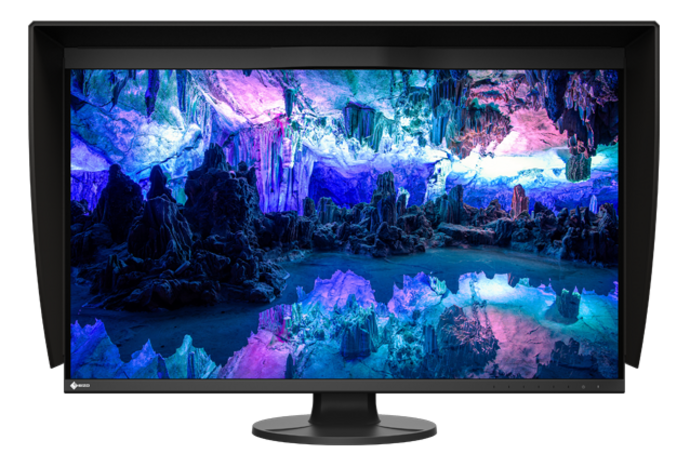
EIZO announced its first ColorEdge OLED on September 1, 2026. The company’s official newsroom release specifies a 31.5-inch 3840 x 2160 QD-OLED panel, 140 PPI density, 60 Hz maximum refresh and a low-reflection anti-glare coating. It claims 99% DCI-P3 and 94% Adobe RGB coverage, with 10-bit output driven by a 24-bit lookup table.
The screen accepts USB-C, DisplayPort and HDMI. USB-C supplies up to 60 W and feeds a two-port USB-A hub. There is no Ethernet port, Thunderbolt connection or built-in KVM in the published specification. A professional editor may already use a separate dock, but this monitor will not replace one.
The stand offers 142.1 mm of height adjustment, 344 degrees of swivel and portrait rotation. The monitor weighs 10.3 kg with its stand and 11 kg with the supplied hood. That is manageable on the stock base. Anyone using an arm should check the 100 x 100 mm VESA mount and the arm’s real payload rating before putting an expensive OLED above the desk.
The Useful Idea Is Brightness Control
OLED brightness normally falls as a bright area occupies more of the screen. That behaviour protects the panel and power system, but it can make a grading window change luminance when its size changes. EIZO’s answer is a pair of automatic brightness limiter modes.
Highlight Dimming reduces only the brightest areas to preserve mid- and low-luminance detail. Uniform Dimming adjusts brightness across the whole image for more consistent overall luminance. EIZO’s ABL Safe View can also reduce the active display area to 10% or 25% for highlight checks with less chance of limiter activation. Users can set an SDR contrast target from 500:1 to 2000:1 in 100-step increments. That sounds backwards on a panel claiming 1,500,000:1 contrast, but it addresses a real problem: SDR work is often mastered for much lower-contrast displays.
The chart below puts the claimed brightness range beside two established 31.5-inch professional OLEDs. Peak figures and full-screen figures are different jobs, not interchangeable bragging rights.
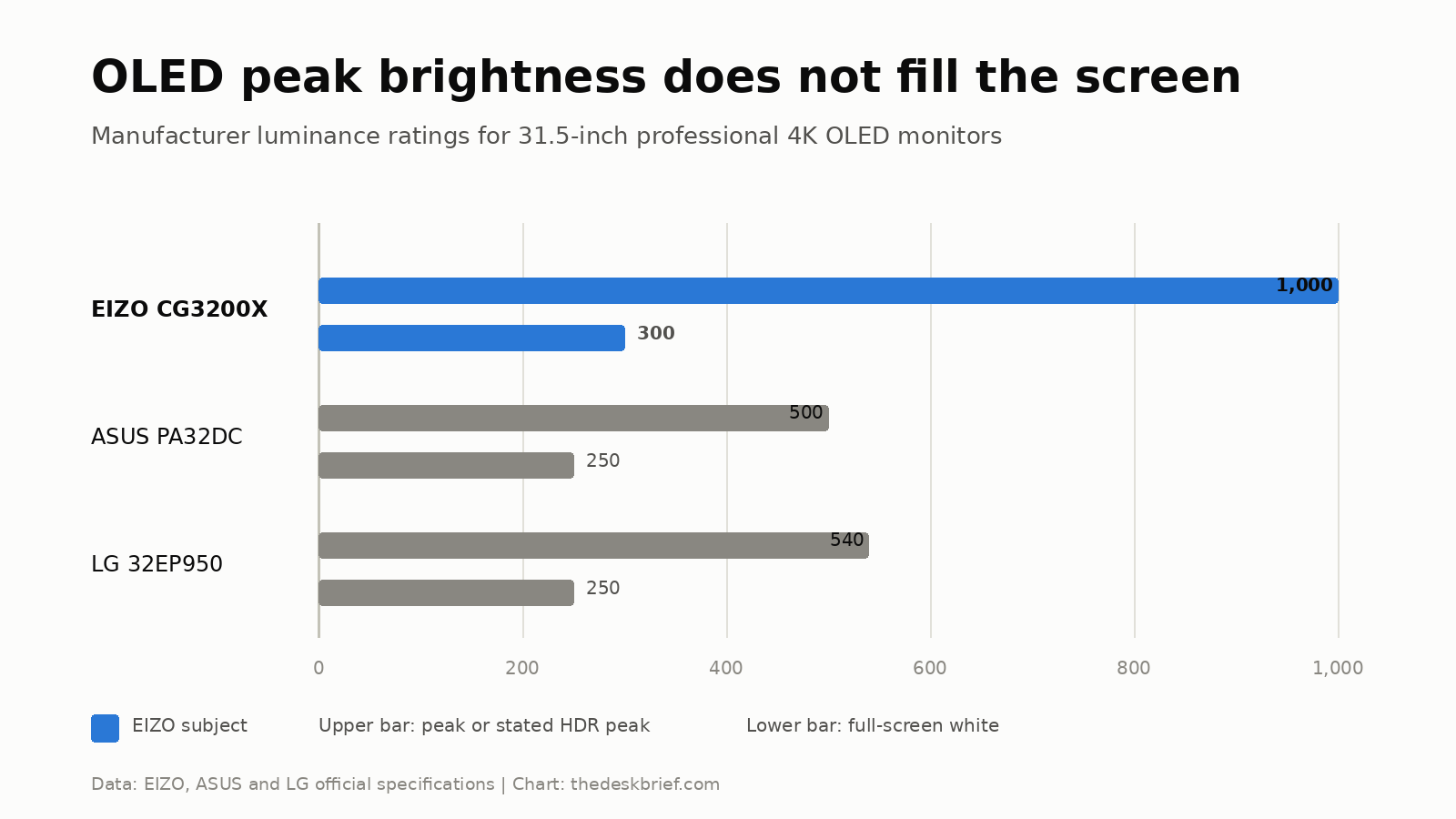
The EIZO has the strongest published pair at 1,000 cd/m² peak and 300 cd/m² full-screen white. ASUS lists 500 and 250 cd/m² for the PA32DC. LG’s 32EP950 specification gives 540 cd/m² at 50% average picture level and 250 cd/m² at 100%, so its first value is not a tiny-window peak. None of these manufacturer figures replaces measurement of sustained output, uniformity, colour accuracy or heat behaviour.
Calibration Is the Real Product
The motorized sensor swings onto the screen for scheduled self-calibration. EIZO’s ColorNavigator 7 can store calibration results in the monitor, which lets the display retain its profile when the connected computer changes. A studio can also manage multiple units through ColorNavigator Network.
That workflow is what separates this from a gaming QD-OLED with a factory calibration report. A report describes the unit when it left the factory. An integrated sensor is supposed to maintain a target over time. NewsShooter’s announcement coverage confirms the built-in sensor and the monitor’s HLG and PQ support, but it does not claim independent colour measurements.
I would still wait for a qualified review to test near-black handling, uniformity, calibration repeatability and how the limiter behaves with real timelines. Those details matter more than the 0.1 ms response claim on a 60 Hz grading monitor.
CG3200X vs ASUS ProArt PA32DC
The ASUS ProArt PA32DC is a useful established reference because it is also a 31.5-inch 4K professional OLED with a built-in motorized colorimeter. EIZO is not inventing self-calibration here. It is pairing that workflow with a newer QD-OLED panel and different control over brightness.
| Decision point | EIZO ColorEdge CG3200X | ASUS ProArt PA32DC |
|---|---|---|
| Price | Not announced | No current ASUS direct price displayed when checked |
| Panel | 31.5-inch 4K QD-OLED | 31.5-inch 4K RGB OLED |
| Peak / full-screen brightness | 1,000 / 300 cd/m² claimed | 500 / 250 cd/m² claimed |
| Published gamut | 99% DCI-P3, 94% Adobe RGB | 99% DCI-P3, 99% Adobe RGB |
| Built-in calibrator | Yes, SelfCalibration | Yes, motorized colorimeter |
| USB-C power | 60 W | 65 W |
| Published warranty | 5 years; OLED panel 1 year or 10,000 hours | 2 years including panel burn-in |
| Named drawback | No price or independent measurements | Lower published HDR brightness |
The EIZO looks more capable for HDR on paper. The ASUS covers more Adobe RGB and supports Dolby Vision, while the EIZO lists HLG and PQ workflows. Price will decide whether those gains are a reasonable tool upgrade or a luxury for studios with a procurement department.
The Desk Compromises
For ordinary office work, this is almost certainly too much monitor and not enough dock. A 60 Hz ceiling is fine for editing, but it gives up the smoother cursor and scrolling of current 120 Hz productivity displays. Sixty watts of USB-C charging is also marginal for a powerful editing laptop under sustained load.
QD-OLED still deserves static-content caution. EIZO advertises a five-year warranty, but its press-release footnote limits OLED-panel coverage to one year or 10,000 hours. It also excludes image retention or burn-in caused by prolonged bright or static content. Our gaming monitor versus office monitor guide explains why a spectacular panel can be the wrong tool for an all-day spreadsheet desk.
The 140 PPI density is sharp at a normal 32-inch viewing distance, though it does not match a 27-inch 5K screen’s 218 PPI. If text clarity and a one-cable Mac setup matter more than HDR mastering, the new MSI 341QPXW14G analysis shows a cheaper kind of OLED compromise. That MSI is not a grading reference, but it is closer to what a mixed office and media desk needs.
Price and Availability
EIZO says availability starts in winter 2026, with timing varying by country. It has not announced a US price, Canadian price or Canadian retail date. There is nothing responsible to convert or estimate.
That missing number prevents a buying verdict. A professional display can save billable time through reliable calibration, but only if its workflow benefit exceeds the price gap to a proven alternative. Wait for regional pricing, independent measurements and the exact warranty document.
Who Should Skip This
Skip it if you mainly write, browse, code or play games. You would be paying for calibration hardware, HDR mastering modes and network management that those jobs do not need. A less expensive IPS monitor is a safer static-content choice, while a high-refresh OLED is more appropriate for gaming.
Freelance photographers should also pause unless video HDR is a major part of the workload. The published 94% Adobe RGB coverage trails the PA32DC’s claimed 99%, and price remains unknown. A newer panel is not automatically a better fit for every colour space.
CG3200X FAQ
How much does the EIZO CG3200X cost?
EIZO has not announced a price. It also has not confirmed Canadian pricing or a Canadian retail date. Treat any unsourced estimate as speculation.
Does it calibrate itself?
It has a built-in sensor and supports scheduled SelfCalibration through EIZO’s ColorNavigator workflow. Independent testing has not yet measured the sensor’s repeatability on this exact model.
Is it a good gaming monitor?
No. The 60 Hz maximum refresh rate and professional feature set target post-production. Gaming QD-OLED monitors offer much higher refresh rates for less money, though they do not provide the same integrated calibration workflow.
Can USB-C charge a laptop?
Yes, at up to 60 W. That is enough for many thin laptops, but demanding mobile workstations may charge slowly or draw from the battery under heavy load.
The Short Version
This monitor combines a bright 31.5-inch 4K QD-OLED panel with the calibration workflow that makes ColorEdge monitors useful to working colourists. Its limiter controls and built-in calibration system are more meaningful than another giant contrast claim. Price, Canadian availability and independent measurements are still missing. Wait for all three unless your studio has already validated the workflow and can justify whatever EIZO eventually charges.