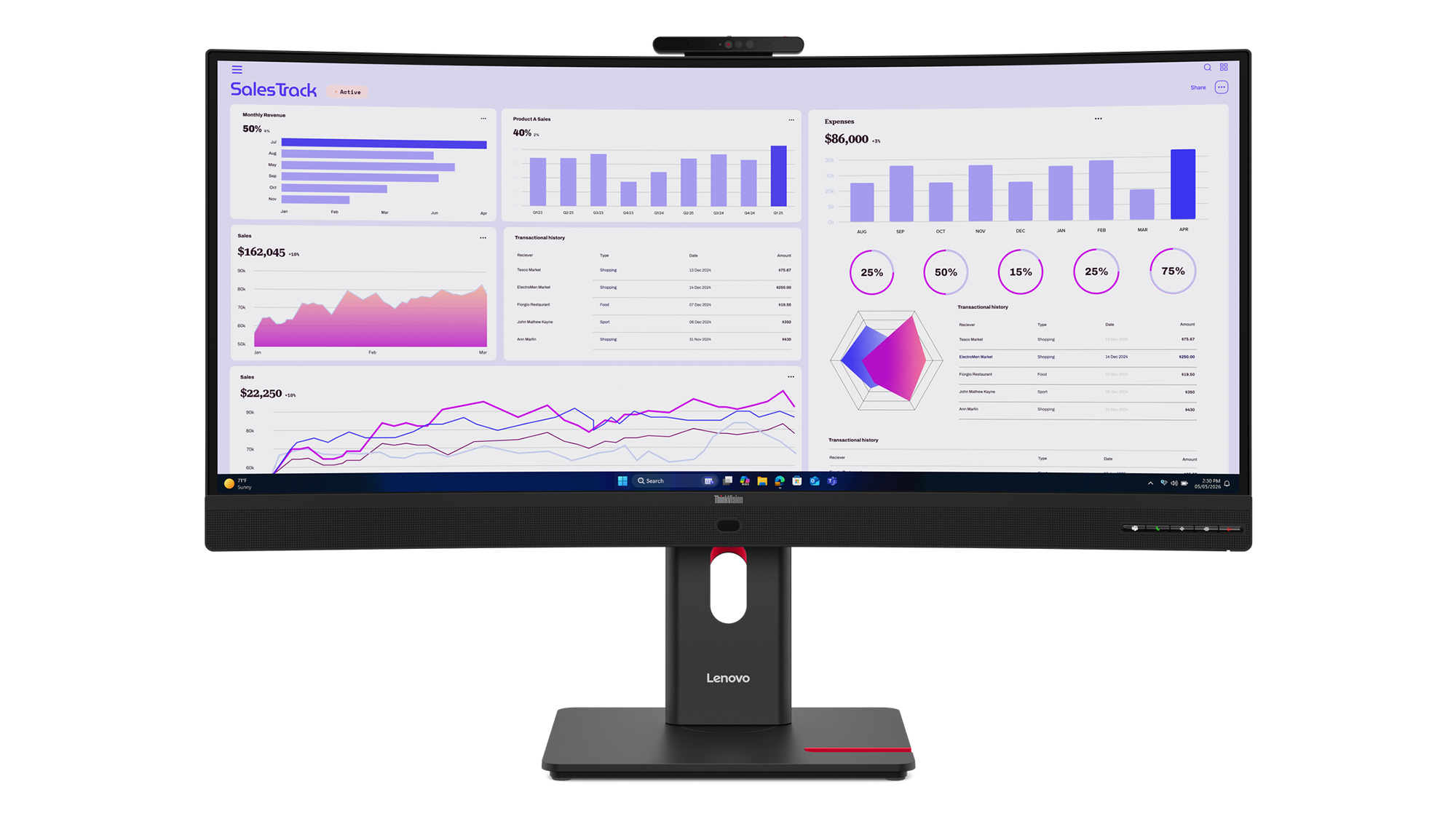
ThinkVision T34WD-4v is a 34-inch meeting monitor that Lenovo has announced but has not shipped as of October 30, 2026. Lenovo’s Innovation World announcement gives it a December 2026 availability window and an expected European price of €599 (about US$673), while US and Canadian prices remain unannounced. Exact-model listings found this week are reservation-only, and searches of Amazon US, Best Buy and Newegg found no shipped unit.
The buying decision is unusually clear. Wait for the ThinkVision T34WD-4v if one USB-C cable needs to handle your laptop, network, webcam, speakers and 120 Hz ultrawide display. Buy a proven alternative now if display quality matters more than an integrated meeting stack. Lenovo has supplied enough detail to judge the layout, but not enough independent testing to judge VA smearing, camera quality, microphone pickup or USB reliability.
This is specification analysis, not a hands-on review. I compared Lenovo’s launch material and newly published specifications with current independent coverage and Dell’s live documentation for a shipping reference monitor. The expected euro price converts at the Bank of Canada’s October 16 daily EUR/CAD and USD/CAD averages.
Table of Contents
- What Lenovo Is Actually Selling
- ThinkVision T34WD-4v vs Dell U3425WE
- The Meeting Hardware Is the Reason to Wait
- Why 120 Hz Matters More Than the AI Label
- The Missing Tests Matter
- Who Should Skip This
- What We Will Update at Launch
- ThinkVision T34WD-4v FAQ
- The Short Version
What Lenovo Is Actually Selling
Lenovo is building the screen around a laptop desk, not a gaming tower. The 34-inch VA panel runs at 3440 by 1440 with a 1500R curve, 300-nit claimed brightness and a variable 48 to 120 Hz refresh range. Lenovo claims 99 percent coverage of sRGB and BT.709, which is sensible for office graphics and video calls. It has not announced HDR certification or wide-gamut DCI-P3 coverage for this model.
The port list is the real product. One upstream USB-C connection carries display data and supplies up to 100 W to a compatible laptop. A second USB-C port supplies up to 15 W, and three USB-A ports handle ordinary peripherals. HDMI 2.1, DisplayPort 1.4, Gigabit Ethernet and a 3.5 mm audio jack round out the desk connections. The USB data path is 5 Gbps, so the screen is not a substitute for a fast Thunderbolt storage dock.
That distinction matters. A monitor can replace the tangle on a desk without replacing every specialized dock. If your workday is browser tabs, office files, calls and ordinary external drives, 5 Gbps is plenty. If you move large video projects or use multiple high-resolution displays from one Thunderbolt chain, it is the wrong bottleneck to buy deliberately.
ThinkVision T34WD-4v vs Dell U3425WE
The Dell UltraSharp U3425WE is the useful reference because it is a shipping 34-inch, 120 Hz office ultrawide with a serious dock. It is not a cheap foil chosen to make Lenovo look clever. Dell’s US store listed it at US$984.99 on October 30, and its current specification page documents the differences that affect a work setup.
| Decision point | Lenovo ThinkVision T34WD-4v | Dell UltraSharp U3425WE |
|---|---|---|
| Panel | 34-inch VA, 1500R | 34.1-inch IPS Black, 1900R |
| Resolution and refresh | 3440 by 1440, 48 to 120 Hz | 3440 by 1440, up to 120 Hz |
| Claimed brightness | 300 nits | 300 nits |
| Color claim | 99% sRGB and BT.709 | 98% DCI-P3 and Display P3; 100% sRGB and BT.709 |
| Laptop connection | USB-C, 5 Gbps, up to 100 W | Thunderbolt 4, up to 90 W |
| Video-call hardware | 5 MP RGB and IR camera, dual microphones, 2 x 5 W speakers | No webcam; 2 x 5 W speakers |
| Network | Gigabit Ethernet | 2.5GbE |
| Price and state | Expected €599 in Europe (about US$673); preorder-only, US price unannounced | US$984.99 at Dell; shipping |
The Lenovo wins the checklist for calls. Dell wins the documented display and connection case with IPS Black, wider color coverage, Thunderbolt 4, 2.5GbE and internal screen partitioning. Dell does not include a webcam. A good camera added to it takes another cable and port, but that is preferable to being stuck with a mediocre built-in camera. We will not know which side of that trade Lenovo occupies until its 5 MP module is tested.
If the new model’s expected European price survives retail, it will sit well below Dell’s current US price after a rough currency conversion. That is encouraging, not decisive. Regional tax, warranty terms and launch pricing can erase a paper advantage before the first box reaches a desk.
The Meeting Hardware Is the Reason to Wait
The 5 MP camera combines RGB and infrared sensors, so Lenovo can support Windows Hello sign-in as well as video. A physical privacy shutter is visible in Lenovo’s image. Dual microphones and two 5 W speakers complete a setup that can wake, sign in and join a call without a separate webcam or speakerphone.
Lenovo also lists Microsoft Teams certification, an ambient-light sensor and a time-of-flight sensor. Those are useful only if the behavior is predictable. Automatic framing that hunts during a call is worse than a fixed crop. Presence detection that dims the screen while you read is worse than pressing a button. Manufacturer feature names do not answer either question.
That is why the ultrawide versus dual-monitor decision should come before the AI extras. One wide screen removes a central bezel and simplifies a laptop desk. Two displays remain easier to replace independently, and one can stay visible while the other is shared on a call.
Why 120 Hz Matters More Than the AI Label
A 120 Hz office monitor refreshes often enough to make scrolling, cursor movement and window animation look cleaner than they do at 60 Hz. It does not make a spreadsheet calculate faster. It makes the display respond in smaller visual steps, which is the part you notice every time you move through a long page.
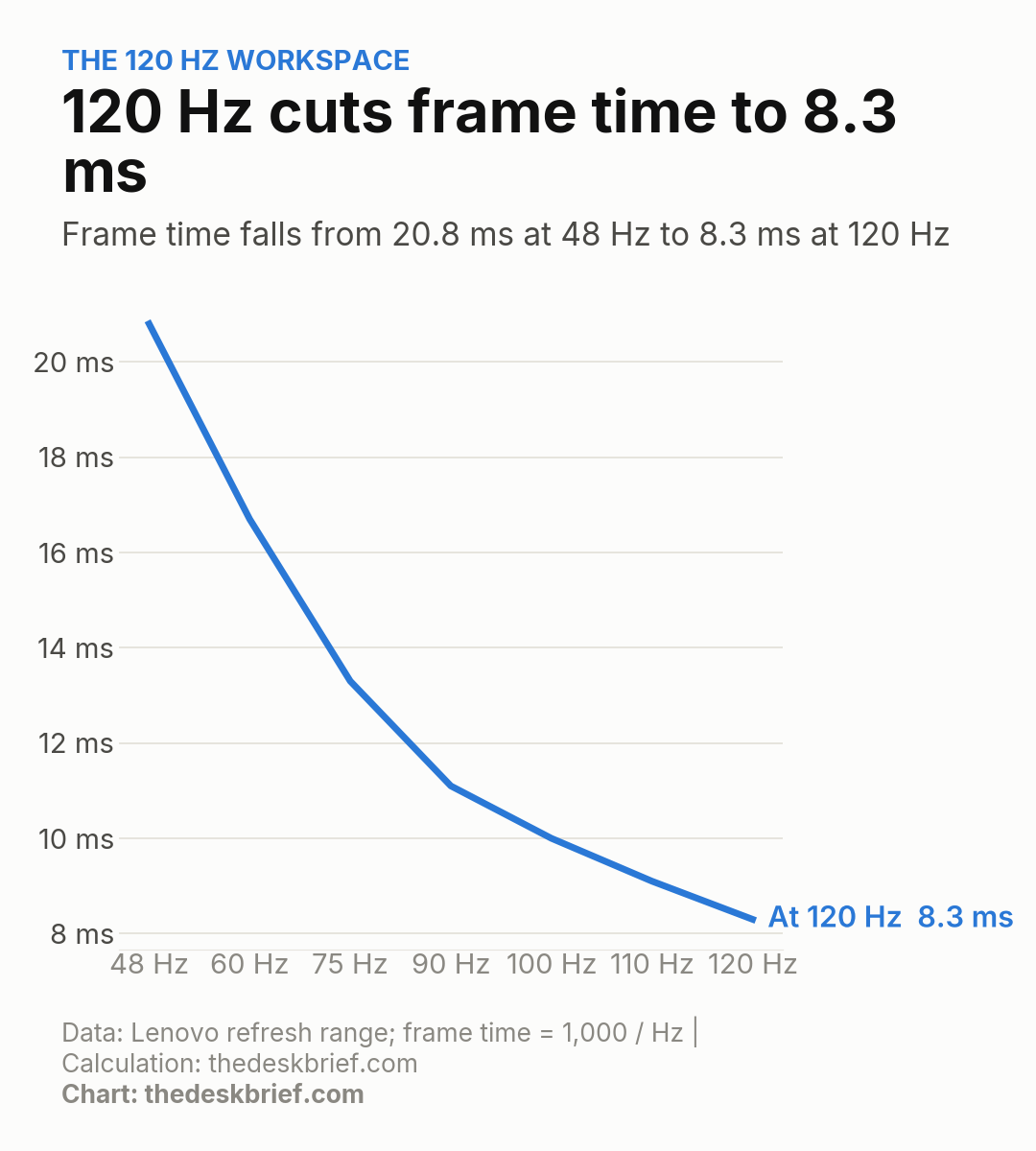
At 48 Hz, a new frame arrives every 20.8 milliseconds. At 120 Hz, that interval falls to 8.3 milliseconds. The curve is simple arithmetic, not a performance test, and it does not measure pixel response. A slow VA transition can still smear even while the monitor accepts 120 frames each second.
Lenovo claims 4 ms in its fastest response mode and 6 ms in normal mode. Those figures do not reveal overshoot or dark-level smearing. The exact panel needs instrumented testing before anyone calls it a gaming bargain. For a product that mixes work and occasional play, however, 120 Hz is a more durable benefit than another dashboard full of vaguely named AI controls.
The Missing Tests Matter
Notebookcheck’s launch coverage confirms global regional variants and the newly published port details, but it is not a hands-on review. There is no independent exact-model measurement for contrast, color error, brightness uniformity, response time, input lag, camera exposure, microphone rejection or USB-C wake behavior.
Those gaps touch the entire reason to buy this monitor. A 300-nit claim is ordinary, and bright windows can expose weak anti-glare treatment. VA contrast should beat ordinary IPS in a dark room, but black smearing can make dark interfaces less pleasant in motion. A built-in webcam saves space only if it handles backlighting and skin tones well enough to keep.
The safest comparison today is functional. The Philips 34B2U5900C aims at higher-resolution 5K2K work, while the MSI 341QPXW14G targets OLED contrast and Mac docking. Lenovo is choosing integrated calls and office fleet management instead. Different problem, different compromises.
Who Should Skip This
Skip the ThinkVision T34WD-4v if you already own a webcam, microphone and dock that you like. Bundling those parts inside a monitor reduces cables, but it also ties their replacement cycle to the panel. A failed camera should not force a monitor upgrade, and an aging panel should not send a perfectly good camera to recycling.
Color-critical workers should wait for measured accuracy and uniformity, or buy the documented Dell alternative. Gamers should wait for response-time and VRR testing. Mac users who depend on Thunderbolt daisy chaining should not assume a USB-C logo provides the same topology. Owners of performance laptops that expect more than 100 W will still need the laptop’s power adapter under heavy load.
The best fit is narrower and more practical: a Windows laptop user who wants one curved screen, one cable, wired networking, Windows Hello and respectable motion clarity. If that describes the desk, waiting for launch reviews makes sense. Preordering does not.
What We Will Update at Launch
We will add confirmed US and Canadian prices, live regional stock, warranty terms and independent panel measurements when the monitor ships. Camera samples, microphone noise rejection, USB-C wake behavior and VRR performance are the priority. If Lenovo changes the December window or the expected €599 European price, those details will be corrected from Lenovo’s regional store pages.
ThinkVision T34WD-4v FAQ
Is the ThinkVision T34WD-4v on sale?
No shipped listing was found as of October 30, 2026. Lenovo says availability starts in December 2026, and an exact-model Spanish listing is accepting reservations with zero stock.
Does it have a webcam?
Yes. Lenovo specifies a 5 MP RGB and infrared camera with Windows Hello support, a privacy shutter, dual microphones and two 5 W speakers. Independent image and microphone tests have not been published.
Can its USB-C port charge a laptop?
Yes, up to 100 W on a compatible USB Power Delivery laptop. The computer must also support DisplayPort Alt Mode over USB-C to carry video on the same cable.
Is it better than the Dell U3425WE?
It is better equipped for video calls because it includes a webcam and microphones. Dell has the stronger documented display and docking package with IPS Black, wider color coverage, Thunderbolt 4 and 2.5GbE. Lenovo needs testing and final regional prices before there is an overall winner.
The Short Version
The ThinkVision T34WD-4v makes sense as a one-cable Windows meeting desk, not as a blind preorder. Its 34-inch 120 Hz panel, 100 W USB-C, Ethernet, 5 MP Windows Hello camera and speakers can replace several separate devices. The expected price is promising, but the panel, webcam, microphones and dock behavior remain untested. Wait for shipping units and regional pricing before buying the convenience.