M6 MacBook Pro starts at US$1,999, and the price tells you almost as much as the new chip does. Apple has moved the base 14-inch model to a 12-core CPU, a 12-core GPU and 1TB of storage without changing the familiar screen, chassis or Thunderbolt 4 ports. This is a faster version of the same laptop, not the redesign some buyers have been waiting for.
The new model is available only for preorder as of October 28, 2026. Apple says deliveries and store availability begin November 6 in the US, Canada, UK and other launch markets. The Canadian starting price is CA$2,799, while Apple lists US$1,999 in the US. No customer units have shipped yet.
My early verdict is simple: preorder if you are replacing an Intel Mac or an M1 machine and already planned to spend this much. M5 owners should keep their laptops. These conclusions come from current specifications, Apple-published test figures and independent launch analysis, not hands-on testing. What we will update at launch: measured battery life, fan noise, sustained performance, display results and the real speed of the SSD.
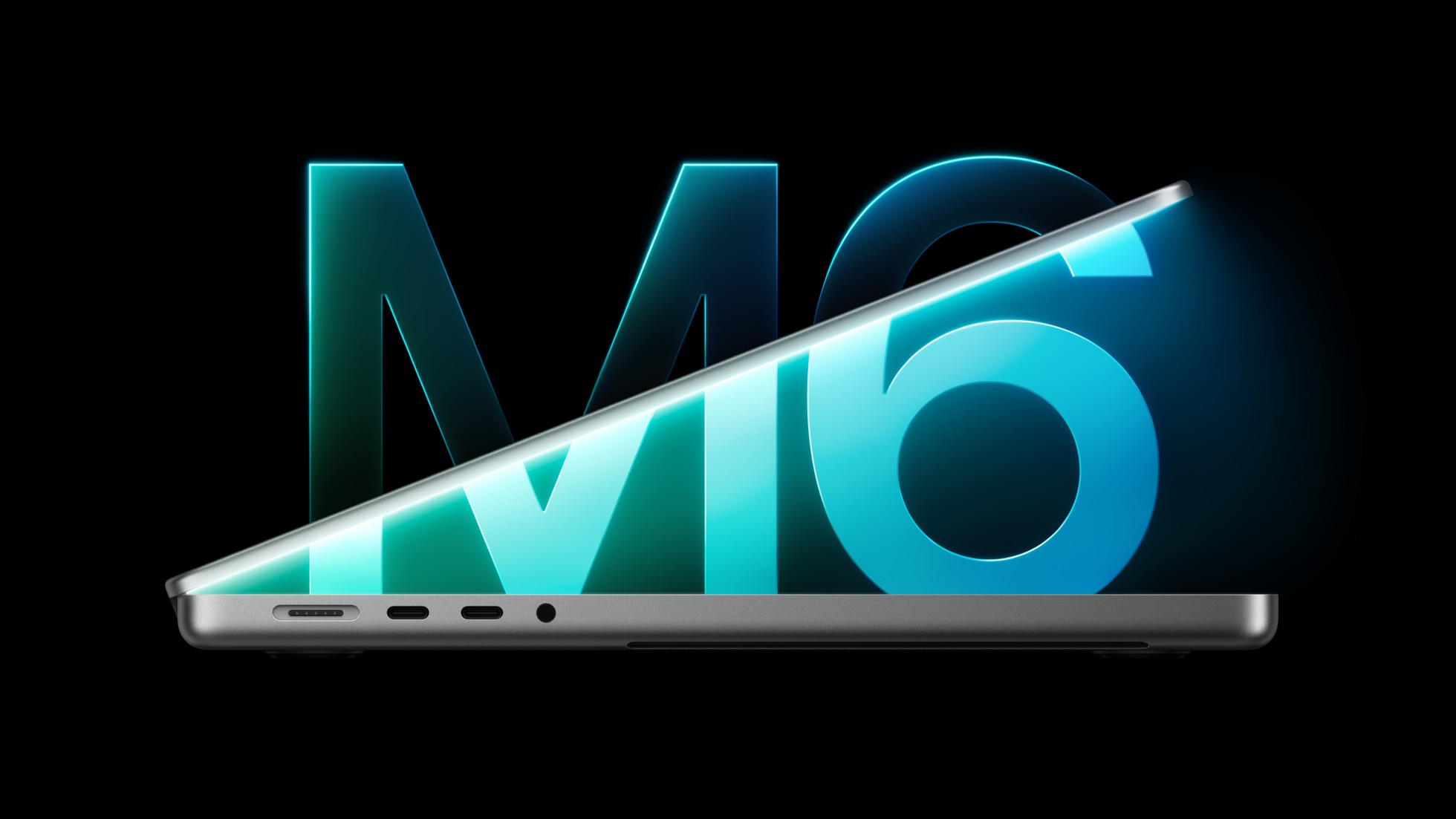
Table of Contents
- M6 MacBook Pro specs and price
- M6 versus M5
- What Apple’s performance claims show
- Memory and storage
- Ports and display
- Who should preorder
- Who should skip this
- What we will update at launch
- M6 MacBook Pro FAQ
- The Short Version
M6 MacBook Pro Specs and Price
The base configuration pairs the M6 chip’s 12-core CPU and 12-core GPU with 16GB of unified memory and a 1TB SSD. Apple offers 24GB and 32GB memory options, but 32GB remains the ceiling. The base chip is available only in the 14-inch body; the 16-inch MacBook Pro still starts with M5 Pro.
The 14.2-inch Liquid Retina XDR display keeps ProMotion up to 120 Hz and Apple’s claimed 1,600-nit peak HDR brightness. The port set is also familiar: three Thunderbolt 4 ports, HDMI, an SDXC card slot, MagSafe 3 and a headphone jack. The wireless upgrade is more meaningful, with Wi-Fi 7 and Bluetooth 6 replacing Wi-Fi 6E and Bluetooth 5.3.
Apple’s US$1,999 price is US$400 higher than the old US$1,599 entry point many people associate with a 14-inch MacBook Pro, but this configuration also starts with 1TB rather than 512GB. That distinction matters when comparing clearance stock. A cheaper M5 with a smaller SSD is not the same configuration, and Apple’s storage upgrades have never been famous for generosity.
M6 Versus M5: The Useful Differences
The CPU and GPU each gain two cores. The M6 also adds a second 16-core Neural Engine and moves to a newer 2 nm manufacturing process, according to MacRumors’ M5 and M6 comparison. Those changes should help demanding work, but most of the laptop surrounding the chip is unchanged.
| Decision point | 14-inch M6 model | 14-inch M5 model |
|---|---|---|
| CPU and GPU | 12-core CPU, 12-core GPU | 10-core CPU, 10-core GPU |
| Unified memory | 16GB, 24GB or 32GB | 16GB, 24GB or 32GB |
| Base storage | 1TB | 512GB at launch |
| Wireless | Wi-Fi 7, Bluetooth 6 | Wi-Fi 6E, Bluetooth 5.3 |
| Wired expansion | Three Thunderbolt 4 ports | Three Thunderbolt 4 ports |
| Display | 14.2-inch Liquid Retina XDR, 120 Hz | 14.2-inch Liquid Retina XDR, 120 Hz |
| Apple battery claim | Up to 24 hours | Up to 24 hours |
| Release state | Preorder, ships November 6 | Released |
The comparison supports a boring but useful conclusion. At the same price, memory and storage, buy M6. If an M5 clearance model is hundreds less and already has enough memory, the new wireless radios and extra cores may not repay the difference. The site’s gaming laptop versus MacBook guide covers the larger Windows versus macOS decision before a chip generation makes it unnecessarily complicated.
What Apple’s Performance Claims Actually Show
Apple claims up to 30% faster graphics and 25% faster AI workloads than M5. The detailed figures are more interesting because the uplift changes sharply by task. Apple publishes M6 and M5 results as multiples of an M1 baseline, so I divided the two values for each shared test to calculate the generation-over-generation change.
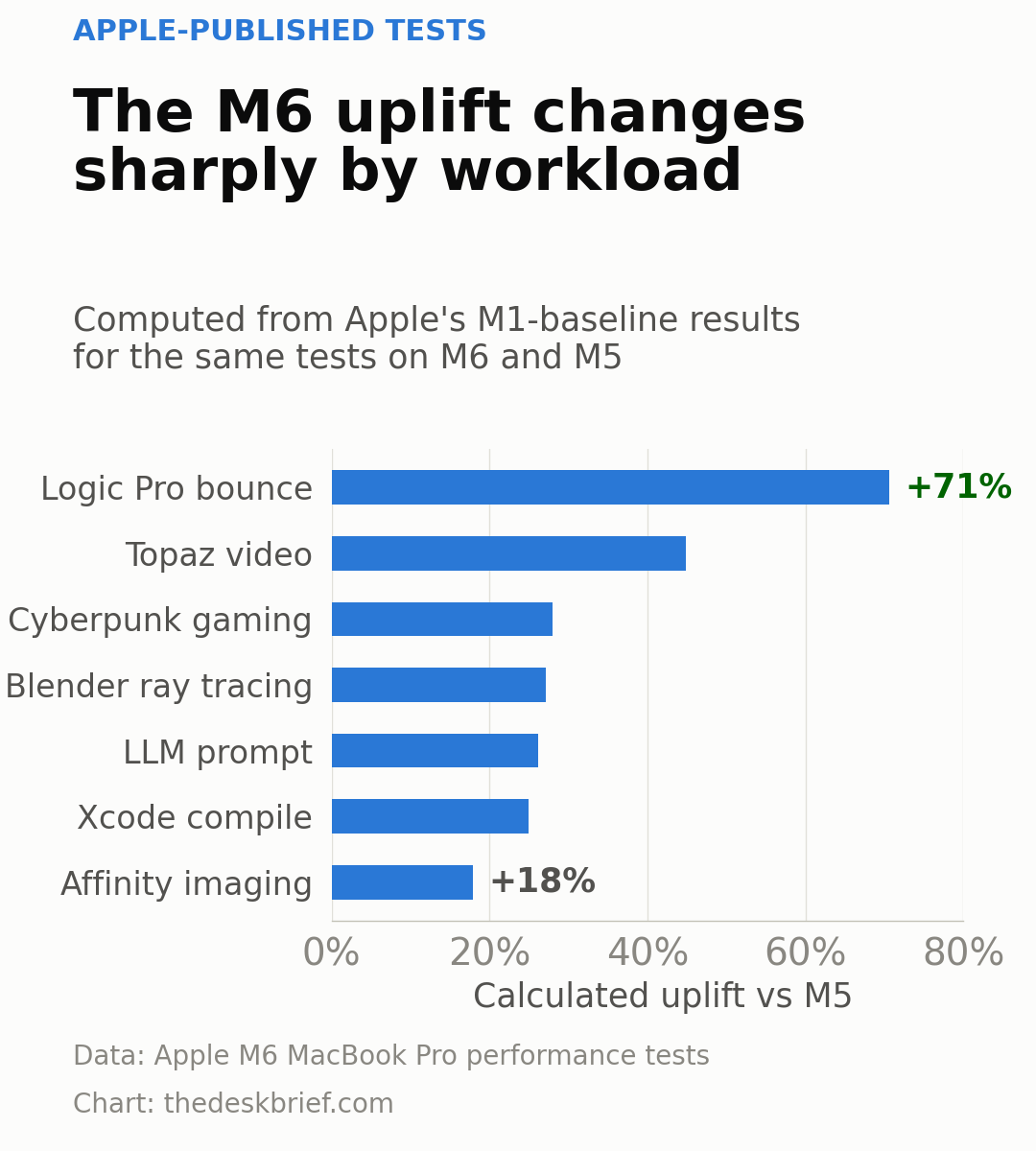
The calculated range runs from about 18% in Affinity image processing to 71% in a Logic Pro track-bounce test. Xcode compiling, LLM prompt processing, Blender rendering and gaming land near 25% to 28%, while Topaz AI video reaches roughly 45%. This pattern is more honest than one headline percentage: the M6 can be a large upgrade when an application uses its new hardware well, and a modest one when it does not.
These are Apple tests with selected projects and configurations. They are not independent laptop benchmarks. Tom’s Guide has tested the M6 in a Mac mini, but it also says the M6 MacBook Pro still needs lab testing. Cooling, power limits and SSD behavior can change results inside the laptop.
The 1TB SSD Helps, but 32GB Is Still the Ceiling
Starting at 1TB removes the easiest complaint about the old base configuration. Creative applications, local developer environments and a modest photo library can make 512GB feel temporary. An external SSD works, but nobody buys a US$1,999 laptop because they are excited to hang another rectangle from it.
The memory limit is the tougher compromise. Apple’s unified memory architecture lets the CPU and GPU share one pool, which is useful for graphics and local AI. It does not make 32GB infinite. The operating system, applications, model weights and context cache still compete for capacity.
If local AI is the main job, compare the M6 MacBook Pro with machines that offer 64GB, 128GB or discrete GPU memory before paying for a premium configuration. The site’s RTX Spark versus Apple silicon analysis explains why memory capacity, software support and power use matter more than a single AI-performance label.
The Ports and Display Are Good, Not New
Three Thunderbolt 4 ports are plenty for most desks, especially with HDMI and SDXC handled separately. They are still Thunderbolt 4. Apple’s M5 Pro and M5 Max models get Thunderbolt 5, so the newer base-chip laptop does not have the fastest wired connection in the family.
The display is a similar story. A 14.2-inch mini-LED panel with 120 Hz ProMotion, strong HDR capability and a nano-texture option remains excellent hardware. It is also the same basic proposition M5 buyers already own. If you are deciding between screen sizes rather than chips, the site’s 13, 14, 16 and 17-inch laptop comparison is the more useful starting point.
Who Should Preorder
Preordering makes sense for someone replacing an Intel MacBook Pro or an M1 model that is already slowing real work. You get a modern 1TB base configuration, current wireless standards, a proven port layout and a chip that Apple says is materially faster across several demanding applications.
It also suits a buyer whose current computer has failed and who cannot wait for discounts or reviews. Apple has published the price and November 6 delivery date, so the transaction itself is not mysterious. Performance under sustained load is.
Who Should Skip This
Skip the preorder if you own an M5 MacBook Pro. The display, body, ports, battery claim and memory ceiling are too similar to justify replacing a one-year-old laptop before independent tests exist. Keep the M5 and spend nothing. It is a remarkably effective specification.
Also skip it if you need more than 32GB of memory, Thunderbolt 5 or the larger 16-inch screen. Those requirements push you toward an M5 Pro or M5 Max configuration, a different platform or a later model. Buyers who mainly browse, write and join video calls should compare a MacBook Air before paying for cooling and ports they may never use.
What We Will Update at Launch
The first update will replace manufacturer performance claims with attributed independent measurements. Battery runtime, fan noise, CPU and GPU performance on battery, sustained rendering and SSD speed all need testing. We will also check whether the 16GB base configuration swaps heavily under creative and local-AI workloads.
Retail availability matters too. The current release state is preorder-not-shipping, with first deliveries scheduled for November 6. Once units ship, this page will note live regional configurations and whether M5 clearance pricing creates a better value.
M6 MacBook Pro FAQ
When does the M6 MacBook Pro ship?
Apple says the first deliveries and in-store availability begin November 6, 2026. Preorders opened October 28 in 35 countries and regions. No units had shipped when this article was published.
How much does it cost?
The 14-inch model starts at US$1,999 in the US and CA$2,799 in Canada. Both prices come directly from Apple’s regional launch announcements. Memory and configuration upgrades cost more.
Does it have Thunderbolt 5?
No. The M6 version has three Thunderbolt 4 ports. Apple reserves Thunderbolt 5 for the current M5 Pro and M5 Max MacBook Pro models.
Should an M5 owner upgrade?
Probably not. The M6 adds CPU and GPU cores plus newer wireless hardware, but it keeps the same memory ceiling, port standard, display and battery-life claim. Wait for independent testing and a more substantial hardware change.
The Short Version
The M6 MacBook Pro is a sensible replacement for an old Intel or M1 machine. Its 12-core CPU, 12-core GPU, 1TB starting storage, Wi-Fi 7 and Bluetooth 6 improve the base model without disturbing a strong display and useful port selection.
It is not a sensible upgrade from M5. At US$1,999, the 32GB ceiling and Thunderbolt 4 ports deserve scrutiny, while Apple’s varied test results make independent benchmarks essential. Preorder only if you need a laptop now. Everyone else can wait until November 6 turns claims into measurements.