Laptop screen size is the wrong place to chase the biggest number. A 16-inch panel gives you 31% more display area than a 14-inch panel when both use the same 16:10 shape, but it also asks for more bag space and more desk depth. My practical answer is 14 inches if you carry the machine daily or dock it to a monitor, 16 inches if the laptop display is your main workspace, and 17 inches only if the computer rarely leaves the desk.
The extra two diagonal inches aren’t a small upgrade. Area grows with the square of the diagonal, which is why 16 inches feels substantially roomier rather than merely a little wider. Geometry has no respect for tidy marketing labels.
This guide uses display geometry, current workplace ergonomics guidance, and practical window-layout needs. It is a sizing analysis, not a hands-on review of every laptop on the shelf.
Table of Contents
- Laptop Screen Size by Use Case
- Why 16 Inches Feels Much Bigger Than 14
- Resolution and Aspect Ratio Change the Answer
- A Bigger Laptop Isn’t Automatically More Ergonomic
- An External Monitor Changes the Answer
- Who Should Skip This Advice
- Frequently Asked Questions
- The Short Version
Laptop Screen Size by Use Case
Start with where the laptop will spend most of its time. The best laptop screen size for a train commute is not the best one for eight hours of spreadsheets at a kitchen table.
| Display class | Best fit | Main advantage | Main compromise |
|---|---|---|---|
| 13 to 14 inches | Daily commuting, flights, frequent docking | Fits smaller bags and shallow desks | Two full document windows feel tight |
| 15 to 16 inches | Hybrid work, coding, spreadsheets, creative tools | Enough area for useful side-by-side work | More awkward to carry every day |
| 17 to 18 inches | Desk-bound desktop replacement | Largest built-in workspace | Consumes desk and bag space quickly |
A 13.3-inch or 14-inch machine is the sensible default for a worker who moves between rooms, clients, or transit. It leaves space in the bag for the charger and doesn’t take over a café table. The catch is predictable: a browser beside a document works, but each window becomes narrow enough that toolbars and side panels start eating the content.
A 15.6-inch or 16-inch model is the better default when the built-in display does real work. It gives spreadsheets more columns, editing apps more room for controls, and code editors enough width for a file tree beside the document. This is the size I would choose for a laptop that moves occasionally but works undocked most days.
A 17.3-inch or 18-inch laptop is a portable computer in the legal sense. It can move, but the large chassis, matching power adapter, and deep footprint make it a poor answer for frequent commuting. Buy it because you need a large self-contained screen, not because 18 is more impressive than 16.
Why 16 Inches Feels Much Bigger Than 14
Manufacturers measure a display diagonally from one panel corner to the opposite corner, excluding the bezel. That single number hides the relationship readers actually feel: usable area.
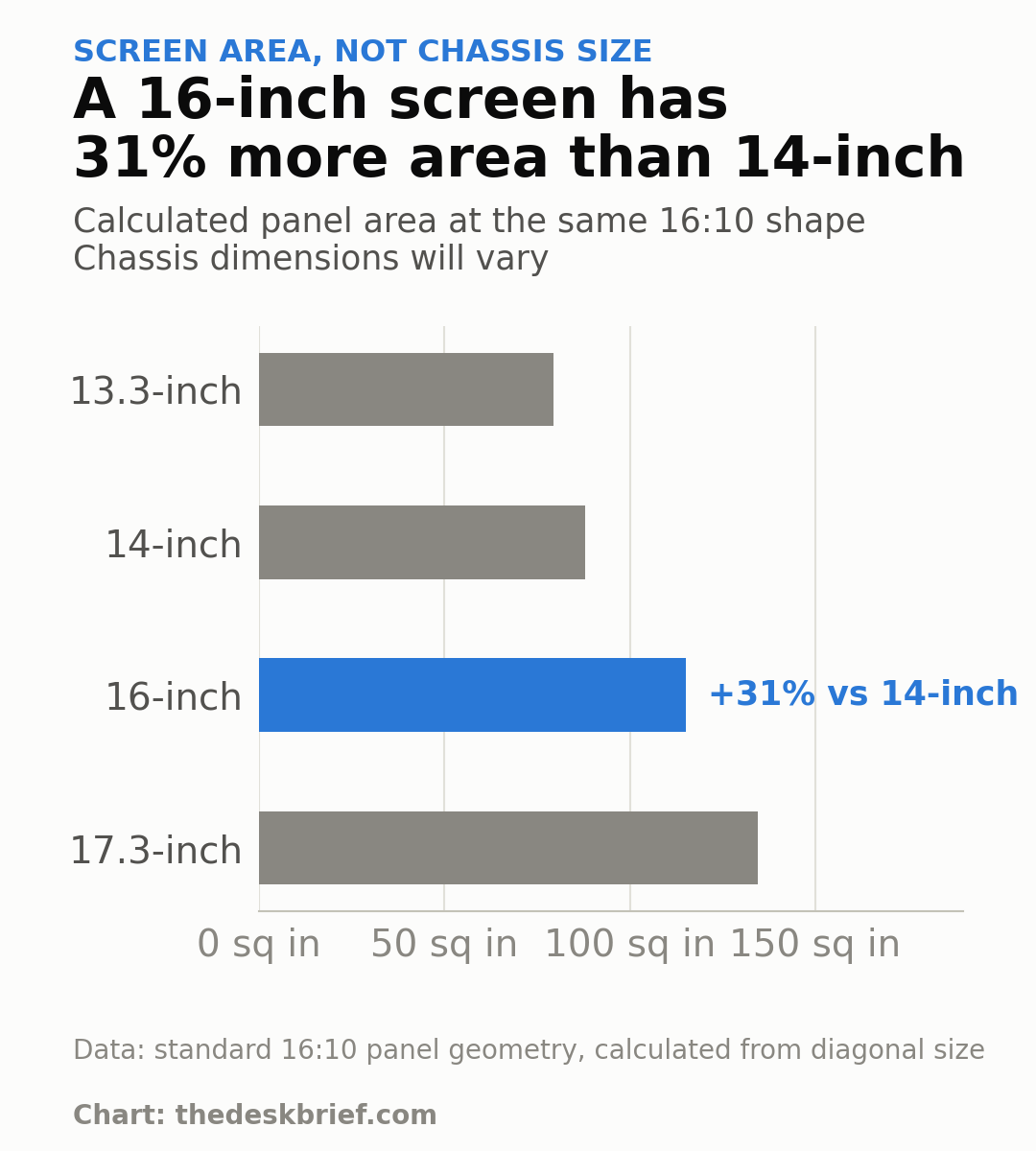
At 16:10, a 14-inch panel has about 88.1 square inches of display area. A 16-inch panel has about 115.1 square inches, a 31% increase. A 17.3-inch panel reaches about 134.5 square inches, only 17% more than 16 inches, so the jump from 14 to 16 is the more meaningful step.
Those figures describe the panel, not the whole laptop. Narrow bezels can let a modern 14-inch machine occupy less space than an older 13.3-inch design. Check the chassis width, depth, thickness, and weight after choosing a screen class. The diagonal alone doesn’t know what bag you own.
Resolution and Aspect Ratio Change the Answer
A large panel can still be a weak workspace. Resolution decides how much detail the panel can draw, while operating-system scaling decides how large text and controls appear. A 16-inch display at 1920 by 1200 pixels produces larger, less dense pixels than a 14-inch display at 2560 by 1600, even though the larger panel is physically easier to divide.
Aspect ratio matters too. At the same 1920-pixel width, a 1920 by 1200 16:10 panel provides 11% more vertical pixels than a 1920 by 1080 16:9 panel. That extra height is useful for documents, browser pages, code, and timelines because it reduces vertical scrolling without making the laptop dramatically wider.
Windows can arrange two apps side by side or place several in a grid with Snap layouts. The software makes window management easy, but it cannot make cramped text pleasant. For regular side-by-side work, 16 inches is the safer choice; for one focused window at a time, 14 inches is enough.
A Bigger Laptop Isn’t Automatically More Ergonomic
The keyboard and display are attached, which creates the basic laptop compromise. Put the keyboard at a comfortable typing height and the screen sits low. Raise the screen and the keyboard follows it upward. A larger laptop screen size makes content easier to see, but it doesn’t separate those two conflicting positions.
The Canadian Centre for Occupational Health and Safety says an arm’s length is usually a good starting estimate for viewing distance and advises keeping the top of a tall screen no higher than eye level. Its monitor-positioning guidance also says a wide display may need to sit farther away to reduce neck rotation. Bigger can help, provided the desk is deep enough to place it properly.
For regular desk use, Employment and Social Development Canada’s computer-workstation guide recommends an appropriately sized keyboard and gives an external keyboard as the example for a laptop used regularly at a desk. That is more useful than pretending a premium hinge fixes posture. Put the laptop on a stand, add a keyboard and mouse, then use our ergonomic desk setup checklist and monitor-height guide to place it.
An External Monitor Changes the Answer
If the laptop connects to a full-size monitor at your main desk, choose the smaller portable computer. A 14-inch laptop paired with a 27-inch monitor gives you a better fixed workspace and an easier machine to carry. Paying a permanent portability penalty for a display you ignore while docked is poor arithmetic.
The equation flips if you move around the home and rarely dock. A 16-inch panel keeps the computer self-contained, avoids a tangle of accessories at each stop, and gives video calls or split-screen tasks more breathing room. Our work-from-home laptop setup guide covers the docked version, while the work-from-home desk setup hub handles the rest of the workspace. This sizing decision is about how often you will actually use the built-in panel.
Count travel days honestly. Someone who takes a laptop to the office twice a month can tolerate a larger machine. Someone carrying it through transit five days a week will notice every centimetre of depth long after the excitement of a bigger display has worn off.
Who Should Skip This Advice
Skip the simple 14-versus-16 rule if your software dictates a specific machine. A video editor may value panel quality and GPU options over portability. A field worker may need ruggedness and outdoor brightness. A frequent flyer may accept a smaller display because tray-table space is the real limit.
Also skip any laptop whose panel is poor just because its diagonal is right. Brightness, contrast, colour coverage, refresh rate, surface finish, resolution, and scaling all affect the experience. Screen size is the first filter, not the final verdict.
Frequently Asked Questions
How is laptop screen size measured?
Measure diagonally from one visible panel corner to the opposite corner. The bezel and the rest of the chassis do not count, so two laptops with the same diagonal can have different exterior dimensions.
Is a 14-inch or 16-inch laptop better for work?
Choose 14 inches for daily carrying and regular monitor use. Choose 16 inches when the built-in panel is your main work surface and you often keep two windows visible. That is the central laptop screen size trade-off.
Does a bigger laptop screen use more battery?
Not by size alone. Panel technology, brightness, resolution, refresh rate, battery capacity, processor efficiency, and the work being done all affect runtime. Compare independent battery tests of exact configurations instead of assuming every 14-inch model beats every 16-inch model.
Is 13.3 inches enough for split-screen work?
It works for a browser beside notes or a call beside a document, but dense toolbars and side panels leave little content space. If split-screen work is routine and you do not use an external monitor, 15 to 16 inches is easier to live with.
The Short Version
Pick 14 inches for frequent travel or a laptop that spends most of its desk time connected to a monitor. Pick 16 inches when the built-in display is the primary workspace. Pick 17 inches or more only when the machine is a desktop replacement that happens to fold.
The useful surprise is the area calculation: a same-shape 16-inch panel is 31% larger than a 14-inch panel. That is enough to change how two windows fit, but it does not cancel the extra chassis size. The right laptop screen size is the smallest one that comfortably handles your undocked work.