The best budget laptop for video editing in Canada is the Lenovo LOQ 15AHP10 with an RTX 5060, as long as you budget for a second memory module. Its 8GB GPU, 100% sRGB screen and two storage slots give you the parts that are expensive or impossible to fix later. The stock 16GB of memory is the weak point.
Last updated: September 2026.
Disclosure: This page contains affiliates. If you buy through them, The Desk Brief may earn a commission at no extra cost to you.
Prices checked and links verified September 13, 2026.
Don’t want to read the whole article? Here are our quick picks.
1Best portable Apple MacBook Air 13 M4. Silent, light design includes dedicated media engines.
2Best large-screen value Acer Nitro V 16. Large screen and RTX 5060 suit local editing.
3Most affordable acceptable Acer Nitro V 15. Lowest-cost option handles ordinary 1080p editing.
As an Amazon Associate I earn from qualifying purchases.
If portability matters more than upgradeability, the 13-inch M4 MacBook Air is the better answer. It is silent, light and has dedicated H.264, HEVC and ProRes media engines. The 256GB base drive is painfully small for video, though, and Apple charges too much for internal storage.
This is a specification and value analysis, not a hands-on test. I rechecked the five Canadian product families, manufacturer pages, exact model references and software requirements in September 2026. The M4 MacBook Air and RTX 3050 Nitro V 15 are older hardware, but both remain deliberate discount picks rather than mistaken claims that they are the newest generation. Retail stock changes quickly, so the affiliates below open current Amazon.ca destinations rather than promising a price that may disappear tomorrow.
Table of Contents
- The five picks compared
- The specifications that actually matter
- Best overall: Lenovo LOQ 15AHP10
- Best portable: M4 MacBook Air
- Best large-screen value: Acer Nitro V 16
- Most affordable acceptable: Acer Nitro V 15
- Best stretch pick: Lenovo Legion 5
- What I would skip
- Who should skip these laptops
- Frequently asked questions
- The Short Version
Best Budget Laptop for Video Editing: Quick Comparison
| Model | Best for | Memory | Graphics | Storage | Main catch | Buy |
|---|---|---|---|---|---|---|
| Lenovo LOQ 15AHP10 | Best overall value | 16GB, up to 32GB | RTX 5060 8GB, up to 115W | 1TB, two SSD slots | Upgrade the single 16GB module for regular 4K work | Not listed |
| Apple MacBook Air 13 M4 | Travel and short-form editing | 16GB unified | Apple M4 8-core GPU | 256GB | Small non-upgradeable drive and fanless cooling | Amazon |
| Acer Nitro V 16 ANV16-72-7882 | Large screen and local media | 16GB, up to 32GB | RTX 5060 8GB, up to 85W | 1TB | Lower GPU power than the LOQ | Amazon |
| Acer Nitro V 15 ANV15-51-55QN | Lowest-cost 1080p editing | 16GB | RTX 3050 6GB | 512GB | Old GPU and limited room for footage | Amazon |
| Lenovo Legion 5 Gen 10 | 4K work without an immediate upgrade | 32GB | RTX 5060 8GB | 1TB | Costs more than the budget models | Not listed |
The best budget laptop for video editing is not automatically the most affordable row. The Acer Nitro V 15 can cut ordinary 1080p footage, but the LOQ’s faster RTX 5060 and upgrade path are worth paying for if this machine earns money.
The Specifications That Actually Matter
Adobe’s current Premiere requirements recommend 16GB of memory for HD media and 32GB or more for 4K on Windows. Adobe also recommends 8GB of GPU memory and a separate high-speed drive for media. That is why a bargain laptop with 8GB of RAM and a large marketing sticker does not belong here.
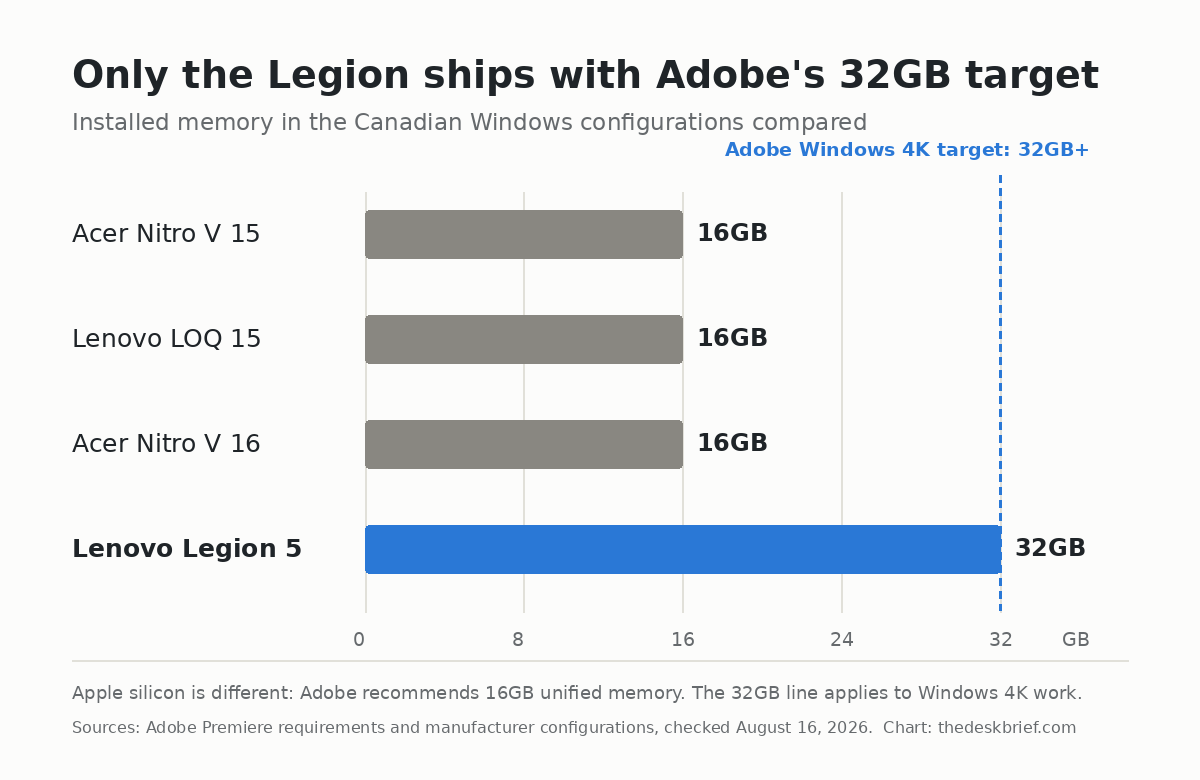
GPU labels need context too. NVIDIA positions RTX 5050, 5060 and 5070 laptop GPUs as its essential tier for video editing up to 4K. You do not need an RTX 5080 to edit a YouTube channel. You need enough memory, a sensible codec workflow and storage that is not full.
For the screen, 100% sRGB is the minimum I would choose for paid web video. It still does not replace calibration, and none of the budget IPS panels should be treated as an HDR mastering display. If colour is the job, connect a calibrated external monitor and use the laptop screen for tools.
Top pickBest Overall: Lenovo LOQ 15AHP10
The LOQ is my best budget laptop for video editing because Lenovo did not cripple the expensive parts. The Canadian RTX 5060 configuration gives you 8GB of GDDR7 graphics memory at up to 115W, a Ryzen 7 250, a 100% sRGB screen and two SSD slots. The chassis is not elegant, but it is a far better editing foundation than a thin machine with soldered 16GB memory.
The catch is the single 16GB memory module in common configurations. It is enough to start and it meets Adobe’s HD recommendation, but I would add a matching module before taking on frequent 4K multicam projects. The 60Wh battery and 2.3kg weight also make this a desk-first laptop, not an all-day café machine.
Before pricing that second module, read the RAM prices in 2026 buy-or-wait analysis. The companion tracker covers desktop DIMMs rather than laptop SODIMMs, so don’t treat the kit prices as interchangeable.
check the Lenovo LOQ 15AHP10 on Amazon. Choose the RTX 5060 version, not a similarly named RTX 5050 listing, and confirm the memory and storage before paying.
Best portableBest Portable: 13-inch M4 MacBook Air
The M4 MacBook Air is the best choice here for travel, quiet rooms and short-form content. Its 16GB unified memory meets Adobe’s Apple silicon recommendation, and the media engine handles H.264, HEVC and ProRes without needing a discrete GPU. It weighs 1.24kg and has no fan, which is lovely until a long export loads the chip continuously.
The base 256GB SSD is the reason I cannot call it the best overall. Premiere caches, proxies and footage can consume that space before lunch. Buy an external SSD immediately, or compare the total cost with a 512GB M5 Air before assuming the older machine is cheaper.
check the Apple M4 MacBook Air on Amazon. This is the value pick only when the M4 discount survives the cost of the storage you need.
Best valueBest Large-Screen Value: Acer Nitro V 16
Acer’s ANV16-72-7882 configuration pairs a Core 7 240H with an RTX 5060, 16GB of DDR5 memory and a 1TB SSD. The 16-inch 1920 by 1200 display gives a timeline more vertical room than a conventional 16:9 panel, while the microSD reader is useful for creators who do not want another dongle in the bag.
Its RTX 5060 is capped at 85W, well below the LOQ’s maximum graphics power. That does not make it bad, but it does mean the same GPU name does not promise the same sustained performance. Acer also lists a 32GB memory ceiling, so this is not the machine for a future 64GB workflow.
check the Acer Nitro V 16 on Amazon. I would choose it over the LOQ only when the larger 16:10 screen, microSD slot or current sale price matters more than maximum GPU power.
Best budgetMost affordable Acceptable: Acer Nitro V 15
The Nitro V 15 ANV15-51-55QN is the floor, not a secret workstation. Its Core i5-13420H, 16GB of DDR5 memory and 6GB RTX 3050 can handle 1080p social video, basic colour work and occasional 4K footage with proxies. The 512GB SSD is small, but at least the machine starts with enough memory to avoid immediate pain.
Do not buy it for heavy noise reduction, complex After Effects compositions or several 4K camera angles. The RTX 3050 is two generations behind the current RTX 50-series options, and the screen specification does not establish it as a colour-critical panel.
check the Acer Nitro V 15 on Amazon. It is the best budget laptop for video editing only when the budget cannot reach an RTX 5060 machine and the work is mostly 1080p.
Best for 4KBest Stretch Pick: Lenovo Legion 5 Gen 10
The Legion 5 configuration with a Ryzen AI 7 350, 32GB of dual-channel memory, a 1TB SSD and an RTX 5060 is the first machine here that meets Adobe’s Windows 4K memory recommendation without an immediate upgrade. Some configurations also pair that hardware with a higher-resolution OLED screen, which is a real quality-of-life improvement for editing.
You pay for the nicer display and better configuration. Once its price climbs into premium creator-laptop territory, compare it against a MacBook Pro or ASUS ProArt instead of blindly buying the gaming badge. Our Lenovo Legion 7i Gen 10 review explains the same family’s strengths and annoyances in more detail.
check the Lenovo Legion 5 on Amazon. Verify that the listing has 32GB of memory. Several cheaper Legion 5 configurations ship with 16GB.
What I Would Skip
I would skip any new Windows laptop with 8GB of memory, even if the price looks wonderful. I would also skip 256GB Windows configurations because Windows, applications and cache files leave too little working room. A Chromebook is the wrong tool for Premiere Pro and DaVinci Resolve.
The ASUS TUF A16 is not a bad computer, but the 32GB RTX 5060 configuration was listed at CA$2,599 when I checked. That is not budget territory. ASUS lists the RTX 5050 version from CA$1,899, and its 100% sRGB display and upgradeable memory are sensible, but the LOQ is the stronger value whenever its RTX 5060 configuration costs less.
I would not wait for RTX Spark just to edit ordinary 4K video either. The RTX Spark laptop lineup is built around far more unified memory and local AI capacity than most editors need. It becomes interesting for huge AI models and specialized professional workflows, not a weekly YouTube upload.
Who Should Skip These Laptops
Skip this budget tier if your normal project is 6K or 8K RAW, several multicam streams, heavy Fusion work or long After Effects compositions. You will spend more time building proxies and waiting for renders than the initial saving is worth. A desktop also delivers more sustained performance per dollar if you never edit away from one room.
Colour-critical HDR work needs more than a laptop spec sheet. Budget panels can be good for web delivery, but they are not reference displays. Put the money toward a measured external display, calibration hardware and fast storage before paying for a laptop GPU tier your timeline does not use. Our Canadian SSD price tracker can help with the storage side.
For current prices across major Canadian retailers, use the Laptop Deals Canada tracker before choosing a configuration.
Our pick: The Lenovo LOQ 15AHP10 is the best choice here because it offers the most balanced set of trade-offs in this group.
Frequently Asked Questions
Is 16GB of RAM enough for video editing?
It is enough for HD editing and lighter Apple silicon workflows. Adobe recommends 32GB or more for 4K on Windows, so treat a 16GB Windows configuration as a starting point rather than the finished machine.
Do I need an RTX 5060 for 4K video?
No. Proxies and optimized media can make weaker hardware workable. An RTX 5060 gives you 8GB of graphics memory, faster GPU effects and more headroom, which makes it the sensible Windows value tier rather than an absolute requirement.
Is a gaming laptop good for video editing?
Often, yes. Gaming laptops provide strong cooling, upgradeable memory and dedicated graphics for less than creator-branded machines. Check colour coverage, fan noise, weight and battery capacity because those are the usual compromises.
Should I buy a Mac or Windows laptop for editing?
Choose the MacBook Air for portability, quiet operation and efficient H.264, HEVC or ProRes work. Choose Windows when you want replaceable memory, more internal storage and stronger GPU effects for the money. Your software, codecs and travel needs matter more than the logo.
The Short Version
The Lenovo LOQ 15AHP10 is the best budget laptop for video editing for most Canadian Windows buyers. Get the RTX 5060 configuration and upgrade it to 32GB if 4K work is normal. The Acer Nitro V 16 is a reasonable alternative when its larger screen or sale price wins, while the Nitro V 15 is only for tight-budget 1080p work.
Buy the M4 MacBook Air if you value low weight and silence more than internal storage or sustained export speed. Buy the 32GB Legion 5 if editing pays the bills and you would rather avoid an immediate upgrade. The cheaper machine is not a bargain when it interrupts every project.