Gaming laptop vs MacBook is an easy decision once you stop pretending one machine is better at everything. Buy the gaming laptop if Windows games, CUDA software, replaceable memory, or maximum graphics performance matter most. Buy the MacBook if battery life, quiet portable work, macOS, and colour-managed creative apps carry more weight. Trying to force either machine into the other’s best job is an expensive hobby.
Prices checked and links verified September 2026.
This page contains affiliate links. If you buy through these links, we may earn a small commission at no extra cost to you. Full disclosure.
The current gaming laptop vs MacBook price comparison makes this less obvious than it used to be. On August 27, 2026, Best Buy Canada listed a Lenovo Legion 7i with an RTX 5070, 32GB of RAM, and a 1TB SSD at CA$2,999.99. Its 14-inch MacBook Pro with an M5 Pro chip, 24GB of unified memory, and a 1TB SSD was CA$3,489.99. The Mac costs CA$490 more before either side buys a mouse, dock, or game it will ignore for six months.
Table of Contents
- Gaming Laptop vs MacBook: The Fast Verdict
- The CA$490 Price Gap
- Gaming Is Still the Windows Laptop’s Job
- The MacBook Wins Away From the Outlet
- Local AI Changes the Answer
- Ports, Displays, and Upgrades
- What I Would Buy
- Who Should Skip This
- Frequently Asked Questions
- The Short Version
Gaming Laptop vs MacBook: The Fast Verdict
The choice should follow your least negotiable task. A Windows gaming laptop gives you the broader PC game catalogue, an NVIDIA GPU, CUDA support, and hardware that is usually easier to service or expand. A MacBook Pro gives you a lighter machine, much longer unplugged work time, an excellent display, and a single pool of unified memory that can be useful for local models when you buy enough of it. Gaming laptops on Amazon (affiliate)
| Buying detail | Lenovo Legion 7i reference | MacBook Pro 14 reference |
|---|---|---|
| Price checked | CA$2,999.99 | CA$3,489.99 |
| Processor | Intel Core Ultra 9 275HX | Apple M5 Pro, 15-core CPU |
| Graphics | GeForce RTX 5070 Laptop GPU, 8GB | M5 Pro, 16-core integrated GPU |
| Memory | 32GB DDR5 | 24GB unified memory |
| Storage | 1TB SSD | 1TB SSD |
| Display | 16-inch 2560 x 1600 OLED, 240 Hz | 14.2-inch 3024 x 1964 Liquid Retina XDR, up to 120 Hz |
| Weight | 2.05 kg | 1.60 kg |
| Named drawback | Short unplugged life and an 8GB VRAM ceiling | Higher current price and a smaller native game catalogue |
This is not a synthetic benchmark shootout. It is a buying comparison between two real premium configurations at nearly the same budget. Apple and Lenovo tune their hardware, power limits, and software differently, so one isolated score would create more confidence than clarity.
The CA$490 Price Gap
Best Buy’s current listings put the Lenovo at CA$2,999.99 and the MacBook Pro at CA$3,489.99. The Lenovo listing was sold out online when checked, so this is a price comparison, not a promise that a box is waiting for you. Apple originally announced a CA$2,999 starting price for the 14-inch M5 Pro model in March, which shows why launch pricing should not be treated as permanent furniture.
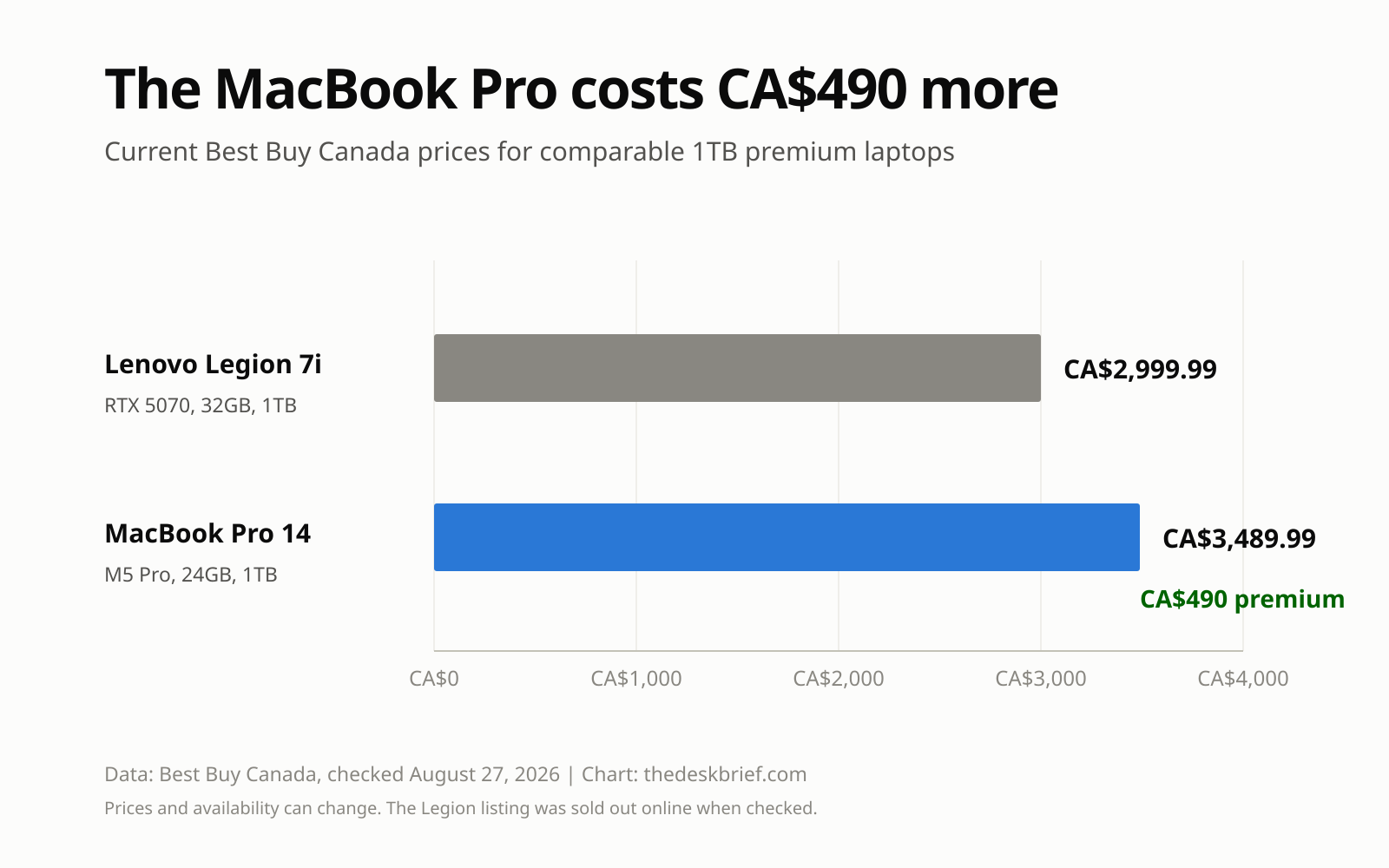
In this gaming laptop vs MacBook comparison, the cheaper machine is not automatically the better value. The Legion spends more of its bill of materials on a dedicated GPU and cooling system. The Mac spends its advantages on portability, battery efficiency, display quality, and Apple’s integrated hardware and software. Buy the advantages you will use, not the logo whose owner argues loudest in a comment section.
Gaming Is Still the Windows Laptop’s Job
If gaming is the first word in your shopping list, choose the RTX laptop. The Legion reference has a dedicated RTX 5070 Laptop GPU with 8GB of GDDR7 and a 240 Hz OLED panel. NVIDIA’s CUDA platform also remains a practical requirement for plenty of GPU-accelerated development, AI, rendering, and engineering tools. A Mac cannot become a CUDA machine through optimism or a particularly nice USB-C cable.
Mac gaming is no longer a punchline. Apple’s current Mac games list highlights native releases including Cyberpunk 2077, Assassin’s Creed Shadows, Control Ultimate Edition, and Death Stranding, while macOS Tahoe adds Metal 4 and a dedicated Games app. Apple also claims up to 1.6 times faster ray-traced gaming for M5 Pro than M4 Pro in its own tests. That is progress, but it does not make every Windows title, anti-cheat system, mod, or peripheral utility appear on macOS.
Check the actual games you play before buying. Five native blockbusters do not rescue the sixth title that hosts your entire friend group. Cloud gaming and streaming from another PC can fill gaps, but paying CA$3,489.99 for a laptop and then renting access to someone else’s GPU is not the clean win the brochure suggests.
The MacBook Wins Away From the Outlet
The MacBook case gets much stronger when the laptop leaves your desk. Apple’s current specification sheet rates the 14-inch M5 Pro for up to 14 hours of wireless web use and 22 hours of video streaming. Those are manufacturer test figures, not a guarantee for your workload, but they set a very different expectation from a high-power gaming system.
Ryan’s long-term Lenovo Legion 7i review reports roughly two to three hours under light office-style use with energy saving and a dimmed screen. It also documents useful details that spec sheets bury, including its two storage slots, replaceable memory, and awkward USB-C charging behaviour. The Legion is portable in the same sense that a toolbox is portable. You can carry it, but you will notice.
The MacBook Pro reference weighs 1.60 kg, while the Best Buy Legion configuration is 2.05 kg before its larger power adapter joins the bag. For a desk-bound gamer, that 450 g gap barely matters. For someone crossing a campus or airport twice a week, it becomes a recurring tax.
Local AI Changes the Answer
A gaming laptop vs MacBook decision gets less tidy for local AI. The RTX 5070 has 8GB of dedicated VRAM and broad CUDA software support. The MacBook’s GPU shares its 24GB unified memory with macOS and applications, leaving more potential memory for a model but no separate VRAM pool. Capacity and software compatibility pull in opposite directions.
Our RAM guide for local AI explains why model size, quantization, context length, and free system memory matter more than a generic AI badge. If your tool requires CUDA or you train and accelerate supported workloads, choose NVIDIA. If you run supported inference software and need a larger model to fit into one efficient memory pool, a Mac with enough unified memory can be compelling.
The catch is the phrase “enough memory.” Twenty-four gigabytes is shared by everything. Buyers serious about larger local models should price 48GB or more before ordering rather than assuming the base configuration will stretch. Our RTX Spark vs Apple silicon comparison goes deeper on that architecture choice.
Ports, Displays, and Upgrades
Both reference laptops can run a serious desk. The MacBook Pro supplies three Thunderbolt 5 ports, HDMI, SDXC, MagSafe 3, and a headphone jack. Apple says the M5 Pro model supports up to three external displays. The Legion supplies Thunderbolt 4, another USB-C port, two USB-A ports, HDMI 2.1, SD, and audio, although the reviewed configuration’s charging and display routing deserves attention before buying a one-cable dock.
The Windows machine has the practical upgrade advantage. The reviewed Legion configuration uses two SODIMM memory modules and two M.2 storage positions. Apple’s specification sheet treats memory and storage as configure-to-order choices, so price the capacity you need at checkout. This is where the cheaper Legion can stay useful longer, provided the battery and cooling hardware age gracefully.
If this computer will spend most of its life closed beside a monitor, the MacBook’s beautiful built-in display and lighter chassis lose some value. If it will travel daily, the gaming laptop’s replaceable parts and faster panel do not cancel a short battery. The physical routine matters as much as the processor.
What I Would Buy
For gaming first, I would buy the Lenovo and keep the CA$490 difference. The Lenovo Legion 7i listing at Best Buy Canada is the right reference, but it was sold out online when checked. Do not substitute a marketplace configuration without checking the GPU memory, display, seller, and warranty.
For mobile creative work, long unplugged days, and macOS software, I would pay more for the 14-inch M5 Pro MacBook Pro at Best Buy Canada. I would not choose its 24GB configuration for ambitious local AI without checking model requirements first. Apple memory upgrades hurt once. Running out of memory hurts every day.
The gaming laptop vs MacBook winner is therefore conditional, not diplomatic. Gaming and CUDA choose the Legion. Battery life and macOS choose the MacBook. Local AI demands a second decision about software and memory capacity before either machine gets your card number.
Who Should Skip This
Skip both premium references if your work is mostly browser tabs, documents, meetings, and streaming. A less expensive MacBook Air or mainstream Windows laptop will do that work without charging CA$3,000 admission. Also skip a gaming laptop if fan noise, charger size, and battery life already annoy you before purchase.
Skip the MacBook if one required application, game, plugin, or peripheral depends on Windows or CUDA. Compatibility beats elegance. Skip the Legion if you need a dependable full workday away from power and do not actually use the RTX GPU. Buying unused graphics performance is just a costly way to warm your backpack.
Frequently Asked Questions
Is a gaming laptop better than a MacBook Pro?
It is better for Windows gaming, CUDA software, and workloads that benefit from a dedicated NVIDIA GPU. The MacBook Pro is better for battery life, lower travel weight, macOS workflows, and supported applications that use Apple silicon efficiently.
Can a MacBook Pro replace a gaming laptop?
Only if your actual game list supports macOS and you accept a smaller catalogue. Current native Mac titles include major games, but compatibility must be checked title by title. Streaming does not make unsupported local software native.
Which is better for local AI?
An RTX laptop is the safer choice for CUDA-dependent tools. A MacBook with ample unified memory can fit larger supported models than an 8GB laptop GPU, but its memory is shared with the operating system and applications. Check the model and software before choosing.
Which lasts longer on battery?
The MacBook Pro is the clear choice here. Apple rates the 14-inch M5 Pro for up to 14 hours of wireless web use, while our Legion 7i experience was roughly two to three hours under light office-style conditions. Different tests prevent a precise ratio, but not the buying conclusion.
The Short Version
Choose the gaming laptop for games, CUDA, upgrade access, and better graphics value. Choose the MacBook Pro for battery life, travel, macOS, and efficient creative work. At the checked Canadian prices, the Lenovo costs CA$2,999.99 and the MacBook costs CA$3,489.99. That CA$490 premium is sensible only when the Mac’s strengths match the work you do.
The clean answer to gaming laptop vs MacBook is to list your three non-negotiable applications, your real game library, and the longest time you work away from an outlet. The machine that clears all three wins. Everything else is specification theatre.