The best label maker for most home offices is the Brother P-touch PT-D220. It has a real QWERTY keyboard, previews labels before printing, and uses laminated TZe tape that is easier to trust on folders, bins, shelves and cables than paper-only labels. The DYMO LabelManager 160 is the simpler alternative, while app-based users should step up to a 24 mm model.
This guide compares four label makers that were in stock at Amazon.com when checked, using manufacturer specifications, tape systems, connectivity, cutter design and ongoing supply costs. The recommendations are research-based, not hands-on test claims. Prices and availability can change.
By Ryan Billings | Updated October 8, 2026.
The Best Label Makers at a Glance
Disclosure: As an Amazon Associate I earn from qualifying purchases. Retail links are sponsored and do not change the price you pay.
Don’t want to read the whole article? Here are our quick picks.
1Best overall Brother P-touch PT-D220. Standalone keyboard covers everyday twelve-millimetre labels.
2Best simple alternative DYMO LabelManager 160. Simple keyboard makes occasional labels quickly.
3Best for design Brother PT-P710BT. Bluetooth and USB support wider label designs.
4Best wide labels Epson LabelWorks LW-C610PX. Sharper output supports wide and specialty media.
As an Amazon Associate I earn from qualifying purchases.
| Pick | Amazon price | Maximum tape | Connection | Cutter |
|---|---|---|---|---|
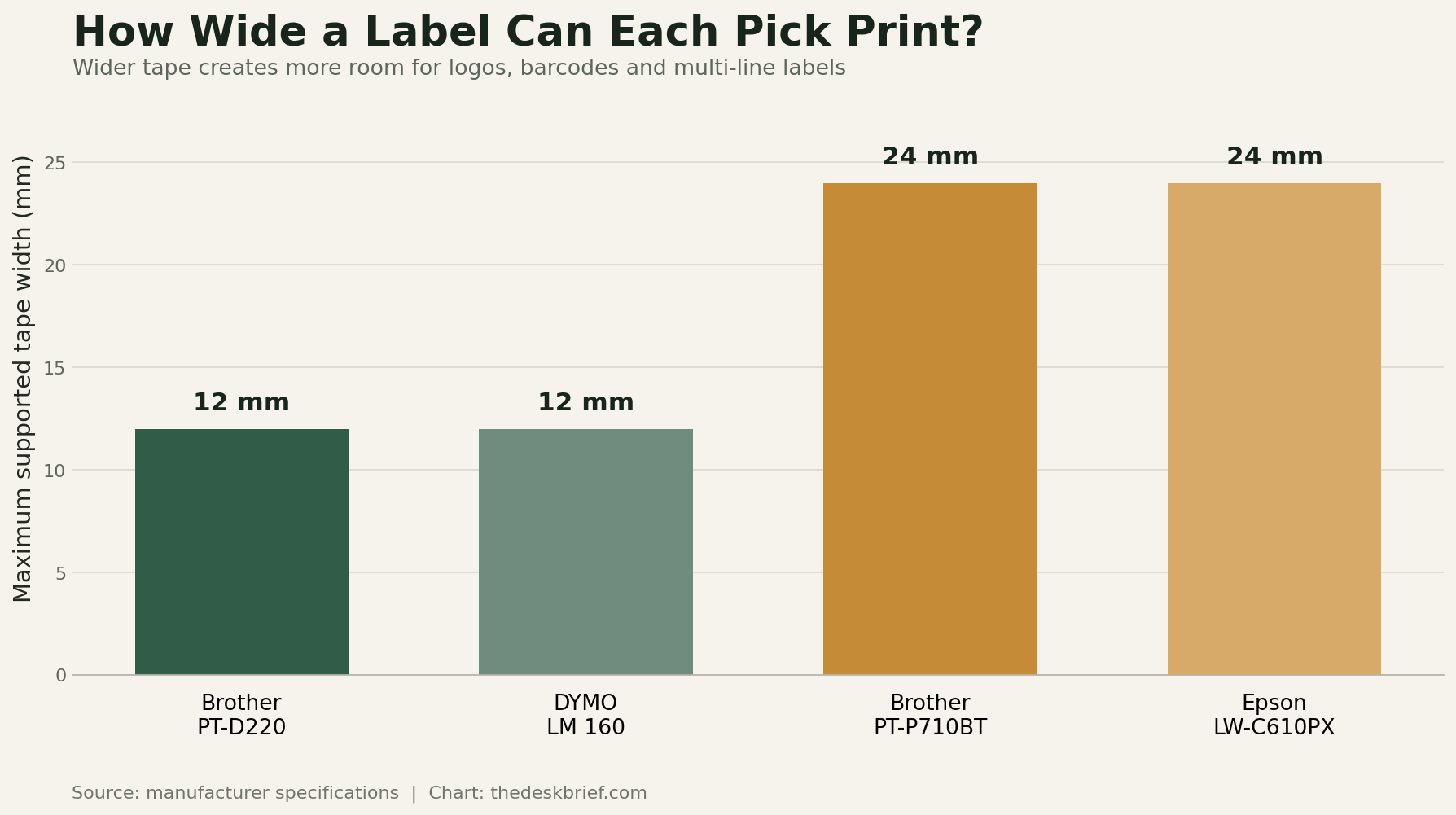
| Brother PT-D220 | $69.49 CAD | 12 mm | Standalone | Manual |
| DYMO LabelManager 160 bundle | $91.99 CAD | 12 mm | Standalone | Manual |
| Brother PT-P710BT | $119.99 CAD | 24 mm | Bluetooth and USB | Automatic |
| Epson LabelWorks LW-C610PX | $237.16 CAD | 24 mm | Mobile app | Automatic |
Amazon.ca pricing and availability were refreshed October 27, 2026 at 10:34 AM EDT. Product prices and availability are accurate as of the date/time indicated and are subject to change. Any price and availability information displayed on Amazon.ca at the time of purchase will apply to the purchase of this product.
Quick decision: Buy the Brother PT-D220 if you want to type and print without opening an app. Choose the Brother PT-P710BT when 24 mm tape, phone design and an automatic cutter justify the higher cost.
How to Choose a Label Maker
Choose the tape family before the machine. A low purchase price can disappear after a few replacement cassettes, and tape systems are not interchangeable. Brother PT-D220 and PT-P710BT models both use TZe tape, which makes an upgrade easier. DYMO LabelManager machines use D1 cassettes. Epson LabelWorks LW-C610PX uses LabelWorks PX supplies.
For folders, drawer fronts and small storage bins, 12 mm tape is enough. Wider 18 or 24 mm tape makes room for two lines, larger text, icons, barcodes and labels that can be read from across a room. Cable flags normally need flexible tape and a machine with a cable-wrap or flag template. Check both the material and adhesive rather than assuming every cassette survives heat, moisture or a curved cable.
A physical keyboard is faster for one-off labels. An app is better for logos, imported graphics, unusual fonts and repeatable templates. Automatic cutters matter when printing batches; they add little value when you make two labels per month. If desk clutter is the actual problem, start with the cable-management guide and the work-from-home desk setup before labelling every mystery cable you own.
Best Overall: Brother P-touch PT-D220
The Brother PT-D220 at Amazon was in stock when checked. It is the best label maker for someone who wants an appliance rather than another connected gadget. It has a QWERTY keyboard, a 15-character preview display, 25 preset templates, 14 fonts, 99 frames and storage for 30 labels. It prints up to two lines on TZe tape as wide as 12 mm.

Brother specifies a 20 mm-per-second maximum speed and 180 dpi resolution. Those figures are modest, but entirely adequate for text labels on folders, drawers and storage containers. The laminated tape family is available in standard, flexible-ID, extra-strength, tamper-evident and fabric variants. That supply range is the strongest reason to choose Brother over an inexpensive thermal sticker maker.
The compromise is power. Six AAA batteries and the optional AC adapter are not included. The cutter is manual, there is no phone app, and 12 mm tape is cramped for prominent shelf labels. Brother’s official PT-D220 specifications confirm those limits. Buy it for quick standalone organization, not logo-heavy small-business work.
Best Simple Alternative: DYMO LabelManager 160
The DYMO LabelManager 160 three-tape bundle at Amazon was in stock when checked. It is the straightforward alternative when D1 tape is easier to find locally. It uses 6, 9 and 12 mm D1 cassettes, provides one-touch formatting keys, previews labels, and shuts itself off to preserve its six AAA batteries.

DYMO lists standard, permanent and flexible D1 supplies. The flexible version is the relevant choice for curved or textured surfaces and cable flags. The keyboard is familiar, and there is no account, pairing procedure or app update standing between you and a file-folder label.
Its ceiling resembles the PT-D220’s: 12 mm tape, a manual cutter and no mobile design workflow. The current official LabelManager 160 page also creates some confusion by describing portability and computer flexibility while its comparison chart lists no connectivity for this model. Treat it as a standalone keyboard labeler. Choose between it and Brother based on the local price and the tape system you want to keep buying.
Best for Phone and Computer Design: Brother PT-P710BT
The Brother P-touch CUBE Plus PT-P710BT at Amazon was in stock when checked. It exchanges the keyboard for Bluetooth and USB. Brother supports design from a phone or tablet through its apps and from a computer through P-touch Editor. It accepts TZe tape up to 24 mm, includes a rechargeable lithium-ion battery and uses an automatic cutter.

This is the better small-office machine for branded storage, larger shelf labels, barcodes and repeatable templates. Its standard resolution is 180 dpi, with a 180 by 360 dpi high-resolution mode, and its stated maximum speed is 20 mm per second. The wider tape makes more visual difference than the speed specification.
The cost is friction as well as money. You need a phone or computer to create every label, and Brother has multiple label apps whose capabilities overlap. It is also excessive for someone who labels a tax folder twice a year. The official PT-P710BT product page lists the included USB cable, built-in battery and two starter tapes, which softens the initial supply cost.
Best for Sharper Wide Labels: Epson LabelWorks LW-C610PX
The Epson LabelWorks LW-C610PX at Amazon was in stock when checked. It is the specialist pick. It prints on tape up to 24 mm at 360 dpi, uses an automatic cutter, and works with Epson’s Label Editor Mobile app. The extra resolution is useful for fine text, icons and designs where the 180 dpi Brother output looks visibly coarse.
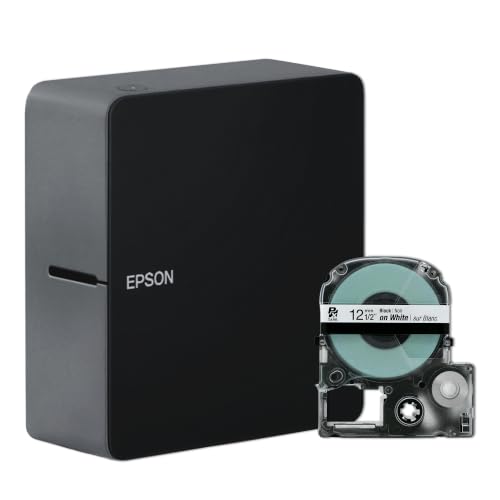
Epson lists more than 60 compatible label varieties and backs the printer with a lifetime warranty. The compact body weighs about one pound. Those are meaningful advantages for a craft room or small office that will use specialty tapes rather than printing only black text on white.
Read the box details carefully. Six AA batteries and the power adapter are sold separately, according to the official LW-C610PX specifications. It also has no built-in keyboard. The Epson is a good label maker when resolution and media variety are buying criteria; the PT-D220 remains the simpler choice for ordinary office organization.
Tape Cost Matters More Than the Machine Discount
Compare replacement cassettes before buying. Note the tape width, total length, material and whether the listing is genuine or compatible. A cheap cassette can contain less tape, use a weaker adhesive or leave larger margins. Printer firmware and cutter behaviour can also vary with third-party supplies.
Estimate the cost per usable metre, not the price per box. If a machine wastes a long leader before every label, batch several labels in one print job and cut them afterward. Automatic half-cut features can reduce backing-paper frustration, while manual cutters keep the machine cheaper. For a business, tape availability is more important than saving a few dollars on the printer once.
Who Should Skip a Label Maker
Skip these machines if you need 4-by-6-inch carrier labels. That job belongs to a shipping-label printer, not a 12 or 24 mm tape labeler. Skip an app-only model if phones are prohibited in the workspace or several people need to print without pairing their devices. A permanent marker and masking tape remain remarkably competitive for temporary boxes.
Do not label every cable until the routing is stable. A KVM switch for two computers, dock or monitor change can make carefully labelled leads obsolete. Organize the layout, remove unused cables, and label both ends only after the system works.
Continue Building the Small Office
This guide is part of The Desk Brief’s small-office equipment series. After comparing label makers, continue with paper shredders, laminators, photo scanners. Each guide uses the same Amazon-stock and manufacturer-specification checks.
Frequently Asked Questions
Is Brother or DYMO better?
Brother has the stronger upgrade path in this comparison because both the PT-D220 and PT-P710BT use TZe tape. DYMO’s LabelManager 160 is equally sensible for basic standalone labels when D1 cassettes cost less locally. Compare supply availability before the machines.
Do label makers use ink?
These four machines do not use separate ink cartridges. Brother, DYMO and Epson tape labelers use thermal-transfer cassettes that contain the label material and printing ribbon. You still buy consumables, but there is no ink cartridge to dry out.
What tape width is best for a home office?
Twelve-millimetre tape is sufficient for file tabs, drawers, small bins and most cable flags. Choose 18 or 24 mm tape for shelf labels, two-line text, logos, icons or labels intended to be read from farther away.
The Short Version
The Brother PT-D220 is the best label maker for most home offices because it is self-contained, uses a versatile laminated tape family and covers ordinary 12 mm organization jobs without an app. The DYMO LabelManager 160 is a reasonable price-driven alternative. Move to the Brother PT-P710BT for 24 mm tape, Bluetooth, USB and automatic cutting. Choose the Epson LabelWorks LW-C610PX when 360 dpi output and specialty media matter more than having a keyboard or included power adapter.