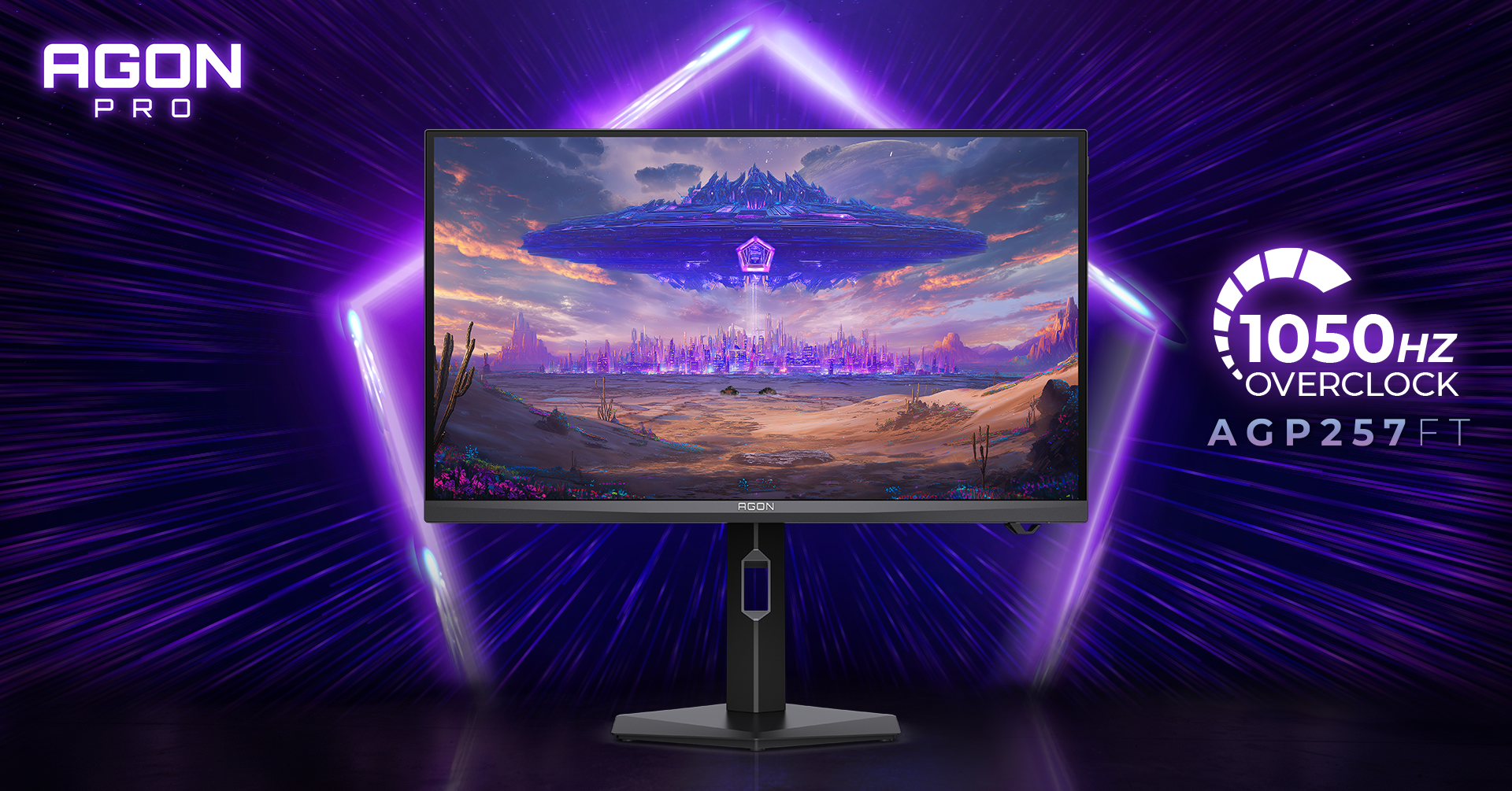
AGP257FT cuts a full refresh to one millisecond, but that does not make it the sensible monitor for most desks. AOC’s 24.5-inch esports display runs at 1,000 Hz natively and 1,050 Hz when overclocked, all at 1920 x 1080. The speed is real on the specification sheet. The buying case is much narrower.
The AGP257FT is for a competitive player who can keep frame rates in the many hundreds and is willing to trade resolution, contrast and office connectivity for the smallest possible scanout delay. Everybody else should wait for measured response-time and motion-clarity testing, then compare the price with a fast 1440p display. AOC has not announced a price or Canadian release date.
This is specification analysis, not a hands-on review. I compared AOC’s current product data with current Sony and Dell specifications, checked the frame-time math, and separated manufacturer response claims from independently measured performance.
Table of Contents
- AGP257FT specs that matter
- The 1,000 Hz math
- What AOC has not proved
- AGP257FT vs Sony and Alienware
- A desk monitor with esports priorities
- Who Should Skip This
- FAQ
- The Short Version
AGP257FT Specs That Matter
AOC’s official product page confirms a 24.5-inch oxide-based Fast IPS panel, 1920 x 1080 resolution, 1,000 Hz native refresh rate and 1,050 Hz overclock. It also lists a 450-nit brightness rating, 1,000:1 static contrast, 20 local-dimming zones, 99% sRGB coverage and 90% DCI-P3 coverage. Those are manufacturer specifications, not lab results.
- Two HDMI 2.1 inputs and one DisplayPort 2.1 input
- Three 5 Gbps USB-A ports through a USB-B upstream connection
- No USB-C power delivery, no Ethernet and no KVM switch
- 150 mm of height adjustment, plus tilt, swivel and pivot
- DisplayHDR 400, G-SYNC Compatible support and a 100 x 100 mm VESA mount
There are no speakers, though there is a headphone output. The USB hub is useful for a mouse, keyboard and headset receiver, but it cannot replace a laptop dock. That matters on a mixed work-and-play desk: this is a specialized gaming display with some desk conveniences, not a one-cable office monitor wearing a fast badge.
The 1,000 Hz Math
Refresh rate becomes easier to judge when it is converted into time per frame. Divide 1,000 by the refresh rate: 280 Hz gives the display 3.57 milliseconds per refresh, 540 Hz gives it 1.85 milliseconds, and 1,000 Hz lands at exactly 1.00 millisecond. The jump from 1,000 to the advertised 1,050 Hz overclock trims that interval to about 0.95 milliseconds.
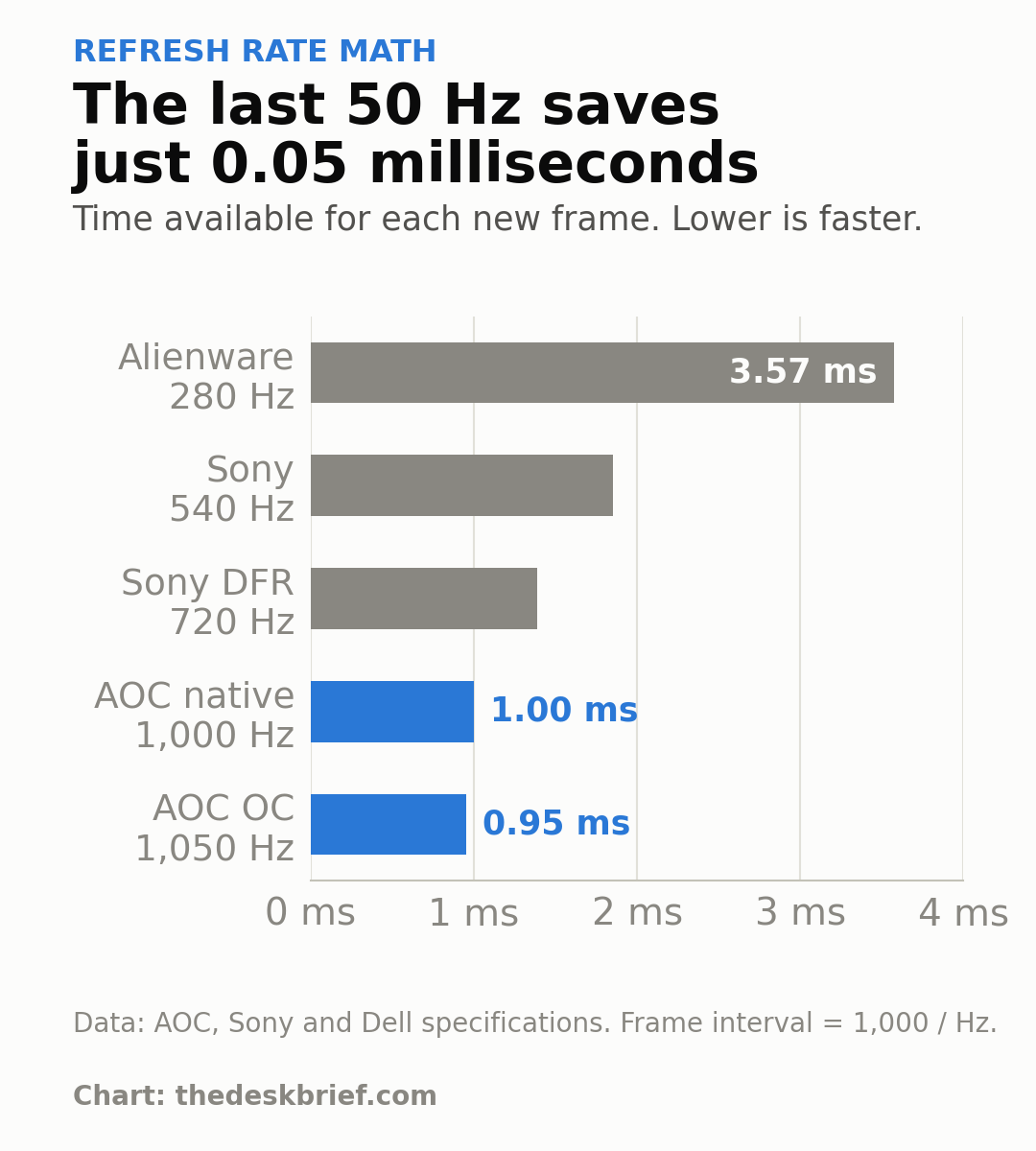
That 0.05-millisecond difference is not nothing in a tournament where tiny advantages are the whole product category. It is also smaller than the uncertainty created by pixel response, input processing, frame-rate swings and the player’s own system. A stable 1,000 frames per second is a different requirement from a game briefly touching that number in a quiet scene.
The monitor can still reduce scanout delay when the game runs below 1,000 fps. It does not require a perfect one-to-one match to provide smoother temporal sampling. The practical question is whether that final slice of latency is worth accepting 1080p on a display that will probably spend many hours showing documents, browser text and desktop applications.
What AOC Has Not Proved
AOC quotes a minimum 0.3 ms grey-to-grey response and 0.1 ms MPRT. Neither number tells us the average response across colour transitions, how much overshoot appears at aggressive overdrive settings, or whether the panel can keep up cleanly with a one-millisecond refresh window. Those answers need an instrumented review of the shipping unit.
PC Gamer’s launch analysis makes the right distinction: quoted MPRT is not the same thing as representative pixel behaviour. The outlet had tested other extreme-refresh monitors, but it did not claim to test this AOC. Borrowing a result from the LG 25G590B or a Sony OLED would be tidy, convenient and wrong.
The 20-zone local-dimming system also deserves modest expectations. Twenty zones cannot place highlights with anything close to pixel-level precision. DisplayHDR 400 certification confirms a basic HDR capability, not OLED blacks or controlled blooming. AOC has announced Q1 2027 availability in Europe, while local pricing, Canadian availability, warranty terms and the panel’s measured performance remain unannounced.
AGP257FT vs Sony INZONE M10S II and Alienware AW2726DL
The useful comparison is not another unreleased 1,000 Hz headline. It is a premium esports OLED that has already reached stores and a cheap 1440p IPS monitor that is fast enough for serious play without making office work look like an afterthought.
| Monitor | Panel and resolution | Maximum refresh | Current price | Main drawback |
|---|---|---|---|---|
| AGP257FT | 24.5-inch Fast IPS, 1920 x 1080 | 1,000 Hz native, 1,050 Hz OC | Not announced | No independent measurements; no USB-C |
| Sony INZONE M10S II | 26.5-inch OLED, 2560 x 1440 | 540 Hz native, 720 Hz dynamic mode | CA$1,499.99 | Very expensive |
| Alienware AW2726DL | 27-inch IPS, 2560 x 1440 | 280 Hz | CA$269.99 | Much lower refresh; no USB hub |
Sony’s INZONE M10S II keeps 2560 x 1440 resolution and uses an OLED panel at 540 Hz. Sony lists a 0.02 ms response specification and a 720 Hz dynamic frequency-and-resolution mode. At CA$1,499.99, it is a specialist purchase too, but it offers the contrast and pixel response advantages that make OLED attractive beyond the refresh-rate number.
The Alienware AW2726DL is the value reference. Dell currently lists it at CA$269.99 with a 27-inch 2560 x 1440 IPS panel, 280 Hz refresh and a claimed 1 ms extreme-mode response. It gives up most of the AOC’s headline speed, but it provides 78% more pixels and leaves well over CA$1,000 in the budget compared with the Sony.
Until the AOC price and measured performance exist, the Alienware is the rational choice for a work-and-play setup. The Sony is the credible premium alternative for a buyer who wants extreme speed without settling for 1080p. The AOC only wins a buying decision when refresh rate itself is the job.
A Desk Monitor With Esports Priorities
The AGP257FT has a genuinely practical stand. Height, tilt, swivel and pivot adjustments are all present, and AOC adds measurement markings so a player can recreate a position after moving the monitor. The quick-release stand and external QuickSwitch control also make sense for tournament travel.
The display is less convincing as a full working surface. At roughly 90 pixels per inch, a 24.5-inch 1080p panel shows less information and less finely rendered text than a 27-inch 1440p monitor at about 109 PPI. Windows scaling is easier, but that is a weak consolation when spreadsheets, code and browser windows are part of the day.
A second monitor can solve the workspace problem, though it changes the budget and footprint. My preferred layout would put the AOC directly in front for competitive play and a sharper secondary display beside it for work. If that sounds excessive, a single fast 1440p monitor is the more honest answer. Our gaming monitor versus office monitor guide explains the wider trade-off, while the AW2726DL analysis covers the cheaper reference in detail.
Who Should Skip This
Skip it if your competitive games usually run below 300 fps, because a good 240 Hz or 280 Hz display already serves that system without the 1080p compromise. Skip it if the monitor also handles eight hours of writing, design, photo work or dense spreadsheets. More pixels will improve every working hour; 1,000 Hz will not.
OLED shoppers should wait for direct motion testing rather than assume a four-digit LCD refresh rate automatically beats a 540 Hz OLED. Buyers who need USB-C charging, a KVM or network connectivity should look elsewhere immediately. None of those omissions can be repaired with a firmware update.
The remaining audience is small but real: high-level Counter-Strike 2, Valorant and similar players with hardware tuned for very high and stable frame rates. Even they should wait for price, input-lag data, response-time charts and overshoot measurements. A specification can open the door. It cannot finish the purchase.
FAQ
Is the AGP257FT really a 1,000 Hz monitor?
Yes. AOC specifies 1,000 Hz as the native maximum and 1,050 Hz as an overclocked mode at 1920 x 1080. That confirms the supported signal rate, not independently measured response quality at that rate.
Do you need 1,000 fps to benefit from 1,000 Hz?
No. A faster refresh can reduce scanout delay and show more recent frames even below 1,000 fps. The benefit grows more relevant as frame rate rises, while inconsistent frame delivery, pixel response and system latency still affect the final result.
How much faster is 1,050 Hz than 1,000 Hz?
One refresh takes 1.00 millisecond at 1,000 Hz and about 0.95 milliseconds at 1,050 Hz. The overclock saves roughly 0.05 milliseconds per refresh. That is a measurable difference, not a broad reason to replace a good monitor.
When will it be available in Canada?
AOC says European availability is expected in Q1 2027. It has not announced Canadian pricing or a Canadian release date. Treat retailer placeholders and currency conversions as guesses until AOC publishes local details.
The Short Version
The AGP257FT is an honest attempt to remove display scanout as an esports bottleneck. Its native 1,000 Hz mode reaches a one-millisecond frame interval, the stand is tournament-friendly, and the port selection is sensible for a dedicated gaming station.
It is still a 24.5-inch 1080p IPS monitor with no announced price, no Canadian date and no independent exact-model measurements. Buy nothing on the refresh-rate claim alone. For a shared work-and-play desk, take the cheaper 1440p Alienware. For a premium esports setup, compare the shipping AOC against Sony’s 540 Hz OLED after proper tests arrive.