What is a local LLM? It’s a large language model that runs entirely on your own computer, so your prompts, documents, and code never leave the machine. There’s no API key, no monthly bill, and no company logging your inputs to train its next model.
That single change, moving the model off a rented server and onto your desk, is why local AI stopped being a hobbyist curiosity this year. The real question behind what is a local LLM is about control: who holds your data, what you pay over the long run, and whether the tool still works when your internet doesn’t. This guide covers how it works, the hardware you genuinely need, how people run one, and where the honest limits sit.
For current recommendations by task and memory tier, see the best local LLM guide.
Table of Contents
- What Is a Local LLM, in Plain Terms
- Local LLM vs Cloud AI: The Real Differences
- What You Actually Need to Run One
- How You Actually Run a Local LLM
- Where a Local LLM Falls Short
- Who Should Skip a Local LLM
- Frequently Asked Questions
- The Short Version
What Is a Local LLM, in Plain Terms
A large language model is the technology behind chatbots like ChatGPT and Claude. It’s trained once on a huge amount of text, then packaged into a file of numbers called weights. When you type a prompt, software loads those weights into memory and predicts a response word by word. Nothing about that process strictly requires the cloud. The reason most people meet these models through a website is that the biggest ones are too large to fit on a normal PC, so companies run them on their own servers and rent access.
So what is a local LLM, mechanically? It’s the same idea running on hardware you own. You download an open model, a smaller cousin of the giant commercial ones, and a piece of software loads it into your RAM or graphics memory and does the same word-by-word prediction on your machine. Meta’s Llama, Google’s Gemma, Alibaba’s Qwen, and Mistral’s models are all open enough to download and run this way, and they’ve closed a lot of the gap with the paid services over the past year.
The tradeoff is honest and simple. You give up access to the very largest frontier models and take on a little setup work. In return, your data stays put, the model costs nothing to run after your hardware, and it keeps working on a plane, in a cabin, or during an outage. For anyone who writes, codes, or handles sensitive documents at a desk, that’s a real shift in who controls the tools.
Local LLM vs Cloud AI: The Real Differences
The cloud services win on raw capability and convenience, and it’s worth saying that plainly before anyone rips out a subscription. A frontier model in a data centre will out-reason a model that fits on your laptop, and you don’t have to install anything. That’s the practical core of what is a local LLM decision: you’re trading peak intelligence and zero setup for privacy, offline access, and no recurring fee. Here’s how the two stack up on the factors that actually change your choice.
| Factor | Local LLM | Cloud AI service |
|---|---|---|
| Where your data goes | Stays on your device | Sent to a provider’s servers |
| Ongoing cost | Free after hardware and power | Subscription or per-token fees |
| Works offline | Yes | No |
| Setup effort | Install a runtime, download a model | Sign up and start typing |
| Top-end capability | Capped by your RAM and GPU | Access to the largest models |
| Speed on hard prompts | Depends on your hardware | Usually faster on big models |
Privacy is where the argument gets concrete. A cloud prompt travels to a provider that may log it, and even providers with good policies can change terms or get breached. The NIST AI Risk Management Framework exists partly because data governance and trust are hard to guarantee once information leaves your control. Keeping the model on your own drive removes that whole category of worry, which is the reason clinics, lawyers, and anyone under an NDA keep asking about it.
What You Actually Need to Run One
A local model is a file you download and load into fast memory. Its size, and how much of it fits in RAM or graphics memory, decides whether it runs smoothly or crawls. A rough rule holds up well: a model needs roughly its download size in free memory, plus headroom for the conversation. That’s why the file sizes below map so directly onto hardware.
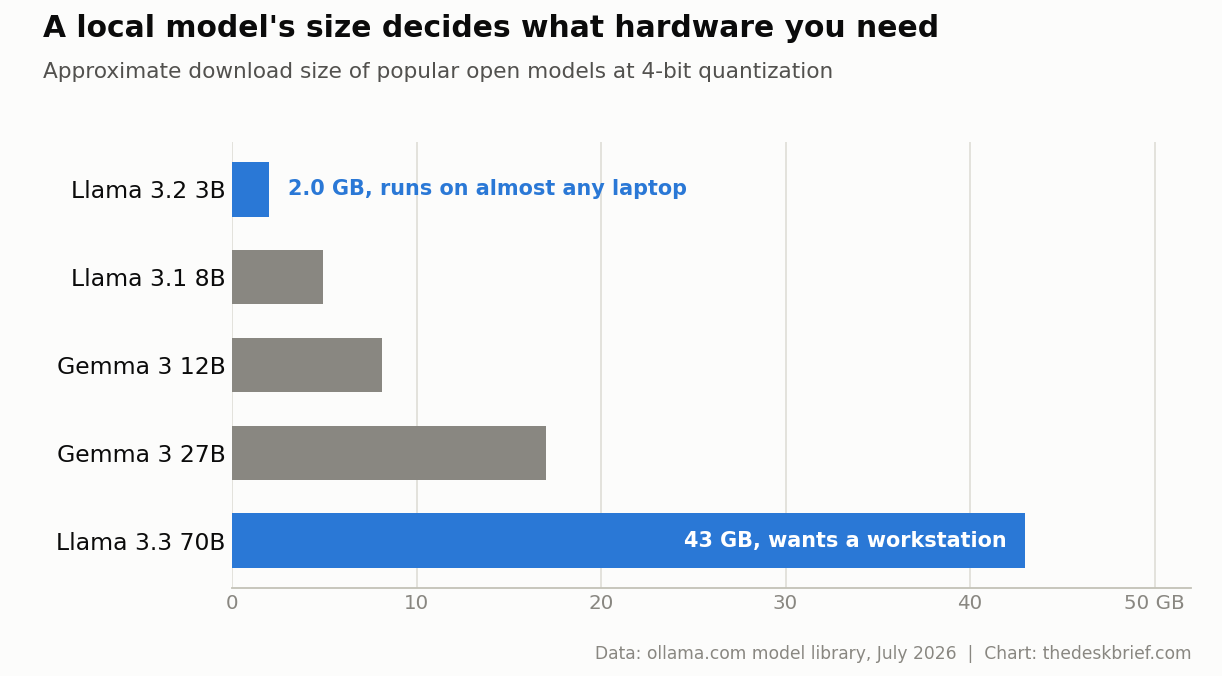
Those numbers come from the Ollama model library, fetched this week, and they use 4-bit quantization, a compression step that shrinks a model to a quarter of its full size while keeping most of its quality. A small 3-billion-parameter model like Llama 3.2 is about 2 GB and runs on almost any recent laptop. A 12B model wants around 8 GB free. A 70B model is roughly 43 GB and effectively needs a workstation or a machine with 48 GB or more of memory. The 405B giants sit near 243 GB and stay out of reach for normal desks.
A dedicated GPU helps because graphics memory is far faster than system RAM for this work, but it isn’t mandatory. Apple Silicon Macs run these models well because their memory is shared and quick, and a plain CPU will run smaller models slowly but fine. If you want the full breakdown of memory tiers, our guide to how much RAM you need for local AI maps model sizes to 32 GB, 64 GB, and 128 GB machines.
How You Actually Run a Local LLM
The software has gotten easy enough that you no longer need a machine-learning background. Three tools cover almost everyone. Ollama is the popular starting point: you install it, run one command, and it downloads and serves a model behind a local API at localhost:11434, with an OpenAI-compatible endpoint so existing apps can talk to it. LM Studio wraps the same idea in a friendly window with a model browser and a chat pane, which suits people who’d rather not open a terminal.
Underneath most of these tools sits llama.cpp, a lean C and C++ engine that does the actual inference. It reads models in the GGUF format, supports quantization from 1.5-bit up to 8-bit, and runs across Apple Metal, NVIDIA CUDA, AMD, Intel, Vulkan, and plain CPUs. It also ships a lightweight OpenAI-compatible server, which is why so many desktop apps can quietly plug into a local model. If you want the click-by-click version, we have a full walkthrough on how to run an LLM locally without buying new hardware.
Picking a model is its own small decision. Coding, chat, and document work reward different sizes and training, so a model that shines at one can flounder at another. Our rundown of the best local LLM for coding shows how task and available memory drive that pick, and the same logic applies if you’re wiring a model into a private assistant or one of the home AI agents people are building now.
Where a Local LLM Falls Short
Honesty first: a model that fits on your laptop is not as sharp as a frontier model in a data centre. Smaller models make things up more often, lose the thread on long or multi-step problems, and can be confidently wrong in ways that catch you off guard. If you’re relying on one for facts, you still have to check its work, the same as with any AI. A local model also has no live web access out of the box, so it can’t look anything up unless you bolt on extra tools.
Speed is the other catch. On a CPU-only machine, a mid-size model can feel sluggish, producing a few words a second, and the biggest useful models simply won’t load without serious memory. There’s also maintenance: you update models yourself, manage disk space as those multi-gigabyte files pile up, and occasionally troubleshoot a driver. None of this is hard, but it’s more than clicking a bookmark. Going in expecting a capable, private, free assistant rather than a magic ChatGPT clone keeps the experience from disappointing you.
Who Should Skip a Local LLM
If you only reach for AI occasionally, have no privacy constraint, and want the smartest possible answers, a cloud subscription is cheaper and easier up front, and there’s no shame in staying there. The same goes if your machine has 8 GB of RAM and no dedicated GPU, because you’ll be limited to tiny models that frustrate more than they help. Buying hardware purely to run local AI rarely pays off unless privacy, offline use, or heavy daily volume is driving the decision.
Local AI makes the most sense when at least one of three things is true: you handle data you can’t send to a third party, you want to stop paying a monthly fee for something you use constantly, or you like owning your tools and tinkering with them. If none of those fit, keep using the cloud with a clear conscience and revisit this when your needs change.
Frequently Asked Questions
What is a local LLM good for?
Private drafting, summarizing sensitive documents, coding help, and offline chat are the strongest use cases. It’s ideal anywhere the data shouldn’t leave your device or where you want a free, always-available assistant for routine work rather than the sharpest possible answer.
Do I need a GPU to run a local LLM?
No. Small models run on a normal CPU, and Apple Silicon Macs handle mid-size models well thanks to fast shared memory. A dedicated GPU with plenty of memory mainly buys you speed and the ability to run larger models, so it’s a nice-to-have rather than a requirement.
Is a local LLM as good as ChatGPT or Claude?
Not at the top end. The largest cloud models still reason better on hard, multi-step problems. For everyday writing, summarizing, and coding, a good open model on capable hardware gets close enough that many people stop noticing the gap for their daily tasks.
Is running a local LLM actually private?
Yes, when it runs fully offline. The model and your prompts stay on your drive, so nothing is transmitted. Just watch for tools that add optional cloud features or telemetry, and keep the model offline if privacy is the whole point of running it.
The Short Version
If you remember one thing about what is a local LLM, make it this: it’s a capable AI model running on your own hardware, private by default and free to run, in exchange for a little setup and a ceiling below the biggest cloud models. A 2 GB model runs on almost any laptop today, and the software has gotten simple enough that a single install gets you talking to one.
Choose it when privacy, offline access, or escaping a subscription matters to you, and stick with the cloud when you just want the smartest answer with zero fuss. For most desk workers, the honest move is to try a small model first, see how far it gets your real work, and scale up only if it earns the hardware.