Best standing desk converter shopping starts with a tape measure, because a 36-inch riser on a 30-inch desk is not an upgrade. It is a furniture overhang with ambitions. The converter has to fit your desk, lift your actual equipment, put the keyboard near elbow height, and remain useful when you sit back down.
Prices checked and links verified September 2026.
This page contains affiliate links. If you buy through these links, we may earn a small commission at no extra cost to you. Full disclosure.
My overall pick is the FlexiSpot 36-inch manual converter. It gives a normal dual-monitor setup a 33-pound top capacity and a genuinely deep 12.1-inch keyboard tray without paying electric-desk money. Buy the Nulaxy C5 for a laptop-only setup. Choose the AVLT MT17-1 when integrated dual-monitor arms and independent screen positioning matter more than portability or price.
By Ryan Billings | Published August 31, 2026.
This is a specification-based buyer’s guide, not a hands-on review. I have not tested these converters. Amazon.com prices and availability were checked for delivery in the United States on August 31, 2026 and can change.
Don’t want to read the whole article? Here are our quick picks.
1Best Overall FlexiSpot 36-inch standing desk converter. Broad work surface with a familiar two-tier layout.
2Best Premium Vari Pro Plus 36. Stable premium converter with generous keyboard space.
3Best alternative VersaDesk PowerPro 36. Powered height adjustment reduces lifting effort.
4Best portable option Nulaxy C5 laptop stand. Lightweight riser for laptop-only work away from home.
As an Amazon Associate I earn from qualifying purchases.
Table of Contents
- Measure the Desk Before the Converter
- How to Choose the Best Standing Desk Converter
- Six Picks at a Glance
- Best Overall: FlexiSpot 36-Inch
- Best Premium Manual: Vari Pro Plus 36
- Best Electric: VersaDesk PowerPro 36
- Best Portable Laptop Riser: Nulaxy C5
- Best Monitor-Arm Combo: AVLT MT17-1
- Best Keyboard Ergonomics: Ergotron WorkFit-TX
- Capacity, Height and Stability
- Keyboard Tray Depth and Transition Speed
- Who Should Skip This
- Frequently Asked Questions
- The Short Version
Measure the Desk Before the Converter
Measure clear width, clear depth, desktop thickness, and the distance from the floor to the existing top. Do not count rounded corners, a raised back edge, or the section occupied by a hutch. A converter’s base must sit fully on a rigid surface. A broad top floating past the edge looks dramatic right up to the first coffee spill.
Then calculate the load that moves. Weigh the monitors with their stands, laptop, keyboard, mouse, dock, speakers, and anything else that rides on the riser. Keep the top and keyboard-tray limits separate. FlexiSpot, for example, rates the main surface for 33 pounds but the tray for 4.4 pounds. A mechanical keyboard, wrist rest, and ambitious mug can use that lower allowance quickly.
Height is the quiet deal-breaker. Add the converter’s maximum working height to your existing desk height, then compare that total with your standing elbow height. The correct desk height guide explains the elbow measurement. If the keyboard stops below it, you will lean down. If the seated position starts too high, you will shrug all day with great consistency.
If the converter will sit above a treadmill deck, add the deck height before comparing ranges. The best walking pad guide compares deck heights, footprints, and storage dimensions for current models.
How to Choose the Best Standing Desk Converter
The best standing desk converter preserves one setup in both positions. Your shoulders should stay relaxed, your elbows should remain near your body, and the keyboard and mouse should share one usable level. OSHA’s computer-workstation guidance puts the top of the monitor at or just below eye level and calls for wrists aligned with the forearms. A tall screen on a shallow tray can satisfy one target while wrecking the other.
CCOHS’s sit-stand desk guidance says the standing platform should sit around elbow height, the monitor should remain at eye level or slightly below, and cables must not interfere with adjustment. It also recommends alternating positions rather than standing indefinitely. A converter is a movement tool. It is not a contest to see who can turn sore feet into a personality.
Z-lift converters use spring assistance and handles. They move quickly without power, but many travel up and forward, so check the raised footprint and cable slack. Vertical lifts stay inside the base footprint and suit shallow desks better. Electric converters make a heavy setup easier to move, although they add a power cable and leave you with a motor as one more failure point.
Six Picks at a Glance
Disclosure: As an Amazon Associate I earn from qualifying purchases. This does not change the price you pay. The retail links below are sponsored.
| Pick | Current price | Lift or range | Listed capacity | Keyboard area | Main drawback | Buy |
|---|---|---|---|---|---|---|
| FlexiSpot 36-inch | Check current price | 4.7 to 19.9 in for M7M chassis | 33 lb top, 4.4 lb tray | 34.6 × 12.1 in | Tray has a low load limit | Amazon |
| Vari Pro Plus 36 | Check current price | 4.5 to 17.5 in, 11 settings | 35 lb | 30 × 12.25 in | 52.5-pound unit | Amazon |
| VersaDesk PowerPro 36 | Check current price | Electric, rises to 20 in | 80 lb | Wide separate tray | Needs power | Amazon |
| Nulaxy C5 | Check current price | 1.18 to 21 in | 22 lb | None | External input devices required | Amazon |
| AVLT MT17-1 | Check current price | Electric, 3.9 to 23.6 in | 55 lb surface, 17.6 lb per arm | 28.3 × 8.7 in | 75-pound product | Amazon |
| Ergotron WorkFit-TX | Check current price | 17 in surface, 3 in tray adjustment | 10 to 40 lb | 28 × 8 in | Very expensive | Amazon |
Best Overall: FlexiSpot 36-Inch
The FlexiSpot 36-inch standing desk converter on Amazon is the sensible middle of this list. Its current listing specifies a 33-pound top capacity, a 4.4-pound keyboard-tray capacity, a spring lift, and a 34.5-pound product weight. It arrives mostly assembled, with the keyboard tray left to attach.
The current Amazon model is identified as M57 or MB, while FlexiSpot’s closely matched 36-inch M7M documentation gives a 34.6 by 16.3-inch top, 34.6 by 12.1-inch tray, and 4.7 to 19.9-inch range. I would confirm those dimensions against the selected Amazon variant before checkout because the seller does not put M7M in the listing title. The official FlexiSpot M7 specification page is the reference, not an excuse to pretend marketplace naming is tidy.
This is my default pick for one or two ordinary monitors, a keyboard, and a mouse. The wide tray has enough depth for a full-size keyboard without reducing the mouse area to a postage stamp. The top capacity is adequate, not enormous. Add both monitor weights before buying, and remember that the separate 4.4-pound tray limit is the stricter number during every transition.
The downside is that a broad manual converter still occupies much of the original desk. It also raises the seated work surface by at least several inches. Shorter users and people whose chairs are already high should measure the lowered keyboard position before committing.
Best Premium Manual: Vari Pro Plus 36
The Vari Pro Plus 36 on Amazon is a current option. Vari rates it for 35 pounds, gives it 11 spring-assisted height settings from 4.5 to 17.5 inches, and ships it fully assembled. The upper surface is 36 inches wide, while the lower keyboard area is 30 by 12.25 inches.
The official Vari specification sheet also shows how much room this design wants. Its working depth reaches 29.75 inches, and the product weighs 52.5 pounds in the published specifications. That mass is useful once it is planted. It is less charming when the desk is upstairs.
Choose Vari over FlexiSpot if full assembly, a heavily weighted base, and fixed height stops matter enough to justify the higher price. Skip it if you need continuous height adjustment or if your desk is shallow. The lift arcs forward as it rises, so cable routing and the space behind your chair need attention.
Best Electric: VersaDesk PowerPro 36
The VersaDesk PowerPro 36 on Amazon is a current option. Instead of squeezing handles while lifting the load, you hold a powered control. The current listing specifies an 80-pound capacity, a separate keyboard tray, a USB charging port, and three grommet holes for optional monitor arms.
VersaDesk’s product page lists a 36 by 24-inch surface and says the vertical lift rises to 20 inches. That 80-pound limit gives this model far more load headroom than the manual picks. It does not make the supporting desk stronger. Check the old desk’s own capacity and keep the converter’s load distributed over the base.
This is the electric pick for a heavy but conventional workstation. The vertical path is friendly to shallow desks, and the push-button control removes the awkward moment when a loaded spring riser wants help. The cost is a power lead, dependence on a motor, and a larger cable bundle that must flex through the full travel. Use the site’s standing desk cable-management plan before the first lift, not after a monitor cable becomes a tripwire.
Best Portable Laptop Riser: Nulaxy C5
The Nulaxy C5 laptop stand on Amazon is a current option. It supports laptops from 10 to 17 inches, has a listed 22-pound capacity, and adjusts from about 1.18 to 21 inches. At 4.2 pounds in the published specifications, it is the only option here that belongs in the same sentence as travel.
Nulaxy’s own C5 product page carries the warning I want to see: some height and angle combinations may wobble while you type directly on the laptop. The company recommends an external keyboard and mouse. That limitation is not buried trivia. Once the screen rises to eye level, the built-in keyboard rises with it, so a separate input set is required for neutral wrists anyway.
Buy the C5 for a laptop, compact keyboard, and mouse that move between rooms. Do not buy it for a monitor or expect it to replace a broad work surface. It solves screen height cheaply. It does not create somewhere to put a notebook, dock, and cup.
Best Monitor-Arm Combo: AVLT MT17-1
The AVLT MT17-1 electric converter on Amazon is a current option. It integrates two VESA monitor arms rated for screens up to 32 inches and 17.6 pounds per arm. The motorized column moves from 3.9 to 23.6 inches and stores three height presets.
The AVLT specification page lists a 28.3 by 15.7-inch work surface, 28.3 by 8.7-inch keyboard tray, 55-pound surface capacity, and 75-pound product weight. Monitor arms free the main surface and let you set screen height separately from keyboard height. That separation is the real reason to spend more than the VersaDesk, not the presence of another button.
Check VESA compatibility and screen weight without the original stands. A 32-inch label is not a capacity measurement, and a heavy ultrawide can exceed 17.6 pounds before the arm has a chance to look optimistic. The 8.7-inch tray is also shallower than the FlexiSpot and Vari trays. It fits ordinary input devices, but deep ergonomic keyboards deserve an actual measurement.
Best Keyboard Ergonomics: Ergotron WorkFit-TX
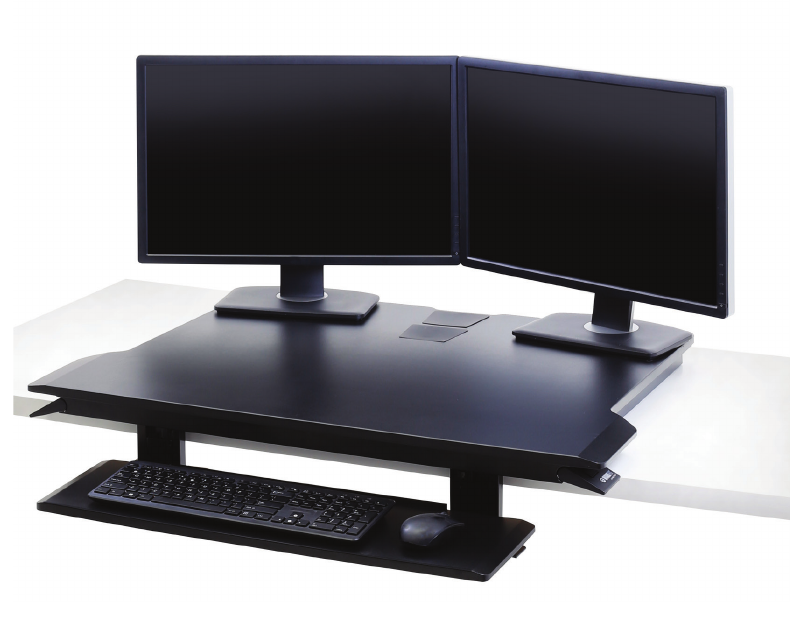
The Ergotron WorkFit-TX on Amazon is a current option. That is hard to recommend beside complete electric standing desks, but its design solves a problem most converters ignore. The keyboard tray gets three inches of independent height adjustment and up to 10 degrees of backward tilt, while the main surface has 17 inches of vertical lift.
Ergotron’s official media sheet lists a 32 by 27-inch work surface, 28 by 8-inch tray, 10-to-40-pound operating capacity, 58.5-pound product weight, and five-year warranty. It folds to a two-inch profile. That low seated position and drop-down tray are the buying argument because converter users spend part of the day sitting, a minor detail that many products celebrate by ignoring.
Optional Ergotron monitor kits use dedicated mounting locations, but the converter price here does not include one. Buy this for a shared professional workstation where independent keyboard adjustment matters and the budget is already approved. For a normal home office, the premium over FlexiSpot is difficult to defend.
Capacity, Height and Stability
Capacity is not a target. Leave margin for the equipment you will add later and for the force applied when you type or lean on the edge. Spring-assisted products can also have a minimum working load. Ergotron specifies 10 to 40 pounds for the WorkFit-TX, so an almost empty premium converter is not automatically the easiest one to move.
Stability at maximum height is where geometry becomes visible. A broad X-lift with its weight centred over the base has a simpler stability story than a narrow column holding two extended monitor arms. That does not prove one model wobbles less. None of the manufacturer specifications used here provides a standardized maximum-height wobble measurement, so I will not manufacture one with adjectives.
Use the smallest height that puts the keyboard at your elbow and the screen near eye level. More height creates more leverage. Keep heavy items centred, remove monitor stands when using compatible arms, and never treat a tray as a handrail. After installation, run the full ergonomic desk setup checklist in both seated and standing positions.
Keyboard Tray Depth and Transition Speed
A 12-inch-deep tray gives a full-size keyboard and wrist rest more room than an 8-inch tray. Width determines whether the mouse stays beside the keyboard. Depth determines whether your wrists can remain supported without the keyboard touching the back edge. Measure the actual keyboard, including any palm rest and the cable connector.
Transition speed is mostly friction. A spring converter is ready after you release the handles, but the user still guides the loaded surface. An electric model asks you to hold a button while the motor travels. Presets reduce repeated adjustment on the AVLT, while 11 stops make Vari positions easy to repeat. No manufacturer source used here publishes a comparable full-travel time, so there is no honest seconds-per-lift winner.
The best mechanism is the one you will use several times a day. If moving the workstation means clearing papers, rescuing cable slack, and holding two handles around a loaded tray, it will stay down. If electric lift requires crawling under the desk to find an outlet, it will also stay down. Build the transition into the setup before judging the hardware.
Who Should Skip This
Skip a converter if your current desk is narrow, flexible, damaged, glass, or already too high while seated. Skip one if you need a large drawing surface, heavy studio monitors, or an ultrawide display that exceeds the chosen arm or platform limit. A riser cannot correct a bad foundation.
A complete standing desk is also the cleaner answer when the converter and accessories approach US$500. It gives you the full desktop, a lower seated minimum, and fewer stacked layers. Read the Uplift V3 standing desk verdict if you want a premium full desk, or the L-shaped standing desk fit guide if the real problem is usable surface area.
Frequently Asked Questions
What is the best standing desk converter for two monitors?
The FlexiSpot 36-inch is my value pick for two ordinary monitors if their combined weight plus accessories stays below the 33-pound top limit. Choose the AVLT MT17-1 when you need integrated arms and each VESA-compatible monitor weighs no more than 17.6 pounds without its stand.
Are electric standing desk converters better?
Electric lift is better for a heavy workstation or anyone who finds a loaded spring converter awkward. It is not automatically more stable or ergonomic. Surface height, keyboard position, monitor adjustment, cable slack, and the strength of the supporting desk still decide whether the setup works.
Can I put a standing desk converter on any desk?
No. The original desk needs enough clear width and depth for the full base, enough load capacity for the converter and equipment, and a rigid surface. Check the manufacturer’s restrictions before using one on glass, a folding table, or a desktop with pronounced curves.
How high should a standing desk converter go?
Its keyboard surface should reach approximately standing elbow height when added to your existing desk. The screen should then sit at eye level or slightly below without forcing the keyboard higher. Measure both targets because one platform may not place both correctly.
The Short Version
The FlexiSpot 36-inch is the best standing desk converter for most home offices. Vari offers a heavier, fully assembled manual alternative. VersaDesk adds electric lift and an 80-pound rating. Nulaxy is the cheap laptop-only answer, AVLT is the integrated dual-monitor-arm system, and Ergotron is the expensive choice with the best keyboard adjustment.
Measure the existing desk, standing elbow height, equipment weight, and keyboard depth before ordering. The converter that fits those four numbers is useful. The one with the longest feature list but the wrong seated height is just a very elaborate shelf.