Q27G4ZRAD arrives with a 260 Hz QHD panel and a price low enough to make its compromises feel reasonable. The announced £229 price (about US$312) is attractive, but Canadians can’t buy it yet and the Alienware AW2726DL already costs CA$299.99 with a faster 280 Hz panel. My verdict is simple: wait for Canadian pricing. If AOC lands below CA$300, this could be a tidy shared work-and-gaming screen. If it costs more, Dell has already spoiled the argument.
Last updated September 22, 2026: AOC’s regional product page now links to orderable European stock. Canadian retail availability and independent response-time testing remain unconfirmed.
Treat this as an evidence check on the specification sheet. I have not tested the monitor, and no independent editorial outlet on the Canadian page-one results has published an exact-model hands-on review. I checked AOC’s current specifications, the August 21 launch report, Dell Canada’s live comparison price, and the Bank of Canada exchange rates available on August 22, 2026.
Table of Contents
- Q27G4ZRAD Specs Against the Alienware
- The £229 Decision
- The 20 Hz Difference Is Tiny
- What Works on a Shared Desk
- What AOC Hasn’t Proved
- Who Should Skip This
- Frequently Asked Questions
- The Short Version
Q27G4ZRAD Specs Against the Alienware
The sensible reference is the Alienware AW2726DL I covered earlier. Both are flat 27-inch Fast IPS monitors with 2560 x 1440 resolution, 400-nit manufacturer brightness figures, 1,000:1 stated contrast, adjustable stands, and three-year warranties. Neither gives a work laptop USB-C power delivery or a USB hub. This is a value fight, not a feature-rich docking-monitor fight.
| Specification | AOC Q27G4ZRAD | Alienware AW2726DL |
|---|---|---|
| Price checked | £229 announced, about US$312 | CA$299.99 at Dell Canada |
| Panel and resolution | 27-inch Fast IPS, 2560 x 1440 | 27-inch IPS, 2560 x 1440 |
| Maximum refresh | 240 Hz native, 260 Hz overclocked over DisplayPort | 280 Hz |
| Brightness and contrast | 400 nits claimed, 1,000:1 | 400 nits claimed, 1,000:1 |
| Colour claim | 95.2% DCI-P3 | 93% DCI-P3 |
| Video ports | 2 HDMI 2.0, 1 DisplayPort 1.4, headphone out | 1 HDMI, 1 DisplayPort 1.4 |
| Stand | 130 mm height, tilt, swivel, pivot | 130 mm height, tilt, wide swivel, pivot |
| Built-in audio | 2 x 2 W speakers | Not listed |
| Main drawback | No Canadian price, USB-C, or independent measurements | No USB-C, USB hub, or built-in speakers |
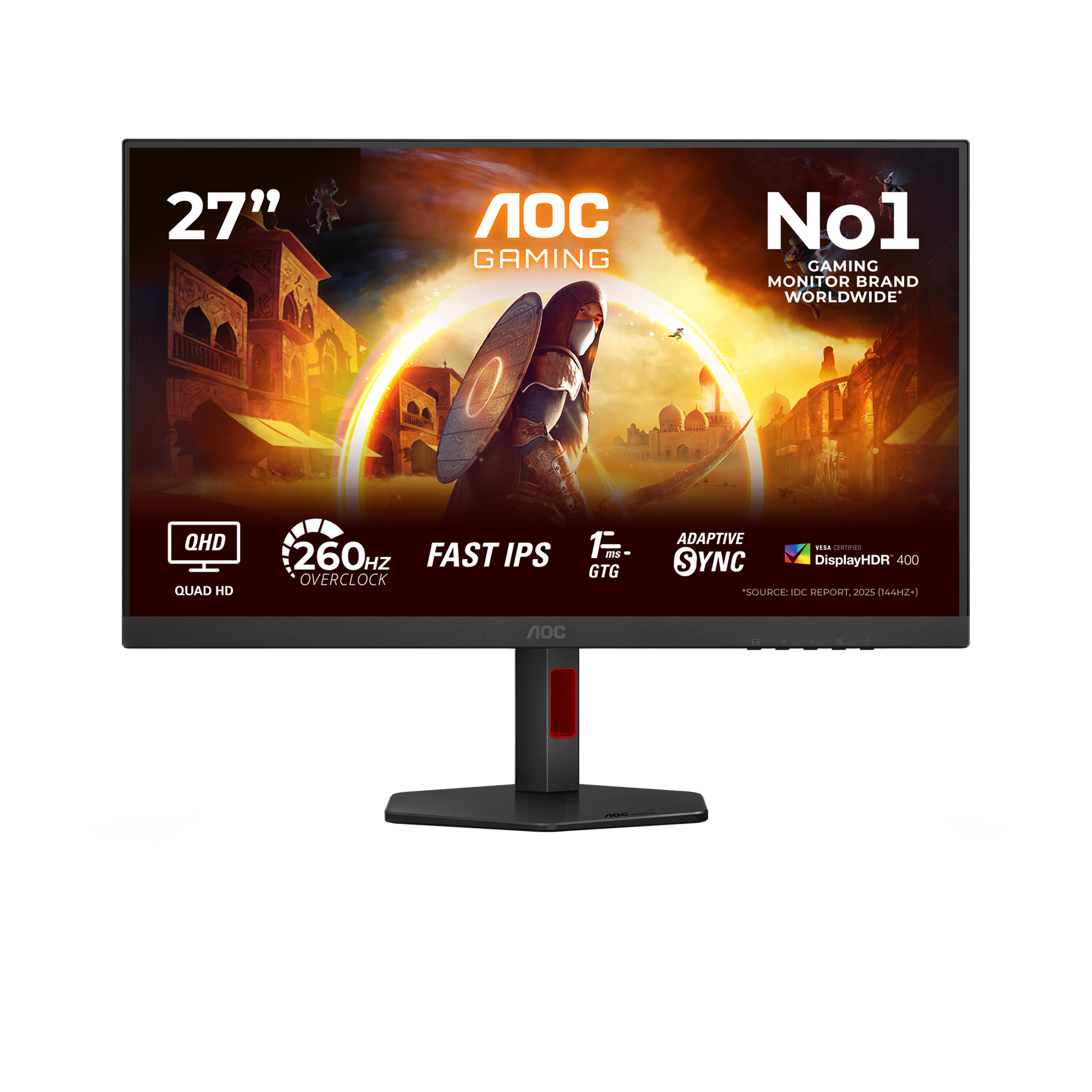
AOC’s official page confirms 108.8 pixels per inch. That is a much better desk fit than 27-inch 1080p, where text and spreadsheet edges have to stretch across larger pixels. It also places the new model squarely inside the decision explained in my gaming monitor versus office monitor guide: enough resolution for work, plus refresh headroom for gaming after hours.
The £229 Decision
The launch price needs context. AOC announced £229 in the UK, which converts to about US$312 using the Bank of Canada’s August 21 GBP/CAD and USD/CAD daily rates. That conversion is a reference, not a prediction of North American pricing. Taxes, distribution, and regional promotions make direct conversion a parlour game with a power cable attached.
Dell Canada lists the AW2726DL at CA$299.99 today. It is a known local transaction with an add-to-cart button, not a currency exercise. AOC has not announced a Canadian price, retailer, or ship date for the Q27G4ZRAD. Until it does, there is no honest Canadian recommendation to link and no reason to import one from Britain.
My cutoff would be CA$299. At CA$279 or less, AOC’s speakers, extra HDMI input, and modestly wider claimed colour coverage would make a solid case. Above CA$300, the Alienware’s 280 Hz ceiling and established Canadian availability win. That recommendation can change after independent response-time testing. Right now, the price has to compensate for uncertainty.
The 20 Hz Difference Is Tiny
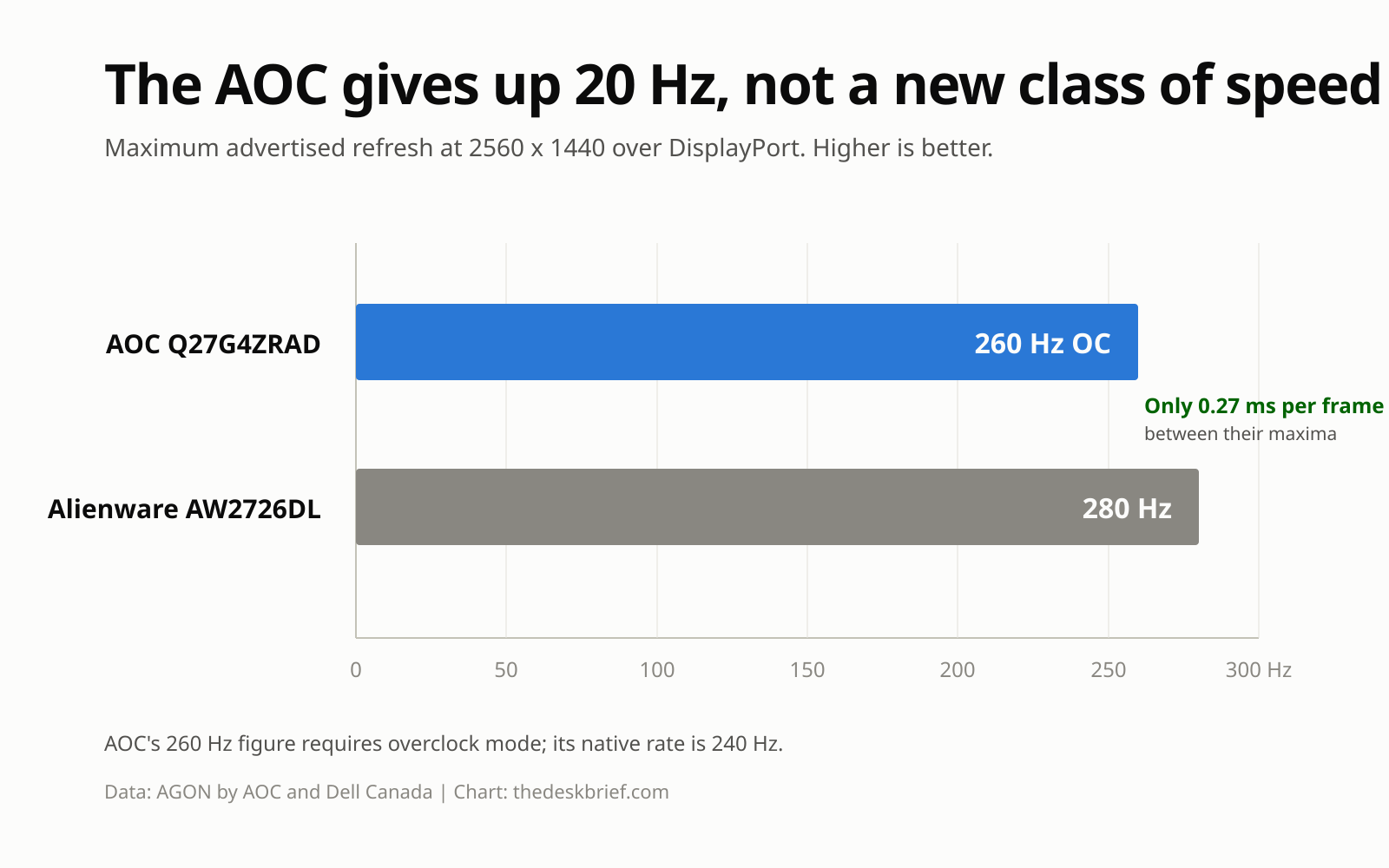
AOC advertises 240 Hz natively and 260 Hz in overclock mode. Dell lists 280 Hz. At their maximum rates, a new frame arrives every 3.85 milliseconds on the AOC and every 3.57 milliseconds on the Alienware. The difference is roughly 0.27 milliseconds. Your graphics card holding 260 frames per second consistently matters more than that sliver.
Do not read the 1 ms GtG and 0.3 ms MPRT claims as independent measurements. AOC says the faster MPRT figure uses motion-blur reduction. That feature normally trades brightness and variable refresh behaviour for clearer motion, so it is not interchangeable with a full grey-to-grey response test. The launch materials also say overclocking requires DisplayPort. HDMI tops out at 144 Hz at QHD according to AOC’s current signal-frequency table.
What Works on a Shared Desk
The physical design is more useful than the refresh-rate bragging. The stand adjusts 130 mm for height, tilts from roughly -3 to 21 degrees, swivels 28 degrees each way, and pivots into portrait orientation. A low-profile esports base leaves more room around a keyboard than the wide V-shaped feet attached to many budget gaming monitors.
That does not guarantee the screen will reach the right position for every body and desk. Use my monitor-height setup before deciding you need an arm. If the supplied stand still crowds the desk, the confirmed 100 x 100 mm VESA mount gives you an ordinary escape route.
Two HDMI inputs, one DisplayPort input, a headphone jack, and 2 W stereo speakers also suit a PC-plus-console desk. The speakers will not replace proper desktop audio, but they can handle system sounds and an occasional call without adding another object. The missing pieces are more serious for laptop users: no USB-C video, no power delivery, no KVM switch, and no USB hub.
What AOC Hasn’t Proved
The Q27G4ZRAD announcement supplies a long specification sheet and no measured performance. There is no verified average pixel response, input lag result, overshoot chart, contrast measurement, uniformity test, or usable HDR assessment. DisplayHDR 400 confirms a low certification tier and a 400-nit peak target. It does not add local dimming or turn a 1,000:1 IPS panel into an HDR display with deep blacks.
Colour coverage is another claim waiting for a meter. AOC lists 95.2% DCI-P3 and 123.6% sRGB coverage by CIE 1976 area. Gamut area can exceed 100% by overshooting a colour space, which is not the same thing as accurate factory calibration. No Delta E guarantee appears on the product page. Creative workers who need dependable colour should wait for a proper review or buy a monitor sold for that job.
Canadian availability, dead-pixel handling, and the exact regional warranty process also remain unannounced. The European page states three years, but regional terms can differ. A launch article cannot fill those blanks with optimism and call it research.
Who Should Skip This
Skip this monitor if one cable from a laptop is a requirement. Adding a dock defeats some of the budget appeal. Skip it for serious HDR work, because the confirmed panel and certification do not promise meaningful black-level control. Skip it if you already own a good 165 Hz or 180 Hz QHD IPS monitor and mostly play slower games. A new box will not improve a spreadsheet by 80 frames per second.
Competitive players with a GPU that can sustain very high frame rates are the obvious audience. Mixed-use buyers can also shortlist it if Canadian pricing undercuts the Alienware. Everyone else should wait for measured response behaviour and a local return policy. Launch-week enthusiasm is cheaper than return shipping, but only one of them is useful.
Frequently Asked Questions
Is the Q27G4ZRAD a 260 Hz monitor?
Yes, but 260 Hz is an overclocked mode over DisplayPort. Its native refresh rate is 240 Hz. AOC’s specification table lists HDMI at up to 144 Hz at 2560 x 1440.
Does it have USB-C?
No. The confirmed connections are two HDMI 2.0 inputs, one DisplayPort 1.4 input, and a 3.5 mm headphone output. AOC does not list USB-C, USB power delivery, or a USB hub.
What will it cost in Canada?
A Canadian price has not been announced. The UK launch price is £229, about US$312 at the exchange rates checked for this article. That conversion does not include Canadian distribution or tax.
Is it better than the Alienware AW2726DL?
Not on the evidence available today. The Alienware is faster on paper and already sells for CA$299.99. AOC adds speakers, another HDMI input, and a slightly wider claimed DCI-P3 gamut. The winner depends on Canadian price and independent response testing.
The Short Version
The AOC has the right bones for a mixed desk: QHD resolution, 240 Hz native refresh, a fully adjustable stand, speakers, and a compact base. Its announced £229 price is competitive in Britain. Canada has no confirmed price or release date, and nobody independent has measured the exact model.
Wait. Below CA$300, it deserves a shortlist beside the Alienware AW2726DL. Above that line, buy the available Dell or keep the monitor you already own. Twenty extra hertz is not a reason to gamble on missing regional details.
Editorial rating: 3.5 out of 5. The Q27G4ZRAD combines QHD, 240 Hz native refresh, speakers, and a full ergonomic stand at a competitive UK price. Buyers outside the UK should wait for local pricing and independent response-time measurements.