Yunzii IF75 is easy to understand after one number: 30 hours. That is Yunzii’s maximum battery claim when the keyboard’s colour screen and RGB lighting are both running. Turn those two headline features off and the claim jumps to 23 days. The screen is not a free extra. It is the reason to notice this keyboard and the reason its 8,000 mAh battery can behave like a much smaller one.
At the US$86.69 price shown on Yunzii’s store when I checked, the rest of the package is unusually complete: a 79-key layout, QMK and VIA support, three connection modes, hot-swap sockets, a gasket mount, a knob, and 1,000 Hz polling. My verdict is to shortlist it if you genuinely want the screen and function row. Buy the established Keychron V1 Max instead if documentation and a simpler layout matter more than a tiny dashboard beside the keys.
This is specification analysis, not a hands-on review. I compared the current manufacturer pages, current independent launch reporting, and this site’s earlier coverage of the smaller IF68. No independent outlet has published measured latency, runtime, wireless stability, or typing tests for the new model yet.
Table of Contents
- Yunzii IF75 Specs That Matter
- The Screen Has a Battery Bill
- IF75 vs IF68 and Keychron V1 Max
- What US$86.69 Buys
- The Untested Parts
- Who Should Skip This
- Frequently Asked Questions
- The Short Version
Yunzii IF75 Specs That Matter
The official Yunzii IF75 product page describes a 75% board with 79 keys, a multifunction knob, and a 135 by 240-pixel TFT. It measures 332.57 by 136.7 by 42.88 mm and weighs 945 g, give or take 20 g. That is compact enough to preserve mouse room, but it is not a travel board pretending to weigh nothing.
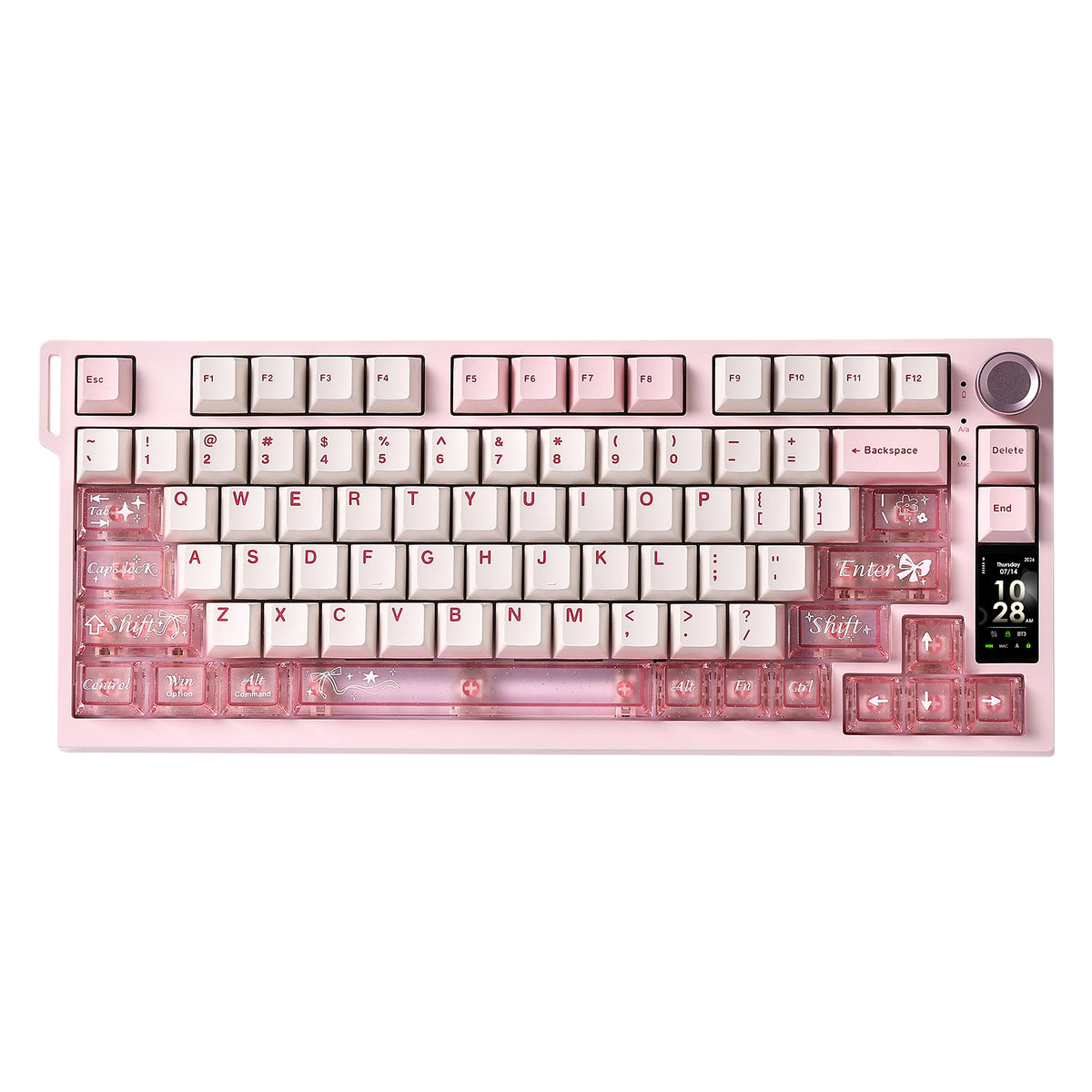
Connectivity covers USB-C, Bluetooth 5.0, and 2.4 GHz wireless. Yunzii says it can pair with as many as five devices, supports N-key rollover, and reaches a 1,000 Hz polling rate. QMK and VIA handle key remapping, layers, and macros. The display uses separate Windows software or an online tool that Yunzii says works with Windows and macOS.
The construction is familiar enthusiast-keyboard territory. You get a flexible PCB, gasket mounting, five layers of dampening material, south-facing RGB, double-shot PBT and translucent PC keycaps, plus hot-swap sockets for 3-pin and 5-pin mechanical switches. Candy linear and Onyx Gray tactile or clicky switches are the listed choices. Those details suggest configurability, not proven sound quality. Foam count is not a typing test.
The Screen Has a Battery Bill
TechPowerUp’s launch report gives the useful battery context that the current product page leaves vague. Yunzii rates the 8,000 mAh battery for up to 30 hours with the display and RGB enabled, or up to 23 days with both disabled. Converting 23 days to 552 hours makes the gap easier to see: the low-power claim is 18.4 times the full-lighting claim.
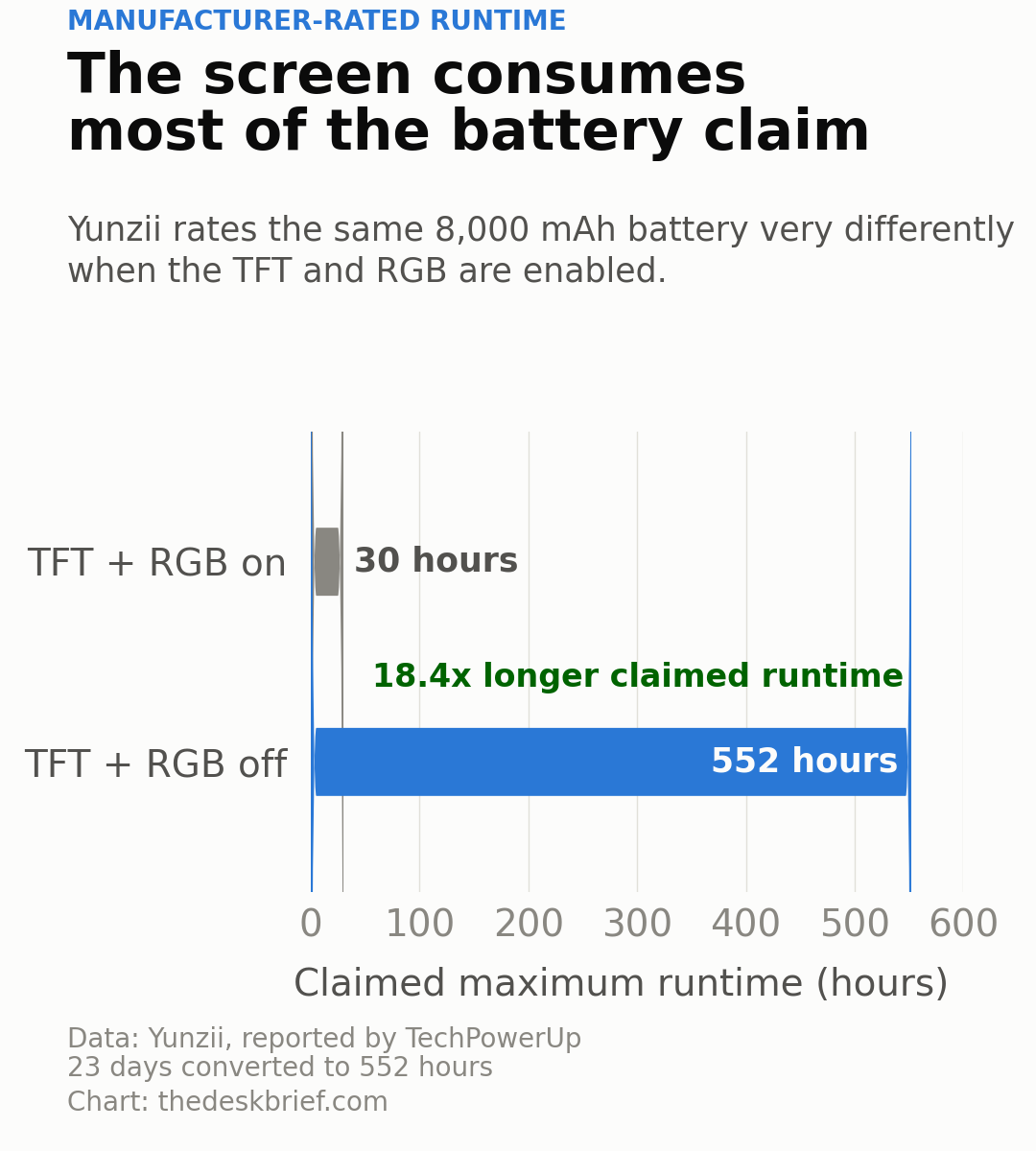
Neither figure is an independent measurement. Wireless mode, brightness, sleep timing, battery age, and how often the display updates can all change real runtime. Still, the relationship is useful. If you buy the Yunzii IF75 for animated images and leave the lighting on, plan around hours rather than weeks. The five-minute automatic shutoff helps between sessions, but it does not make an illuminated screen economical.
IF75 vs IF68 and Keychron V1 Max
The closest sibling is the Yunzii IF68 covered here in July. That model uses a 65% layout with 63 keys, so the IF75 mainly buys back a function row and dedicated navigation keys. It adds only about 6 mm of width, but it is nearly 20 mm deeper and roughly 220 g heavier. That is a sensible trade if F-keys are part of your workday. It is pointless if the smaller board already covers every command you use.
| Keyboard | Current price evidence | Layout | Battery | Display | Main drawback |
|---|---|---|---|---|---|
| Yunzii IF75 | US$86.69 at Yunzii | 75%, 79 keys | 8,000 mAh | 135 x 240 TFT | No independent testing yet |
| Yunzii IF68 | Old official page unavailable during this check | 65%, 63 keys | 8,000 mAh | 200 x 480 TFT | No function row |
| Keychron V1 Max | US$114.99 assembled at Keychron | 75% with knob | 4,000 mAh | None | Costs US$28.30 more |
The Keychron V1 Max is the cleaner reference. It also offers a 75% layout, QMK and VIA, a knob, hot-swap sockets, gasket mounting, Bluetooth, 2.4 GHz wireless, and 1,000 Hz polling. Its assembled price was US$114.99, with two switch variants listed in stock during this check. It lacks a screen and carries a 4,000 mAh battery rated for up to 190 hours.
That makes the choice less dramatic than the spec list suggests. Pick the Yunzii for the display, larger battery, colour choices, and lower price. Pick Keychron for its plainer design, screw-in stabilizers, clearer technical documentation, and a product line with broader independent coverage. A screen is useful for battery status. It does not make a keyboard better at being a keyboard.
What US$86.69 Buys
The Yunzii store’s structured product data listed each in-stock colour and switch combination at US$86.69 during this run. TechPowerUp recorded US$84.99 at launch, so the direct price has already moved by US$1.70. Canadian pricing was not separately stated. A localized storefront is not the same thing as a Canadian-dollar price, and import charges or tax can erase a small paper advantage.
Even at US$86.69, the feature value is strong. The competing Keychron is US$28.30 more, while the Epomaker RT75 screen-keyboard analysis shows why display software and configuration matter as much as the panel itself. The IF75’s QMK and VIA support is the better long-term feature because keymaps survive after the novelty image has become background furniture.
I would not pay extra for a promised sound profile. Yunzii uses phrases such as creamy and satisfying on the product page, but no microphone measurement or comparative typing test supports them. Switch choice, desk surface, keycaps, stabilizer tuning, and the individual unit can change what reaches your ears. Buy the layout and firmware. Treat the sound adjectives as packaging.
The Untested Parts
The biggest unknown is software quality. The keyboard uses QMK and VIA for keys, but display customization follows a separate path. Yunzii says Windows users can use local software and that an online tool supports Windows and macOS. It does not publish enough detail to judge firmware-update policy, Linux screen customization, profile storage limits, or whether animated images affect stability.
Latency also needs measurement. A 1,000 Hz polling specification describes how often the keyboard can report, not how quickly a physical keypress appears on screen. Wireless interference, debounce settings, firmware, and scan behaviour still matter. The Wooting 80HE+ analysis is the useful contrast: that product follows a keyboard with independent latency testing, while the IF75 has a fresh spec sheet and no instrumented review.
Warranty terms are another gap. The live product page did not give a clear warranty length in the specification block I checked. Canadian retail availability is also unclear. That does not make the product unreal, but it changes the risk of chasing a small price saving across borders.
Who Should Skip This
Skip it if you dislike charging accessories, because using both visual features turns the headline 23-day claim into a 30-hour claim. Skip it if you need a numpad, dedicated media cluster, or a proven low-latency wireless board. The 75% layout is efficient, but efficient is not the same as complete.
Current IF68 owners should also pause. The larger board restores the function row and navigation keys, yet it repeats the same basic screen, firmware, connection, battery, and construction idea. Replacing a two-month-old keyboard for sixteen more keys is how a compact setup grows a storage shelf.
Frequently Asked Questions
Is the Yunzii IF75 hot-swappable?
Yes. Yunzii says the PCB accepts both 3-pin and 5-pin mechanical switches without soldering. That does not include magnetic Hall-effect switches, which use a different sensing system.
Does it support QMK and VIA?
Yes. QMK and VIA handle key remapping, layers, and macros. The TFT uses separate Yunzii software or its online customization tool.
How long does the battery last?
Yunzii claims up to 30 hours with the display and RGB on, or up to 23 days with both off. Those are manufacturer ratings, not independent measurements.
Is it better than the IF68?
It is better for people who need a function row and dedicated navigation keys. The IF68 remains smaller and lighter, while sharing the same 8,000 mAh capacity and core screen-keyboard concept.
The Short Version
The Yunzii IF75 offers a lot for US$86.69: 75% keys, QMK and VIA, tri-mode wireless, hot-swap sockets, a knob, and a colour display. The honest catch is that the screen and RGB reduce the manufacturer’s maximum battery claim from 23 days to 30 hours.
Shortlist it if the dashboard and function row solve a real need. Choose the Keychron V1 Max when you want the same basic layout and open remapping without another screen or another software utility. Wait for independent testing if wireless latency, acoustics, and real battery life decide the purchase.