Should you trade a working Uplift V2 for the new Uplift V3? For most people who already own a V2, the honest answer is no. If you’re buying your first electric standing desk in 2026, though, the Uplift V3 is the one I’d steer you toward, and the case comes down to about five real numbers rather than the marketing copy.
Prices checked and links verified September 2026.
This page contains affiliate links. If you buy through these links, we may earn a small commission at no extra cost to you. Full disclosure.
Currency note: Canadian dollar equivalents use the Bank of Canada daily average of 1 USD = 1.4014 CAD on July 17, 2026. Converted amounts are approximate; the original US price is shown in brackets.
I haven’t assembled one myself, so every figure below is attributed, not measured. Forbes Vetted’s reviewer built one and lived with it, Standing Desk Reference logged the full spec sheet, and Uplift publishes the warranty and configurator prices. Where those sources disagree, I’ve said so.
What changed, what it really costs once you get past the headline number, and who should keep the desk they already have: all three are below.
Table of Contents
- What Changed From the V2
- The Motor and Stability Upgrades That Actually Matter
- What an Uplift V3 Actually Costs
- The Honest Downsides
- Who Should Skip This
- Uplift V3 FAQ
- The Short Version
What Changed From the V2
Uplift didn’t reinvent the desk. It sanded down the parts people complained about. The clearest example is assembly: the V3 uses 16 screws where the V2 needed 32, and the control box now ships pre-installed. Standing Desk Reference lists the headline changes like this:
- Motor speed: 2 inches per second, roughly 33% faster than the V2
- Height range: 22.6 to 48.7 inches (a lower minimum, but also a lower maximum than the V2)
- Weight capacity: 355 lbs on the dual-motor, three-stage frame
- Frame: reinforced steel with I-beam crossbar rails and a stability plate to cut wobble
- Warranty: 15 years covering frame, motors, electronics and the desktop
- Assembly: 16 screws, down from 32, with the FlexMount cable manager now included
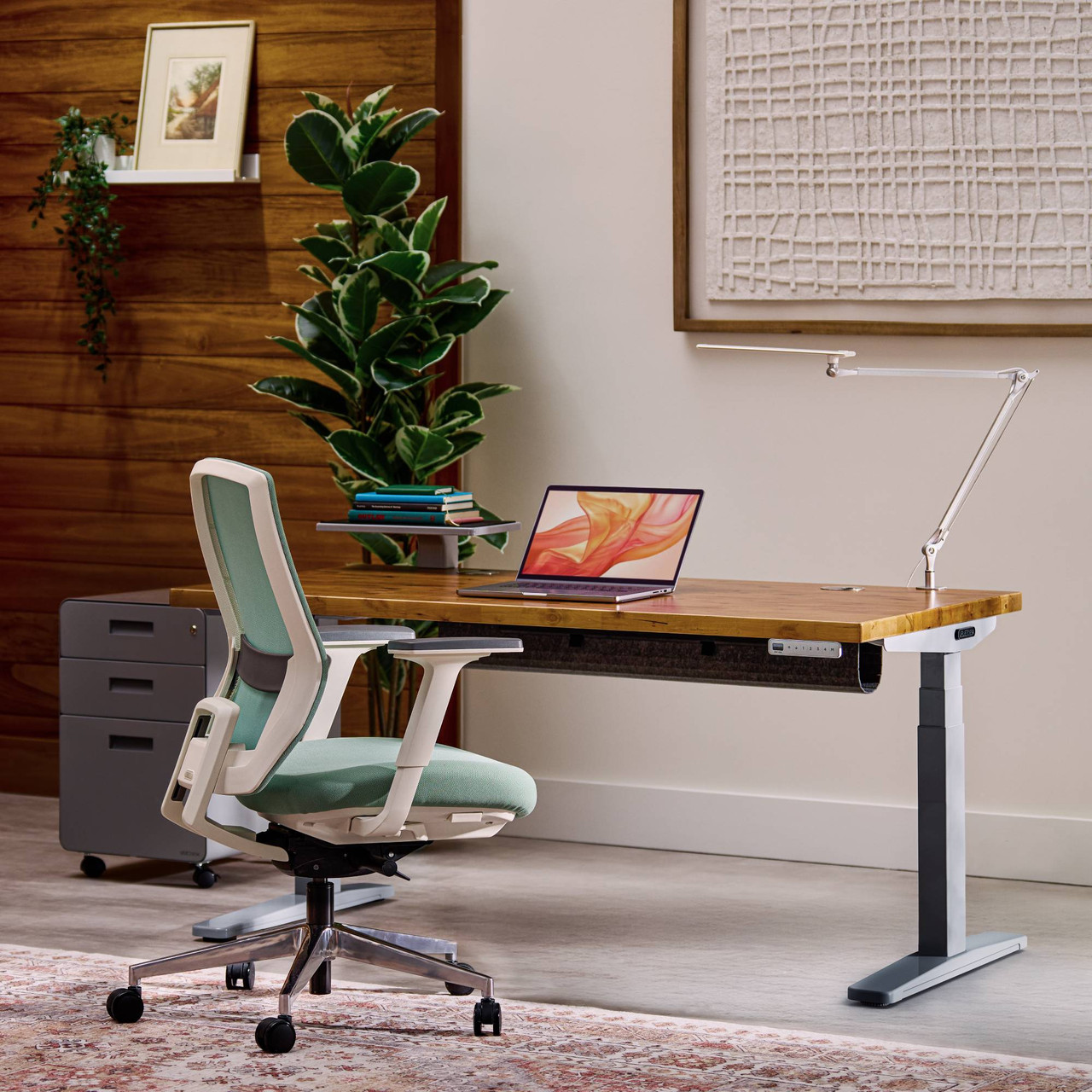
The three-stage legs are doing quiet work in that list. Three telescoping segments per leg give the desk both a taller potential reach and a faster travel speed, because each stage moves at once, and the two motors are what let the frame carry 355 lbs without straining. That’s enough for two large monitors, a laptop, a heavy mechanical keyboard and whatever else colonizes a desk over time, with margin to spare.
Two other items deserve a second look. The lower maximum height of 48.7 inches is a genuine downgrade for very tall users who could push the old V2 higher, so measure your standing elbow height before you assume newer means taller. The 15-year warranty, on the other hand, is unusually broad: it covers the electronics and the desktop, not just the frame, which is exactly where cheaper desks quietly exclude the expensive failure points. A motor or controller dying in year six is the failure that actually strands people, and here it’s covered.
The Motor and Stability Upgrades That Actually Matter
The motor is the upgrade you feel every day. At 2 inches per second, the Uplift V3 finishes a full sit-to-stand move in about eight seconds, and Forbes Vetted’s reviewer clocked the noise at around 48 decibels, quiet enough that it won’t cut through a call. Standing Desk Reference puts it a touch lower at 45 decibels. Either way it’s a library-quiet hum, not the grinding whine older frames were known for. Speed matters more than it sounds: a desk that takes 15 slow seconds to raise is a desk you leave sitting, and the whole point is to switch positions often.
Stability is the less glamorous win. That reinforced steel frame with I-beam crossbar rails and a stability plate is Uplift’s answer to the complaint that shadows every tall standing desk: wobble at full height. A desk that shakes when you type standing up is a desk you stop raising, which defeats the whole exercise, so pair the sturdier frame with proper keyboard position at both your sitting and standing heights. If you’re still weighing whether a motorized desk earns its footprint at all, I worked through that question here.
What an Uplift V3 Actually Costs
The CA$839 (US$599) starting price is real, and it’s also a bare frame with a basic laminate top. Nobody’s desk ends there. Add a bamboo or solid-wood top, a keyboard tray and the accessories that make the thing usable, and a typical Uplift V3 build lands near CA$1,540 (US$1,099). Max it out with the largest sizes and premium tops and you’re looking at roughly CA$3,083 (US$2,200).
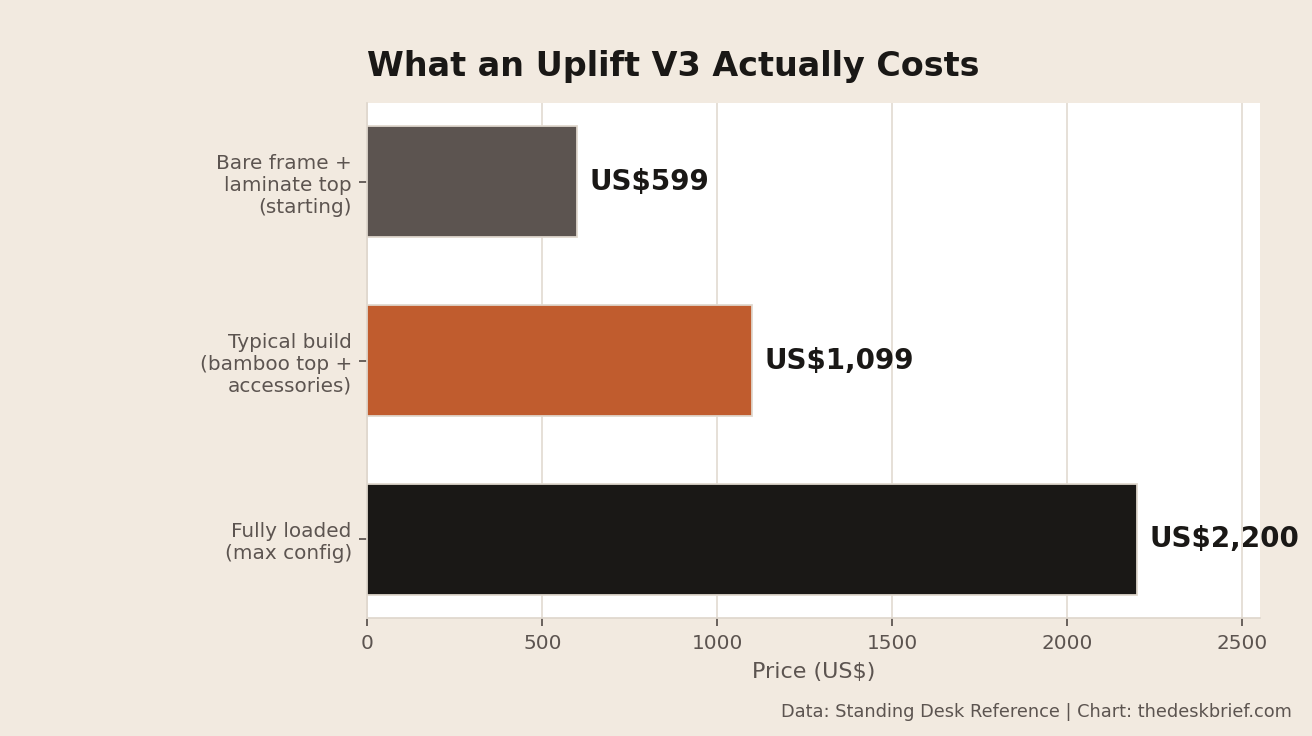
That CA$1,540 (US$1,099) middle figure is the number to budget around, and it’s about CA$210 (US$150) more than a comparable V2 build ran. You’re paying that premium for the faster motor, the broader warranty and the included cable management. Whether it’s worth it depends entirely on how long you keep your desks: spread over 15 years it’s rounding error, over two years it isn’t. For the record, a budget frame like the FlexiSpot E7 still starts near CA$671 (US$479) if the Uplift tax stings, and it will hold a two-monitor setup just fine.
The Honest Downsides
No desk is all upside, and this one has three catches worth knowing before you order. First, the “simplified” assembly still isn’t a solo job in practice: Forbes Vetted’s reviewer found some steps, like fitting the desk extension, genuinely need a second pair of hands despite the lower screw count. Second, that same review flagged confusing accessory manuals that occasionally turned up in the wrong boxes, which turns a 20-minute add-on into a scavenger hunt.
Third is the height ceiling. Trimming the maximum to 48.7 inches shortens the range very tall users leaned on with the V2, so if you’re north of about 6-foot-4 and stand tall, check the numbers against your own elbow height before committing. None of these are dealbreakers. They’re the gap between the marketing and the Saturday-in-the-driveway reality, and since a good desk is one you’ll use for a decade, getting the rest of your ergonomic setup right matters as much as the frame does.
Who Should Skip This
Current V2 owners are the easy call: your desk already does the job, the V3’s gains are incremental, and CA$1,540 (US$1,099) buys a lot of other upgrades. Skip it. Budget-first buyers who just want a stable motorized frame should look at cheaper options like the FlexiSpot E7 near CA$671 (US$479) and put the savings toward a better chair. And if you’re very tall and routinely push a desk to its upper limit, the lower V3 ceiling means the older V2 or a taller-range frame actually serves you better; check your correct desk height before deciding between them.
Who should buy it: first-time standing-desk buyers who plan to keep the thing for years, anyone who hated wobble on a previous desk, and people who value the bundled FlexMount cable manager enough to not fight a nest of cords under the top. If cable chaos is your real problem, mind you, you can solve most of it for far less with basic cable management gear and keep your current desk.
Uplift V3 FAQ
Is the Uplift V3 worth it over the V2?
For most V2 owners, no. It’s faster, quieter and better-warrantied, but those are refinements, not reasons to spend another CA$1,540 (US$1,099). If your V2 is failing or you never owned one, the V3 is an easy recommendation.
How much does an Uplift V3 really cost?
The CA$839 (US$599) starting price is a bare frame. A realistic build with a nice top and accessories runs about CA$1,540 (US$1,099), and a maxed-out configuration reaches roughly CA$3,083 (US$2,200).
How fast and how loud is the Uplift V3 motor?
It moves at 2 inches per second, about an eight-second sit-to-stand cycle, at roughly 45 to 48 decibels depending on whose measurement you trust. Quiet enough to raise the desk mid-call.
Does the Uplift V3 include cable management?
Yes. The FlexMount cable manager now comes bundled at no extra cost, a small but real saving over the V2, where you often bought it separately.
The Short Version
The Uplift V3 is a careful refinement of an already-good desk: a 33% faster 2-inch-per-second motor, a sturdier steel frame, a genuinely broad 15-year warranty, and cable management thrown in, starting at CA$839 (US$599) and landing near CA$1,540 (US$1,099) once it’s actually built. Buying your first serious standing desk and planning to keep it for years? It’s the one to beat. Already own a V2? Keep it, and spend the money somewhere it’ll change your day.
Editorial rating: 4.0 out of 5. The UPLIFT V3 is a strong first premium standing desk with a faster motor, sturdy frame, broad warranty, and bundled cable management. Existing V2 owners should keep their desks because the improvements are refinements rather than a compelling replacement case.
Current offer checked August 30, 2026: US$599.00, in stock. Prices and availability can change.