This page contains affiliate links. If you buy through these links, we may earn a small commission at no extra cost to you. Full disclosure.
The Bigme B251 Pro asks US$1,299 for a 25.3-inch color E Ink monitor that claims something no E Ink display has managed before: a refresh rate of up to 60 FPS. The whole pitch rests on that one figure, which is also the part nobody outside Bigme has independently measured. Preorders remain open at US$1,299. Bigme now estimates early October shipping, a delay from the July date previously quoted. No delivered production-unit review or independent 60 FPS measurement has appeared.
Last updated: September 11, 2026.
Color E Ink is a genuinely appealing idea for text-heavy desk work. A reflective screen with no backlight is gentle on the eyes, and a version that can also handle scrolling and the odd video clip sounds close to ideal. The catch is the price and the physics. At US$1,299 on sale, or US$1,599 at list, the B251 Pro costs roughly twice a very good 27-inch 4K office monitor, and E Ink still does not behave like an LCD once things start to move.
Table of Contents
- What Bigme confirms about the B251 Pro
- The 60 FPS claim is still just a claim
- Color and sharpness: the Kaleido tax
- Ports and the USB-C catch
- B251 Pro vs a conventional 4K monitor
- What the base B251 can and cannot tell us
- Who Should Skip This
- Frequently Asked Questions
- The Short Version
What Bigme confirms about the B251 Pro
Start with what is actually on the spec sheet, because that part is solid. Bigme’s own store page lists a 25.3-inch Kaleido 3 color E Ink panel at 3200 by 1800, which works out to about 145 pixels per inch. It shows 4,096 colors and 16 levels of grey, with an adjustable front light that mixes warm and cool tones so you can read in a dark room. The stand tilts and rotates, a remote is in the box, and wireless screen mirroring is supported.
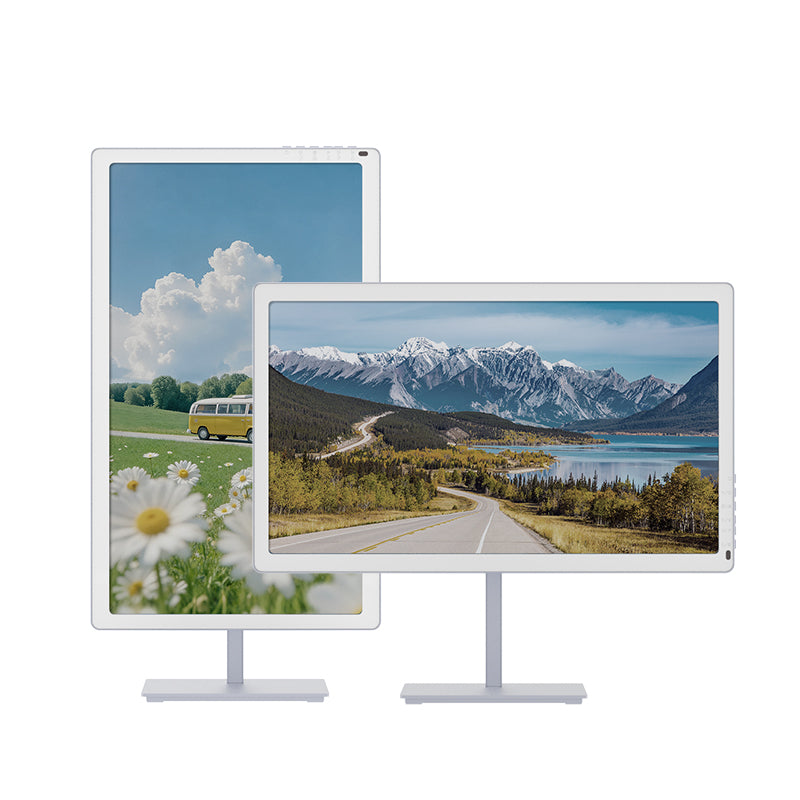
Here is the confirmed hardware, straight from the manufacturer listing:
- Panel: 25.3-inch Kaleido 3 color E Ink, 3200 x 1800, roughly 145 PPI
- Color: 4,096 colors and 16 grey levels, with a black-and-white mode
- Front light: adjustable warm and cool
- Video inputs: HDMI x 1 and DisplayPort x 1
- USB-C x 1, listed for system and firmware updates only
- Power: dedicated DC input
- Extras: remote control, wireless screen mirroring, landscape or portrait
- Warranty: 1 year
- Price: US$1,299 on sale, US$1,599 at list
That is a complete picture of the physical product. Everything past this point is either a claim Bigme has made or a limitation that E Ink imposes on every screen of this type, and both deserve a closer look before you spend the money.
The 60 FPS claim is still just a claim
The headline is the refresh rate. Bigme’s official launch release states that the maximum frame rate rose from 21 FPS on the previous B251 to 60 FPS on the Pro, using a waveform system it brands xRapid. That is a real jump if it holds up, and 60 FPS would be a first for a color E Ink monitor this size. It would move E Ink from readable but sluggish toward something you could scroll and even watch on without wincing, which is why Tom’s Hardware framed it as a monitor that could reportedly hit 60 FPS.
Two things keep this from being settled. The spec is written as “up to 60 FPS,” which is the same hedge every display maker reaches for, and no independent lab has published measurements of the Pro yet. Igor’s Lab, which covered the launch, is blunt that fast refresh on E Ink comes with reduced grayscale and color quality, visible artifacts, and increased ghosting in the aggressive mode. So the honest reading is that 60 FPS may well exist as a mode, but whether it looks good at 60 FPS is exactly the question a reviewer needs to answer, and none has.
Color and sharpness: the Kaleido tax
Kaleido 3 is the same color layer used in most color E Ink devices, and it comes with a fixed compromise. The color filter sits on top of the ink, so color content resolves at roughly half the sharpness of black-and-white text. Igor’s Lab describes the result as generally muted, closer to newspaper print than to an IPS panel. Those 4,096 colors are real, but they are not vivid, and nobody should expect photo editing or accurate design work from this screen.
At about 145 PPI for the panel, black text is crisp and pleasant, which is the whole point of buying E Ink in the first place. If your day is documents, code, long-form reading, and email, that reflective, flicker-free surface is a real comfort win. If your day involves color that has to be right, this is the wrong tool, and no firmware update changes the physics of the filter.
Ports and the USB-C catch
The connectivity has a trap worth flagging loudly. Video comes in over HDMI or DisplayPort only. The single USB-C port is listed for system and firmware updates, not for display or power, so you cannot run one cable from a laptop and get picture, data, and charging the way a modern USB-C monitor allows. Power is a separate DC brick.
For a desk that has standardized on one-cable docking, that is a step backward. You will route a full-size video cable plus a power cable, and a laptop user loses the single-wire tidiness that makes a USB-C hub monitor so easy to live with. It is not a dealbreaker, but at this price it is a surprising omission, and it is worth planning your cable run before it arrives. If you are setting it up, get it to the correct monitor height like any other display.
B251 Pro vs a conventional 4K monitor
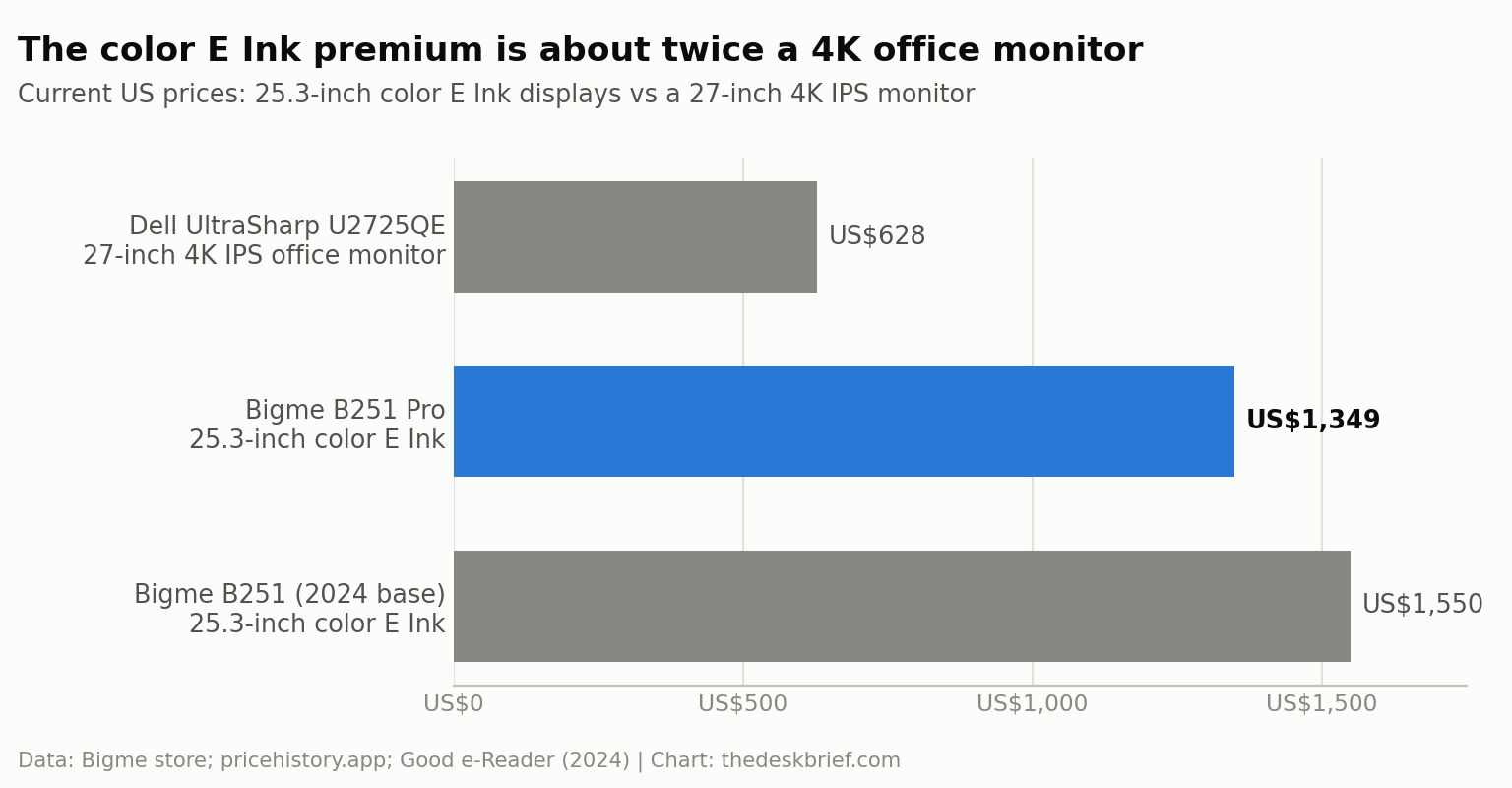
The fairest yardstick is not the old B251. It is what US$1,299 buys in a normal monitor. A Dell UltraSharp U2725QE, a 27-inch 4K IPS Black office display, sells for about US$628 right now, per price-tracking data, against a US$639 list. That is less than half the money for a screen that beats the B251 Pro on nearly every conventional metric.
| Spec | Bigme B251 Pro | Bigme B251 (2024) | Dell U2725QE |
|---|---|---|---|
| Price | US$1,299 sale / US$1,599 list | US$1,549.99 at launch | About US$628 (US$639 list) |
| Panel | 25.3-inch Kaleido 3 color E Ink | 25.3-inch Kaleido 3 color E Ink | 27-inch IPS Black LCD |
| Resolution | 3200 x 1800 (about 145 PPI) | 3200 x 1800 (about 145 PPI) | 3840 x 2160 (about 163 PPI) |
| Refresh | Up to 60 FPS claimed, unverified | Up to 21 FPS | 120 Hz measured |
| Color | 4,096 colors, muted | 4,096 colors, muted | 99% DCI-P3, DisplayHDR 600 |
| USB-C | Firmware only, no video or power | Firmware only, no video or power | Thunderbolt 4 hub, up to 140W |
| Backlight | Reflective, front light only | Reflective, front light only | Self-emissive, up to 600 nits |
| Warranty | 1 year | 1 year | 3 years |
The Dell wins on resolution, color, brightness, motion, single-cable docking, and warranty length, and it does all of that for less than half the outlay. The one thing it cannot do is be reflective and glow-free. That is the entire case for the B251 Pro, and whether that case is worth an extra US$700 or so is a personal call about eye comfort, not a spec you can argue with. If you are still weighing screen types, our guide on a gaming monitor versus an office monitor lays out the trade-offs for conventional panels.
What the base B251 can and cannot tell us
There is real review data on the older model, and it is worth reading with care. When Good e-Reader tested the base B251 in March 2024, the reviewer found that typing appeared on screen instantly, called ghosting almost non-existent, and described transitions as fluid. Less flattering: mouse movement felt slow, the build used mid-range plastics, and the side buttons were hard to read. At US$1,549.99, the verdict was that the price was not appealing and that it did not break new ground, with the Onyx Mira Pro and Dasung Paperlike 253 offering comparable speed.
None of that transfers to the Pro. The whole point of the new model is a claimed jump from 21 FPS to 60 FPS, which is a different refresh behavior on a differently tuned waveform. The base model’s smooth typing does not prove the Pro’s video mode looks clean, and its ghosting result does not carry over to a mode running nearly three times faster. Treat the base B251 as useful context for build quality and color character, and treat the Pro’s motion performance as untested until an independent lab publishes numbers. For the wider field, our e-ink monitor buyer’s guide compares the current Dasung, Boox, and Bigme options.
Who Should Skip This
Skip the B251 Pro if you need accurate color, if motion and video matter, or if you have built your desk around one USB-C cable. Skip it if value is the priority, because a US$628 4K IPS panel outclasses it on paper for less than half the money. And skip it for now if you are the kind of buyer who wants to see measured results before trusting a headline spec, because the 60 FPS claim has not been verified by anyone independent.
It makes more sense if your work is almost entirely text, you already know you prefer a reflective screen, and eye comfort outranks color fidelity and price. Even then, waiting for the first real review costs you nothing but a few weeks, and it could save you US$1,299.
Frequently Asked Questions
Is the B251 Pro’s 60 FPS refresh rate real?
It is a manufacturer claim, written as “up to 60 FPS,” and Bigme says its xRapid waveform lifts the maximum from 21 FPS on the old model. No independent lab has measured it, and coverage of the launch warns that E Ink’s fastest modes add artifacts and ghosting. Believe the mode exists, but wait for a review to judge how it actually looks.
Can the B251 Pro replace my main monitor?
Only if your work is mostly reading and writing. The reflective panel is easy on the eyes and text is crisp, but color is muted, motion is unproven, and there is no single-cable USB-C docking. For spreadsheets, code, and documents it could serve as a primary screen; for anything visual it cannot.
Does the B251 Pro charge a laptop over USB-C?
No. The single USB-C port is listed for system and firmware updates only. Video runs over HDMI or DisplayPort, and power comes from a separate DC adapter, so you cannot use it as a one-cable dock the way you would a modern USB-C display.
Is the B251 Pro worth US$1,299?
Only for a specific buyer. That money buys a much stronger conventional monitor, so the B251 Pro is worth it only if reflective, flicker-free reading is something you value enough to pay a large premium for, and only once you accept that its marquee refresh claim is still unverified.
The Short Version
The B251 Pro is the most interesting color E Ink monitor announced so far, and the most expensive way to find out whether 60 FPS E Ink is any good. Bigme confirms a 25.3-inch Kaleido 3 panel, 4,096 muted colors, HDMI and DisplayPort in, a firmware-only USB-C port, and a US$1,299 sale price. It claims up to 60 FPS, up from 21 FPS on the base model, and nobody outside the company has measured that yet.
If you love E Ink and read all day, keep an eye on it and wait for the first independent review. If you want the best screen for the money, a US$628 4K IPS monitor is the easy answer. The technology is exciting; the price and the unverified claim mean patience costs you nothing here.
Editorial rating: 3.0 out of 5. The B251 Pro is a promising 25.3-inch color E Ink monitor for text-heavy work and eye comfort. Its high price and unverified 60 FPS claim make waiting for independent testing the sensible choice.
Current offer checked September 11, 2026: US$1299.00, available for preorder. Prices and availability can change.