The best e-ink monitor for most first-time buyers is still a sharp 13.3-inch Dasung Paperlike 13K when it is actually in stock. The new Bigme B13 Pro is the lowest-priced current colour option at US$569, but it is a preorder with an October 26 dispatch label and no independent exact-model testing. Bigme remains the large-screen value leader, while BOOX is the polished premium option but is sold out through its Canadian store. If eye comfort is the reason you are considering one, our complete eye-strain monitor guide compares E Ink with low-blue-light LCD and OLED alternatives.
Last updated: October 22, 2026
By Ryan Billings
My buying advice is simple: wait for a 13.3-inch Dasung if you want the sharper way to test E Ink at a desk. The Bigme B13 Pro preorder is cheaper at US$569, but its claimed 60 FPS mode has not been independently measured and the October 26 date is a dispatch target, not proof of delivery. Consider the orderable 25.3-inch Bigme B251 Pro only if a large text-heavy workspace already justifies four figures. Do not buy any of them because a manufacturer promises medical relief. This is consumer-tech analysis, not medical advice, and these products do not diagnose or treat eye conditions.
The existing shortlist prices retain their September 15 checks. Bigme B251 Pro and B13 Pro prices and manufacturer-store availability were rechecked on October 22, 2026. All figures are US-dollar prices before tax, import fees, and currency conversion. I have not used these monitors. This guide is verified research based on official product pages and clearly attributed independent reporting, not hands-on testing.
Table of Contents
- The e-ink monitor shortlist
- Current prices and the size premium
- Dasung: the practical 13.3-inch choices
- BOOX Mira Pro Color: polished but expensive
- Bigme B13 Pro preorder: cheaper, still untested
- Bigme B251 Pro review: value with caveats
- Is an E Ink monitor eye-friendly for office use?
- What is the best E Ink monitor for a desktop dashboard?
- What E Ink still does badly
- Who Should Skip This
- Frequently asked questions
- The Short Version
The e-ink monitor shortlist
| Model | Size and resolution | Colour | Claimed speed | Observed price | Best fit | Buy |
|---|---|---|---|---|---|---|
| Dasung Paperlike 13K B&W | 13.3-inch, 3200 x 2400, 300 PPI | 16 gray levels | Up to 37 Hz | US$679, sold out | Portable text-first trial | Not listed |
| Dasung Paperlike 13K Color | 13.3-inch, 3200 x 2400, 300 PPI B&W | Kaleido colour | Up to 37 Hz | US$749, sold out | Portable work needing colour cues | Manufacturer |
| Bigme B13 Pro | 13.3-inch, 3200 x 2400, 300 PPI B&W | Kaleido 3 colour | Up to 60 FPS, unverified | US$569 preorder, October 26 dispatch label | Lower-cost portable colour option | Manufacturer |
| Bigme B251 Pro | 25.3-inch, 3200 x 1800, 145 PPI | 4096 colours, 16 gray levels | Up to 60 FPS, unverified | US$1,349, orderable now | 25-inch colour option | Manufacturer |
| Dasung Paperlike Color Revolutionary | 25.3-inch, 3200 x 1800, 145 PPI | Kaleido 3 | Up to 50 Hz, manufacturer claim | From US$1,698, sold out | Large colour desk with known limits | Not listed |
| BOOX Mira Pro Color | 25.3-inch, 3200 x 1800, 145 PPI | 4096 colours, 16 gray levels | BOOX Super Refresh, no public Hz figure | US$1,899.99, sold out | Polished stand, ports, and controls | Manufacturer |
Those speed numbers are not directly comparable to an LCD refresh rate. E Ink has slow pixel transitions and uses refresh processing to trade ghosting against motion. A higher claimed frame rate can make a cursor move more smoothly while text smears or old content remains faintly visible. Treat every headline number as a mode, not a promise of LCD-like motion.
Current prices and the size premium
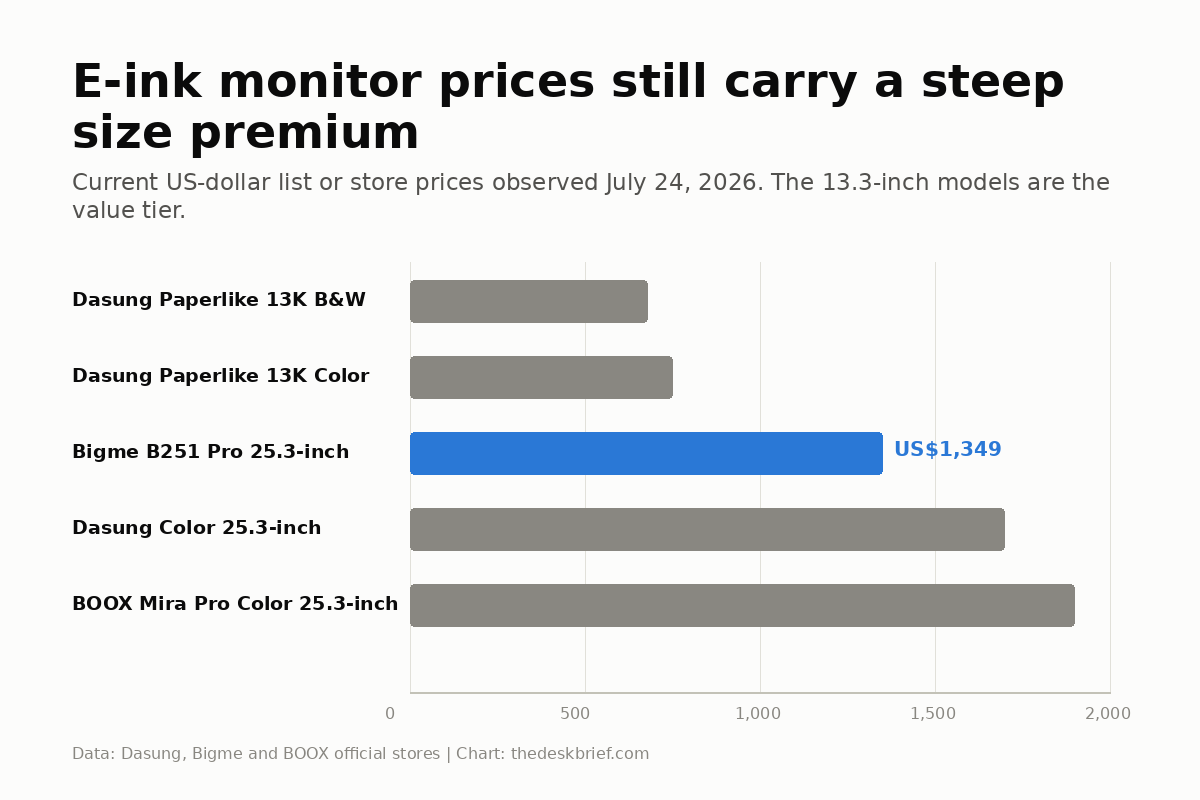
On September 15, Dasung’s official store listed the 13.3-inch monochrome Paperlike 13K from US$679 and the colour model at US$749, but the individual product pages marked both sold out. The 25.3-inch monochrome Paperlike 253 was also sold out at a listed US$1,548 starting price. The 25.3-inch colour model was listed from US$1,698 under new 50Hz branding and marked sold out across its variants.
On October 22, Bigme’s official store listed the B251 Pro at US$1,349 with an active Add to cart button. Its variant label still says end of September, a date that has passed, so buyers should confirm dispatch before ordering. The new B13 Pro is a US$569 preorder with an October 26 dispatch label. The BOOX Mira Pro Series page remained live, but BOOX’s Canadian monitor collection marked the US$1,899.99 Mira Pro Color sold out.
Bigme now covers both ends of this shortlist: the B13 Pro is the lower-cost portable preorder, while the B251 Pro is the orderable 25-inch value candidate. Neither is an impulse buy. Confirm dispatch timing, return costs, panel-defect coverage, firmware support, and warranty logistics before importing either one.
Top pickDasung: the practical 13.3-inch choices
The Dasung Paperlike 13K monochrome model remains the most sensible entry point by specification, but it was not an immediate buy on September 15 because Dasung marked it sold out. Its 3200 x 2400 resolution works out to 300 PPI, much sharper than the 145 PPI large panels, and Dasung claims up to 37 Hz. The format is small for a primary display but large enough for a document, terminal, reference window, or distraction-free writing pane.
When stock returns, choose the US$679 monochrome version when text is the job. It avoids Kaleido’s lower effective colour resolution and darker-looking background. The US$749 colour version makes sense only when syntax highlighting, charts, status colours, or annotation cues materially improve the work. The extra US$70 is modest beside the full purchase, but washed-out colour is still washed-out colour.
The 25.3-inch Paperlike Color Revolutionary gives you the large canvas at a US$1,698 starting price. Dasung now brands the listing as 50Hz and says newer hardware can receive the associated firmware features, so treat 50Hz as a manufacturer claim rather than a measured result for every unit. The 3200 x 1800 panel works out to 145 PPI and will not look as crisp as the 13K at close distance. Use the correct monitor height guide before assuming a physically larger screen belongs closer to your face.
Best premiumBOOX Mira Pro Color: polished but expensive
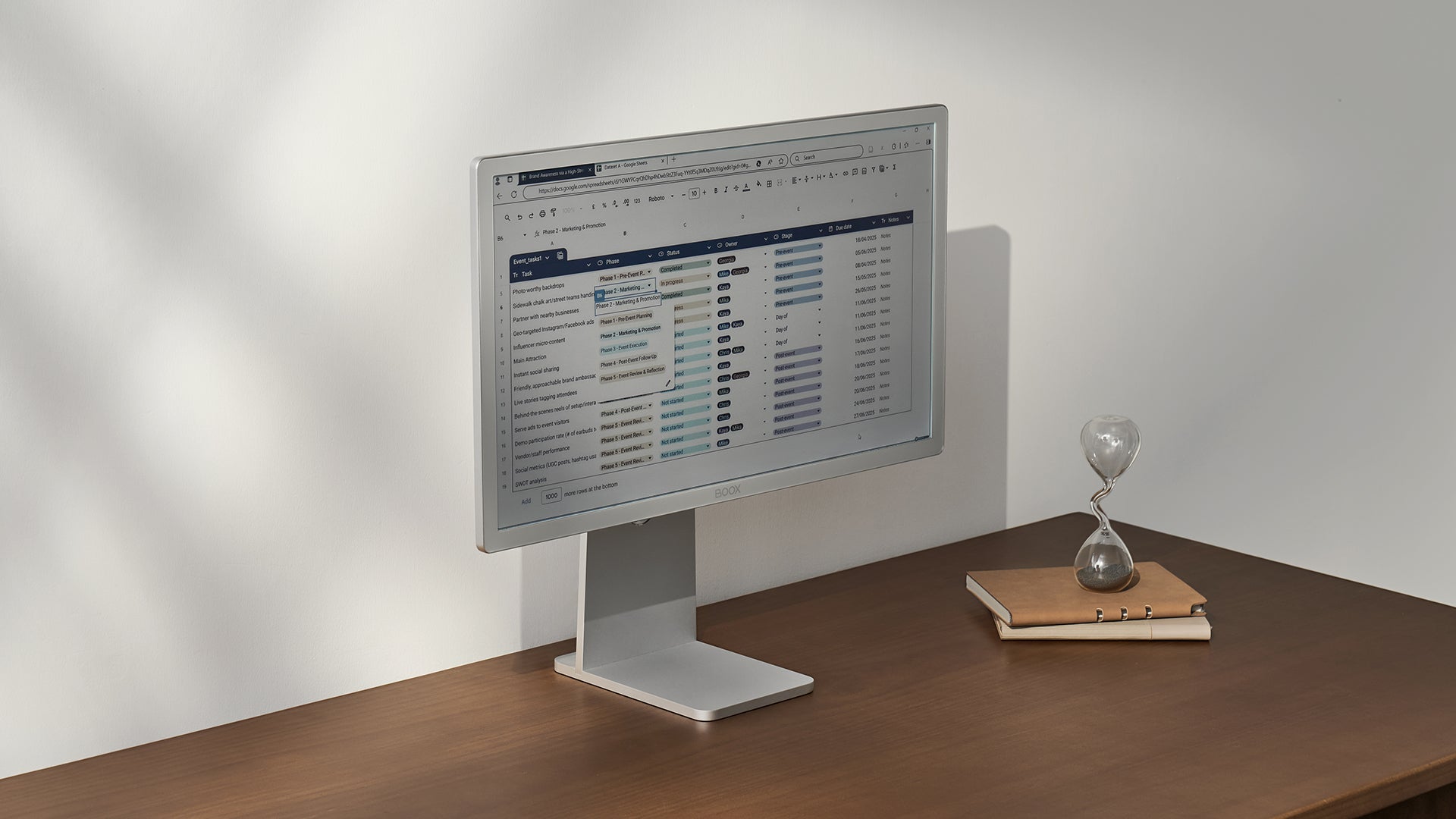
The BOOX Mira Pro Color is the easiest premium model to understand. It has a 25.3-inch Kaleido 3 panel, 3200 x 1800 resolution, 4096 colours, 16 gray levels, dual-tone front lighting, dual speakers, and a stand that tilts, pivots, and offers 50 mm of height adjustment. Ports include HDMI, Mini HDMI, USB-C, DisplayPort, and DC power, plus a 75 x 75 mm VESA mount.
BOOX is unusually candid about the central compromise: its official page says faster refresh produces more ghosting. Four preset modes let you lean toward speed or text clarity. That flexibility is useful, but it means there is no single best setting. Scrolling, typing, reading, and video ask the panel to make different compromises.
BOOX’s Canadian collection still listed this model at US$1,899.99 on September 15, but marked it sold out. That is US$550.99 above Bigme’s current price and US$1,150.99 above Dasung’s portable colour model. The stand, mature controls, five ports, and BOOX software may justify part of the premium after stock returns. They do not turn 4096 muted colours into a colour-critical editing display.
Bigme B13 Pro preorder: cheaper, still untested
The Bigme B13 Pro is available to preorder from Bigme’s official store at US$569, reduced from a stated US$749 regular price. The store labels the selected preorder variant October 26. That is a dispatch target, not evidence that customer orders are already shipping.
On paper, it combines a 13.3-inch Kaleido 3 panel, 3200 x 2400 black-and-white resolution, 1600 x 1200 colour resolution, USB-C video and power, Mini HDMI, and wireless casting. Bigme claims up to 60 FPS, but no independent exact-model test has measured usable frame output, latency, ghosting, or cleanup behaviour. Treat it as a cheaper preorder, not a proven replacement for the sharper Dasung or a normal LCD.
Best valueBigme B251 Pro review: value with caveats
The Bigme B251 Pro is the most interesting large e-ink monitor in this comparison because its current US$1,349 official-store price undercuts BOOX and Dasung. The page accepts orders now, although its end-of-September variant label is stale enough that buyers should confirm dispatch. It has a 25.3-inch colour panel, 3200 x 1800 resolution, 145 PPI, 4096 colours, 16 gray levels, adjustable warm and cool front lighting, HDMI, DisplayPort, wireless mirroring, a remote, and portrait support.
The headline is “up to 60 FPS.” Bigme states it, but I could not find independent measurements confirming 60 distinct clean frames per second with latency, ghosting, and image quality documented. Tom’s Hardware also labels the figure as a claim and notes that slow pixel response, latency, ghosting, and motion quality remain concerns.
There is another catch: Bigme’s listed USB-C port is for system upgrades only. It is not the one-cable laptop dock people expect from a modern office monitor. Video comes through HDMI or DisplayPort. That is not fatal, but it belongs in the buying decision.
My verified-research Bigme B251 Pro review verdict is cautious: it is the strongest orderable large-screen value here, but only for buyers who accept imported-support risk, a stale dispatch label, and motion claims that still lack useful independent measurement. Buy it for the panel size, inputs, front light, and lower price, not for an unverified frame-rate record.
Is an E Ink monitor eye-friendly for office use?
An eye-friendly E Ink monitor for office use makes the most sense when the work is mostly reading, writing, coding, documents, or reference material. A reflective E Ink display uses ambient light instead of an LCD-style backlight, so a bright workspace can make the surface easier to see rather than more washed out. That is a practical difference, not proof that the monitor prevents eye strain.
When room light is insufficient, these models use an adjustable front light that still emits light across the panel. Comfort also depends on text size, contrast, viewing distance, glare, blinking, breaks, and whether ghosting makes you strain to read. For mixed office work with frequent video calls or rapid scrolling, a conventional monitor adjusted using the eye-strain monitor guide may be the less frustrating choice.
What is the best E Ink monitor for a desktop dashboard?
The best E Ink monitor for a desktop dashboard is not automatically the largest. A 13.3-inch Paperlike 13K is sharper for one calendar, task list, build-status panel, ticket queue, or home-automation view. A 25.3-inch Bigme gives a multi-column dashboard more room and uses muted colour for status cues, but its lower 145 PPI is less crisp. Update the dashboard only when data changes and avoid animated charts, scrolling tickers, or video. Those defeat E Ink’s low-motion advantage and make ghosting more obvious.
What E Ink still does badly
Video, gaming, animation, dragging windows, and rapid scrolling are still bad fits. Fast modes improve motion by accepting ghosting or reduced detail. A manual or automatic full refresh clears the residue, often with a visible flash. If that behaviour will irritate you more than LCD light does, an e-ink monitor is an expensive way to discover it.
Colour E Ink is also not normal monitor colour. The large models advertise 4096 colours, while conventional displays reproduce millions. Saturation is muted, gradients can band, and Kaleido’s colour layer lowers effective colour detail. Use it for colour labels and basic charts, not photography, video grading, design approval, or any task where a subtle colour difference carries money.
Ambient light is an advantage, not magic. A reflective panel becomes easier to see as useful room light increases, but large colour panels can still look dark. Their adjustable front light shines across the surface rather than through it from behind. It remains emitted light, and no configuration guarantees comfort for a particular person.
Finally, software matters. E Ink rendering benefits from per-application modes, contrast controls, refresh shortcuts, and operating-system tuning. A high-resolution Mac interface with translucent effects and animation is harder to render cleanly than plain black text on white. Budget setup time as well as money. If you run a conventional monitor alongside the e-ink display, dialing in the monitor color settings on the primary screen reduces the brightness and colour contrast mismatch between the two.
Who Should Skip This
Skip every model here if you need one display for meetings, video, gaming, colour work, and fast general computing. A good 27-inch 4K IPS monitor costs much less and handles those jobs with fewer compromises. The site’s gaming versus office monitor guide explains why refresh behaviour and connectivity matter more than a health label.
Skip the 25-inch models if you have not used E Ink as a computer display. A US$679 13.3-inch model is still expensive, but it limits the cost of learning whether ghosting and slow motion are acceptable. Buying the biggest panel first is not a commitment strategy. It is a four-figure gamble.
Skip the category if the purchase is meant to replace an eye exam or address unexplained symptoms. The research does not support treating an e-ink monitor as a medical device. The blue-light glasses evidence is a useful reminder that a plausible screen story and a proven outcome are different things.
Frequently asked questions
Can an e-ink monitor replace a normal monitor?
For text-heavy writing, coding, documents, and reference work, possibly. For video, games, animation, rich colour, and quick window movement, no. Many buyers will be happier using E Ink as a second display.
Is colour E Ink as sharp as monochrome E Ink?
Not for colour content. Kaleido overlays a colour filter, so black-and-white resolution and colour resolution differ. The 13.3-inch Dasung 13K has a sharper 300 PPI monochrome image than the 145 PPI large panels.
Does a 60 FPS claim mean an E Ink monitor behaves like LCD?
No. Frame output is only one part of motion. Pixel response, latency, ghosting, cleanup refreshes, and image detail determine what the result looks like. Bigme’s 60 FPS figure needs independent verification.
Do E Ink monitors have blue light?
The reflective panel does not require an LCD-style backlight, but models with a front light still emit light and may offer cool and warm settings. Ambient room light also contains blue wavelengths. The practical distinction is how the display creates a visible image, not a promise of zero blue light.
The Short Version
Wait for the US$679 Dasung Paperlike 13K B&W to return if you want the sharper e-ink monitor experiment, or consider the US$749 colour version when colour cues matter. Bigme’s US$569 B13 Pro is the current lower-cost colour preorder with an October 26 dispatch label, while the orderable US$1,349 B251 Pro is the large-screen value. All remain specialist text displays with ghosting, motion, colour, and setup compromises.