Good wrist rest ergonomics comes down to one uncomfortable fact: the way most people use the pad is the way you’re not supposed to. The foam sits at the front edge of the keyboard, your wrists settle into it, and your fingers reach up to the keys from there. It feels like support. It’s also the exact posture that ergonomists spend most of their breath talking people out of.
So this isn’t a list of pads to buy. Wrist rest ergonomics, done right, is about what a wrist rest is for, the one habit that turns it from helpful to harmful, and what the research on carpal tunnel pressure actually says about a bent wrist. If you already own a wrist rest, the fix costs nothing. You just use it differently.
Table of Contents
- What a wrist rest is actually for
- The habit that turns a wrist rest against you
- What the wrist-angle research shows
- Getting your wrist rest ergonomics right
- Who should skip a wrist rest
- Frequently asked questions
- The Short Version
What a wrist rest is actually for
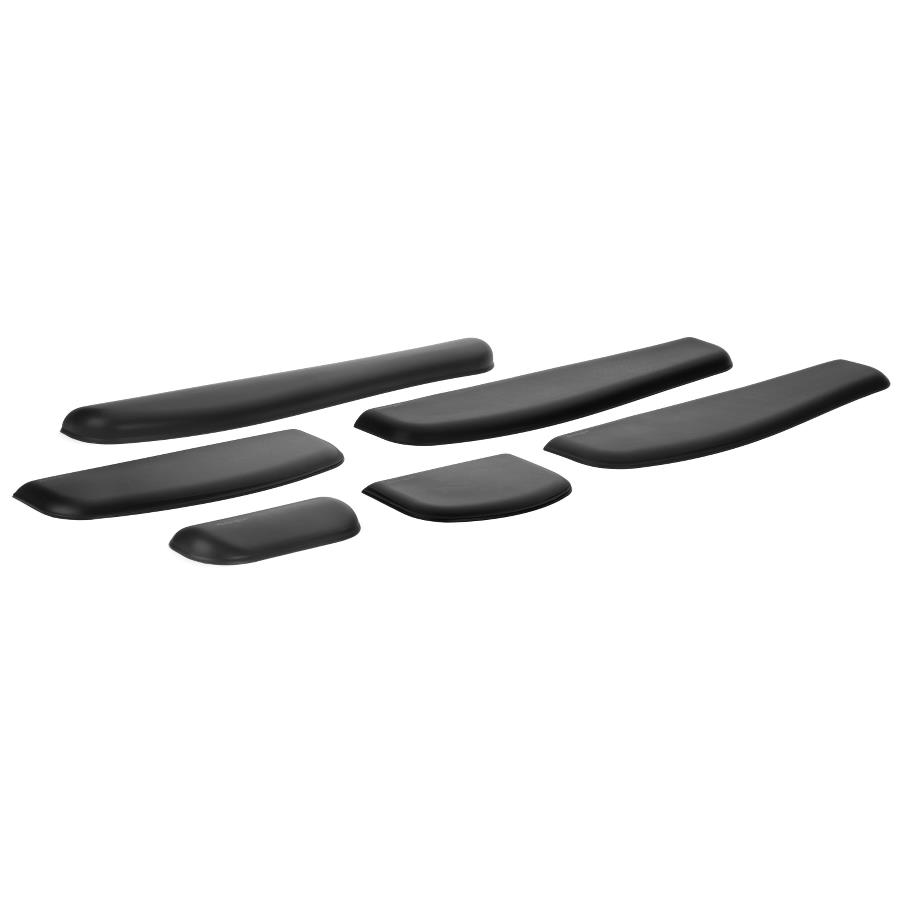
Here is the short answer the product name hides: a wrist rest is for resting, and resting is not the same as typing. Both OSHA and the Canadian Centre for Occupational Health and Safety say almost the same thing in almost the same words. Your hands should move freely and stay elevated above the pad while you type, and when you do rest, the pad should meet the heel or palm of your hand, not the wrist itself.
Read that twice, because it inverts how the thing usually gets used. The pad is a place to park your palms during the gaps between bursts of typing, not a shelf to plant your wrists on while your fingers work. The name oversells it. A wrist rest you actually rest your wrist on is doing the wrong job.
The habit that turns a wrist rest against you
Plant the base of your wrist on a pad and two things happen at once. The contact point anchors the bottom of your hand, so your fingers have to stretch up and back to reach the keys, which tips the wrist into extension. And the soft tissue on the underside of your wrist, right where the median nerve and its neighbours pass through the carpal tunnel, gets pressed into the foam.
CCOHS is blunt about the second part: steady pressure there can cause problems for the delicate tendons on the underside of the wrist and may feed into carpal tunnel syndrome or tenosynovitis. Cornell’s ergonomics group, run by Alan Hedge, is blunter still, describing wrist rests as a poor way to hold the hands in position while you type. The takeaway from both is identical. Keep the wrist floating and neutral while the fingers are moving, and save the pad for the pauses.
What the wrist-angle research shows
None of this is hand-waving. Researchers have put pressure sensors inside the carpal tunnel and watched what happens as the wrist bends. In a 2007 study in the journal Human Factors, Keir and colleagues measured 37 people and worked out how far the wrist can move from neutral before pressure inside the tunnel reaches 30 mmHg, the level linked to reduced blood flow to the nerve. The angles below are the ones that keep three out of four people under that mark.
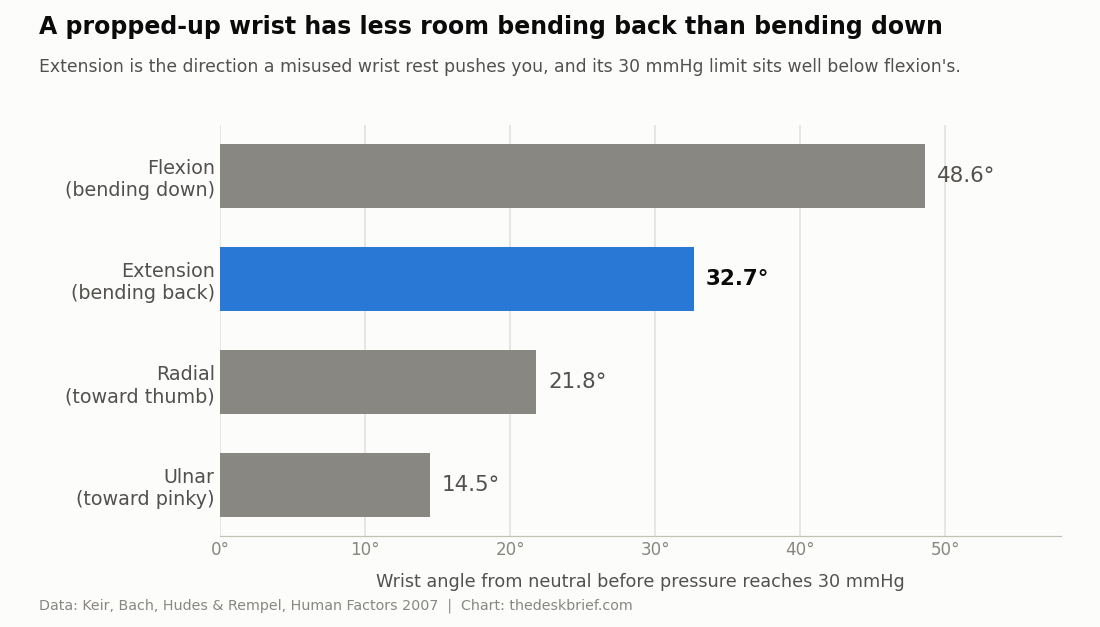
Two things stand out for wrist rest ergonomics. Bending back into extension gives you less room than bending down into flexion, and a wrist rest used as a wrist shelf pushes you straight toward extension. A companion study led by David Rempel found that the act of typing raises carpal tunnel pressure on its own, on top of whatever your posture adds, and that extension and a thumb-ward tilt push it higher again. Neutral is simply the most affordable place to keep your hand, and anything that holds you away from neutral all day is quietly working against you.
Getting your wrist rest ergonomics right
If you want the pad in your setup, here is how to make wrist rest ergonomics work instead of backfire. Start away from the desk. Set your chair and desk height so your elbows land at roughly the same height as the keyboard and your forearms run parallel to the floor. Most wrist trouble is really a desk-height problem wearing a disguise. Get that right and your wrists float near neutral with no pad at all.
Then flatten the keyboard. Fold the little feet down, not up. Raising the back of the keyboard tilts your wrists into the exact extension the research warns about, which is why ergonomic keyboard position matters as much as the pad you rest on. From there the pad’s job is narrow and specific.
Pick and place the pad by a few rules that both OSHA and CCOHS spell out:
- Firm and broad beats soft and squishy. A pad your wrist sinks into just raises the contact pressure it is meant to lower.
- At least 3.8 cm (1.5 inches) deep, with a rounded front edge, matched to the height and slope of your keyboard’s front edge.
- Level with the keyboard’s home row, so the wrist stays straight instead of kinking up or down to reach it.
- Contact the heel of your palm, never the wrist, and only during the pauses.
The same logic covers the mouse. A mouse pad with a built-in rest should support the heel of your palm, keep the wrist straight, and never turn into a pivot you grind against while you click.
Who should skip a wrist rest
Plenty of people are better off without one, and I’ll say that plainly because most guides won’t. If your desk and chair are set correctly, your wrists already hover in a neutral line and a pad mostly gets in the way. A tall or mushy rest can manufacture the bent-wrist problem it claims to solve.
Skip it too if you’ve moved to a negative-tilt tray that slopes the keyboard away from you, or a split board that lets your hands sit at a natural angle. Those fix the posture at the source. If you’re starting from scratch, work through a full ergonomic desk setup checklist first and treat the pad as the last item, not the first. A wrist rest is a small patch, not a cure, and for a fair number of desks it patches a hole that was never there.
Frequently asked questions
Should your wrist touch the wrist rest while you type?
No. Both OSHA and CCOHS say your hands should stay elevated above the pad while your fingers are moving. The rest is for the pauses between typing, and even then it should meet the heel of your palm rather than the wrist.
Are gel or memory foam wrist rests better than firm ones?
Firmer and broader usually wins. A pad soft enough that your wrist sinks in raises the contact pressure over the carpal tunnel, which is the opposite of the point. You want enough give to be comfortable and enough support that nothing bottoms out.
Does wrist rest ergonomics apply to the mouse too?
Yes, and the rules don’t change. Support the heel of your palm, keep the wrist straight and neutral, and don’t let the rest become a fixed pivot you drag your hand around. The mouse hand tends to deviate toward the thumb, and the research shows that direction runs out of room fast.
Can a wrist rest cause carpal tunnel syndrome?
On its own, no. But sustained pressure on the wrist and a wrist held in extension are both recognised risk factors, and a pad used as a wrist shelf delivers both all day. Used the way this guide describes, it is harmless. Used as a place to plant your wrists, it stacks the odds the wrong way.
The Short Version
A wrist rest is a rest, not a typing surface. Keep your wrists floating and neutral while your fingers move, and let the pad catch the heels of your palms only during the pauses. The research is consistent: bending the wrist back into extension shrinks the room inside the carpal tunnel, and a pad used as a wrist shelf holds you there. Good wrist rest ergonomics is mostly free. Set your desk height, flatten the keyboard, keep a firm pad level with the keys if you want one, and touch it with your palm, not your wrist.