The Samsung ViewFinity S80HF is now available. Samsung US listed it at US$699.99 when checked on September 25, 2026, and that number finally answers the question the original version of this guide spent 2,000 words waiting for. For a 27-inch 5K display, it lands in a fight Samsung didn’t start.
This page contains affiliate links. If you buy through these links, we may earn a small commission at no extra cost to you. Full disclosure.
Last updated: October 19, 2026. Now available: the Samsung ViewFinity S80HF has live US and Canadian retail listings. No exact-model independent measured review was available from RTINGS, Tom’s Hardware, Monitors Unboxed, or TFTCentral when checked, so the verdict below still rests on published specifications and the independently reviewed ASUS alternative.
Currency note: Canadian dollar equivalents use the Bank of Canada daily average of 1 USD = 1.4014 CAD on July 17, 2026. Converted amounts are approximate; the original US price is shown in brackets.
For years, a 27-inch 5K desktop monitor meant Apple’s Studio Display at CA$2,241 (US$1,599) or Samsung’s own ViewFinity S9 at CA$2,242 (US$1,599.99). Same 5120 by 2880 resolution, the same 218 pixels per inch, roughly the same money. Then ASUS put a 5K ProArt on shelves for US$799 and the premium stopped being a law of physics. The S80HF is Samsung arriving at a party that’s already going.
Here’s the honest version of the answer, based on the specs Samsung, ASUS and TFTCentral have published. I haven’t had one on my desk, so every number below is attributed, not measured.
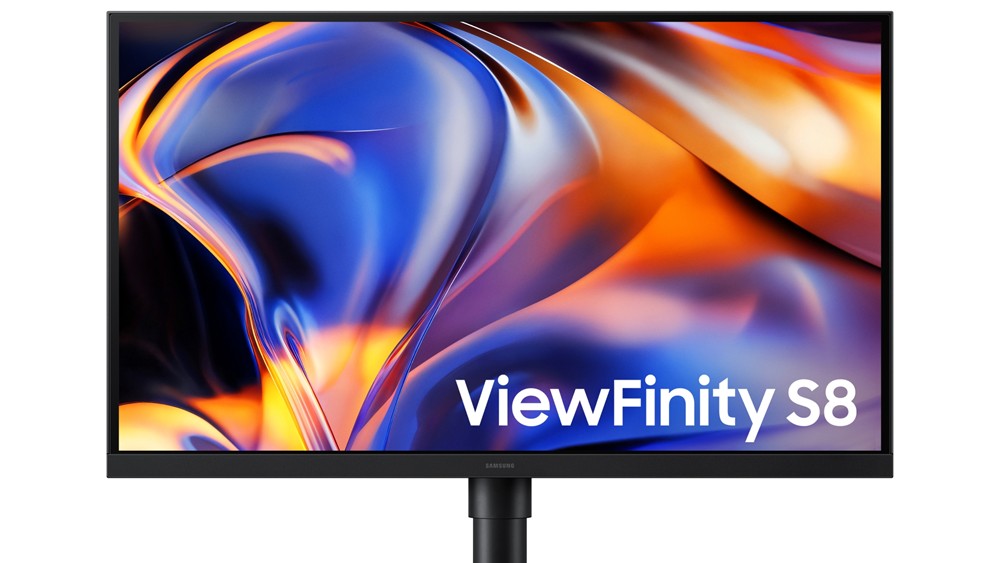
Table of Contents
- What the Samsung ViewFinity S80HF Actually Is
- The 5K Price Problem It Solves
- The Monitor Samsung Has to Beat
- 27-Inch 5K Monitors Compared
- Where Samsung Cut to Hit the Price
- Who Should Skip This
- FAQ
- The Short Version
What the Samsung ViewFinity S80HF Actually Is
Strip away the branding and the Samsung ViewFinity S80HF is a 27-inch IPS panel running 5120 by 2880, the 5K resolution that squeezes 218 pixels into every inch. That density is the whole reason 5K exists: text gets a printed-page crispness that 4K at this size can’t quite hit, and you can run interface elements at a true 2x scale without the fuzzy in-between that plagues 4K on a 27-inch screen.
According to TFTCentral’s spec breakdown, the panel itself is straightforward and the connectivity is where Samsung got generous:
- 27-inch IPS, 5120 x 2880 (5K), 218 PPI, 60Hz, 5ms G2G
- 350 nits SDR brightness, 1000:1 contrast, 10-bit color (1.07 billion shades)
- 99% of the sRGB color space
- USB-C with DisplayPort Alt Mode and 90W power delivery
- DisplayPort 1.4, HDMI 2.1, and a built-in RJ45 ethernet port
- USB-A and USB-B hub, a KVM switch, and picture-in-picture
- Full height, tilt, swivel, and pivot on the stand
Two things there matter more than they look. The 90W USB-C means a MacBook Pro or most Windows laptops charge and drive the display over one cable, which is the whole appeal of a monitor like this. And the RJ45 port is genuinely rare: no other 5K monitor in this comparison has one, which matters if your desk is far from the router and you’d rather not run a dongle. If you’d rather float the panel off the desk entirely, our breakdown of whether to use a monitor arm or the included stand still applies here.
The 5K Price Problem It Solves
5K was a rich person’s resolution for a long time. Apple’s refreshed Studio Display, announced in March 2026, still starts at CA$2,241 (US$1,599) for the 27-inch 5K panel, now with Thunderbolt 5 and a 12-megapixel camera. Samsung’s ViewFinity S9 sits right next to it at CA$2,242 (US$1,599.99) with Thunderbolt 4 and a pop-on 4K webcam. LG’s UltraFine 5K pairs a 500-nit P3 panel with Thunderbolt 3 but has drifted out of easy availability.
The launch is no longer theoretical. Samsung US listed the S80HF at US$699.99 when checked on September 25, 2026, and Amazon.com carried ASIN B0GZ5W7375. Samsung Canada published the Canadian model page without a direct price, while Best Buy Canada listed the exact Canadian SKU as available to ship. The US list price puts it below the ASUS ProArt’s US$799 street price.
Samsung UK listed the ViewFinity S80HF at £529 including VAT, reduced from £599 and in stock when checked October 19, 2026. UK readers can also search Amazon UK for the exact model.
At US$699.99, the conversation has changed. Samsung undercut the ASUS ProArt’s US$799 street price by a hundred dollars, and that gap forces a genuine trade-off: you get a cheaper 5K panel with ethernet, but you give up brightness, contrast, and the wide P3 gamut.
The Monitor Samsung Has to Beat
Most coverage of the S80HF frames it as the display that finally breaks the 5K price ceiling. It isn’t. The ASUS ProArt Display 5K PA27JCV got there first, and it’s still the panel to beat.
The ProArt is the same 27-inch, 5120 by 2880, 218 PPI, 60Hz IPS panel, and it sells for US$799 street against a US$849 MSRP. That’s below the floor of the entire Samsung 2026 lineup. It isn’t a stripped-down alternative, either. ASUS lists 400 nits typical brightness against Samsung’s 350, a 1500:1 typical contrast ratio against Samsung’s 1000:1, and VESA DisplayHDR 500 certification where the S80HF offers HDR10 with no local dimming.
Color is where the gap turns into a canyon. The S80HF covers 99% of sRGB. The ProArt covers 99% of DCI-P3, 100% of sRGB and 95% of Adobe RGB, factory calibrated to a Delta E under 2 and Calman Verified. PCWorld’s review called it the high-resolution monitor for the rest of us, and the color numbers are the reason. The ProArt also carries 96W of USB-C power delivery to Samsung’s 90W, and adds a pair of 2W speakers the Samsung doesn’t have.
So what does the S80HF still win? The ethernet port, genuinely. Samsung’s KVM and picture-in-picture implementation is well regarded, and the ProArt’s auto-KVM covers similar ground. Beyond that, it’s Samsung’s retail presence and warranty network, which are real advantages if you want to buy a monitor in a store and have somewhere to take it when it fails.
27-Inch 5K Monitors Compared
The main 27-inch 5K monitors you can realistically buy in September 2026, lined up on the specs that actually change how the thing feels on a desk:
| Spec | Samsung ViewFinity S80HF | ASUS ProArt 5K PA27JCV | Samsung ViewFinity S9 | Apple Studio Display |
|---|---|---|---|---|
| Price checked September 25, 2026 | US$699.99 list | US$799 street | US$1,599.99 | US$1,599 |
| Resolution | 5120 x 2880, 218 PPI | 5120 x 2880, 218 PPI | 5120 x 2880, 218 PPI | 5120 x 2880, 218 PPI |
| Brightness | 350 nits | 400 nits | 600 nits | 600 nits |
| Colour gamut | 99% sRGB | 99% DCI-P3, 100% sRGB, 95% Adobe RGB | 99% DCI-P3 | 99% DCI-P3 |
| USB-C power | 90W | 96W | 90W Thunderbolt 4 | 96W Thunderbolt 5 |
| Ethernet | Yes | No | No | No |
Read down the price row and then the colour row, because that pairing is the whole argument. The two panels near CA$2,242 (US$1,600) buy you brightness, P3 colour and Thunderbolt. The ProArt buys you the brightness and the colour for less than half. The S80HF sits in between on price and at the bottom on panel specs.
Where Samsung Cut to Hit the Price
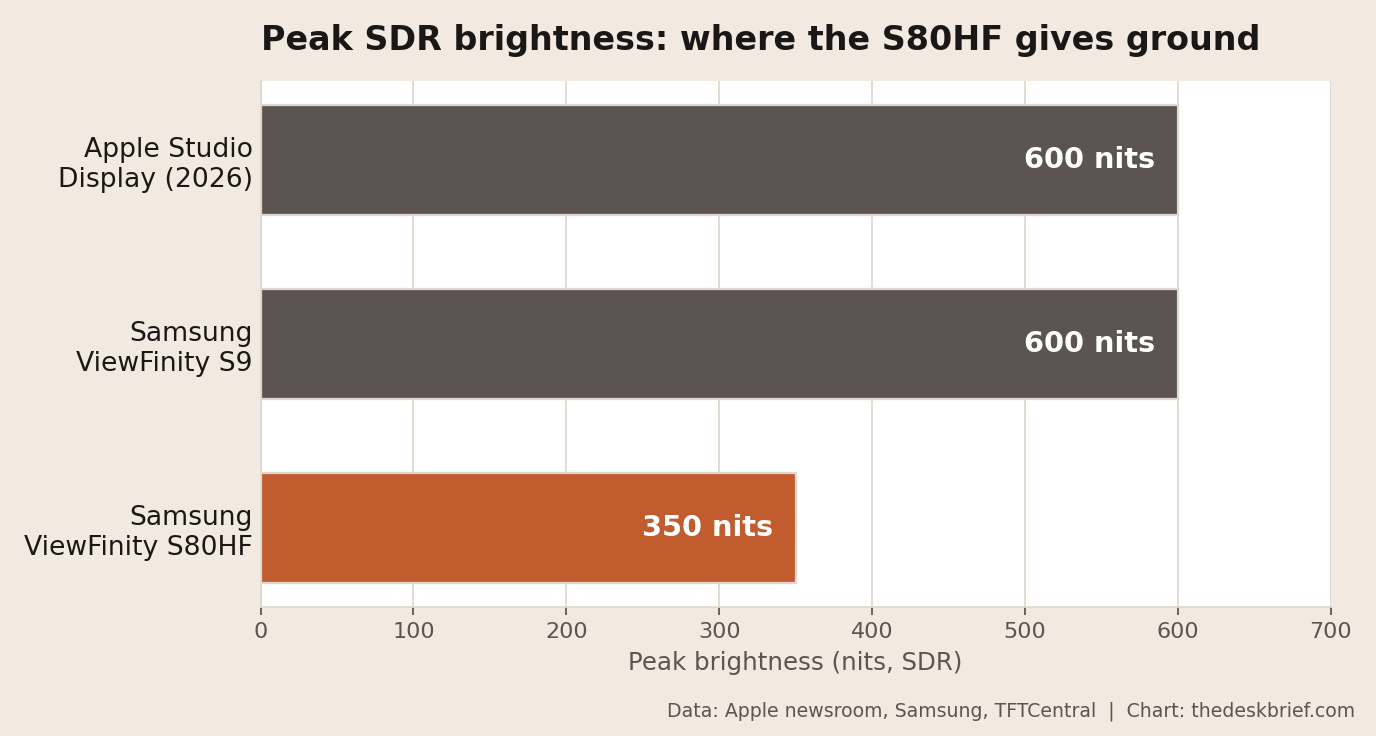
Cheaper 5K doesn’t come free, and Samsung made three specific trades. The first is brightness. The S80HF tops out at 350 nits, where both the Apple Studio Display and the ViewFinity S9 hit 600. That’s not a rounding difference; it’s the gap between a panel that shrugs off a sunny window and one that asks you to close the blinds. If eye strain is your concern, that gap matters beyond sunny windows: a dimmer panel forced to fight ambient light all day is exactly the scenario our best monitors for reducing eye strain guide walks through.
The second cut is color, and it’s the one creative pros should read twice. The S80HF covers 99% of sRGB. The Studio Display, the S9 and the far cheaper ASUS ProArt all cover roughly 99% of the wider DCI-P3 gamut, which is the standard photographers and video editors actually work in. For spreadsheets, code, writing, and web work, sRGB is all you’ll ever touch and the difference is invisible. For grading footage or prepping images for print, it’s a real ceiling, and it’s the one cut that has no price justification left now that a P3 5K panel sells for US$799. Whichever panel you land on, getting color settings right after purchase closes part of that gap; even a 99% sRGB panel looks noticeably better once white point, gamma, and picture mode are dialed in properly.
The third is the port that isn’t there. You get USB-C at 90W, not Thunderbolt, so you lose the high-bandwidth daisy-chaining that Thunderbolt 4 and 5 give the pricier pair. There’s also no built-in camera or speakers, which the S9 and Studio Display both include. If video calls are central to your workday, compare that trade-off with a monitor with a built-in webcam before buying the sharper panel. None of that stings if you already own a webcam and a decent set of desk speakers. If you were counting on the monitor to be your entire conferencing rig, budget for the extras.
The catch underneath all three is that this is squarely an office and creative-adjacent panel, not a gaming one. At 60Hz it’s built for text, code, and layout work, and if you’re torn about resolution versus refresh rate, the gap between a gaming panel and an office panel matters more than any single spec on the box.
Who Should Skip This
Photographers and video editors should skip it. If your work lives in DCI-P3 or you need any real HDR, the 350-nit sRGB panel will fight you. People who work next to a bright window should think hard too, because 350 nits is fine in a normal room and frustrating in direct light.
Here’s the opinion that costs something. At US$699.99, Samsung did undercut the ASUS ProArt PA27JCV’s US$799 street price by a meaningful margin. But the ProArt is still brighter (400 vs 350 nits), has better contrast (1500:1 vs 1000:1), covers the wider DCI-P3 gamut, is factory calibrated, delivers more power over USB-C (96W vs 90W), and includes speakers. If color accuracy matters to your work, the ASUS ProArt PA27JCV is still the better panel for the extra hundred. If your priority is a sharp 5K screen for text, code, and spreadsheets at the lowest possible price, with a built-in ethernet port, the S80HF now makes a real case for itself. Check the current S80HF price on Amazon.
The exception is narrow and real: if you need the built-in ethernet port, the S80HF is the only 5K monitor here that has one, and a dongle-free wired connection may be worth the trade. Whichever one lands on your desk, get the height right first, because a razor-sharp panel at the wrong angle still wrecks your neck. Our ergonomic desk setup checklist covers where the top of the screen should land.
FAQ
How much does the Samsung ViewFinity S80HF cost?
Samsung US listed the ViewFinity S80HF at US$699.99 when checked on September 25, 2026. Samsung Canada did not publish a direct price, but Best Buy Canada listed the exact Canadian SKU as available to ship. The US list price places it about US$100 below the ASUS ProArt 5K PA27JCV’s US$799 street price.
Is the Samsung S80HF better than the ASUS ProArt 5K PA27JCV?
On panel specs, no. The ASUS ProArt PA27JCV matches the S80HF’s 5120 by 2880 resolution and 218 PPI, then beats it on brightness (400 nits to 350), contrast (1500:1 to 1000:1), colour gamut (99% DCI-P3 against 99% sRGB) and USB-C power (96W to 90W), at a US$799 street price. The S80HF’s one clear advantage is its built-in RJ45 ethernet port, which the ProArt doesn’t have.
Is the Samsung ViewFinity S80HF good for photo editing?
Not really. It covers 99% of sRGB but not the wider DCI-P3 gamut that photo and video work depend on. It’s sharp enough, but for color-critical editing you want a P3 panel, and the ASUS ProArt 5K delivers that for less money than the Samsung’s lineup starting price.
Does it work with a MacBook?
Yes. The USB-C port carries DisplayPort Alt Mode and 90W of power delivery, so a MacBook drives the 5K panel and charges over a single cable. You lose Thunderbolt daisy-chaining compared with the pricier 5K options, but for a one-laptop, one-monitor desk that rarely matters.
Is 350 nits bright enough?
For a typical indoor office, yes. 350 nits is comfortable for SDR text and web work in normal room lighting. It struggles in direct sunlight, and it’s an SDR-first panel, so don’t buy it expecting meaningful HDR.
The Short Version
The Samsung ViewFinity S80HF gives you the same 218-PPI sharpness as a CA$2,241 (US$1,599) Studio Display, on a panel with a full ergonomic stand, one-cable 90W USB-C and an ethernet port nobody else offers. Against the two expensive 5K panels, that’s a genuine bargain. Against the ASUS ProArt 5K at US$799, it’s a weaker display on paper but costs US$100 less, and its narrower colour gamut remains the compromise.
The number is in, and Samsung did undercut the competition: US$699.99 makes the S80HF the most affordable 27-inch 5K monitor from a major brand. The ethernet port and retail network make it an easy pick for text and code work. See the S80HF on Amazon. If color accuracy matters more than price, buy the ASUS. And if 5K sharpness isn’t worth four figures at all, our 27-inch monitors under CA$300 are the practical alternatives.
Editorial rating: 4.0 out of 5. At US$699.99 the S80HF is the lowest-priced 27-inch 5K monitor in this comparison, with sharp 5K text, ergonomic adjustment, 90W USB-C charging, and built-in Ethernet. The ASUS ProArt PA27JCV still has the stronger panel, with more brightness, contrast, and P3 color, so creative work may justify the extra US$100.
Check the current offer at the linked retailers. Prices and availability can change.